
Grok Bot · Team Bots
Build one Bot your whole team can use, with private chats for each person.
Grok Bot Team Bots let you build one Bot and share it with your whole team. Each person chats with it in their own private conversation, in the app or in Slack. The Team Bots feature arrived on September 26, 2026, and it has grown every week since.
I read the Shared Bots page of the official docs and the changelog on November 9, 2026. Note that shared Bots are for members of a team plan.
TL;DR
Share a Bot from its Share menu. Pick your whole team or only people you invite. Each chat stays private. The Bot uses the owner's apps and asks before it uses yours. Slack works after an owner or Manager connects it.
What a shared Bot is
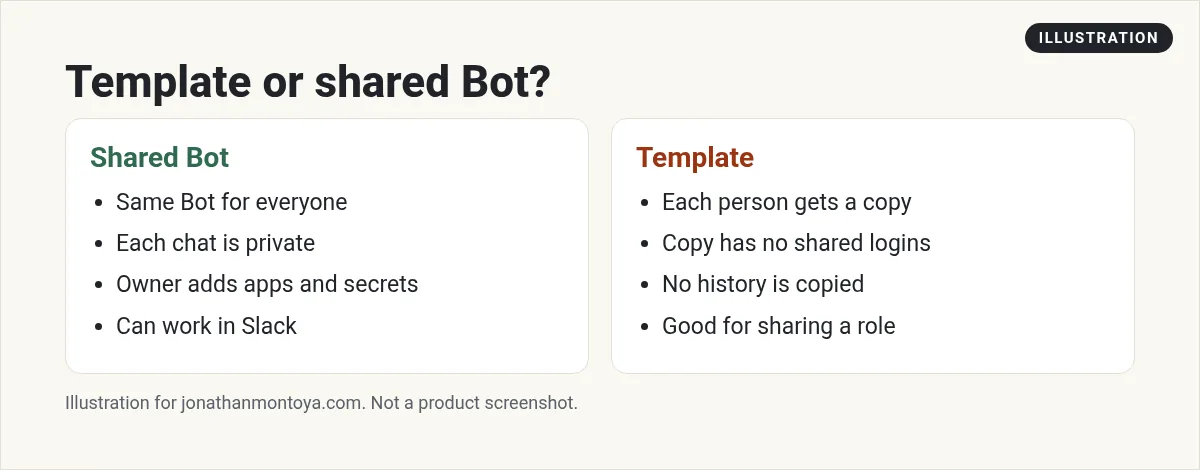
The docs say a Bot is either personal or shared. You share a Bot with your team the way you share a doc, with everyone or only certain people. Sharing does not make a copy. Each person's chat with a shared Bot is private, and shared Bots always run in the cloud.
This is different from a Bot template. A template gives each person their own copy. A shared Bot is the same Bot for everyone.
How to create one
- Choose + in the sidebar, then Create a Bot, and give it a name.
- Tell it what it should help the team with. One sentence is enough.
- Follow its setup steps for apps, secrets, skills, and files. Only add keys and files you are happy for everyone to use.
- Share it.
You can also share a Bot you already have. Sharing does not copy it, so check its apps, secrets, skills, and files first. They work in every teammate's chat.
From the Matt Palmer channel (not mine): A video on Team Bots for a whole team.
Any results mentioned in videos are not typical and are not a promise of income. Your results depend on your work and your market.
Who can use it, and who can manage it
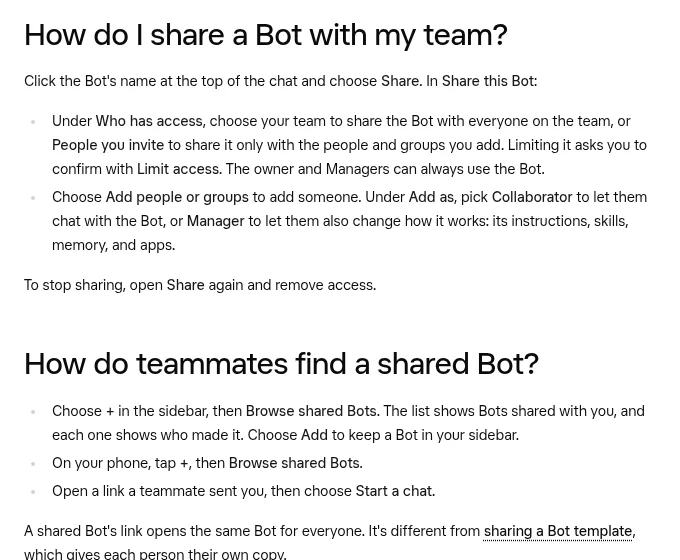
Click the Bot's name at the top of the chat and choose Share. Under Who has access, choose your team, or choose People you invite to share with only some people and groups. Pick Collaborator to let someone chat with the Bot. Pick Manager to let them also change its instructions, skills, memory, and apps.
Teammates find shared Bots under + then Browse shared Bots, or through a link you send, then Start a chat.
Privacy and whose apps it uses
The owner and Managers cannot read your chats with a shared Bot, and you cannot read theirs. The Bot can save things it learns for the whole team, and it tells you when it does. It does not save anything about you personally for the team.
A shared Bot uses the apps and secrets its owner added. In your own chat, it can also use your apps, but it asks first. The card says Allow, then the app name, with Allow once, Always allow, or Skip. A connected account always acts as the person the Bot is answering, never as someone else.
Using a Team Bot in Slack
The owner or a Manager adds the Bot to Slack. Open the Bot's details, find Bring to your team's Slack, and choose Connect. If it says Awaiting admin approval, a Slack admin must approve the app. Each teammate also links their Slack account in Settings, General, Shared Bots.
In a Slack thread, the Bot posts a Review an action card with Allow once, Deny, and View details, and only the person who asked can answer. The changelog says Bots record who asked for each message they post, so anyone in the thread can ask who requested it.
From the Kevin Hogan channel (not mine): A creator explains shared Bots for a human team.
Whose usage pays
A shared Bot reply uses the Grok Bot usage of the person it is answering. Your own limits apply. The owner's usage pays for the owner's own messages, and for Slack posts from apps or workflows that are not linked to an account.
Good ideas for a first Team Bot
- A sales helper that knows your offer and your common questions.
- A support helper with approved answers.
- A weekly report Bot that posts to one Slack channel.
- A new hire guide that answers how do we do this questions.
Start narrow. Add skills and files one at a time, and test with two teammates before the whole team.
A business team inside Grok Bot
One shared Bot is great for answers. A business team handles the whole job.
AIM Agent is an AI Chief of Staff for business owners. It comes with an AI C-suite (COO, CMO, CFO, CRO and CTO), a Business Bot Builder and 100+ business skills, and it runs on AIM OS, a private vault that holds your notes and memory. AIM Agent is a ready-made AI business team that works inside Grok Bot, so you skip the setup and get to work.
Here is what you get:
- An AI Chief of Staff that helps you plan and run your business
- An AI C-suite: COO, CMO, CFO, CRO and CTO
- A Business Bot for each business or project. Give it a real task and it brings the work back for you to review
- 100+ business skills for content, offers, research and more
- Step by step setup guides and email support
So your Bots work inside a business system, not a pile of chats.

Want an AI team to help run your business? Meet AIM Agent, an AI Chief of Staff for business owners. I am a co-founder of AIM Agent and have a financial interest in the product.
Get a business team inside Grok Bot
AIM Agent gives you an AI Chief of Staff, an AI C-suite, and 100+ business skills, with step by step setup guides and email support.
See AIM AgentFrequently asked questions
What is a Team Bot?
It is one Bot that you share with your whole team. Each person has a private chat with it.
Can the owner read my chats?
No. The owner and Managers cannot read your chats with a shared Bot.
Whose apps does it use?
The owner's apps and secrets. In your own chat it asks before it uses yours.
Does it work in Slack?
Yes, after an owner or Manager connects it and each teammate links their Slack account.
Who pays for usage?
The person the Bot is answering. Your own limits apply.
Can I be a Manager?
Yes, if the owner adds you as a Manager. Managers can change instructions, skills, memory, and apps.
What is AIM Agent?
AIM Agent gives you an AI Chief of Staff, an AI C-suite, and 100+ business skills inside Grok Bot, with step by step setup guides and email support.
Sources
Checked November 9, 2026. Plans, prices, and rules can change.
