
Grok Bot · Templates
Grok Bot templates let you start with a Bot someone else already built, or share your own. Here is what really carries over, how to add one, and the checks I would do before you trust it.
Grok Bot templates are the fastest way to get a useful Bot without starting from a blank page. Someone builds a Bot that works, shares it as a template, and you add your own copy in a few clicks.
But a template is not a full copy of someone's Bot. Some parts carry over and some do not. I read the official x.ai guide Templates for Grok Bot, the Marketplace page, and the changelog on October 29, 2026. Here is what you need to know.
TL;DR
Grok Bot templates are a way to share a Bot as a blueprint. A template carries the Bot's instructions, relevant memories and skills, and its first party plugins. It leaves out secrets, personal memories, custom code, scripts, and MCP servers you added. To add one, open a template link or the Marketplace at x.ai/bot/marketplace, review what it includes, and choose Add Bot. You then reconnect any plugins it needs. To share your own, use Share as template, pick team or public, and publish to get a link. AIM Agent gives you a full ready business team instead of one Bot at a time.
What a Grok Bot template is
The official guide sums it up in one line: Templates share a bot as a recipe, not a clone.
Think about a recipe. If I give you my recipe, you cook your own meal. It will not look exactly like mine. A Grok Bot template works the same way. It is the plan behind a Bot. Your new Bot builds its own version from that plan.
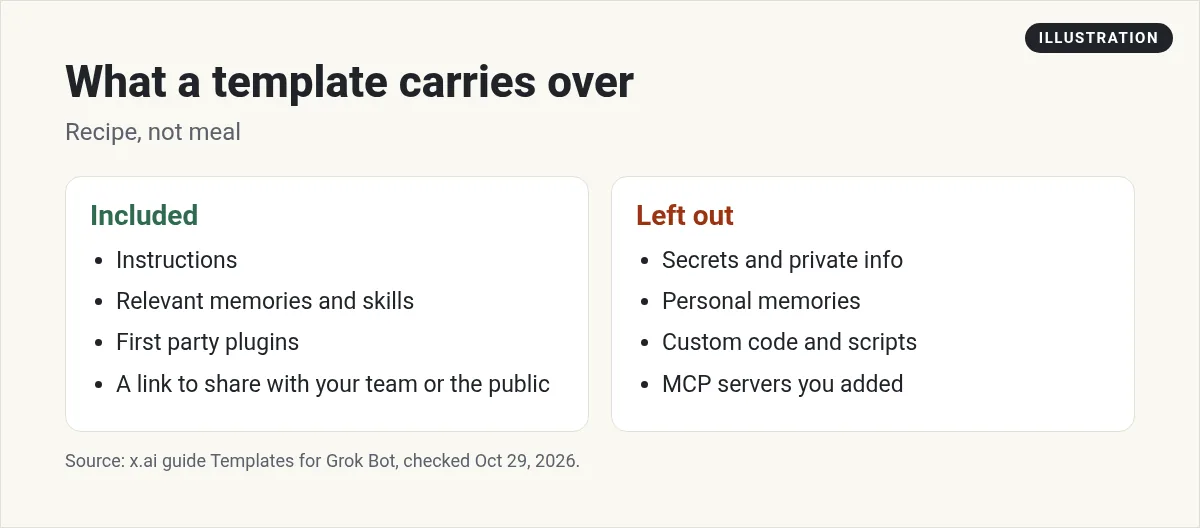
The guide says a template is a collection of skills, memories, and plugins. When you make one, Grok Bot copies the Bot's instructions, the memories and skills that matter for the job, and certain plugins.
What a template leaves out
This part matters for safety. The guide says templates will not share any personal or private skills, or private information.
By default, the Bot leaves out memories that are personal to the person who made it. Custom code and scripts are not included either. If the first Bot used a special MCP server, you need to set that up again yourself.
So if you share your own Bot, your passwords and private notes stay with you. And if you add someone else's Bot, you do not get their accounts.
Where to find templates
The Marketplace at x.ai/bot/marketplace lists Bot templates by type, like Engineering, Sales, Marketing, Design, Personal, and Operations. Some come from the Grok Bot team, and some come from well known builders.
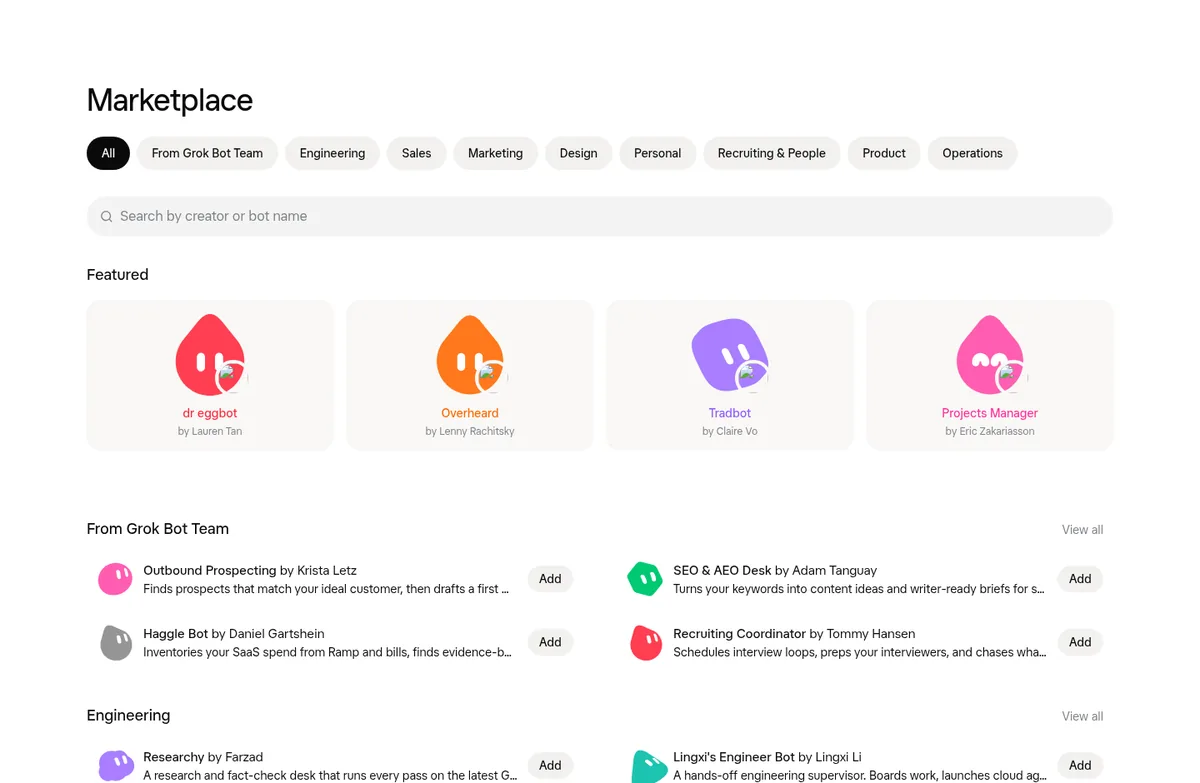
Here are a few I saw on the page, in my own words:
- Outbound Prospecting. Finds people who match your ideal customer and drafts a first message to each. Nothing sends without your yes.
- SEO and AEO Desk. Turns a keyword list into content ideas and writer briefs.
- Sales Call Coach. Scores a sales call from a transcript and tells you what to fix.
- Meeting Recap Deck. Turns meeting notes into a recap deck.
- Recruiting Coordinator. Helps plan interviews and chases what is stalled.
- Researchy. A research and fact check desk that uses live web search.
A small note on names. The changelog for version 0.67.0 says the in app Marketplace is now called Connect Apps, which is for apps. Bot templates live on the web Marketplace page. You can also ask your Bot to find a template that fits what you describe. The 0.70.2 changelog says it can find one and link it in the chat.
Here is the official short video on the Marketplace:
From the Matt Palmer channel (not mine): The Grok Bot team shows the Marketplace of curated Bot templates and how it helps you get started.
How to add a template
- Open the template. Use a link someone shared, or pick one in the Marketplace.
- Choose Add to Grok Bot. The guide says this opens the template in your app.
- Review what it includes. You will see the context and the apps it uses. Check that it is what you expect.
- Choose Add Bot. Now you have your own new copy.
- Reconnect its apps. The guide says your new Bot has to set up its plugins again. It comes with them, but you sign in yourself.
- Give it your details. Tell it about your business, your rules, and what good work looks like.
That last step is the one people skip. A template gives you the job. It does not know your business yet. My Grok Bot memory post shows how to teach it the things it should keep.
What I check before I trust a template
- What apps does it want? Only connect what the job needs. Read only is a good start.
- Does it send or buy? Good templates say nothing sends without your yes. Keep it that way at first.
- Does it run on a schedule? Check any routines so it does not use more than you expect.
- Who made it? Templates from the Grok Bot team or people you know are a safer first try.
- Try it on a small job. One task, then read the result like you would from a new hire.
My Grok Bot safety guide covers approvals in more detail.
How to share your own Bot as a template
If you built a Bot that works well, you can share it. The guide walks through it, and the 0.37.0 changelog says Share as template is in the share menu in the chat header.
- Open the Bot and choose Share as template. The Bot packs itself up. The guide says this does not make it public yet.
- Choose View Details to see exactly what is included.
- Pick who can use it: your team, or anyone with the link.
- Choose Publish, then Copy Link.
If your Bot needs API keys or a custom MCP server, the guide has a smart tip. Ask your Bot to write setup steps into its instructions, so the next person knows what to add.
On a team, admins can choose whether members share templates publicly, only with the team, or not at all.
What creators are adding
In this video, a creator walks through five templates he uses most, out of the many he has tried.
From the Brock Mesarich | AI for Non Techies channel (not mine): A creator shares the five Grok Bot templates he uses most.
The video has links to other tools in its description. Some may be affiliate links, so treat those as his picks, not mine.
Template or build your own?
Templates are great for one clear job. A good template can save you an hour of writing instructions.
But a business needs more than one Bot. You need Bots that know each other's jobs, share the same rules, and hand work off cleanly. That is the hard part, and one template does not solve it. My Grok Bot chief of staff post explains how a manager Bot ties a team together. For ideas on which jobs to start with, see Grok Bot use cases.
A full team, not one template
Templates give you one Bot at a time. You still have to make them work together, share rules, and know who does what.
AIM Agent is an AI Chief of Staff for business owners. It comes with an AI C-suite (COO, CMO, CFO, CRO and CTO), a Business Bot Builder and 100+ business skills, and it runs on AIM OS, a private vault that holds your notes and memory. AIM Agent is a ready-made AI business team that works inside Grok Bot, so you skip the setup and get to work.
Here is what you get:
- An AI Chief of Staff that helps you plan and run your business
- An AI C-suite: COO, CMO, CFO, CRO and CTO
- A Business Bot for each business or project. Give it a real task and it brings the work back for you to review
- 100+ business skills for content, offers, research and more
- Step by step setup guides and email support
So instead of stitching single templates together, you start with an AI Chief of Staff and a business team with skills already made.

Want an AI team to help run your business? Meet AIM Agent, an AI Chief of Staff for business owners. I am a co-founder of AIM Agent and have a financial interest in the product.
Get a ready AI team for your business
AIM Agent gives you an AI Chief of Staff, an AI C-suite, and 100+ business skills, so your Bots have real jobs from day one.
See AIM AgentFrequently asked questions
What is a Grok Bot template?
A blueprint of a Bot. It carries instructions, relevant memories and skills, and first party plugins, so you can add your own copy.
Does a template share my passwords?
No. The guide says templates do not share personal or private skills or private information. Custom code and scripts are left out too.
Where do I find Grok Bot templates?
On the Marketplace at x.ai/bot/marketplace, or from a link someone shares. You can also ask your Bot to find one.
How do I add a template?
Open it, choose Add to Grok Bot, review what it includes, then choose Add Bot. Reconnect any apps it needs.
How do I share my Bot as a template?
Choose Share as template, check View Details, pick team or public, then Publish and copy the link.
Will my copy work the same as the original?
Not exactly. It is a recipe, not a clone. You reconnect apps, add any custom tools, and teach it your business.
Is there a ready team instead of one template?
AIM Agent gives you an AI Chief of Staff, an AI C-suite, and 100+ business skills, so you start with a team built for business work.
Sources
Checked October 29, 2026. Plans, prices, and rules can change.
