
Grok Bot · Comparison
Grok Bot is a hosted team of AI teammates with their own cloud computers. OpenClaw is an open source agent you run on your own machine. Both are good. They fit different people.
Grok Bot vs OpenClaw comes down to one question: do you want someone else to run the machine, or do you want to run it yourself? Grok Bot gives each Bot its own cloud computer and handles the upkeep. OpenClaw is open source and runs on your own hardware, so you get full control and full responsibility.
I read the OpenClaw site, the xAI news post about using Grok in OpenClaw, and the Grok Bot docs on November 2, 2026. I also watched two creators who have used both. Here is a fair side by side.
TL;DR
Pick Grok Bot if you want a hosted team that works in the cloud, chats with you on desktop, phone, Slack, X Chat, and email, and comes with approvals and a Vault for logins. Pick OpenClaw if you want an open source agent on your own machine, like a Mac Mini, a server, or a Raspberry Pi, and you are happy to install, update, and secure it yourself. OpenClaw talks to you from WhatsApp, Telegram, and other chat apps. You can also sign in to Grok models inside OpenClaw with a SuperGrok or X Premium plan.
The short version
Both tools are AI agents. That means they do not just chat. They take actions: they read your email, use apps, run code, and finish tasks. The big difference is where they live and who looks after them.
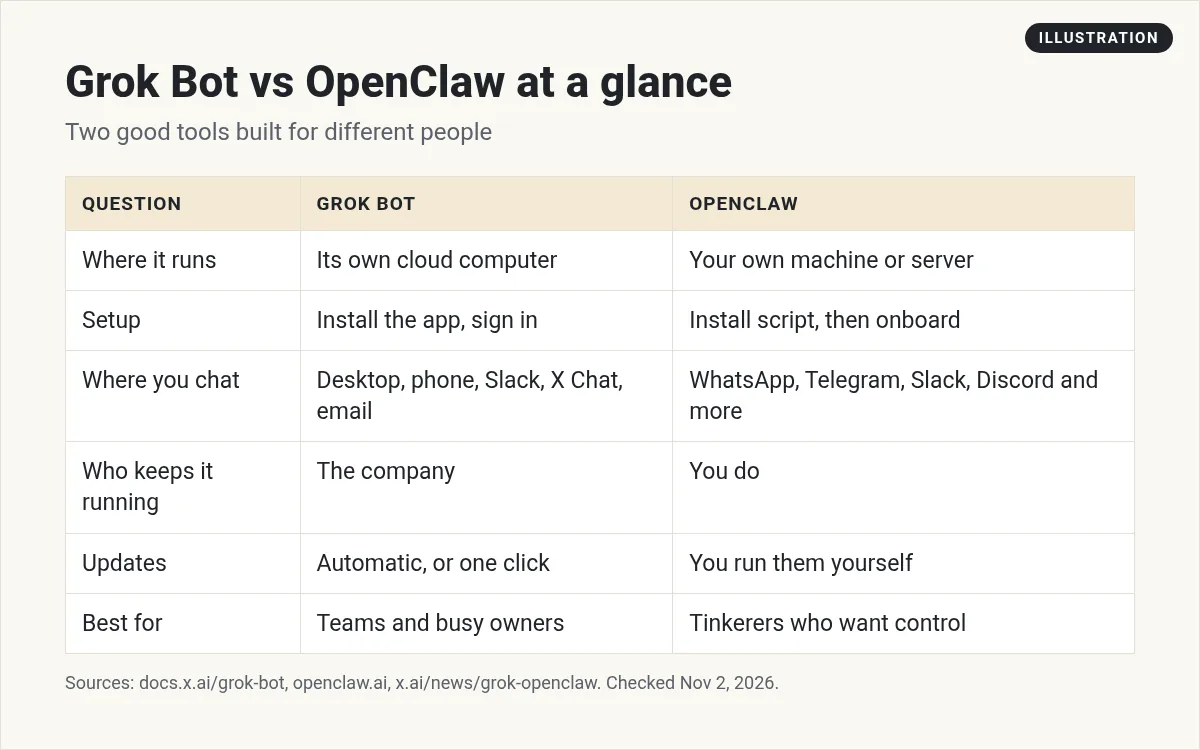
- Grok Bot is a hosted product. Each Bot gets its own computer in the cloud. You install the app, sign in, and start talking.
- OpenClaw is open source software. You install it on a machine you own or rent. Its site says it has no subscription and no hosted tier, and that an independent nonprofit looks after it.
Neither one is better for everyone. I will show you how I would choose.
What OpenClaw is
The OpenClaw site calls it an open source assistant that runs on your machine. It says it can organize your inbox, send emails, manage your calendar, and check you in for flights, all from WhatsApp, Telegram, or another chat app you already use.
The xAI news post from May 19, 2026 adds more. It says OpenClaw is local first, runs on almost any hardware, from a Mac Mini or laptop to a server, a VPS, or a Raspberry Pi, and keeps memory across sessions. It connects to WhatsApp, Telegram, Slack, Discord, Signal, iMessage, and more.
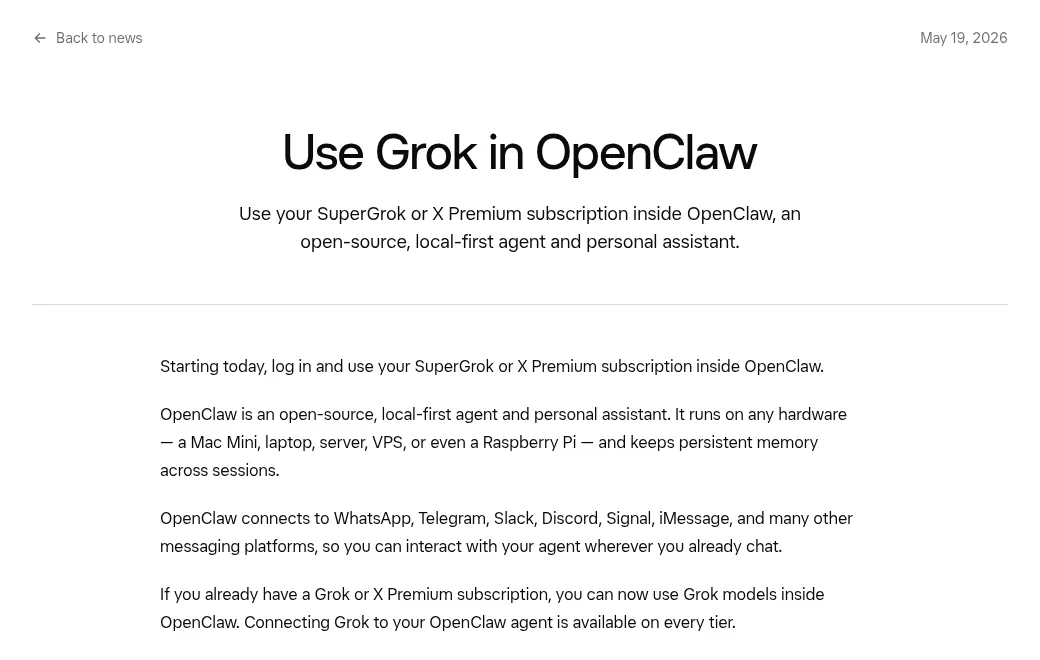
Setup is a terminal job. The site lists a one line install script or an npm install, then a guided onboarding command. You also pick which AI models it uses. That same news post says you can sign in with a SuperGrok or X Premium plan and use Grok models inside OpenClaw, on every tier.
What Grok Bot is
Grok Bot is a team of AI teammates. The docs say each Bot has its own computer, browser, and apps, and keeps working in the cloud when your laptop is closed. You can make many Bots, each with its own job. I run a team of about 25 Bots for my business.
You talk to Bots in the desktop app, the phone app, Slack, X Chat, email, voice, and even in a Tesla. Bots can run routines on a schedule or when something happens. Logins live in a Vault, so the Bot can sign in without seeing your password. Risky actions can wait for your approval.
New to it? Start with Grok Bot explained.
From the Desktheory channel (not mine): Desktheory has used both in real businesses and gives an honest take on install, daily use, and who should pick which. His description has an affiliate link for a voice app, which is not part of this comparison.
Setup and upkeep
This is the biggest difference in daily life.
OpenClaw: you pick the machine, run the install, connect your chat apps, choose your models, and keep it all up to date. If the machine goes to sleep or loses power, your agent stops. If you put it on a server, you also own its security. For a tinkerer, that is the fun part. For a busy owner, it is a second job.
Grok Bot: you download the app and sign in. The company runs the computers and the updates. The Grok Bot engineering guide even jokes that you no longer need a dedicated machine at home running all day for OpenClaw. That is a fair point if your main goal is just to have an agent that is always on.
My Grok Bot setup guide walks through the first hour.
Where you talk to it
OpenClaw wins on chat apps. If you live in WhatsApp, Telegram, Signal, or iMessage, OpenClaw meets you there.
Grok Bot covers the work side: desktop, phone, Slack, X Chat, email, and voice. As of November 2, 2026, WhatsApp and Telegram are not in the Grok Bot docs as built in places to chat. If that matters to you, that alone may decide it.
Control, privacy, and safety
OpenClaw gives you the most control. The site says your memories, skills, models, machines, and data are yours. The code is open, so you or someone you trust can read it. The flip side is that every safety choice is yours to make and keep up.
Grok Bot gives you guard rails out of the box. You get approvals before risky actions, Auto review, a Vault that hides passwords from the Bot, and team controls for companies. You trust the company to run the cloud side well. Read my Grok Bot safety guide for the details.
Both can do real damage if you give them too much access too soon. Start small with either one.
Teams and many agents
Grok Bot is built around many Bots. You can give each Bot a job, put them in group chats, share Bots with a team, and set routines. The xAI guides show teams running dozens of Bots.
OpenClaw is often one main assistant that you shape over time, though you can run it for a team too. If you want an org chart of AI teammates, Grok Bot is the easier path. My Grok Bot for teams post shows how that looks.
From the Rob Braxman Tech Deep Dive channel (not mine): Rob Braxman compares OpenClaw, Hermes, and Grok Bot from a privacy and tinkerer point of view. It is long, and he leans toward running things yourself, which is a useful counterweight to this post.
Who should pick which
Pick OpenClaw if:
- You want open source and want to read the code.
- You already have a spare machine or server and like keeping it running.
- You want to talk to your agent in WhatsApp, Telegram, Signal, or iMessage.
- You want to choose and swap your own models.
Pick Grok Bot if:
- You want it working today, without a terminal.
- You want many Bots, each with a job, working in the cloud.
- You want approvals, a Vault, and team controls built in.
- Your work lives in email, Slack, and business apps.
Some people use both. OpenClaw for personal chat apps at home, Grok Bot for the business. That is a fine answer too.
Also weighing Hermes? See Grok Bot vs Hermes. My Grok Bot vs Muse post has a shorter OpenClaw section too.
Skip the setup on the hosted side
Whichever tool you pick, the hard part is the same. Your agent needs to know how your business works: your offers, your voice, and your follow ups.
AIM Agent is an AI Chief of Staff for business owners. It comes with an AI C-suite (COO, CMO, CFO, CRO and CTO), a Business Bot Builder and 100+ business skills, and it runs on AIM OS, a private vault that holds your notes and memory. AIM Agent is a ready-made AI business team that works inside Grok Bot, so you skip the setup and get to work.
Here is what you get:
- An AI Chief of Staff that helps you plan and run your business
- An AI C-suite: COO, CMO, CFO, CRO and CTO
- A Business Bot for each business or project. Give it a real task and it brings the work back for you to review
- 100+ business skills for content, offers, research and more
- Step by step setup guides and email support
So you get the hosted Grok Bot path with a business team ready on day one.

Want an AI team to help run your business? Meet AIM Agent, an AI Chief of Staff for business owners. I am a co-founder of AIM Agent and have a financial interest in the product.
Start with a team that already knows business
AIM Agent gives you an AI Chief of Staff, an AI C-suite, and 100+ business skills, so your Bots start real work on day one.
See AIM AgentFrequently asked questions
Is OpenClaw free?
The OpenClaw site says there is no subscription and no hosted tier. You still pay for your own machine and whatever AI models you use.
Can I use Grok in OpenClaw?
Yes. An xAI news post from May 19, 2026 says you can sign in with a SuperGrok or X Premium plan and use Grok models inside OpenClaw.
Does Grok Bot work in WhatsApp?
As of November 2, 2026, the Grok Bot docs do not list WhatsApp as a built in place to chat. OpenClaw does support WhatsApp.
Which one is safer?
Grok Bot has approvals and a Vault built in. OpenClaw gives you full control, so safety depends on how you set it up.
Do I need a computer running all the time?
For OpenClaw, yes, the machine it runs on must stay on. Grok Bot runs in the cloud, so your laptop can be closed.
Can I use both?
Yes. Some people use OpenClaw for personal chat apps and Grok Bot for business work.
Is there a faster way to get a Bot team for my business?
AIM Agent gives you an AI Chief of Staff, an AI C-suite, and 100+ business skills, so you start with a team built for business work.
Sources
Checked November 2, 2026. Plans, prices, and rules can change.
