
AI Tools · Pricing
Manus is an AI agent that runs tasks for you, and it bills in credits. Here is what each plan cost on October 23, 2026, how the credits work, and how to avoid running out.
Manus is an AI agent. You give it a task, like research a topic or build a slide deck, and it works through the steps on its own.
The catch is that every task uses credits. So the price you pay matters less than how many credits you get and how fast you use them. I checked the Manus pricing page and its plans docs on October 23, 2026. Here is what I found.
Quick answer
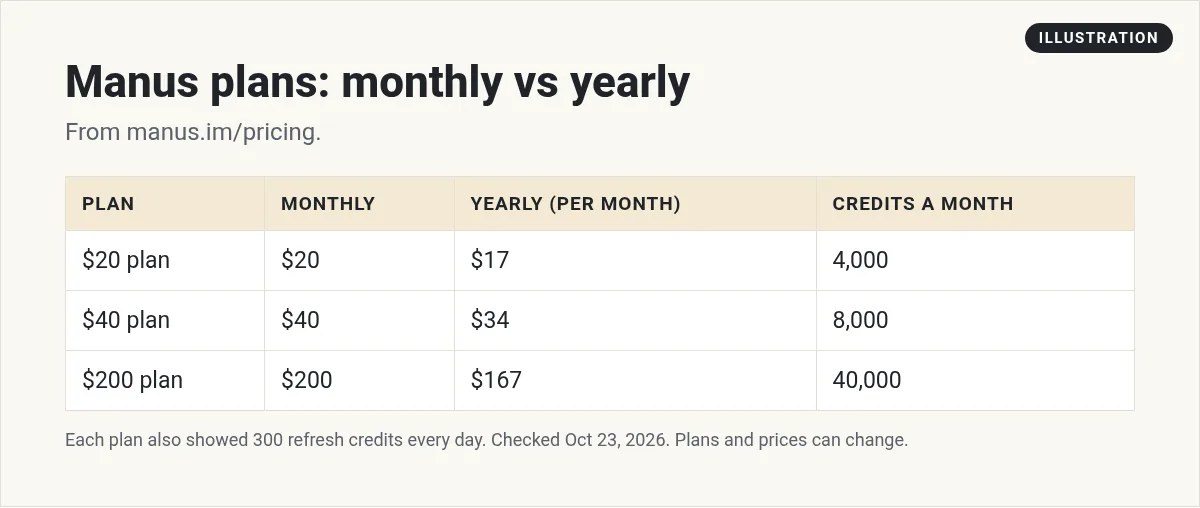
On October 23, 2026, Manus had three paid plans on its pricing page: $20 a month for 4,000 credits, $40 a month for 8,000 credits, and $200 a month for 40,000 credits. All three also got 300 refresh credits every day. Paying yearly dropped them to $17, $34, and $167 a month. The Manus docs also list a Free plan with limited monthly credits and Team plans with shared credits.
What can Manus do?
The Manus home page asks one simple question: what can I do for you? Then it offers quick starts like creating slides, building a website, creating games, making video, and design.
So Manus is more than a chatbot. You hand it a job, and it works through the steps to finish it. That is also why it uses credits. A long job with many steps costs more than a quick answer.
The site footer also lists a mobile app, a desktop app, a Slack integration, and an API. So you can use it in more places than a web browser.
Manus AI pricing at a glance
Here is what the Manus pricing page showed on October 23, 2026.
- $20 a month ($17 a month billed yearly): 4,000 credits a month. Manus calls it standard monthly usage.
- $40 a month ($34 a month billed yearly): 8,000 credits a month. This card has a menu to pick a different credit amount.
- $200 a month ($167 a month billed yearly): 40,000 credits a month, for heavy use.
Every paid plan also showed 300 refresh credits every day, 20 tasks running at once, and 20 scheduled tasks. The yearly toggle said you save 17%.
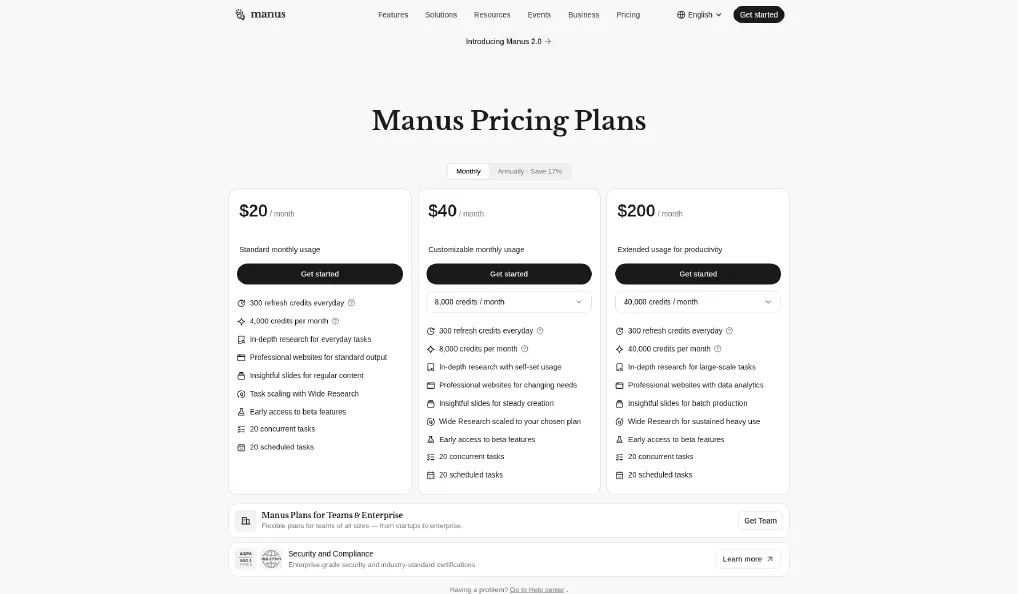
The pricing page showed prices, not plan names. The Manus plans docs describe three plan types: a Free plan, a Pro plan, and a Team plan.
What each paid plan includes
All three paid plans share the same base. Each one showed early access to beta features, 20 tasks running at once, and 20 scheduled tasks. The difference is how much work each plan is built for.
- $20 plan: in depth research for everyday tasks, professional websites for standard output, slides for regular content, and task scaling with Wide Research.
- $40 plan: research with usage you set yourself, websites for changing needs, slides for steady creation, and Wide Research scaled to your chosen plan.
- $200 plan: research for large scale tasks, websites with data analytics, slides for batch production, and Wide Research for sustained heavy use.
In plain words, the features are mostly the same. You are paying for more credits, so you can run bigger jobs more often.
How Manus credits work
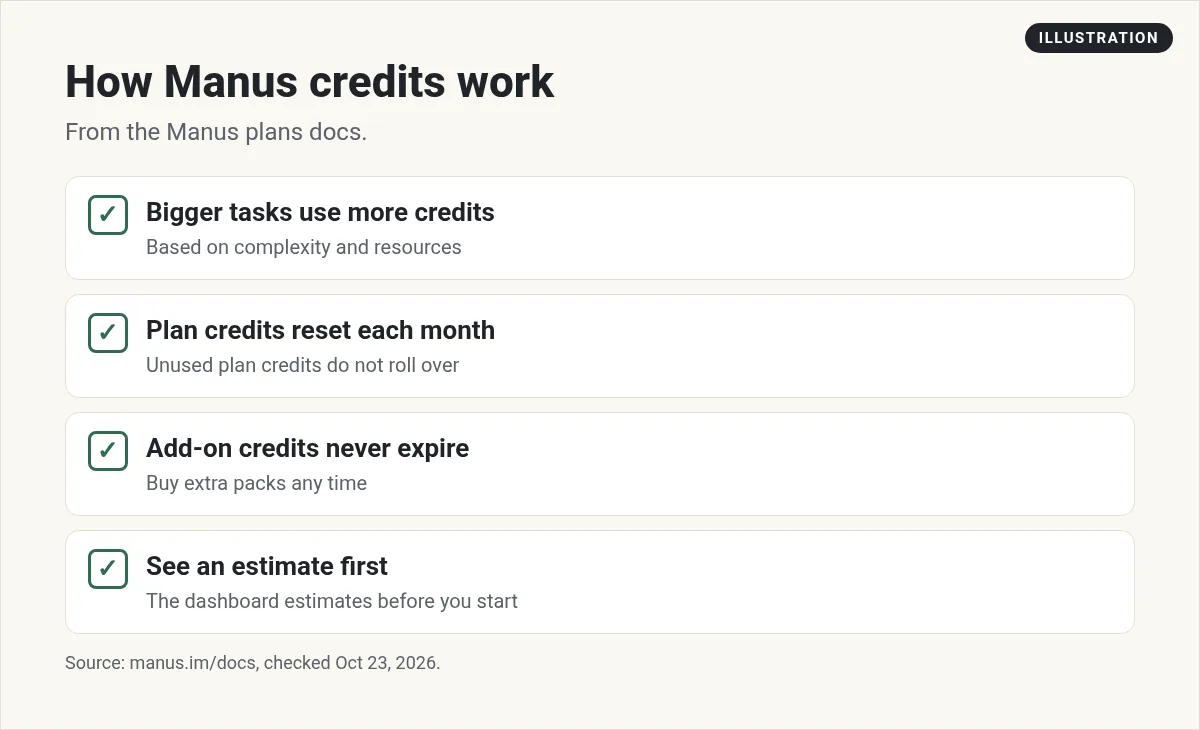
Manus uses credits for everything. Its docs say credits are used based on how complex a task is and what resources it needs. A quick question uses fewer credits than a long research job.
- Plan credits reset each month. Unused plan credits do not roll over.
- Add-on credits never expire. You can buy extra credit packs any time.
- You can see estimates first. The docs say the dashboard gives an estimate before you start a task.
- You get low balance alerts. Manus notifies you when you are running low.
How to track your credit use
The Manus docs say your dashboard shows four things:
- Current balance: how many credits you have left.
- Usage history: past tasks and how many credits each one used.
- Spending insights: which kinds of tasks use the most credits.
- Alerts: a heads up when your balance gets low.
Check your usage history after your first week. It tells you more than any plan page can.
What happens if you run out of credits?
The docs say you will be told when your balance is low. Then you have two choices. You can buy more credits, or you can move up to a bigger plan. Add-on credits never expire, so buying a pack can make sense if you only run out once in a while.
Is there a free Manus plan?
Yes. The Manus plans docs list a Free plan with limited monthly credits and access to core features. It is meant for people exploring Manus. The docs do not give an exact credit number for it, so test it with a small task to see how far it goes.
Manus for teams
The pricing page also has a link for Teams and Enterprise. The docs say Team plans share one credit pool across the team, with admin controls and priority support. There was no public team price on the page. You click Get Team to learn more.
Monthly vs yearly: what you pay
Here is the math using the October 23, 2026 prices.
- $20 plan: 12 months at $20 is $240. Yearly at $17 a month is $204.
- $40 plan: 12 months at $40 is $480. Yearly at $34 a month is $408.
- $200 plan: 12 months at $200 is $2,400. Yearly at $167 a month is $2,004.
Only pay yearly if you already know you will use Manus every month. Start monthly until you know.
Which Manus plan should you pick?
- Just curious? Start on the Free plan and run a few small tasks.
- Use it a few times a week? The $20 plan is the simple place to start.
- Running out each month? Try the $40 plan, or buy add-on credits that never expire.
- Running big research or batch jobs every day? The $200 plan is built for that.
- A team? Ask about a Team plan so everyone shares credits.
A simple one week test before you pay
Here is how I would test any credit based AI tool, including Manus:
- Pick three real tasks. Use work you need done anyway, like a research summary, a simple web page, and a short slide deck.
- Run each one on the Free plan. Write a clear, detailed prompt for each.
- Check the cost. Look at your usage history to see how many credits each task used.
- Do the math. Multiply by how often you would run tasks like these in a month.
- Pick the plan that fits. If the number lands near 4,000 credits a month, start with the $20 plan.
This takes the guesswork out. You pay for what you really use, not what you hope to use.
How to make your credits last
The Manus docs give a few tips. Here they are in plain words:
- Be clear. A well written task means fewer do overs.
- Use Chat mode for quick questions. You do not need the full agent for a simple answer.
- Group related tasks. One request can be cheaper than many small ones.
- Check in on long jobs. Review the early output before it keeps going.
My video: I compare Manus with Perplexity and Claude for real research tasks.
Any results mentioned in videos are not typical and are not a promise of income. Your results depend on your work and your market.
How Manus compares
If you mostly want answers with sources, read my Perplexity Pro review. If you want a strong all around AI helper, see Claude Pro vs Max and how I use Claude Projects. For a wider list, see my AI tools for small business guide.
Want to see how I use AI agents and tools in a real business? I show it in my free AI workshop.
Want to put AI agents to work in your business?
In my free workshop, I show how I use AI tools to save time and get real work done.
Join my free AI workshopFree to join. No credit card needed.
Frequently asked questions
How much does Manus AI cost?
On October 23, 2026, Manus paid plans were $20, $40, and $200 a month, or $17, $34, and $167 a month billed yearly.
How many credits do Manus plans include?
The $20 plan had 4,000 credits a month, the $40 plan had 8,000, and the $200 plan had 40,000. Each also showed 300 refresh credits every day.
Is Manus AI free?
The Manus docs list a Free plan with limited monthly credits and access to core features. They do not give an exact credit number.
Do Manus credits roll over?
Plan credits reset each month. Add-on credits you buy never expire.
Does Manus have a team plan?
Yes. The docs say Team plans share one credit pool with admin controls. The pricing page did not show a public team price.
What is the difference between the Manus plans?
The paid plans share the same base features. The main difference is credits: 4,000, 8,000, or 40,000 a month, so higher plans can run bigger jobs more often.
Can I share Manus credits with my team?
Yes. The Manus docs say Team and Enterprise plans include shared credit pools that all team members can use.
Does Manus have an app?
The Manus site footer lists a mobile app and a desktop app, plus a Slack integration and an API.
Should I pay yearly for Manus?
Only if you already use Manus every month. The yearly toggle said Save 17% on October 23, 2026. By the math above, yearly came to about 15% to 16.5% less than paying monthly, and you pay for the whole year. Start monthly until you know your real credit use.
Sources
Checked October 23, 2026. Plans, prices, and rules can change.
