
Build with AI · Explainer
An MCP server is the plug that lets an AI app use your other tools. Here is what that means, how it works, and how to add one without opening a security hole.
You keep hearing about MCP servers. People say they let AI "do things" in your other apps. That sounds great, but what is actually going on?
On October 23, 2026, I read the official Model Context Protocol docs, Anthropic's launch post, the Claude Code MCP docs, and Claude's help article on custom connectors. Here is the simple version, with the steps to add your first server.
Quick answer
An MCP server is a small program that gives an AI app, like Claude, access to a tool or data source through a shared standard called the Model Context Protocol (MCP). The server offers tools the AI can call, resources it can read, and prompts you can use. Anthropic open-sourced MCP on November 25, 2024. Only connect servers you trust, because they can read and change data.
What is MCP?
The official docs put it this way: "MCP (Model Context Protocol) is an open-source standard for connecting AI applications to external systems."
They also give a handy picture: "Think of MCP like a USB-C port for AI applications." One kind of plug works with many devices. In the same way, one standard lets many AI apps talk to many tools.
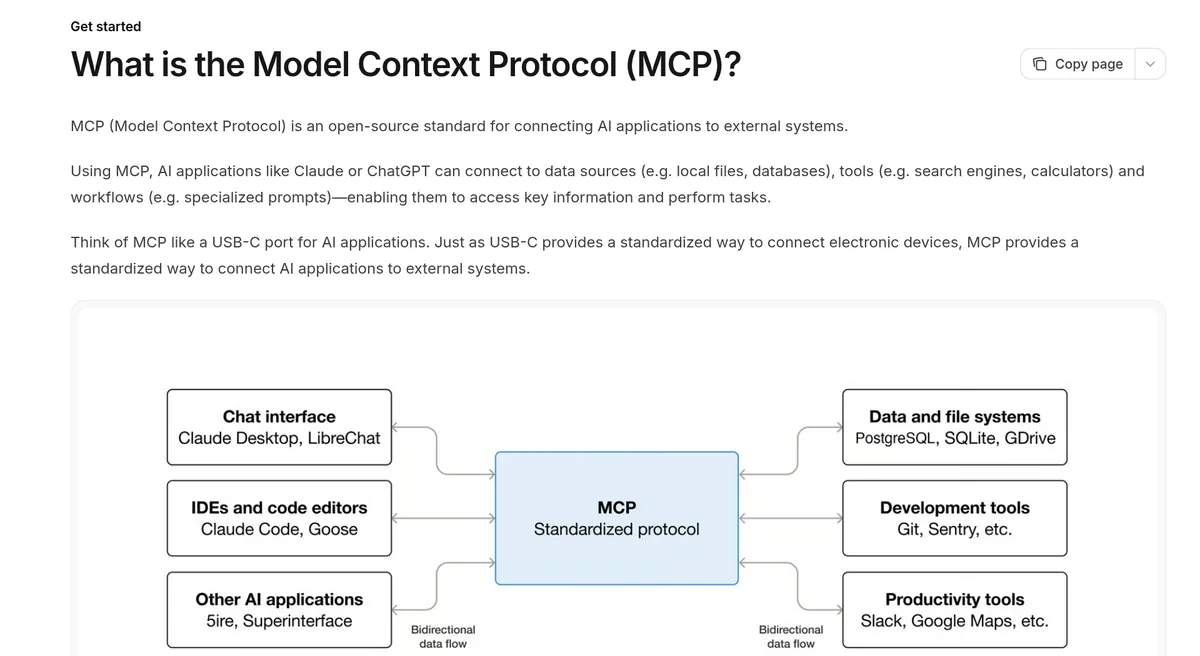
Before MCP, every AI app needed its own custom link to each tool. That meant a lot of one-off work. With MCP, a tool only needs one MCP server, and any app that speaks MCP can use it.
Anthropic, the company behind Claude, open-sourced MCP on November 25, 2024. Its launch post says MCP was created at Anthropic by David Soria Parra and Justin Spahr-Summers.
So what is an MCP server?
Here is the official line: "MCP servers are programs that expose specific capabilities to AI applications through standardized protocol interfaces."
In plain words, an MCP server is a small program that sits between an AI app and one tool. It tells the AI what it can do with that tool, and it does the work when the AI asks.
For example, a calendar MCP server might let Claude read your events and add a new one. A database MCP server might let it look up rows. A GitHub MCP server might let it read issues and open pull requests.
The three parts: host, client, and server
The docs describe three roles:
- Host: the AI app you use, like Claude Desktop or Claude Code.
- Client: a part inside the host that keeps one connection open to one server.
- Server: the program that offers the tool or the data.
So one AI app can hold many connections, one for each server you add.
What an MCP server can offer
The docs say "Servers provide functionality through three building blocks":
- Tools. Actions the AI can take, like searching flights, sending a message, or making a calendar event. The model decides when to use them.
- Resources. Read-only data for context, like files, database layouts, or API docs. The app decides when to use them.
- Prompts. Ready-made instructions, like "plan a vacation" or "summarize my meetings." You, the user, pick them.
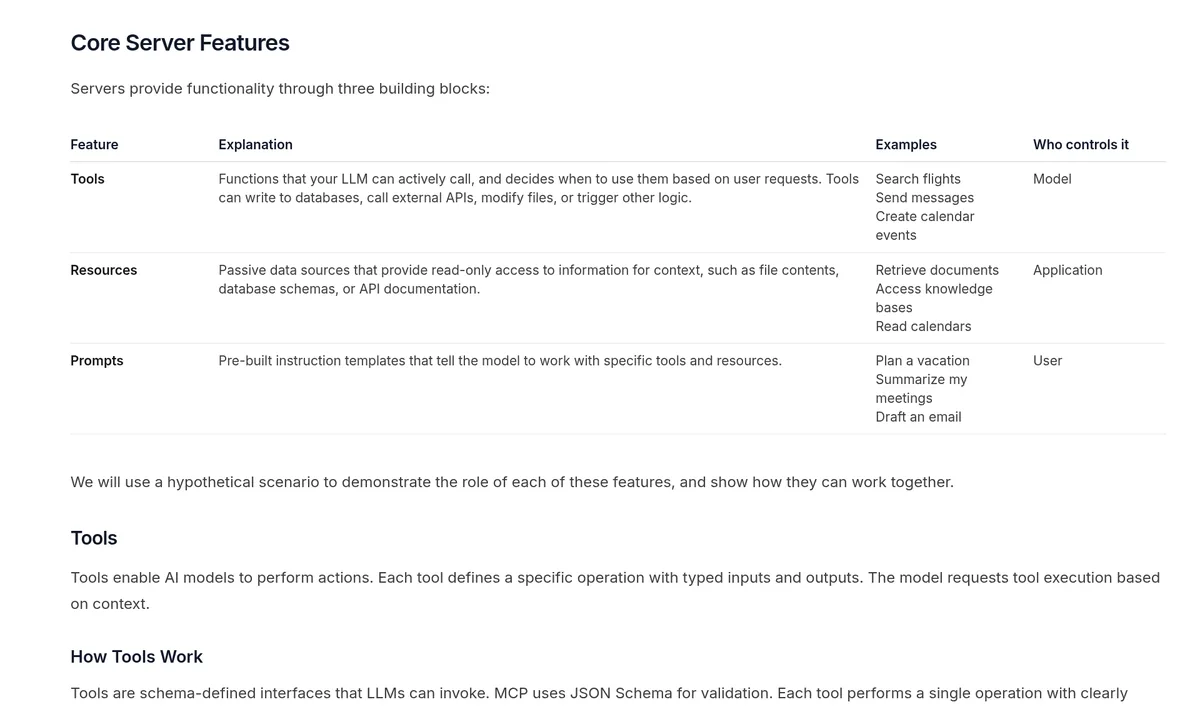
Tools are the part that lets the AI do real work in another app.
What people use MCP servers for
The official docs give a few examples of what MCP makes possible:
- "Agents can access your Google Calendar and Notion, acting as a more personalized AI assistant."
- "Claude Code can generate an entire web app using a Figma design."
- Company chatbots can connect to many databases, so people can ask questions about their data in plain chat.
When Anthropic launched MCP, it shared ready-made servers for "Google Drive, Slack, GitHub, Git, Postgres, and Puppeteer." Since then, many more tools have added their own.
Here is how I would use it in a small business. Connect your calendar so Claude can find open times. Connect your notes app so it can pull up a client's history. Connect your project board so it can draft the next steps. Each one is a separate server, and each one only does what you allow.
Local vs remote MCP servers
There are two main ways an MCP server runs:
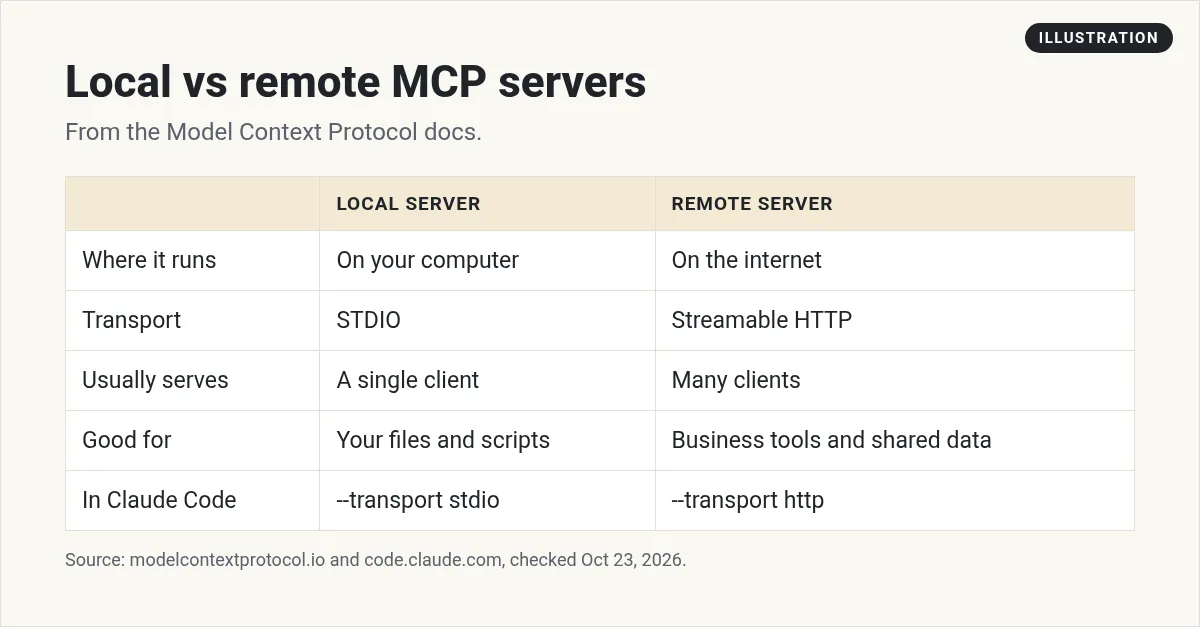
- Local. The server runs on your own computer. It talks to the AI app through what the docs call the STDIO transport. This is good for files on your machine or your own scripts.
- Remote. The server runs on the internet. It uses the Streamable HTTP transport. Claude Code's docs call HTTP "the most widely supported transport for cloud-based services."
The docs say local servers "typically serve a single MCP client," while remote servers "will typically serve many MCP clients."
How to add an MCP server to Claude
In the Claude apps, remote MCP servers show up as "custom connectors." Claude's help center says these are available "for users on Free, Pro, Max, Team, and Enterprise plans," and "Free users are limited to one custom connector."
For a Pro or Max plan, the steps are:
- Go to Customize, then Connectors.
- Click Add, then "Add custom connector."
- Give it a name and paste the server's URL.
- Review the sign-in settings Claude finds, then click Add.
- Turn it on in a chat with the "+" button, then Connectors.
On Team and Enterprise plans, an Owner adds the connector first in Organization settings. Then members connect to it from Customize, then Connectors.
How to add an MCP server to Claude Code
If you build with Claude Code, you add servers from the terminal. The docs show this command for a remote server:
claude mcp add --transport http <name> <url>For a local server that runs on your machine, you use --transport stdio instead, followed by the command that starts the server. The docs say stdio servers are "ideal for tools that need direct system access or custom scripts."
A few more commands help you keep track:
claude mcp listshows your servers and whether each one is connected.claude mcp get <name>shows the details for one server.claude mcp remove <name>removes it./mcpinside Claude Code checks server status.
I go deeper on this in my Claude Code MCP guide.
Stay safe with MCP servers
This part matters. An MCP server can let an AI read and change real data. Claude's help center says, "Only connect Claude to servers built and hosted by organizations and applications you trust."
The Claude Code docs say the same thing: "Verify you trust each server before connecting it." They warn that servers which fetch outside content can expose you to prompt injection. That is when hidden text tricks the AI into doing something you did not ask for.
Here are my simple rules:
- Use official servers first. If a company offers its own MCP server, use that one.
- Give the least access you can. If read-only works, do not grant write access.
- Start with test data. Try a new server on a test account before your real one.
- Watch what the AI does. Approve actions one at a time until you trust the setup.
- Remove what you do not use. Fewer connections means fewer ways for things to go wrong.
Should you build your own MCP server?
You may not need to. Check whether the tool you use already has one. Start there.
Build your own when you have a tool or data source with no server yet, and you want your AI to use it often. The MCP docs have guides and SDKs for that. Anthropic's launch post noted that Claude is good at building MCP servers, so you can ask Claude to help you write one.
If you are new to building with AI, start smaller. Learn to give an AI clear jobs and check its work. I show how regular people do that in my free AI workshop.
Want to build with AI the smart way?
In my free workshop, I show how regular people use AI tools like Claude to build simple online businesses, step by step.
Join my free AI workshopFree to join. No credit card needed.
Frequently asked questions
What is an MCP server in simple terms?
It is a small program that lets an AI app use one tool or data source. It tells the AI what it can do, and it does the work when the AI asks.
What does MCP stand for?
MCP stands for Model Context Protocol. It is an open-source standard for connecting AI apps to outside tools and data.
Who made MCP?
Anthropic created MCP and open-sourced it on November 25, 2024. The MCP docs say it is "supported across a wide range of clients and servers."
Can I use MCP on the free Claude plan?
Yes. Custom connectors using remote MCP work on Free, Pro, Max, Team, and Enterprise plans. Free users are limited to one custom connector.
What is the difference between a local and remote MCP server?
A local server runs on your computer and usually serves one app. A remote server runs on the internet and can serve many apps.
Are MCP servers safe?
They can be, if you are careful. Only connect servers from people you trust, give the least access you can, and watch what the AI does at first.
Sources
Checked October 23, 2026. Plans, prices, and rules can change.
- Model Context Protocol: What is the Model Context Protocol (MCP)?
- Model Context Protocol: Architecture overview
- Model Context Protocol: Understanding MCP servers
- Anthropic: Introducing the Model Context Protocol (Nov 25, 2024)
- Claude Code Docs: Connect Claude Code to tools via MCP
- Claude Help Center: Get started with custom connectors using remote MCP
