
Build with AI · Guide
MCP lets Claude Code reach into the tools you already use, like Notion, GitHub, or your CRM. Here is what it is, how to add your first server, and the safety rules I follow.
Out of the box, Claude Code can read and edit the files on your computer. It cannot see your task list, your docs, or your CRM. MCP is how you fix that.
I went through Anthropic's MCP docs and the official MCP site on October 21, 2026. This guide covers the parts a beginner needs: what MCP is, how to add a server, where it gets saved, and how to keep it safe.
Quick answer
MCP (Model Context Protocol) is an open standard that connects AI apps to outside tools and data. In Claude Code, you add a tool with one command, like claude mcp add --transport http notion https://mcp.notion.com/mcp. Then type /mcp inside Claude Code to check it and sign in. Servers save to local scope (just you, this project) unless you pick project or user scope. Only connect servers you trust, because servers that pull in outside content can carry prompt injection. Checked October 21, 2026.
What MCP is, in plain words
The official MCP site says MCP is an open-source standard for connecting AI applications to external systems. It compares MCP to a USB-C port for AI apps. One plug shape, many devices. For a plain English look at MCP servers in general, see my What is an MCP server guide.
In Claude Code, each tool you connect is called an MCP server. A server might give Claude access to:
- a task tracker, so it can read a ticket and build the feature
- a database, so it can look up real records
- a design tool, so it can match a layout
- your email, so it can draft messages for you to review
Anthropic's own rule of thumb is a good one. Connect a server when you keep copying data from another tool and pasting it into the chat.
Before you add anything: trust first
This part matters more than the setup steps. An MCP server can read data and take actions for Claude. Anthropic's docs warn you to check that you trust each server before you connect it. Servers that fetch outside content can expose you to prompt injection, which is when hidden text tries to give the AI orders.
My rules:
- Use servers from the company that makes the tool, or from Anthropic's Directory.
- Give each one the smallest access you can. A read-only token is better than a full admin key.
- Never paste a real password or token into a file you share with others.
How to add your first MCP server
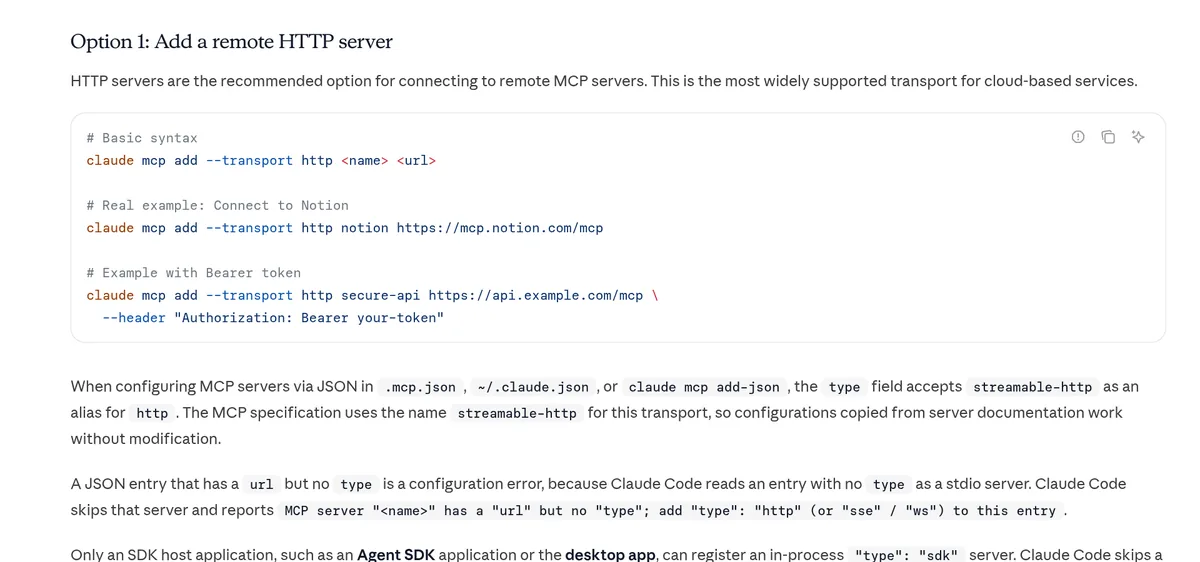
Most cloud tools now offer a remote server. Anthropic calls HTTP servers the recommended option for remote MCP servers. Here is the Notion example from the docs:
claude mcp add --transport http notion https://mcp.notion.com/mcpThe pattern is always the same: claude mcp add, the transport, a name you pick, and the server's address.
- Run the command in your normal terminal, not inside a Claude chat.
- Start Claude Code with
claude. - Type
/mcp. You will see your servers and their status. - If the server needs a login, sign in from the
/mcpmenu. Claude Code supports OAuth 2.0 sign in for remote servers. - Ask a simple, read-only question first, like asking it to list your pages.
The four kinds of MCP servers
Anthropic's docs list four ways a server can connect. You only need to know which one a tool uses.
- HTTP. A remote server on the web. The recommended choice for cloud tools.
- SSE. An older remote type. The docs call it deprecated, so use HTTP when you can.
- Stdio. A server that runs on your own computer, often started with a command like npx. Good for tools that need access to your machine or your own scripts.
- WebSocket. A remote type for servers that push events to Claude. You set it up with a JSON block, not the normal add command.
Setup steps written for another app, like Cursor or Claude Desktop, still work. Anthropic says to look for a URL, a launch command, or an mcpServers JSON block, then turn it into a Claude Code command.
Where your server gets saved (scopes)
When you add a server, Claude Code saves it in one of three places. This decides who can use it.
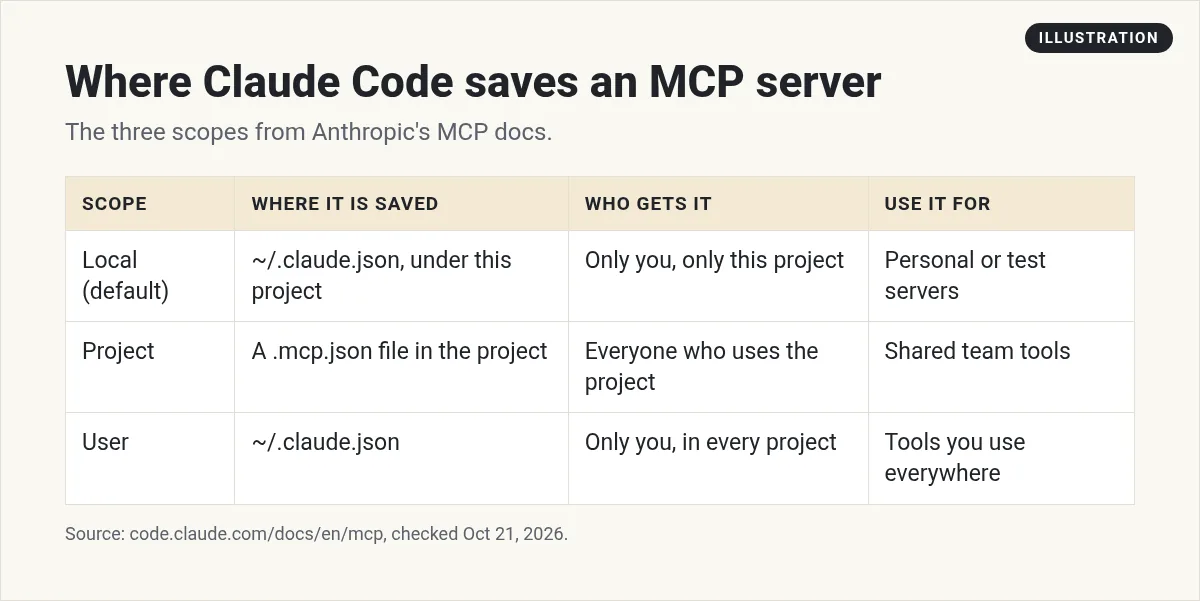
- Local is the default. Only you get it, and only in this one project.
- Project saves it to a .mcp.json file in your project folder. Anyone who uses the project gets it. Add
--scope projectto the command. - User gives it to you in every project on your computer. Add
--scope user.
If the same server name is in more than one place, Claude Code uses the highest one in this order: local, then project, then user. It does not mix them.
How to manage your servers
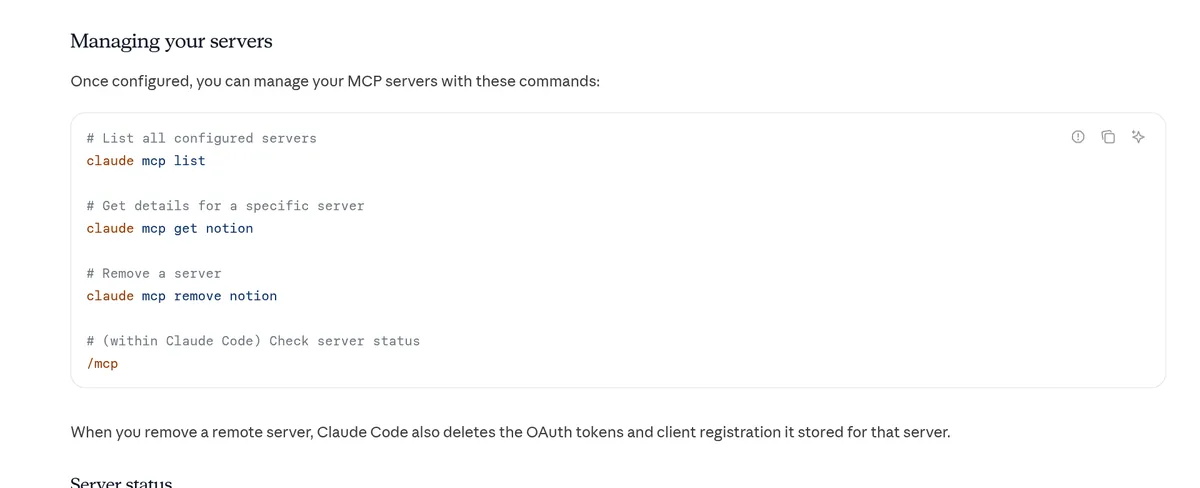
These four commands cover almost everything:
claude mcp list
claude mcp get notion
claude mcp remove notion
/mcp
claude mcp listshows each server and a health status, such as Connected, Needs authentication, or Failed to connect.claude mcp getshows the details for one server.claude mcp removedeletes it. For a remote server, it also deletes the login tokens it stored./mcpruns inside Claude Code. Use it to check status, sign in, and reconnect.
Real examples to try
Here are three ideas, based on the examples in Anthropic's docs. Treat them as starting points, not promises.
- GitHub for code reviews. Add GitHub's remote server with a personal access token. Then ask Claude to review a pull request or list your open ones. Anthropic suggests a fine-grained token that only reaches the repos you want.
- Your notes in Notion. Connect Notion and ask Claude to turn a project page into a task list for your code.
- Your CRM. The docs show adding HubSpot at user scope. If you use GoHighLevel, see my guide to connecting GoHighLevel and Claude.
Start with read-only questions. Once you trust the results, let it take small actions you can check.
Limits and costs to know
- Big outputs. Claude Code shows a warning when an MCP tool returns more than 10,000 tokens. The default limit is 25,000 tokens, and you can change it with the MAX_MCP_OUTPUT_TOKENS setting.
- Many servers. Tool search keeps your context small. Only tool names and server instructions load when a session starts, so adding more servers has little effect until Claude needs them.
- Cost. I did not see a separate MCP charge on Claude's pricing page. But Claude Code itself needs a paid plan, and every tool call uses your plan's usage. The tool you connect may also have its own price. See my Claude Code pricing guide.
When a server will not connect
- It says Needs authentication. Open
/mcpand sign in to that server. - It says Failed to connect. Check the address for typos. Then retry from
/mcp. Claude Code tries to reconnect on its own, and after five failed tries it marks the server as failed. - You used a token and it still fails. The add command saves your setup without testing the token. So a wrong token is accepted at first and fails later. Run
/mcpand look for a checkmark next to the server.
Can you build your own MCP server?
Yes. Anthropic offers an official plugin called mcp-server-dev that can scaffold a server for you. You run its build skill, answer a few questions, and Claude sets up a remote HTTP server or a local one. That is a project for later. Start by connecting tools that already exist.
Where MCP fits with skills, hooks, and subagents
MCP gives Claude new tools to reach. The other features shape how it works:
- Skills teach it a repeatable task.
- Hooks run your own checks at set moments.
- Subagents hand side jobs to helpers.
My first MCP server
Nothing you check here is sent or saved. Download it if you want to keep it.
Know what to build before you connect more tools
In my free workshop, I show how regular people use AI tools to plan and build simple apps and products, step by step.
Join my free AI workshopFree to join. No credit card needed.
Frequently asked questions
What is MCP in Claude Code?
MCP, the Model Context Protocol, is an open standard that lets Claude Code connect to outside tools, databases, and APIs. Each connection is called an MCP server.
How do I add an MCP server to Claude Code?
Run claude mcp add with the transport, a name, and the server address. For example: claude mcp add --transport http notion https://mcp.notion.com/mcp. Then check it with /mcp.
Where does Claude Code store MCP servers?
Local and user servers are stored in ~/.claude.json. Project servers go in a .mcp.json file in your project folder.
How do I see which MCP servers are connected?
Run claude mcp list in your terminal, or type /mcp inside Claude Code. Both show each server's status.
Are MCP servers safe?
Only if you trust them. Anthropic warns that servers that fetch outside content can expose you to prompt injection. Use official servers and give them the least access you can.
Does MCP cost extra in Claude Code?
I did not see a separate MCP charge on Claude's pricing page. Claude Code needs a paid Claude plan or a Console account, and the tool you connect may have its own price.
Sources
Checked October 21, 2026. Plans, prices, and rules can change.
