
AI Tools · Guide
NotebookLM got a new name this summer. Here is what it does now, what you get for free, and a simple way to set up your first notebook.
If you searched for NotebookLM and landed on something called Gemini Notebook, you are in the right place. Google renamed it in July 2026. It is the same tool.
On October 24, 2026, I read Google's announcement, its help center pages, and its AI plans page. Here is a plain guide to what it does, what it costs, and how to start.
Quick answer
NotebookLM is a free Google AI tool that answers questions using only the sources you give it, like PDFs, Google Docs, websites, and YouTube videos. On July 16, 2026, Google renamed it Gemini Notebook. The free Standard plan allows 100 notebooks with up to 50 sources each. Paid Google AI plans raise those limits.
What is NotebookLM?
NotebookLM is a research notebook with AI built in. You add your own sources. Then you ask questions, and it answers from those sources.
That is the big difference from a normal chat bot. A normal chat bot answers from everything it learned. NotebookLM works from the files you choose. Google's help page says you can "Chat with your notebook to get grounded information based on your sources with clear in-line citations for accuracy, transparency, and trust."
So when it tells you something, you can click the citation and see where it came from. For school, work, or business research, that matters.
NotebookLM is now Gemini Notebook
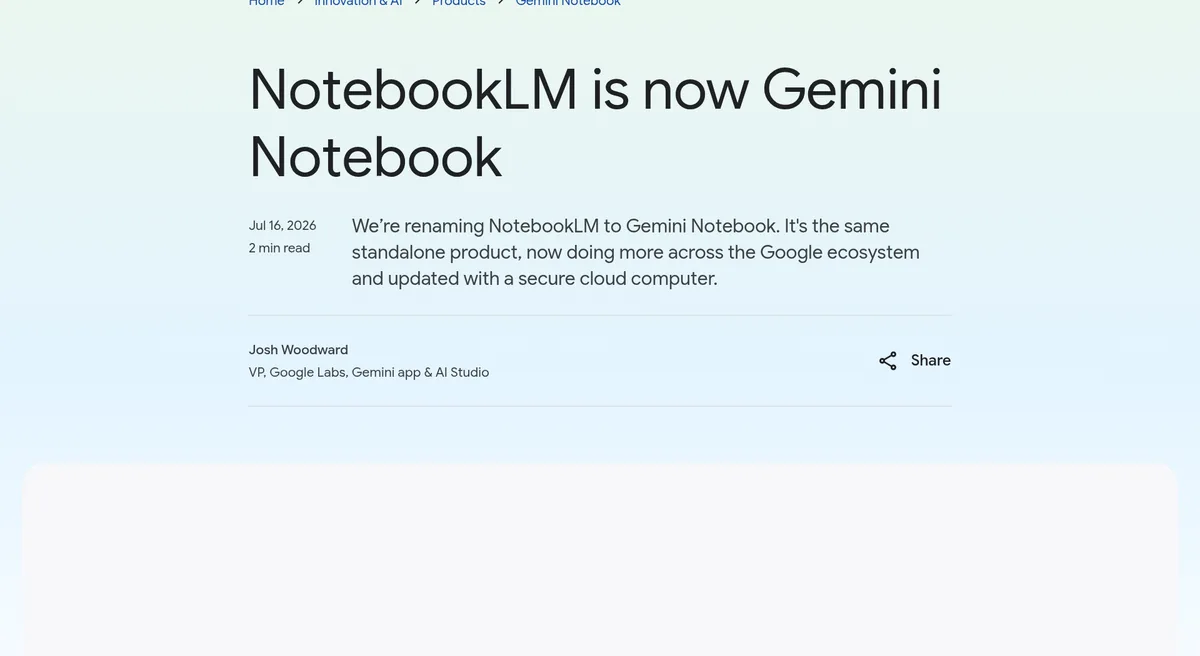
On July 16, 2026, Google posted that it was "renaming NotebookLM to Gemini Notebook." The post says "It's the same standalone product, now doing more across the Google ecosystem and updated with a secure cloud computer."
A few other facts from that post:
- It started at Google I/O 2023 as Project Tailwind.
- Google says "more than 30 million people and over 600,000 organizations" use it.
- Each notebook is getting a secure cloud computer that can write and run code on your sources. Google said this was available first for AI Ultra users and some Workspace business customers, with Pro users on the web next.
In this post I use both names. People still search for NotebookLM, and the help center now says Gemini Notebook.
What you can add as a source
Google's help center lists these source types:
- PDF, Word (docx), text, Markdown, CSV, and PowerPoint (pptx) files
- Google Docs, Slides, and Sheets
- Web page links
- Public YouTube videos with captions
- Audio files, images, ePub files, and pasted text
The help center says "Each source can contain up to 500,000 words or up to 200MB for uploaded files." For YouTube, it says only public videos with captions work.
What it can make for you
Once your sources are in, you can do more than chat. A few things people use it for:
- Audio Overviews. These turn your sources into a spoken summary. Google lists four formats: Deep Dive, Brief, Critique, and Debate. You can pick Shorter, Default, or Longer (the length choice is English only).
- Study help. Ask for a summary, a list of key terms, or quiz questions from your notes.
- Research. Drop in reports or articles, then ask what they agree and disagree on.
Google says you can make Audio Overviews in "80+ languages."
Is NotebookLM free?
Yes. The Standard plan is free with a Google account. Google's plans page says you can "Sign up free of charge by using your gmail account."
The free plan has limits. Here is what Google's help center showed on October 24, 2026:
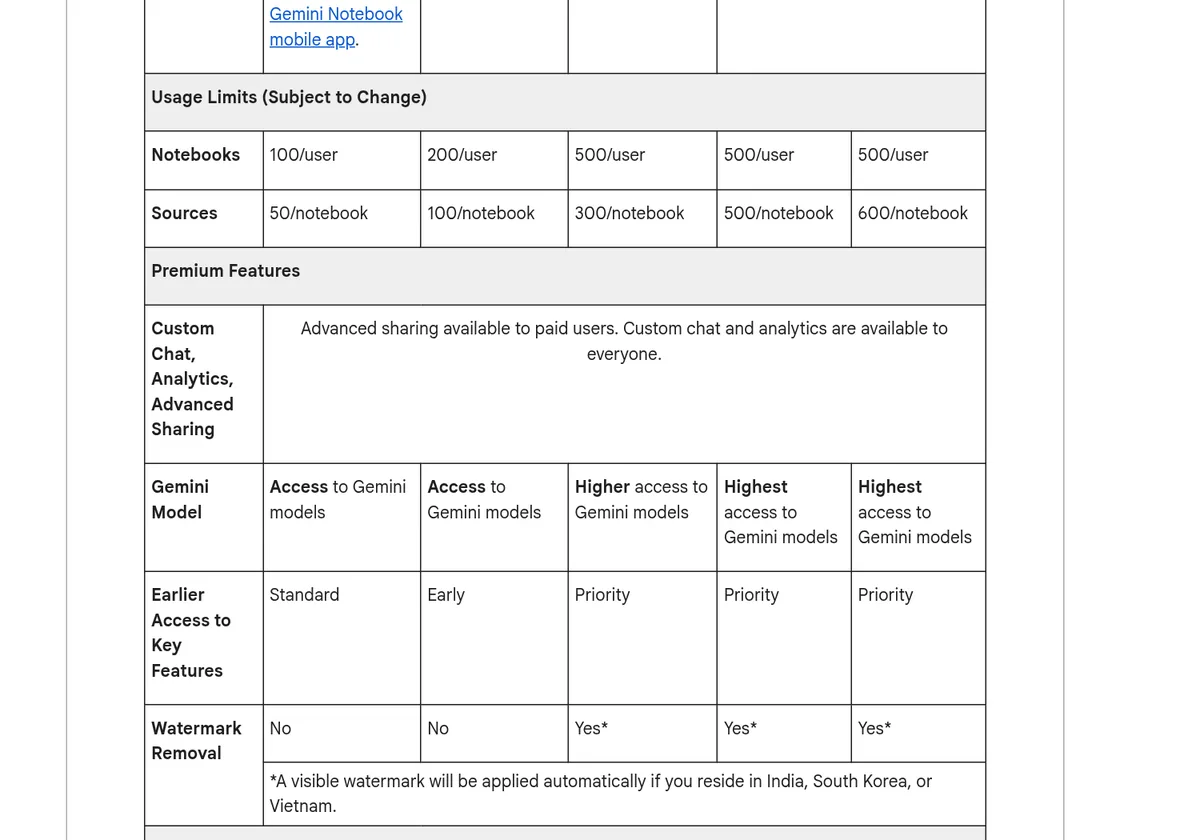
The Standard plan allows 100 notebooks and 50 sources per notebook. Paid plans raise those numbers.
Plans and prices
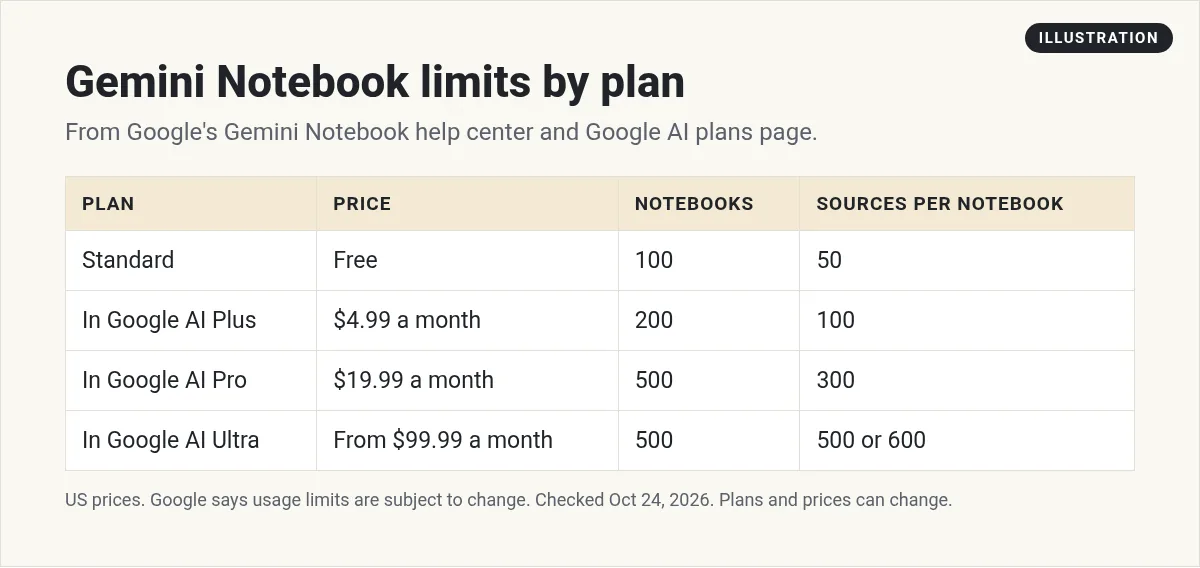
The paid levels come with Google AI plans. On October 24, 2026, Google's AI plans page showed these US prices:
- Google AI Plus: $4.99 a month. 200 notebooks, 100 sources each.
- Google AI Pro: $19.99 a month. 500 notebooks, 300 sources each.
- Google AI Ultra: from $99.99 a month. 500 notebooks, with 500 or 600 sources each depending on the Ultra plan.
The help center also lists watermark removal on Pro and Ultra (a visible watermark still applies in India, South Korea, and Vietnam). Some Google Workspace plans can also unlock more. Prices can differ outside the US.
How the usage limits work
Notebook and source counts are one limit. There is also a usage limit on how much you can ask and create.
Google says the limits are compute based. They depend on how complex your prompt is, which features you use, and how long your chat is. The help page says the quota "refreshes every 5 hours until you reach your weekly limit."
Paid plans get more room. Google lists AI Plus at two times the standard limits and AI Pro at four times. AI Ultra is 5x or 20x higher than AI Pro, depending on the plan.
To check where you are, open Gemini Notebook, then go to Settings and Usage. If you run out on the web, there is a Generate later option for things like Audio Overviews.
How to set up your first notebook
- Pick one topic. One notebook per project works better than one giant notebook.
- Add 3 to 5 good sources. Start small. A few clean sources beat 50 messy ones.
- Ask a simple question first. For example, ask it to list the main points in your sources.
- Click the citations. Check that the answer matches the source.
- Make one output. Try an Audio Overview or a short study guide.
That is it. You can add more sources later as you learn what helps.
Simple ways to use it this week
- Learn a new tool. Add the help docs for a tool you just bought. Ask it how to do the one thing you need.
- Prep for a meeting. Add the notes and files. Ask for the three questions you should ask.
- Turn videos into notes. Add a few public YouTube videos on a topic. Ask for a step list.
- Plan content. Add your old posts and ask what topics you have not covered yet.
If you want to compare it with another free Google tool, my guide to Google AI Studio covers the one built for making apps.
What about privacy?
Google's help center says "Your data is protected, and is not used to train Gemini Notebook unless you provide feedback." If you send feedback, Google says it may review that whole conversation.
For Google Workspace and Workspace for Education users, Google says uploads and chats are not reviewed by people and are not used to train AI models.
My rule is simple. Do not upload anything you would not want someone else to read, like passwords, client secrets, or health records, unless your company has approved it.
How it fits with other AI tools
Gemini Notebook is great for working from your own sources. For writing, coding, or brainstorming, a general chat tool may fit better. Here is my take on three of them:
My video: Claude, Gemini, and ChatGPT compared. Recorded in June 2026, before the NotebookLM rename.
Any results mentioned in videos are not typical and are not a promise of income. Your results depend on your work and your market.
If you are deciding which chat tool to pay for, see my ChatGPT pricing guide too.
Who it is for
Here is who I think it fits well:
- Students. Add class notes and readings. Ask for a study guide or practice questions.
- Small business owners. Add your price list, policies, and FAQs. Ask it to draft answers to customer questions, then check them.
- Content creators. Add your own videos and posts. Ask what you said about a topic so you do not repeat yourself.
- Anyone learning a new skill. Add a few good guides and ask questions in plain words.
It is less useful if you have no sources yet. In that case, a general chat tool is a better first step. You can come back once you have files worth working from.
One more tip. Name each notebook by the job it does, like Client onboarding or Biology unit 3. It makes it much easier to find later.
Mistakes to avoid
- Adding too much at once. Start with a few sources and grow.
- Skipping the citations. The answer is only as good as the source. Check it.
- Using it as a search engine. It works best on sources you picked, not the whole web.
- Paying too early. Use the free plan until you hit a real limit.
Your first Gemini Notebook
Nothing you check here is sent or saved. Download it if you want to keep it.
Learn to use AI tools for real work
Want help turning tools like this into something useful for your business? Join my free AI workshop. I show how I use AI step by step.
Join my free AI workshopFree to join. No credit card needed.
Frequently asked questions
Is NotebookLM the same as Gemini Notebook?
Yes. On July 16, 2026, Google renamed NotebookLM to Gemini Notebook. Google says it is the same standalone product with new features.
Is NotebookLM free?
Yes. The Standard plan is free with a Google account. It allows 100 notebooks and 50 sources per notebook, with usage limits that refresh every 5 hours up to a weekly limit.
How much does NotebookLM cost?
Paid levels come with Google AI plans. On October 24, 2026, US prices were $4.99 a month for AI Plus, $19.99 a month for AI Pro, and from $99.99 a month for AI Ultra.
What sources can I add?
Google lists PDFs, Word, text, Markdown, CSV, and PowerPoint files, Google Docs, Slides, and Sheets, web links, public YouTube videos with captions, audio, and images.
Does Google train on my NotebookLM data?
Google's help center says your data is not used to train Gemini Notebook unless you provide feedback. Workspace users get extra protections.
What is an Audio Overview?
It turns your sources into a spoken summary. Google lists four formats: Deep Dive, Brief, Critique, and Debate, in 80+ languages.
Sources
Checked October 24, 2026. Plans, prices, and rules can change.
- Google blog: NotebookLM is now Gemini Notebook (Jul 16, 2026)
- Gemini Notebook Help: Learn about Gemini Notebook's plans
- Gemini Notebook Help: Manage your usage limits
- Gemini Notebook Help: Add or discover new sources
- Gemini Notebook Help: Audio Overviews
- Gemini Notebook Help: Learn about Gemini Notebook
- Google One: Google AI plans
- Google Workspace Updates: NotebookLM is now Gemini Notebook
