
AI Coding · Review
Warp is a terminal app with an AI agent built in. The terminal part is free. The AI part is where the plans come in. Here is what you get, what it costs, and how to try it.
The terminal is the text window where you type commands to your computer. If you build apps with AI tools, you will end up in one sooner or later. Warp tries to make that window easier to use, and it adds an AI agent you can talk to in plain words.
I checked Warp's pricing page in both views, its FAQ, and its docs on October 27, 2026. Here is what it does, what it costs, and who it is for.
Quick answer
Warp is an open-source terminal with a built-in AI agent, for macOS, Windows, and Linux. On October 27, 2026, the Free plan was $0. With the Annual view (the default), Build was $18 a month, Max $180 a month, and Business $45 per user a month. With the Monthly view, they were $20, $200, and $50. Build includes $20 of agent usage a month, and Max includes $200, according to the plan card.
What Warp is
Warp's docs call it "an open-source Agentic Development Environment." In plain words, it is a terminal app with AI built in. You can run normal commands, and you can also ask the Warp Agent to write code, fix bugs, or explain your project.
The code for the app is open. The docs say "Warp's client is open source under AGPL v3, so you can build it yourself." It runs on macOS (10.14 or above), Windows, and Linux.
You do not need an account to start. The quickstart says you can "optionally sign up for an account (top right), or skip and start using Warp immediately."
Blocks: the feature that makes Warp different
In most terminals, everything you type and every result runs together in one long scroll. Warp splits it up. Its docs say "Every command and its output is grouped into a single Block that you can copy, search, filter, bookmark, share, and navigate independently."
That sounds small, but it helps. You can copy just the result of one command. You can share one Block with a teammate when something breaks. And you can find an old command without scrolling forever.
The Blocks docs list more things you can do with them. You can copy a command or just its output, jump to the start of an output, run a command again, and bookmark commands you use often.
Warp also loads the shell you already use. The docs say zsh is the default on macOS, PowerShell on Windows, and bash on Linux.
Warp pricing
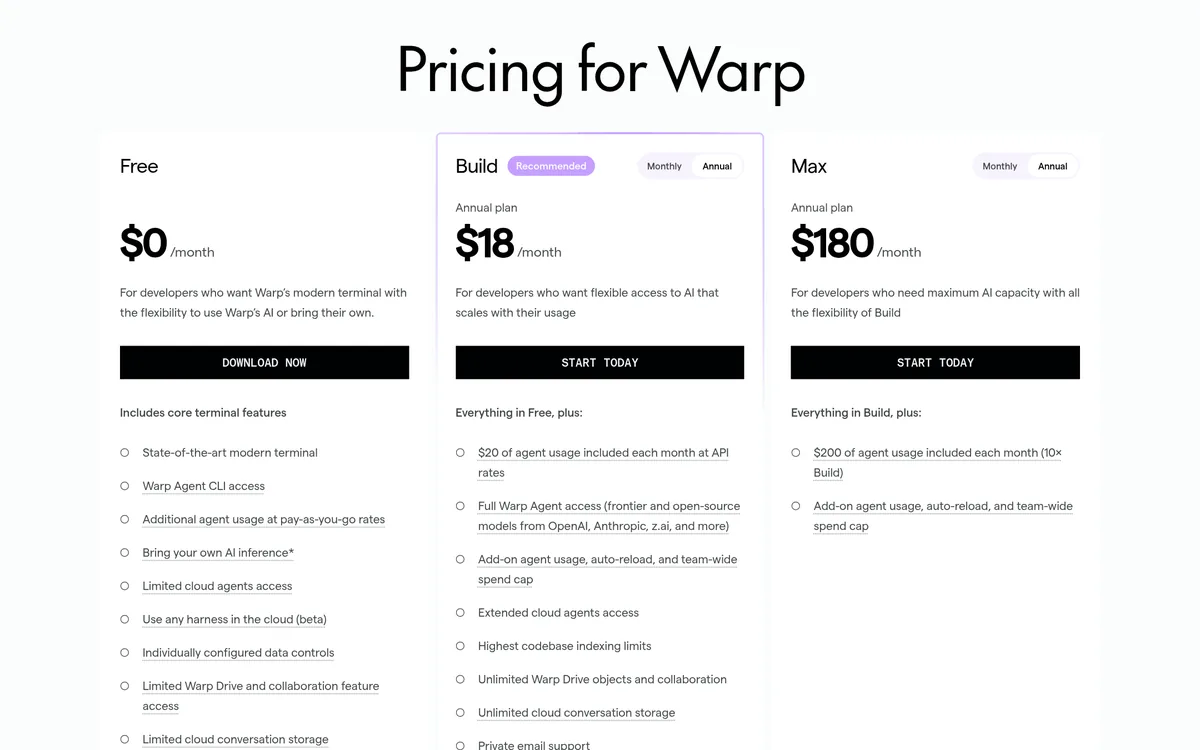
The pricing page opens with the Annual option selected on each paid plan. Here is that default view:
Switch to Monthly, and the prices go up:
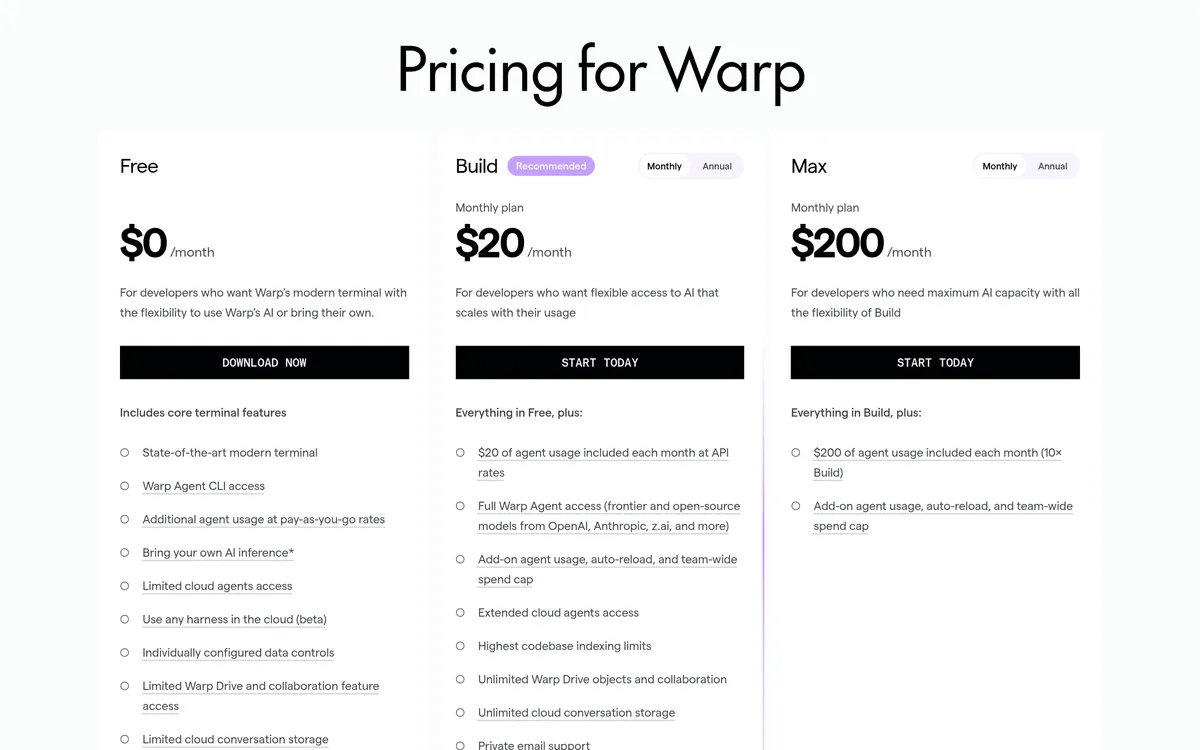
- Free: $0 a month. Core terminal features, Warp Agent CLI access, and the option to bring your own AI.
- Build: $18 a month on the annual plan, or $20 a month on the monthly plan. Includes "$20 of agent usage included each month at API rates."
- Max: $180 a month annual, or $200 monthly. For heavy AI users.
- Business: $45 per user a month annual, or $50 monthly. Up to 25 seats, with SAML-based single sign-on.
- Enterprise: custom pricing.
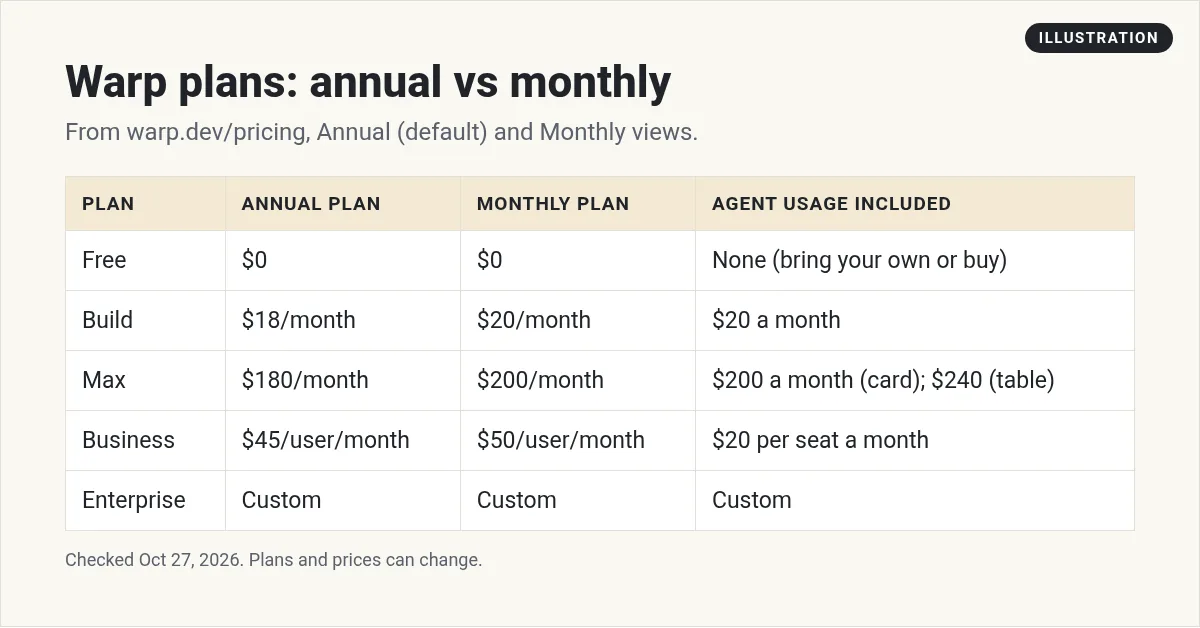
My math on Build: $20 times 12 is $240 a year paid monthly. The annual price of $18 a month is $216 a year. That saves $24.
A conflict on Max
The Max plan card says "$200 of agent usage included each month (10× Build)." The FAQ also says Max "includes $200 each month." But the compare table lower on the same page lists Max as "$240 (18,000 credits)." I am showing both. Go by what your billing page shows after you sign up.
How AI usage is billed
The FAQ says "Warp shows agent usage in dollars." Each paid plan includes a set amount each month. When that runs out, you can buy more.
What a task costs depends on a few things. The FAQ lists "the model, the size of the task, the context and codebase involved, and whether the agent runs locally or in the cloud."
A few more rules from the FAQ:
- Included usage "resets every 30 days from your subscription or renewal date."
- Extra usage you buy "rolls over month to month, and remains valid for 12 months."
- On the Free plan, extra usage costs more: "Free plan prices are 20% higher than paid-plan prices."
- Paid-plan admins can set team spend caps and auto-reload.
- You can check what is left under Settings, then Billing & usage.
- In the Warp Agent CLI, you can run
/costto see the cost of each response.
Which AI models you can use
The FAQ says "Paid plans include frontier models from OpenAI, Anthropic, Google, and xAI," plus open-source models hosted on Fireworks AI in the US. You can pick a model for each prompt, or let Warp's Auto routing choose for you.
Warp also connects to other tools. The pricing page says you can "Connect Warp to Slack, Linear, and GitHub" and mention @Warp to look into bugs, suggest fixes, or open pull requests.
Which Warp plan fits you?
The FAQ gives a simple guide:
- Build "is a good fit for individual developers or small teams that want flexible access to Warp AI."
- Max "is best for heavy AI users who consistently need more capacity."
- Business "is best for teams that need SSO, team usage metrics, admin-configurable data controls, and centralized spend management."
My advice: start on Free. If you already pay for an AI model, connect your own key and see if that covers you. Move to Build only when you want Warp's included usage and the higher limits. Pay monthly at first, then switch to annual once you know you will keep it.
Can you use Warp for free?
Yes. The terminal itself is free. For AI on the Free plan, you can bring your own. The FAQ says you can "Connect your own OpenAI, Anthropic, or Google API key." You can also connect a custom endpoint, or buy usage as you go.
Bringing your own key has limits. The FAQ says it is for individual users and organizations with 10 or fewer employees. Larger groups need Business or Enterprise.
The Free plan also has smaller limits. The compare table lists 3 indexed codebases on Free vs 40 on Build, and 30 cloud conversations on Free vs unlimited on paid plans.
No discounts, though. The FAQ says Warp "does not offer discounts for students, non-profits, or open-source teams." And payment is by credit card only, through Stripe.
How to install Warp
The quickstart says you can get "up and running with Warp in about 10 minutes." Here are the basic steps:
- Download Warp for your computer from warp.dev. On a Mac, you can also install it with Homebrew:
brew install --cask warp - Open Warp. You will see a terminal ready for input.
- Skip the account, or sign up in the top right.
- Run a simple command, like
ls, and see your first Block. - Start an agent chat and ask it to explain your project.
Who Warp is for
Warp makes the most sense if you spend time in a terminal and want AI help right there. If you are learning to code, Blocks and plain-word prompts can make the terminal feel less scary.
If you already pay for another AI coding tool, compare before you add one more bill. See my guides to Cursor pricing, Claude Code pricing, and Codex CLI. For a wider look, read my roundup of AI coding assistants.
Before you pay for Warp
Nothing you check here is sent or saved. Download it if you want to keep it.
Build faster with AI
Want to see how I use AI tools to build apps and automate work? Join my free AI workshop. I walk through it step by step.
Join my free AI workshopFree to join. No credit card needed.
Frequently asked questions
Is Warp terminal free?
Yes. The Free plan is $0 a month and includes core terminal features. For AI, you can bring your own OpenAI, Anthropic, or Google API key, or buy usage as you go.
How much does Warp cost?
On October 27, 2026, Build was $18 a month annual or $20 monthly, Max $180 or $200, and Business $45 or $50 per user a month. Enterprise is custom.
Is Warp open source?
Warp's docs say its client is open source under AGPL v3, so you can build it yourself.
What are Blocks in Warp?
Blocks group each command and its output together, so you can copy, search, filter, bookmark, share, and navigate each one on its own.
Does Warp work on Windows?
Yes. Warp's docs say it is supported on macOS, Windows, and Linux. PowerShell is the default shell on Windows.
How much AI usage does Warp Build include?
Build includes $20 of agent usage each month at API rates. Included usage resets every 30 days, and extra usage you buy stays valid for 12 months.
Sources
Checked October 27, 2026. Plans, prices, and rules can change.
