
Build with AI · Comparison
If you already write code, an AI coding assistant can finish lines, explain old code, and take on whole tasks. Here are five of them, what they cost, and how to pick.
This guide is for people who already code, or are learning to. If you want to build apps without code at all, my list of vibe coding tools is a better fit.
I checked the official pricing and docs pages for five AI coding assistants on October 25, 2026. Here is what each one does, what it costs, and which kind of coder it suits.
Quick answer
An AI coding assistant is a tool that helps you write, fix, and understand code. Five to know in October 2026 are GitHub Copilot (from $10 a month for Pro), Claude Code (included with Claude Pro at $20 billed monthly), Cursor (from $8 a month billed monthly on The X Subscription), OpenAI Codex (included with ChatGPT plans, from Go at $8 a month), and Gemini Code Assist for businesses (from $19 per user a month billed yearly). Most have a free tier. Pick by where you work: your editor, your terminal, or the cloud.
What an AI coding assistant does
Most AI coding assistants do three jobs:
- Complete code as you type. You start a line, and it suggests the rest.
- Chat about your code. You ask why a test fails or what a function does, and it answers in plain words.
- Act as an agent. You give it a task, like adding a login page, and it edits files, runs commands, and shows you the changes.
Agent tools can read your whole project, not just the open file. That makes them more useful, and it also means you need to review their work with care.
The five tools at a glance
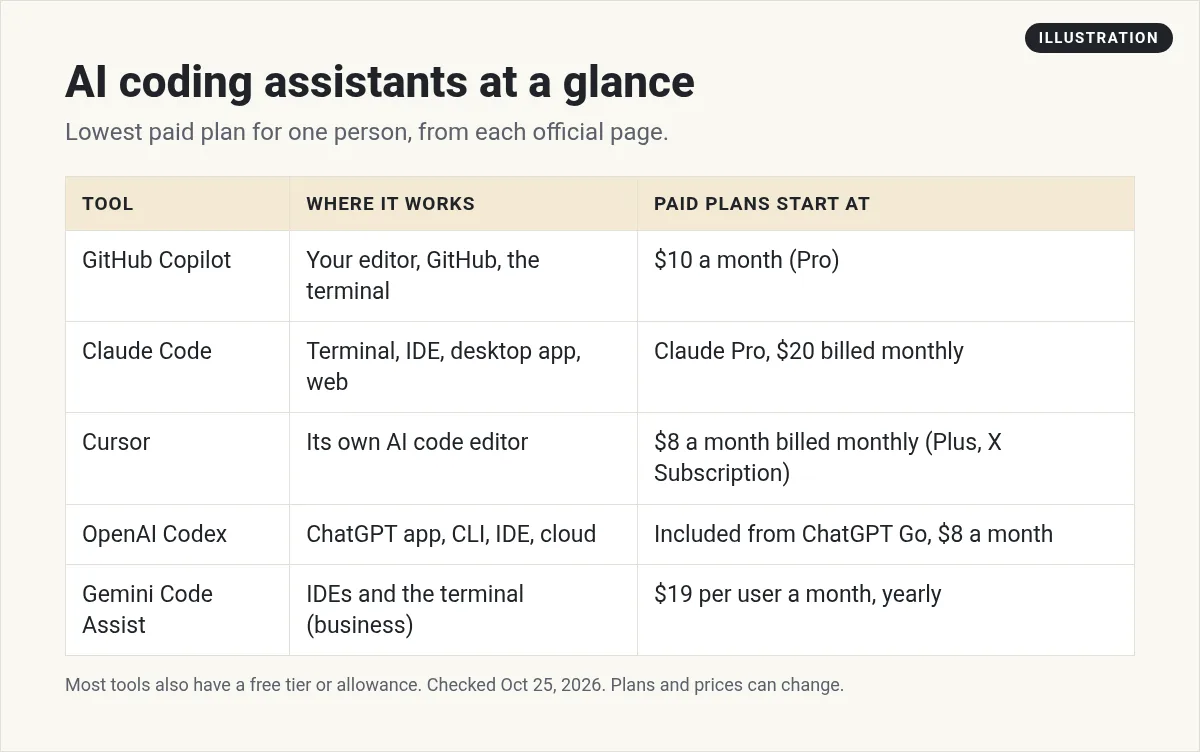
All prices below were checked on October 25, 2026, in US dollars. They are for one person unless I say otherwise.
1. GitHub Copilot
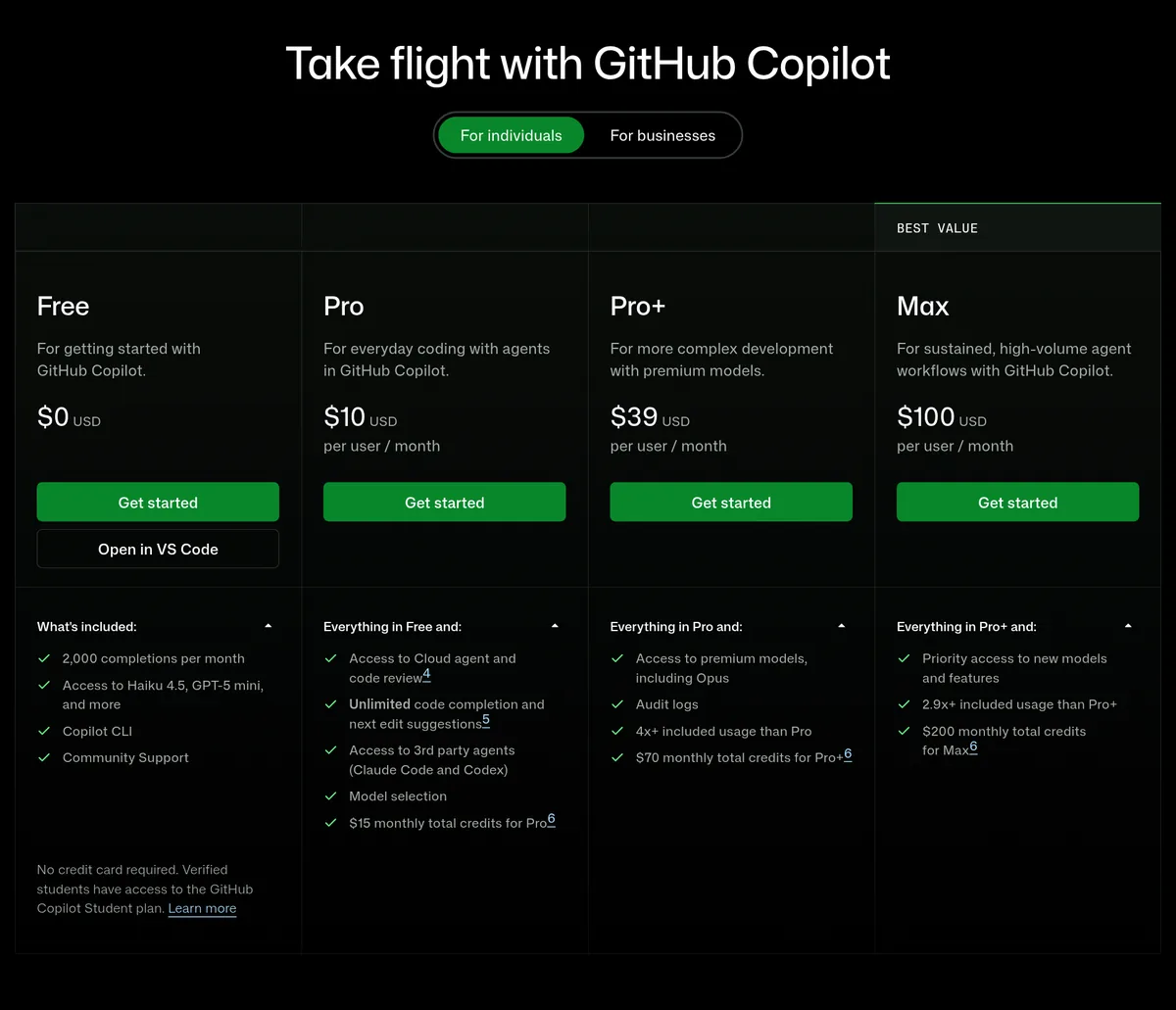
Copilot works inside your editor, on GitHub, and in the terminal. GitHub lists support for VS Code, Visual Studio, Xcode, JetBrains IDEs, Neovim, Eclipse, and more.
- Free: $0. 2,000 completions per month and Copilot CLI.
- Pro: $10 per user a month. Unlimited code completion, the cloud agent and code review, and access to third party agents (Claude Code and Codex). Includes $15 in monthly credits.
- Pro+: $39 per user a month, with $70 in monthly credits and premium models.
- Max: $100 per user a month, with $200 in monthly credits.
Best for: coders who live in GitHub and want help in the editor they already use. For the full breakdown, see my GitHub Copilot pricing guide.
2. Claude Code
Anthropic's docs describe Claude Code as "an agentic coding tool that reads your codebase, edits files, runs commands, and integrates with your development tools." It runs in the terminal, in IDE extensions, in a desktop app, and on the web.
- Free Claude plan: does not include Claude Code, per the plan table.
- Pro: $20 a month billed monthly, or $17 a month with the yearly discount ($200 billed up front). Includes Claude Code.
- Max: from $100 a month, with 5x or 20x more usage than Pro.
Best for: coders who are happy in the terminal and want an agent that does big, multi file tasks. Start with how to use Claude Code, and see Claude Code pricing for usage limits.
3. Cursor
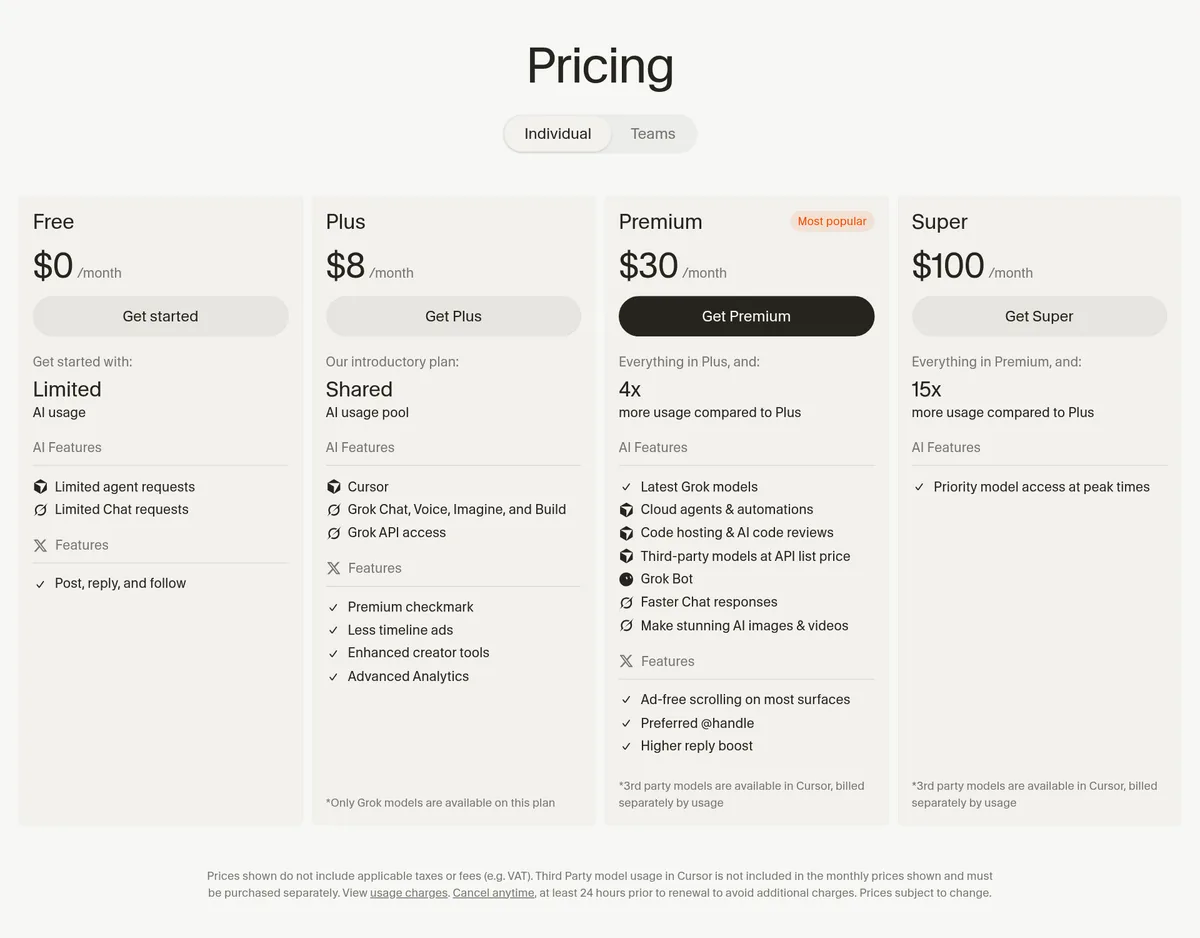
Cursor is its own AI code editor. As of October 2026, Cursor's help center says it "is part of The X Subscription, one subscription for Grok, Cursor, and X."
- Free: $0, with limited agent and chat requests.
- Plus: $8 a month, or $80 a year. Grok models only.
- Premium: $30 a month, or $300 a year. 4x the usage of Plus, cloud agents, code review, and third party models at API list price.
- Super: $100 a month, or $1,000 a year. Ultra: $200 a month, or $2,000 a year.
Prices exclude tax. If you had a Cursor plan before this change, the help center says your legacy plan keeps working as it is.
Best for: coders who want the AI built into the whole editor, not added on. See Cursor pricing for details.
4. OpenAI Codex
Codex is OpenAI's coding agent. Its pricing page says Codex is included in ChatGPT Free, Go, Plus, Pro, Business, Edu, and Enterprise plans.
- Free: $0, for quick coding tasks.
- Go: $8 a month, for lightweight coding tasks.
- Plus: $20 a month. Codex on the web, in the CLI, in the IDE extension, and on iOS, plus automatic code review.
- Pro: from $100 a month, with plans at $100, $200, or $500.
Best for: people who already pay for ChatGPT and want to hand off coding tasks to the cloud. See Codex pricing for usage limits.
5. Gemini Code Assist
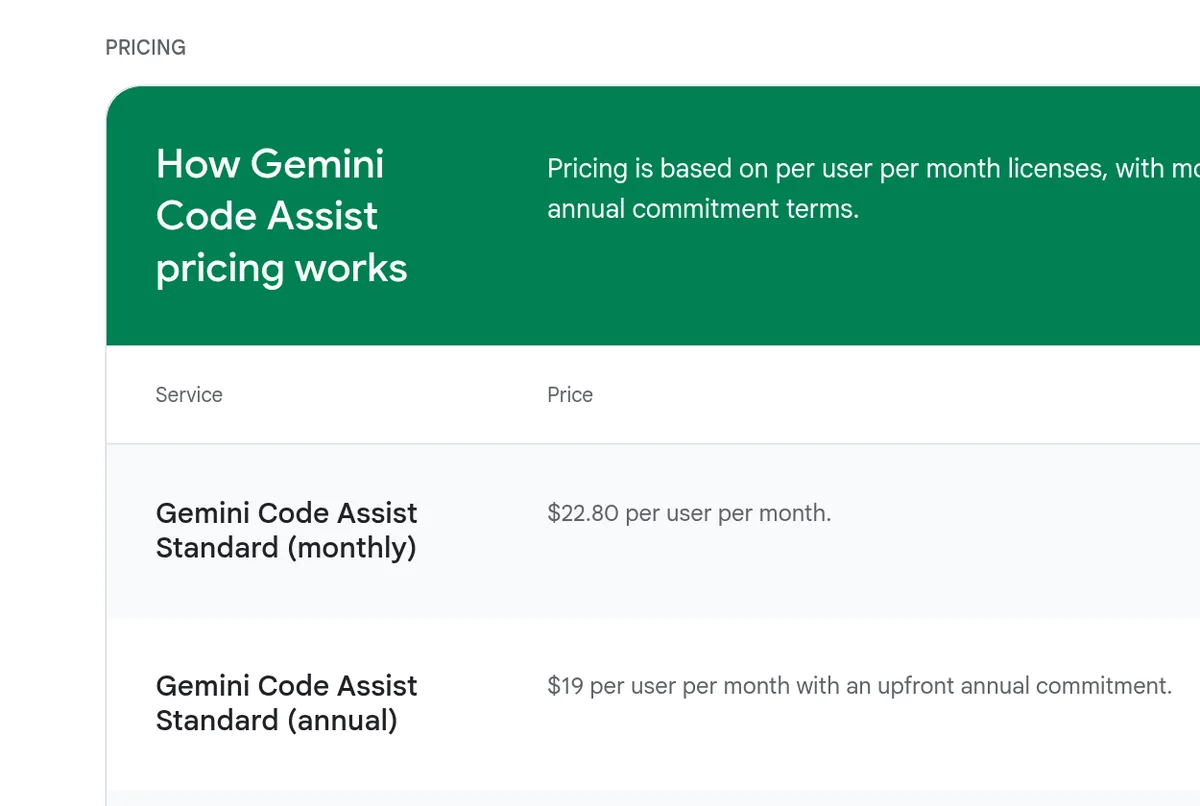
Google's Gemini Code Assist works in VS Code, JetBrains IDEs, and Google Cloud tools, and through Gemini CLI in the terminal. Today its page is aimed at businesses:
- Standard: $22.80 per user a month billed monthly, or $19 with an upfront yearly commitment.
- Enterprise: $54 per user a month billed monthly, or $45 with a yearly commitment.
One change to know: the page says the free tier for individuals was replaced by Google Antigravity on June 18, 2026. Solo coders on the free tier should look there.
Best for: teams that already build on Google Cloud or Firebase.
How to pick the right one
Start with where you work, not with the hype:
- You want help in your current editor: GitHub Copilot.
- You want a strong agent in the terminal: Claude Code.
- You want an editor built around AI: Cursor.
- You already pay for ChatGPT: try Codex first, since it is included.
- Your team is on Google Cloud: Gemini Code Assist.
Try the free tier first. Use it on a real task from your own project for a week. You will learn more from that than from any review. If you are torn between two, my Copilot vs Claude Code and Claude vs ChatGPT for coding posts compare them head to head.
Can you get one for free?
Yes, and you should start there. Here is what the free tiers looked like on October 25, 2026:
- GitHub Copilot Free: 2,000 completions a month, plus Copilot CLI. No credit card needed, per GitHub.
- Cursor Free: limited agent and chat requests.
- Codex in ChatGPT Free: for quick coding tasks, subject to rollout.
- Google Antigravity: where Google moved its free individual tier in June 2026.
Claude Code is the odd one out. It is not on Claude's Free plan, so you need Pro or higher to use it with a Claude account.
Free tiers run out fast if you use agents a lot. That is normal. Use the free tier to learn which tool you like, then pay for the one you reach for most.
What these tools still get wrong
AI coding assistants are good, but they are not magic. Here is what I see most often:
- Confident mistakes. They can write code that looks right and does not run, or calls a function that does not exist.
- Old habits. They may use an older version of a library than the one in your project.
- Too many changes. An agent may touch files you did not ask it to touch.
- Usage limits. Big tasks use more of your plan. You can hit a limit in the middle of a job.
None of this means you should skip them. It means you stay the lead on the project, and the AI is your fast helper.
How to use an AI coding assistant safely
- Read every change. Treat AI code like a pull request from a new teammate.
- Run your tests. If you do not have tests, ask the assistant to write some first.
- Keep secrets out. Do not paste API keys or passwords into a chat.
- Work in small steps. One task at a time is easier to check and undo.
- Use Git. Commit before each big change so you can roll back.
Before you pay for an AI coding assistant
Nothing you check here is sent or saved. Download it if you want to keep it.
See how I build with AI
Want to watch how I plan and build small apps with AI tools, step by step? Join my free AI workshop. Bring a project idea.
Join my free AI workshopFree to join. No credit card needed.
Frequently asked questions
What is the best AI coding assistant?
It depends on where you work. GitHub Copilot fits your current editor, Claude Code is strong in the terminal, Cursor is an AI first editor, and Codex is included with ChatGPT plans.
Is there a free AI coding assistant?
Yes. GitHub Copilot Free includes 2,000 completions a month, Cursor has a free plan with limited requests, and Codex is included in ChatGPT Free for quick tasks.
How much does GitHub Copilot cost?
On October 25, 2026, Copilot Pro was $10 per user a month, Pro+ was $39, and Max was $100. Free was $0.
Is Claude Code included with Claude Pro?
Yes. Claude's pricing page lists Claude Code on Pro, which is $20 billed monthly or $17 a month billed yearly. It is not on the Free plan.
How much does Cursor cost now?
Cursor is part of The X Subscription. Billed monthly, Plus is $8 a month, Premium is $30, Super is $100, and Ultra is $200. Prices exclude tax.
Do AI coding assistants replace programmers?
No. They speed up the work, but you still need to review the code, test it, and decide what to build.
Sources
Checked October 25, 2026. Plans, prices, and rules can change.
