
AI Coding · Pricing
GitHub Copilot now runs on AI credits. Here is what every plan costs per month, how many credits you get, and what happens when you run out.
GitHub Copilot is the AI coding helper built by GitHub. Its pricing has changed, and the newest part is AI credits. If you are not sure what a credit is or which plan you need, you are not alone.
I checked GitHub's plans page and its billing docs on October 25, 2026. Here is every plan, what it costs per month, how credits work, and how to pick.
Quick answer
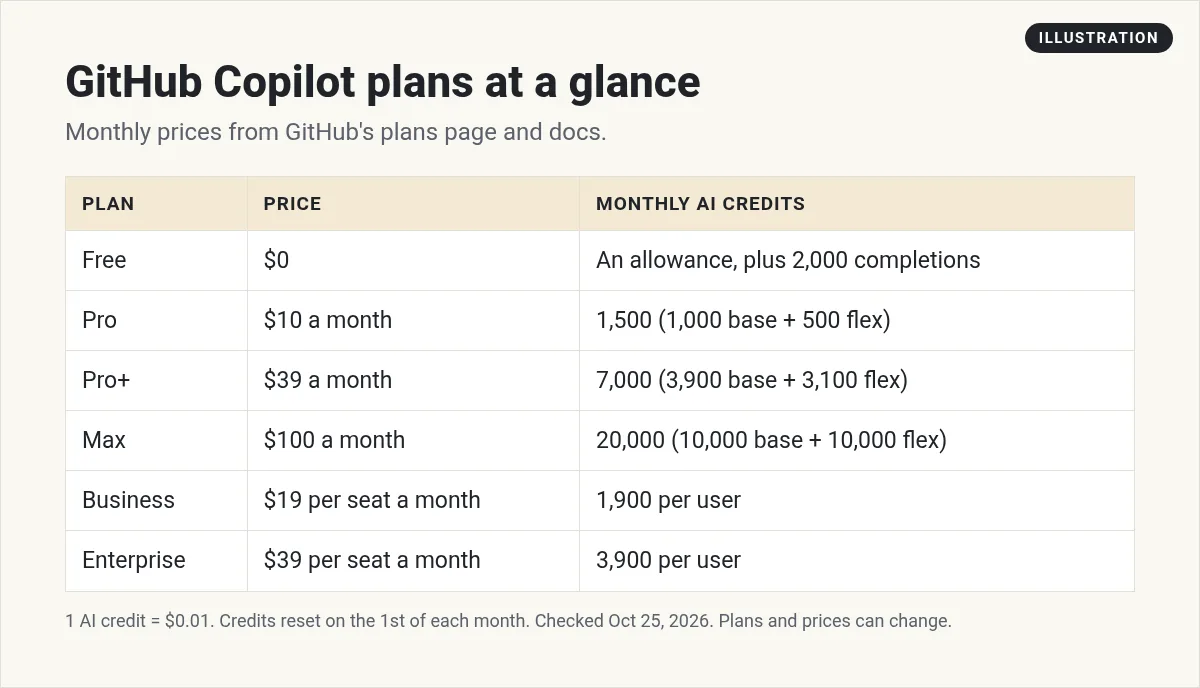
On October 25, 2026, GitHub Copilot had six plans, priced per month. Free was $0. Pro was $10 a month, Pro+ was $39 a month, and Max was $100 a month. For teams, Business was $19 and Enterprise was $39 per granted seat per month. Each plan includes a monthly allowance of GitHub AI Credits, where 1 credit equals $0.01. Code completions are unlimited on paid plans.
GitHub Copilot plans and prices
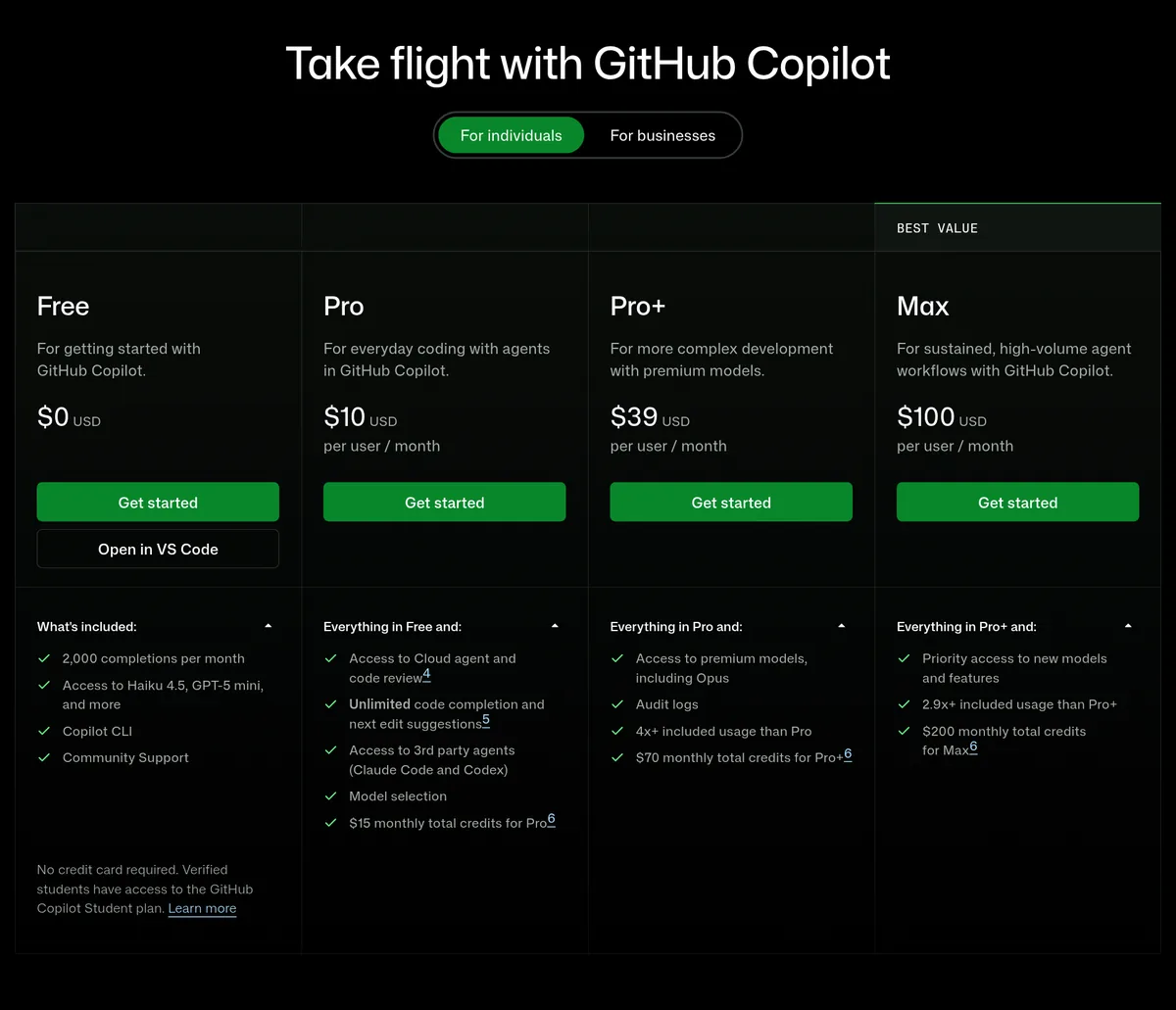
Here is what GitHub listed on October 25, 2026. All prices are in US dollars, billed per month. I did not find a yearly price on the pages I checked, so I list monthly only.
For individuals:
- Copilot Free: $0. An allowance of AI credits, plus 2,000 code completions a month. No credit card needed.
- Copilot Pro: $10 a month. GitHub's docs note it is "free for some users."
- Copilot Pro+: $39 a month.
- Copilot Max: $100 a month.
For organizations:
- Copilot Business: $19 per granted seat per month.
- Copilot Enterprise: $39 per granted seat per month.
There is also Copilot Student, which is free for verified students. And GitHub says verified teachers and maintainers of popular open source projects "may be eligible for free access to Copilot Pro."
How GitHub AI Credits work
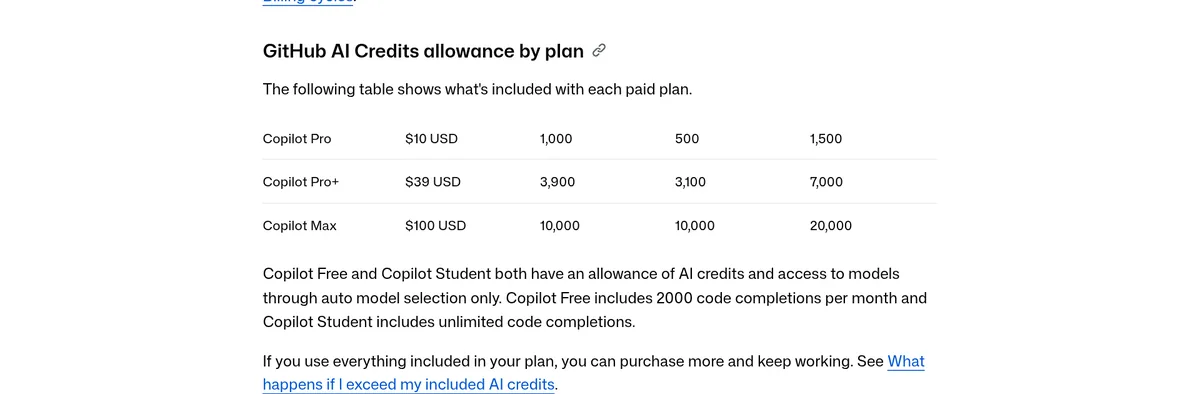
This is the part that changed. GitHub now measures Copilot use in AI credits. The rate is simple: "1 AI credit = $0.01 USD."
Each paid individual plan gives you two pools each month:
- Base credits, used first.
- Flex credits, used after your base runs out, "at the same rates."
Here are the numbers from GitHub's docs:
- Pro ($10 a month): 1,000 base + 500 flex = 1,500 credits.
- Pro+ ($39 a month): 3,900 base + 3,100 flex = 7,000 credits.
- Max ($100 a month): 10,000 base + 10,000 flex = 20,000 credits.
- Business ($19 per seat a month): 1,900 credits per user.
- Enterprise ($39 per seat a month): 3,900 credits per user.
So Pro gives you $15 worth of credits for $10, and the plans page says exactly that: "$15 monthly total credits for Pro."
For Business and Enterprise, GitHub's docs say each license adds credits to a shared pool, and use past the pool is charged at $0.01 per credit.
What uses AI credits, and what does not
Uses credits. The plans page says agent mode, code review, Copilot in the cloud, Copilot CLI, and the Copilot app all use AI credits.
Does not use credits. GitHub says "Code completions and next edit suggestions are not billed in AI credits and remain unlimited for all paid plans." Those are the gray suggestions that pop up as you type.
That matters a lot for budgeting. If you mostly use autocomplete, a paid plan may cover you for the whole month. If you lean on the agent for long tasks, credits can go fast.
One more tip from the docs: paid plans get "a 10% discount on model costs" when you use auto model selection. GitHub also listed a 30% discount on Max with auto model selection through October 28, 2026.
When credits reset, and what happens when you run out
GitHub is clear here. Credits "do not carry over between months." Your allowance resets "at 00:00:00 UTC on the first day of each calendar month." That date is fixed, no matter when you signed up.
If you run out, you have two choices, per the docs:
- Upgrade. "The upgrade cost is only the price difference between your current plan and the new plan."
- Set a budget for extra use. Your budget is in dollars. GitHub's example: "a $10 budget covers 1,000 AI credits."
Set a budget cap so a busy week does not surprise you on your bill. GitHub also notes that "additional usage may be capped." If that happens, it says you will need to pay off the extra usage you already used before you can keep going.
Is GitHub Copilot free?
Yes, there is a free plan. Copilot Free costs $0 and needs no credit card. Per GitHub's docs, it includes:
- An allowance of AI credits.
- 2,000 code completions a month.
- Models through auto model selection only.
- Copilot CLI and agent mode.
One catch: GitHub says Copilot Free is only for individual developers "who don't have access to Copilot through an organization or enterprise."
Students get more. GitHub's docs say Copilot Student includes unlimited code completions. You need to verify your student status first.
GitHub Copilot pricing at a glance
Here is a quick way to think about each plan:
- Free is for trying Copilot, or light hobby use.
- Pro is for one person who codes most days and mostly uses autocomplete and chat.
- Pro+ is for heavy agent use. GitHub's docs list third party agents like Claude and Codex (public preview) on Pro, Pro+, and Max.
- Max is for people who run agents all day and hit Pro+ limits.
- Business and Enterprise are for teams that need admin controls and a shared credit pool.
How to pick a plan
- Start on Free. See how much you use it in a normal week.
- Watch your usage dashboard. GitHub shows your credits left.
- Move to Pro if you hit the 2,000 completion limit. Completions are unlimited on paid plans.
- Move to Pro+ if Pro credits run out before month end. You only pay the price difference to upgrade.
- Set a budget before you rely on extra use.
A note if you also pay for a personal plan at work: GitHub says if you get a Business or Enterprise seat, your personal Pro, Pro+, or Max plan is canceled automatically, with a prorated refund.
Example: what a heavy month could cost
Here is a made up example to show the math. It is an illustration, not a real bill.
Say you are on Pro at $10 a month. You use all 1,500 credits by the 20th. You have two ways to keep going:
- Set a budget. A $10 budget covers 1,000 more credits. Your month costs $10 + $10 = $20.
- Upgrade to Pro+. GitHub says you pay only the price difference, which is $39 minus $10, or $29. Pro+ includes 7,000 credits a month.
If this happens once, a small budget is cheaper. If it happens every month, Pro+ may be the better deal. Look at your usage dashboard for two or three months before you decide.
Questions to ask before you pay
- Do I use the agent, or mostly autocomplete? Autocomplete does not use credits on paid plans.
- Does my school or job already give me Copilot? You may not need to pay at all.
- Do I need models beyond auto selection? Free and Student use auto model selection only.
- Will my team need admin controls? Then look at Business or Enterprise.
GitHub Copilot vs other AI coding tools
Copilot is not the only option. If you are deciding, these guides compare the costs and the way each tool works:
If you do not code at all and want to build an app by describing it, see my guide to vibe coding tools instead.
Before you pick a GitHub Copilot plan
Nothing you check here is sent or saved. Download it if you want to keep it.
Learn to build with AI
Want to see how I use AI tools to build apps and save hours each week, even without being a full time coder? Join my free AI workshop.
Join my free AI workshopFree to join. No credit card needed.
Frequently asked questions
How much does GitHub Copilot cost?
On October 25, 2026, Copilot Free was $0, Pro was $10 a month, Pro+ was $39 a month, and Max was $100 a month. Business was $19 and Enterprise $39 per seat per month.
Is GitHub Copilot free?
Yes. Copilot Free is $0 a month with an allowance of AI credits and 2,000 code completions a month. Verified students can get Copilot Student for free.
What is a GitHub AI credit?
It is how GitHub measures Copilot use. One AI credit equals $0.01. Pro includes 1,500 credits a month, Pro+ 7,000, and Max 20,000.
Do GitHub Copilot credits roll over?
No. GitHub says included credits do not carry over. They reset at 00:00 UTC on the first day of each month.
Do code completions use AI credits?
No. GitHub says code completions and next edit suggestions are not billed in AI credits and are unlimited on all paid plans.
What happens if I run out of Copilot credits?
You can upgrade and pay only the price difference, or set a dollar budget for extra use. A $10 budget covers 1,000 credits.
Sources
Checked October 25, 2026. Plans, prices, and rules can change.
