
Build with AI · Pricing
Codex is OpenAI's coding agent, and it comes with your ChatGPT plan. Here is what each plan really gives you, and when you start paying more.
There is no separate Codex price tag. Codex comes with your ChatGPT plan. That sounds simple, but the plans are very different once you start coding every day.
So on October 22, 2026, I read OpenAI's Codex pricing page and its help article on using Codex with a ChatGPT plan. Below is what each plan includes, how the limits work, and how I would pick one.
Quick answer
Codex is included in every ChatGPT plan. Free is $0 and Go is $8 a month, both with the GPT-6 Luna model in the desktop app. Plus is $20 a month and adds Codex on the web, in the terminal, in your code editor, and on iOS. Pro starts at $100 a month, with tiers at $100, $200, and $500. Business is $20 per user a month billed yearly, or $25 billed monthly. You can also use Codex with an API key and pay API rates. All prices checked October 22, 2026.
How much does Codex cost?
OpenAI's pricing page says Codex is "included in your ChatGPT Free, Go, Plus, Pro, Business, Edu, or Enterprise plan." Here is what each plan for one person looks like, checked October 22, 2026:
- Free, $0 a month: GPT-6 Luna at Standard speed in the desktop app, subject to rollout.
- Go, $8 a month: the same model, for "lightweight coding tasks."
- Plus, $20 a month: Codex on the web, in the CLI, in the IDE extension, and on iOS. It adds cloud features like automatic code review and Slack, plus the GPT-6.1 Sol and GPT-6 Luna models.
- Pro, from $100 a month: everything in Plus, with plans at $100, $200, or $500 a month. Ultrafast mode is on the $500 tier.
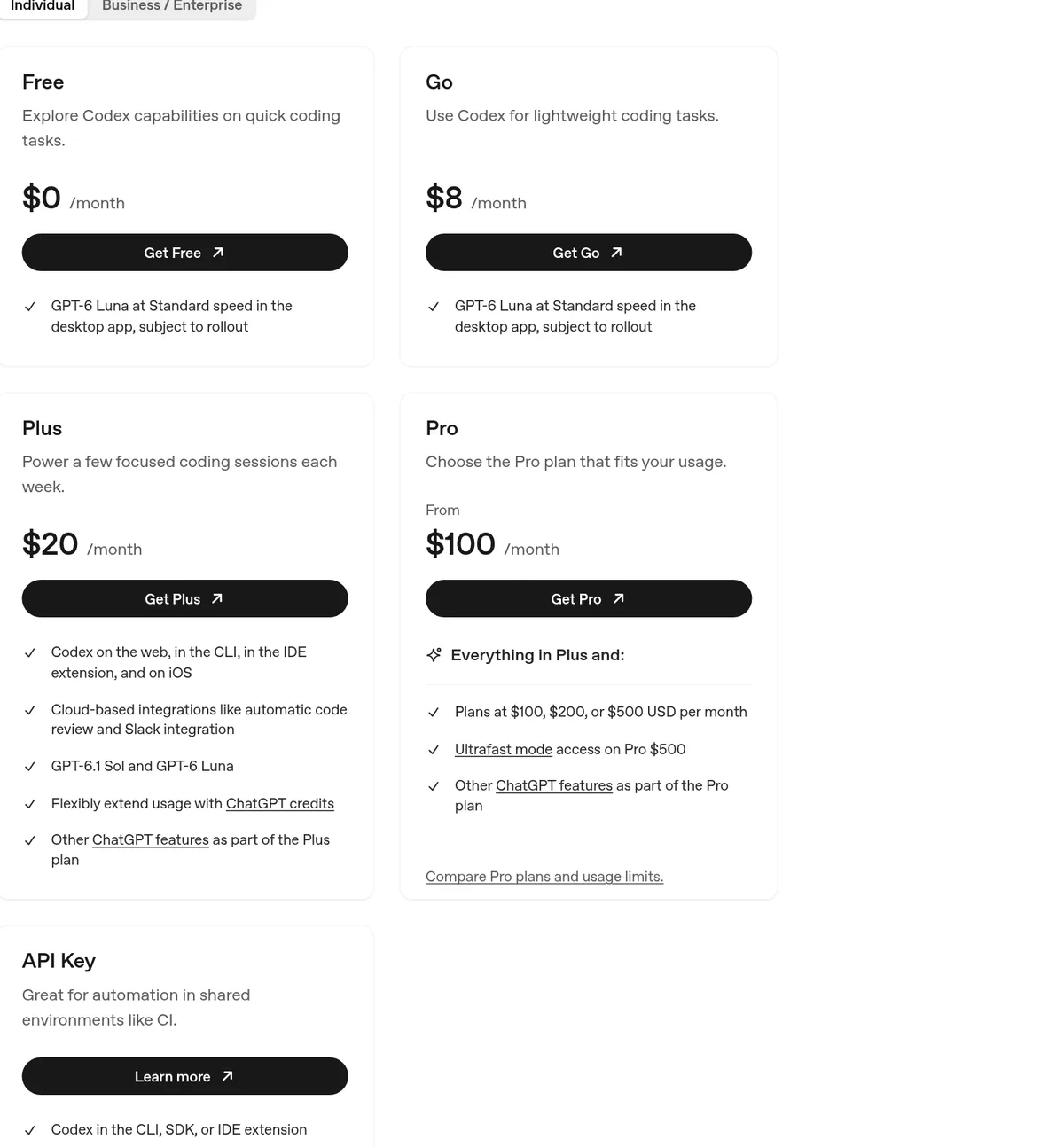
The big jump is from Go to Plus. Free and Go only list the desktop app. Plus is where Codex shows up in your terminal and code editor, which is where most coding work happens.
Codex plans side by side
Here is the same thing in one table, with the business and API options added.
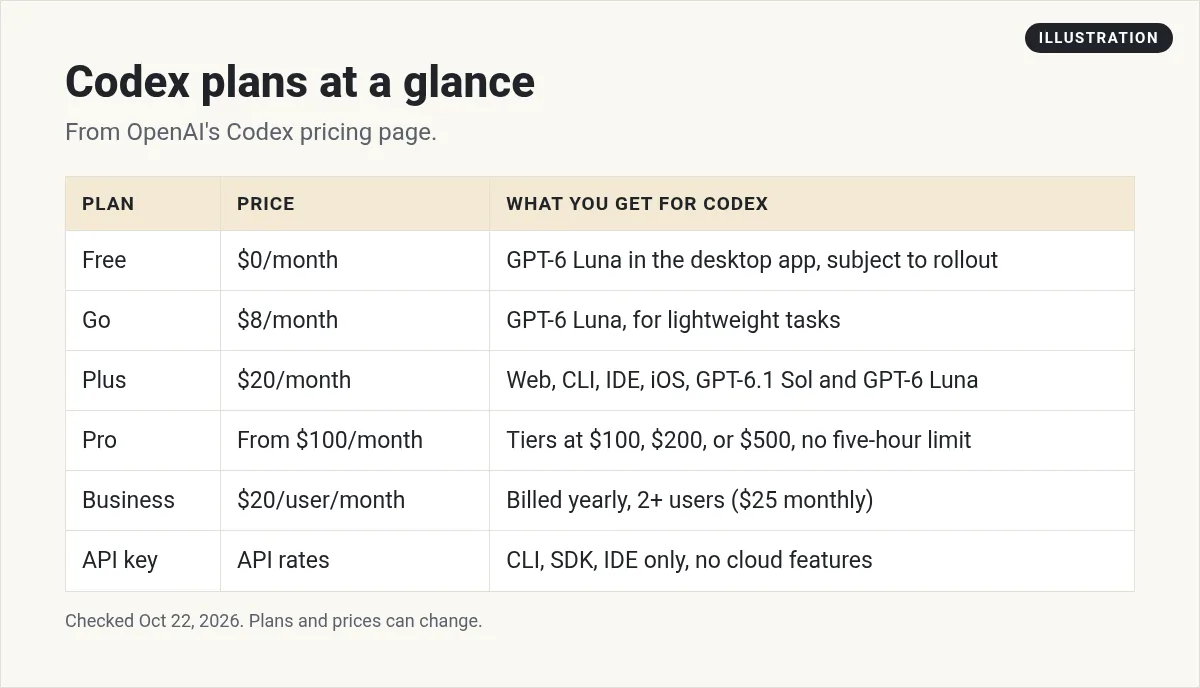
One more thing from OpenAI's help article. Codex Cloud, which runs tasks on OpenAI's computers, is available to eligible Plus, Pro, Business, Enterprise, and Education accounts. The article says, "It is not included with Free or Go."
How Codex usage limits work
This is the part that matters most. Paying for a plan does not mean unlimited use. Each plan gets a usage allowance that resets every five hours, and "Weekly limits may also apply."
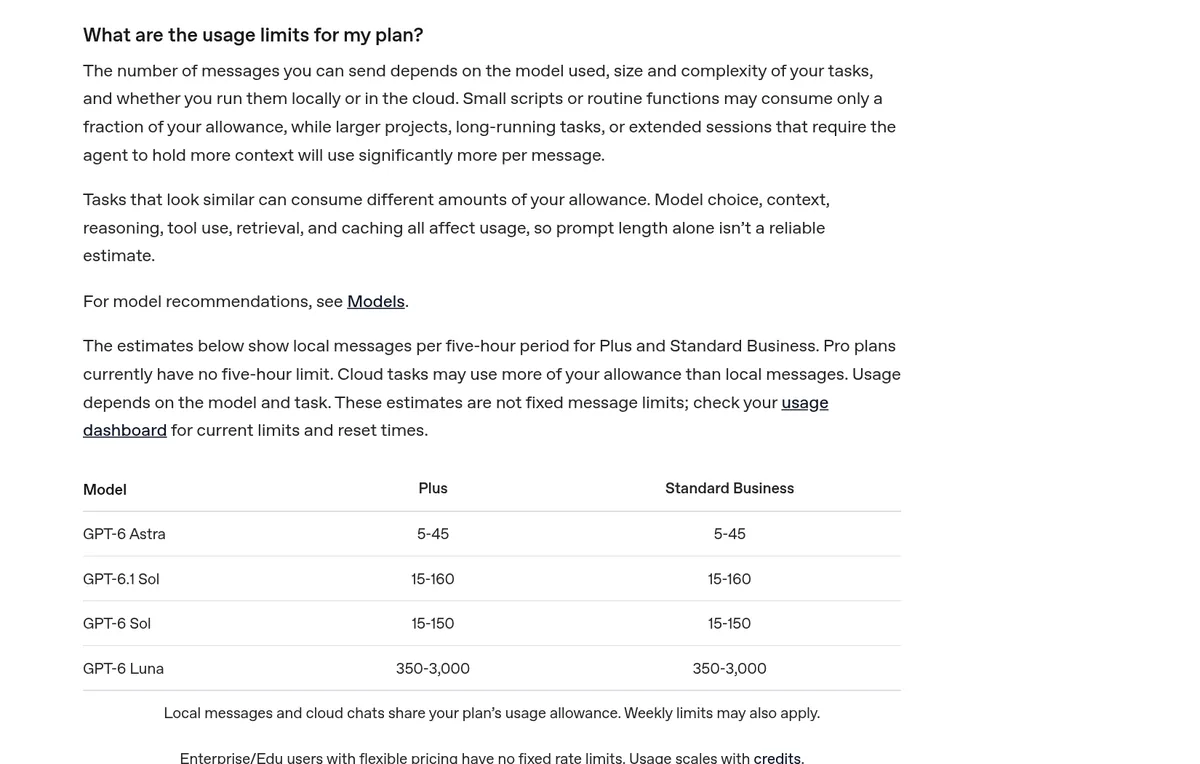
OpenAI gives rough numbers for local messages per five hours on Plus:
- GPT-6 Astra: 5 to 45 messages.
- GPT-6.1 Sol: 15 to 160 messages.
- GPT-6 Sol: 15 to 150 messages.
- GPT-6 Luna: 350 to 3,000 messages.
Why such big ranges? OpenAI says model choice, context, reasoning, tool use, and caching all change how much each message uses. A small fix uses a little. A big task in a large project uses a lot. The page is clear that these "are not fixed message limits."
Pro is different. The page says, "Pro plans currently have no five-hour limit." Weekly limits can still apply.
Fast modes use your limit faster
Codex has faster speed modes. They are handy, but they cost more of your allowance. Compared with Standard speed on the same model, OpenAI lists:
- Fast: uses included usage 2.5 times faster.
- Ultrafast (on supported models): uses included usage 8 times faster.
Image generation also uses limits about 3 to 5 times faster on average, and it is not on the Free plan. If you keep running out, check your speed setting first.
What happens when you hit your limit?
OpenAI says that if you hit a limit in the middle of a turn, the agent can keep working on that turn, within fair use. After that, you have a few choices:
- Wait for the five-hour window to reset.
- Buy credits. Plus and Pro users can buy more credits without changing plans.
- Use an API key for extra local chats, charged at normal API rates.
- Move up a plan, for example from Plus to Pro.
Credits are priced per million tokens and change by model. For example, the page lists GPT-6.1 Sol at 50 credits per million input tokens and 250 credits per million output tokens. What a credit costs in dollars depends on your plan, so check your account before you buy.
Codex for teams and businesses
On the Business / Enterprise tab, Business is $20 per user a month. The fine print says that is for "2+ users, billed annually," and "$25 per user per month when billed monthly." Business is built for teams that share one workspace and need admin controls. The feature list on the page is long, so check the comparison table there for the exact details.
Enterprise and Edu are priced through sales.
Codex with an API key
You can skip the ChatGPT plan and sign in with an OpenAI API key instead. The pricing page says this is "Great for automation in shared environments like CI." There are trade-offs:
- It works in the CLI, SDK, and IDE extension only.
- There are no cloud features, like GitHub code review or Slack.
- You pay for each task at API prices, so costs grow with use.
For most beginners, a ChatGPT plan is easier to budget than an API key.
Which Codex plan should you pick?
Here is how I would think about it:
- Just curious? Try Free or Go in the desktop app.
- Building a real project? Plus at $20 is the first plan with the terminal and code editor tools. Start here.
- Hitting limits every week? Buy a few credits first. If that keeps happening, look at Pro.
- Running a team? Business at $20 per user billed yearly gives you admin controls.
Still choosing between tools? I compare them in Claude Code vs Codex and Claude vs ChatGPT for coding. If you use Claude too, see my Claude Code pricing guide.
My video: I compare Claude, Gemini, and GPT for everyday work. Plans and models have changed since I recorded it, so use this post for current Codex prices.
Any results mentioned in videos are not typical and are not a promise of income. Your results depend on your work and your market.
How Codex pricing compares to Claude Code
A lot of people choose between Codex and Claude Code, so here is a quick look at the entry prices. On October 22, 2026, Claude's pricing page listed Pro at $20 a month billed monthly, and Max from $100 a month. Claude says Claude Code "is included in all paid plans." I compare those two plans in Claude Pro vs Max.
So both tools start at $20 for real terminal and editor use, and both have a $100 step up. The big difference is the free option. Codex lists GPT-6 Luna on Free and Go in the desktop app. Claude Code needs a paid plan. For a full side by side, see Claude Code vs Codex.
A simple way to budget for Codex
Here is how I would set a budget if I were starting today:
- Start on Plus at $20 a month for one or two weeks.
- Run /status at the end of each session to see how much of your limit you used.
- If you only hit the limit once in a while, buy a small amount of credits when it happens.
- If you hit it most days, compare the cost of credits with the $100 Pro plan.
This keeps you from paying for Pro before you know you need it.
Common Codex pricing mistakes
- Expecting the terminal on Go. Free and Go list the desktop app only.
- Reading the message ranges as a promise. OpenAI says they are estimates.
- Leaving Fast mode on. It uses your allowance 2.5 times faster.
- Forgetting the weekly limit. Even Pro can have one.
- Using API prices to guess plan limits. OpenAI says not to.
Before I pay for Codex
Nothing you check here is sent or saved. Download it if you want to keep it.
Learn to build with AI, without the guesswork
In my free workshop, I show how regular people pick a simple app idea and build it with AI tools, step by step.
Join my free AI workshopFree to join. No credit card needed.
Frequently asked questions
Is Codex free?
Yes, there is a free option. OpenAI says Codex is included in ChatGPT Free and Go, with GPT-6 Luna in the desktop app, subject to rollout. Codex Cloud is not included with Free or Go.
How much is Codex on ChatGPT Plus?
Plus is $20 a month, checked October 22, 2026. It adds Codex on the web, in the CLI, in the IDE extension, and on iOS.
How much is Codex Pro?
Pro starts at $100 a month, with plans at $100, $200, or $500. Pro plans currently have no five-hour limit, but weekly limits may apply.
How many messages do I get with Codex?
It depends on the model and the task. On Plus, OpenAI estimates 15 to 160 local messages per five hours with GPT-6.1 Sol. These are estimates, not fixed limits.
What happens when I run out of Codex usage?
You can wait for the reset, buy credits on Plus or Pro, use an API key at API rates, or move up a plan.
How much is Codex for business?
Business is $20 per user a month for 2 or more users billed yearly, or $25 per user billed monthly. Enterprise is priced through sales.
Sources
Checked October 22, 2026. Plans, prices, and rules can change.
