
AI Coding · How To
Codex CLI is OpenAI's coding agent that runs in your terminal. Here is how to install it, sign in, give it your first task, and stay in control of what it changes.
Codex CLI lets you type a plain request, like fix this bug, into your terminal. Codex then reads your code, makes changes, and runs commands to check its work.
I went through OpenAI's Codex CLI docs, the Codex pricing page, and the official GitHub repo on October 26, 2026. Here is the setup in plain steps, plus the commands you will use most.
Quick answer
Codex CLI is OpenAI's open source coding agent that runs on your own computer, in the terminal. Install it with the script from OpenAI's docs, with npm (npm install -g @openai/codex), or with Homebrew. Then run codex in your project folder and choose Sign in with ChatGPT. OpenAI's pricing page says Codex is included in the ChatGPT Free, Go, Plus, Pro, Business, Edu, and Enterprise plans. On the Free and Go plans, the pricing page lists Codex in the desktop app. You can also use it with an API key at API rates.
What Codex CLI is
The official GitHub repo says: "Codex CLI is a coding agent from OpenAI that runs locally on your computer." The repo is open source under the Apache-2.0 license.
OpenAI's docs list three main reasons to use it:
- Work against your local repository. Codex can "inspect files, make edits, and run the tools already installed on your machine."
- Stay in control. You choose "the model, reasoning effort, permissions, and commands that fit the task."
- Scripts and CI. You can use it in a chat or "call codex exec from repeatable workflows and pipelines."
Codex also comes in other forms. The repo points to an IDE extension (for VS Code, Cursor, and Windsurf), a desktop app, and Codex Web at chatgpt.com/codex. This post covers the terminal version.
Which plans include Codex CLI
OpenAI's pricing page says "ChatGPT Work and Codex are included in your ChatGPT Free, Go, Plus, Pro, Business, Edu, or Enterprise plan." The page listed these individual prices on October 26, 2026:
- Free: $0 a month
- Go: $8 a month
- Plus: $20 a month. The page lists "Codex on the web, in the CLI, in the IDE extension, and on iOS."
- Pro: from $100 a month, with "Plans at $100, $200, or $500 USD per month"
Note that the Free and Go cards on that page list Codex in the desktop app. Plus is the first card that names the CLI. Check the page for your plan before you count on it.
There is also an API key option. The page says it is "Great for automation in shared environments like CI" and that you "Pay for Codex usage based on API pricing."
For a full breakdown of limits and credits, see my Codex pricing guide.
How to install Codex CLI
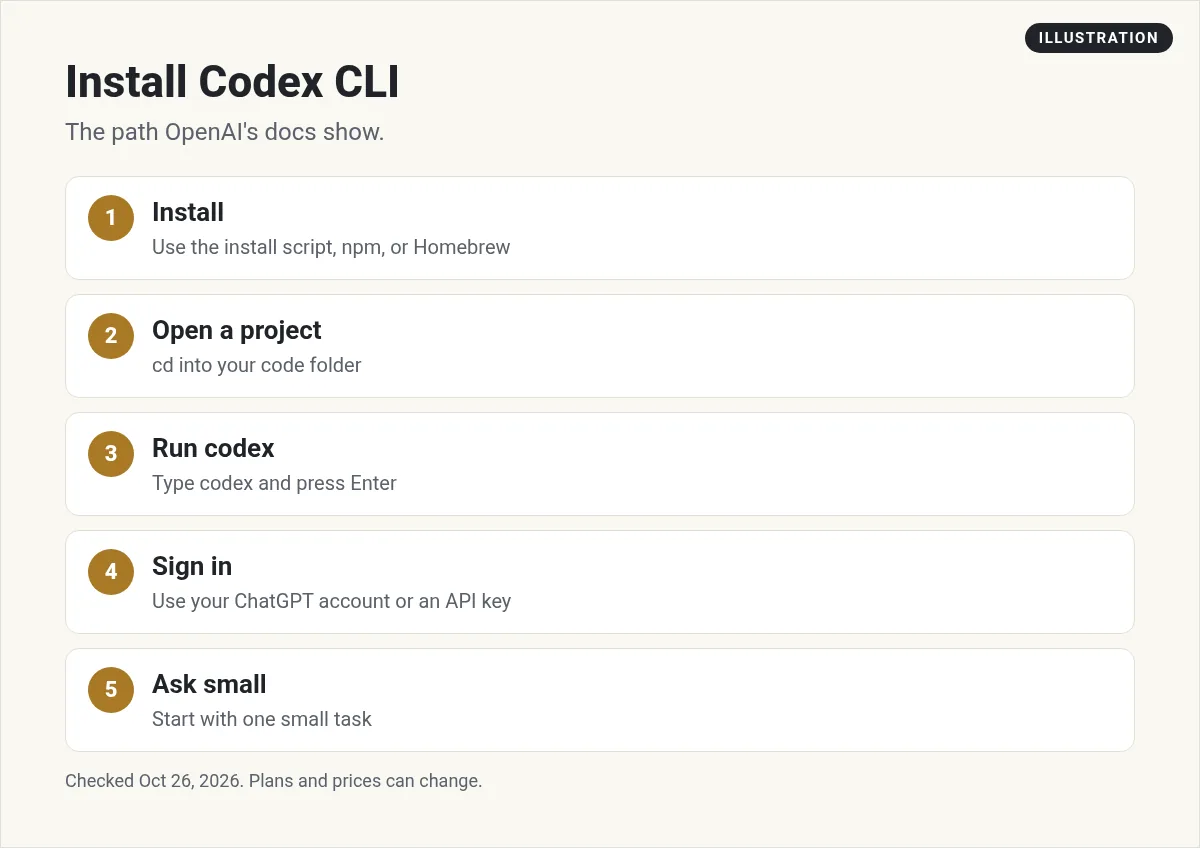
OpenAI's docs give four ways to install. Pick the one that fits your computer.
Mac or Linux: the install script
Open Terminal and run:
curl -fsSL https://chatgpt.com/codex/install.sh | shThe same command updates Codex later.
Windows: PowerShell
The docs say to start from a new PowerShell window. The command is on OpenAI's Codex CLI page. Copy it from there, so you always get the current version.
npm
npm install -g @openai/codexHomebrew
brew install --cask codexTo update with Homebrew, the docs say to use brew upgrade --cask codex.
On October 26, 2026, the latest release on GitHub was 0.164.0. Update often, since new versions add features and fixes.
Sign in and run your first task
- Open your project folder. In the terminal, move into the folder with your code.
- Run codex. Type
codexand press Enter. - Sign in. The docs say: "The first time you run Codex, choose Sign in with ChatGPT or another available sign-in method."
- Ask a simple question first. The docs use this example:
Tell me about this project. - Then ask for one small change. Keep the first real task small, so you can check it easily.
The GitHub repo says OpenAI recommends signing in with your ChatGPT account. It adds: "You can also use Codex with an API key, but this requires additional setup."
One more tip from the docs: "Create Git checkpoints before and after a task so you can revert changes." In plain words, save a version of your code before Codex edits it. Then you can undo anything you do not like.
The commands to know
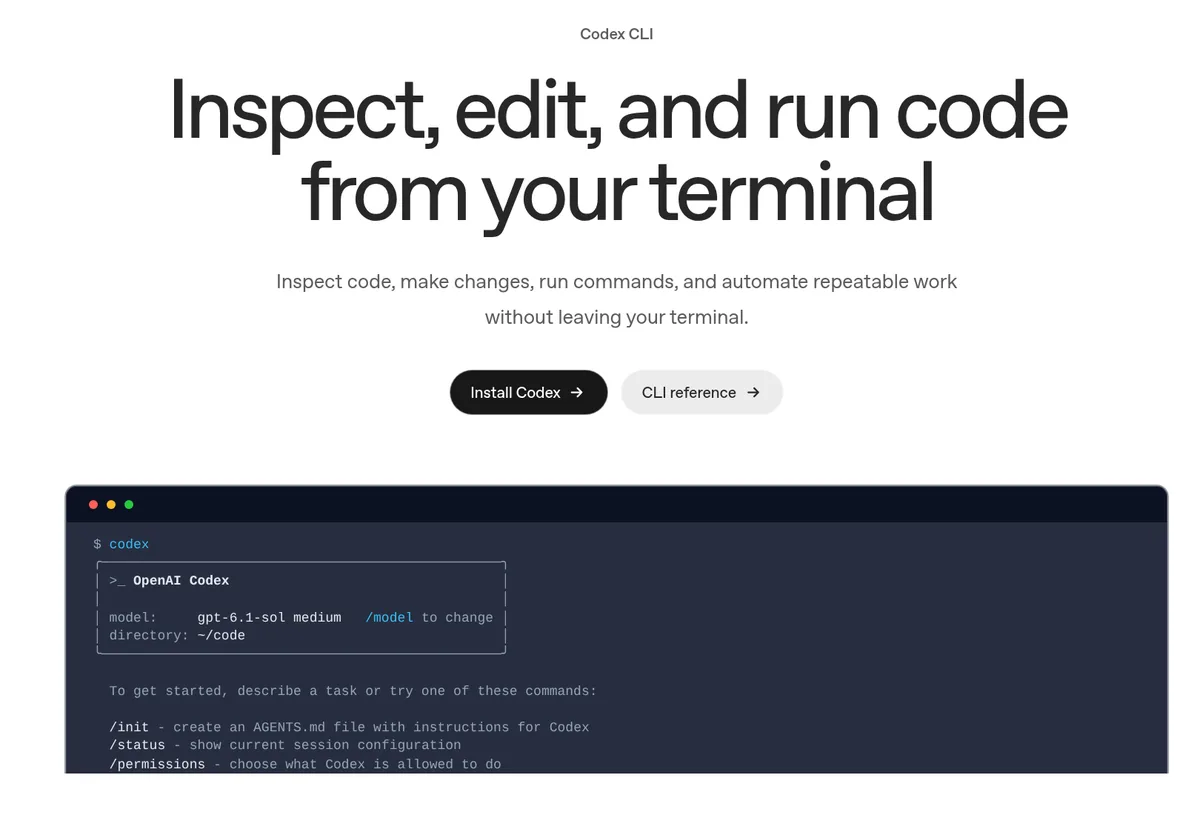
When you start Codex, it shows a short list of commands. Here they are, in OpenAI's words:
/init: "create an AGENTS.md file with instructions for Codex"/status: "show current session configuration"/permissions: "choose what Codex is allowed to do"/model: "choose what model and reasoning effort to use"/review: "review any changes and find issues"
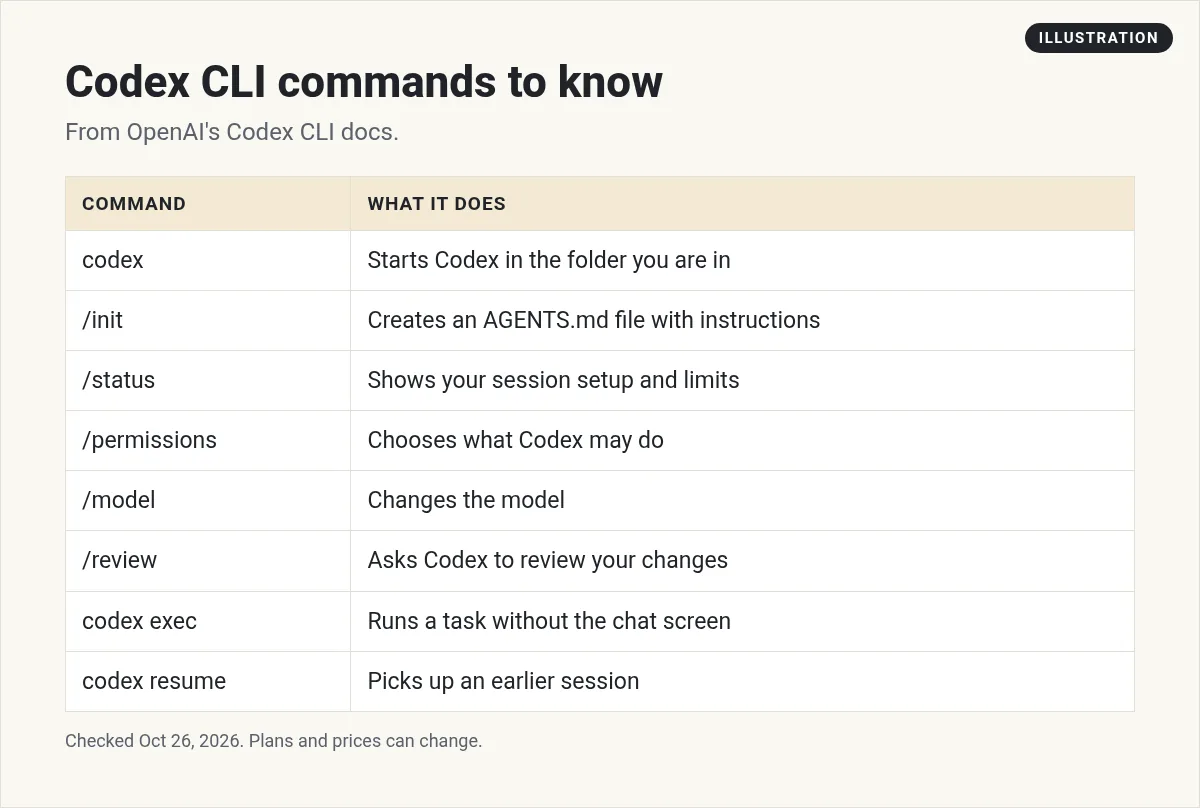
Outside the chat, two more commands help:
codex execruns a task without the chat screen, for scripts and CI.codex resumereopens "a recent chat from the current repository."
The docs also list codex --image to pass in a screenshot, codex --search for live web search, and codex mcp to connect outside tools. New to MCP? See my guide to MCP servers.
The pricing FAQ adds that you can use /status during a session "to see your remaining limits."
Stay in control of what Codex changes
Codex can edit files and run commands, so set your limits first. The docs say /permissions lets you "Choose when Codex can edit files or run commands without asking."
Here is how I would set it up as a beginner:
- Keep Codex asking before it runs commands, until you trust how it works.
- Use Git, so every change can be undone.
- Run
/reviewbefore you commit. The docs say a review "reports prioritized findings without modifying your working tree." - Write an AGENTS.md file with
/init, so Codex knows your project's rules.
Good first tasks to try
The best first tasks are small and easy to check. Here are a few I would start with:
- Explain the project. Ask Codex to describe what each main folder does. This shows you how well it reads your code.
- Write a README. Ask for a short README that explains how to run the project. You can check it in a minute.
- Add a test. Ask Codex to add one test for one function, then run it.
- Fix one bug. Paste the exact error message and ask Codex to find the cause before it changes anything.
- Review your own change. Make a small edit yourself, then run
/reviewand see what it finds.
Each of these takes a few minutes and teaches you how Codex thinks. Once you trust the results, you can give it bigger jobs, like a new feature that touches several files.
Avoid asking for a whole app in one prompt at the start. Big requests are harder to check, and they use more of your plan's limits. OpenAI's pricing FAQ says model choice, context, reasoning, and tool use "all affect usage."
If you hit your limit, the FAQ says Plus and Pro users "can purchase additional credits to continue working without needing to upgrade their existing plan."
Codex CLI vs Claude Code
Both are coding agents that live in your terminal. Codex uses OpenAI's models and your ChatGPT plan. Claude Code uses Anthropic's Claude models and your Claude plan.
Which is better depends on your work and the plan you already pay for. I compare them side by side in Claude Code vs Codex. If you choose Claude, my guide on how to use Claude Code walks through setup.
Before your first Codex CLI task
Nothing you check here is sent or saved. Download it if you want to keep it.
Build faster with AI
Want to see how I use AI coding agents to build real tools, even if you are not a full time developer? Join my free AI workshop. I walk through it step by step.
Join my free AI workshopFree to join. No credit card needed.
Frequently asked questions
What is Codex CLI?
Codex CLI is a coding agent from OpenAI that runs locally on your computer, in the terminal. It can read your code, make edits, and run commands.
How do I install Codex CLI?
Use the install script from OpenAI's docs on Mac or Linux, the PowerShell command on Windows, npm install -g @openai/codex, or brew install --cask codex.
Is Codex CLI free?
The tool is open source. Using it needs a sign in. OpenAI's pricing page says Codex is included in ChatGPT Free, Go, Plus, Pro, Business, Edu, and Enterprise, and the Plus card is the first to name the CLI. You can also pay by API key.
How much does Codex CLI cost?
On October 26, 2026, OpenAI listed Free at $0 a month, Go at $8 a month, Plus at $20 a month, and Pro from $100 a month. API key use is billed at API rates.
How do I sign in to Codex CLI?
Run codex in your project folder. The first time, choose Sign in with ChatGPT or another available sign-in method.
What does /init do in Codex?
It creates an AGENTS.md file with instructions for Codex about your project.
Sources
Checked October 26, 2026. Plans, prices, and rules can change.
