The short answer
Take one useful idea from a video, then turn it into a lesson, a mistake to avoid, a true story, a checklist, and an answer to a beginner’s question. Each post should help someone on its own. Use AI for a first draft, then check the facts and make the words sound like you.
Your next five Facebook posts may already be inside a video you recorded.
The hard part is not finding five new topics. It is spotting the part of your video that a beginner can actually use. A long introduction, a software tour, and a personal story may all be in the same recording. Your reader usually needs one clear point.
In this guide, we will take one lesson from a transcript Jonathan supplied and turn it into five different posts. You will see the finished examples, the prompt behind the process, and a simple worksheet you can use with your own video.
You do not need a new recording or a complicated publishing system. Start with one video you own, one reader, and one useful idea.
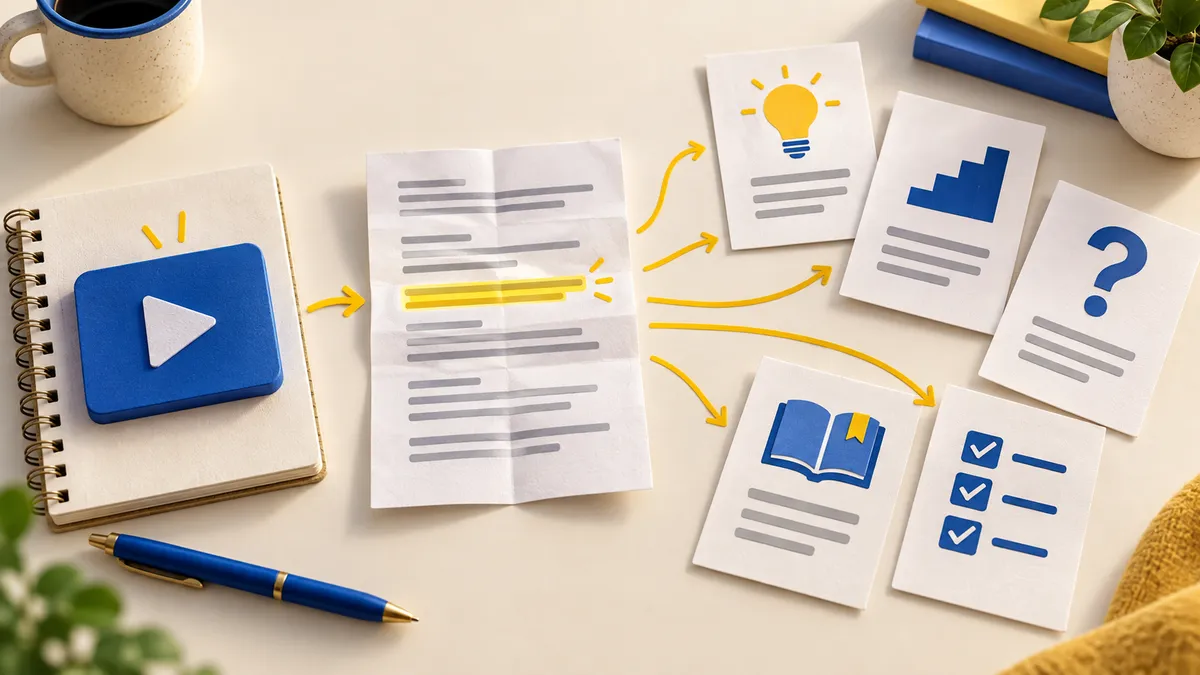
The whole process in one picture
- Choose a lesson.Pick a video that answers a real beginner question.
- Find one idea.Keep the part the reader can understand and use.
- Write five angles.Give each post a different job.
- Check and improve.Keep the meaning. Remove claims you cannot support.
- Share thoughtfully.Choose a useful next step and review actual responses.
1. Choose a video with something worth teaching
Start with a video where you explain a problem, show a process, or answer a common question. A lesson with one concrete takeaway is easier to reuse than a broad motivational talk.
Try this sentence before you open an AI tool: “After reading these posts, a beginner should understand ______.” If you cannot finish it, choose a smaller section of the video.
For a cooking video, that might be how to prepare one meal ahead of time. For a software lesson, it might be how to decide what a first tool should do. For our example, it is how useful teaching can lead into a relevant affiliate recommendation.
Use your own video or material you have permission to adapt. Turning someone else’s full lesson into your posts is not made acceptable by changing a few words. If you are responding to another creator, make your own contribution and point readers to the source.
2. Get the transcript and keep the source beside it
A transcript puts the spoken lesson into text you can edit. YouTube says videos with captions can have a full transcript: open the description and choose Show transcript. Clicking a transcript line can jump to that moment in the video. See YouTube’s transcript instructions.
If a transcript is unavailable, use your original script, your recording notes, or a transcription you are entitled to create. Do not treat a tool’s output as a perfect copy. Check names, product names, prices, and any sentence where a missing word changes the meaning.
Keep four things together: the source video, the transcript, the lesson you want to teach, and the date you checked changing facts. A transcript can preserve a claim accurately while the claim itself has become outdated.
The source is Jonathan’s supplied transcript about a course-led affiliate process. Its exact public YouTube URL was not supplied or verified, so this guide does not attach a different video and pretend it is the source. The examples below are new editorial drafts, not posts that were published or measured.
3. Pull out one idea before asking AI for posts
Jonathan’s transcript describes a path: share useful content, invite a learner to a course, teach a practical job, and recommend relevant software. It also includes personal results, a launch offer, and statements about free access.
Those are different kinds of information. We can teach the process without turning a personal result into a promise or treating an old offer as a current fact.
| Source material | Our editorial decision |
|---|---|
| Teach a useful job before recommending software | Keep. It is the central lesson we can explain with examples. |
| Course → practice → relevant tool | Keep as a teaching path, not a claim that every reader becomes a customer. |
| Personal commission and contest figures | Leave out. This guide does not have verified records for those figures. |
| Free access and beta-release conditions | Do not carry into evergreen posts without checking the current enrollment route and terms. |
| Traffic, setup-time, or results promises | Do not turn these into a beginner’s expected outcome. |
Our one-sentence lesson becomes: Help someone understand a small job before you recommend the tool that helps them do it. That is enough to build five posts. We do not need to retell the whole video.
4. Give each of the five posts a different job
Five posts should offer five useful ways into the idea. Changing only the first line leaves you with the same post five times.
The examples below are ready to study and adapt. Post three uses Jonathan’s own account of developing the course and guide. If that is not your experience, replace the story with a true one. Do not publish it as if you spent those months building his material.
Post 1 · Teach one idea
Start with the problem, not the product.
Original teaching example. Adapt it to your own audience and experience.
You do not need five new ideas for your next five posts.

You need one useful idea explained five different ways.

Here is one: teach someone how to do one small job before you recommend the tool that helps them do it.

For example, show a business owner what should happen when a customer calls after hours. Then explain which software can help with that job.

The lesson gives the recommendation a reason to exist.

Write down one question your audience keeps asking. Answer that question in your next post. Start there.
Post 2 · Fix one mistake
A product link is not a lesson.
Original teaching example. Adapt it to your own audience and experience.
“Here is my link” gives a beginner almost nothing to work with.

Try this instead:

1. Name the problem they recognize.
2. Show one small step they can take.
3. Explain when a tool would help.

If the problem is missed calls, your first post could explain what information an owner needs from a caller: their name, what they need, and how to reach them.

That is useful even if the reader buys nothing.

Before sharing a recommendation, ask: could someone learn something from this post without clicking?
Post 3 · Tell the real story
Keep the turning point. Drop the unsupported proof.
Original draft in Jonathan’s voice, based on the supplied transcript. Review before using.
I spent months putting together a course and a written guide around one idea: lead with useful help.

The path was simple to explain, but there was a lot to improve behind the scenes.

Help a beginner understand the job. Give them a place to practice. Recommend the software when it has a clear purpose.

That is the part I want people to understand about affiliate marketing.

A link by itself is not much of a reason to trust someone. A useful lesson gives the reader something they can actually use.

If you are starting, choose one problem you can explain clearly. Make that your first lesson.
Post 4 · Give a short checklist
Help the reader finish one thing.
Original teaching example. Adapt it to your own audience and experience.
Before you recommend software, give the reader a small job to finish.

Try this three-line plan:

• The person I am helping: ______
• The problem they want to solve: ______
• The first step I can teach: ______

Example:

Person: a local business owner.
Problem: they cannot answer every call.
First step: list the questions a caller should be asked before an owner calls back.

You now have a useful post, a lesson idea, and a reason to research the right tool.

Keep the first step small enough that the reader knows when they have finished it.
Post 5 · Answer a beginner question
Explain how a free lesson and a paid tool fit together.
Original teaching example. Adapt it to your own audience and experience.
“If the lesson is free, how does the person teaching it get paid?”

Sometimes they recommend a paid tool and earn an affiliate commission when a qualifying customer buys through their link.

The lesson and the software are different things.

A free lesson does not mean the software is free forever. A trial is not the same as a paid customer. And sharing a link does not guarantee a commission.

If you teach this way, explain the relationship clearly and help the reader decide whether they need the tool at all.

For the basic model, start here:
https://jonathanmontoya.com/how-does-affiliate-marketing-work/
Notice what is missing: no invented student success, no commission screenshot, no “comment this word to unlock a secret,” and no promise that the reader will earn a certain amount. Each post gives the reader something understandable before asking them to go anywhere.
5. Use this prompt to create your first drafts
Ask for the meaning of the lesson first. Then ask for different posts. That gives you a chance to catch a bad interpretation before it becomes five polished mistakes.
I own or have permission to adapt the transcript below.

Reader: [describe one beginner]
Question they have: [one plain-English question]
Useful idea I want to teach: [one sentence]
Verified next-step link, if needed: [URL or none]
My relationship to that destination: [owner / affiliate / none]

First, summarize the lesson in one sentence. List any income figures, prices, product claims, personal stories, or access promises that need verification. Do not reuse those as facts without evidence.

Then draft five different Facebook posts:
1. Teach the idea with one simple example.
2. Explain one beginner mistake and how to avoid it.
3. Tell a true story from the transcript; do not invent an experience.
4. Give a short checklist that helps the reader finish one small task.
5. Answer a beginner question.

Each post must make sense without seeing the video. Use short paragraphs and ordinary words. Give each post one clear job. No invented results, quotes, urgency, screenshots, guarantees, or engagement numbers. If a factual detail is missing, flag it rather than guessing. Do not add a call to buy to every post. Include a clear ownership or affiliate disclosure when relevant.

After each draft, identify which source idea it uses and what I should check before publishing.

TRANSCRIPT:
[paste only the relevant section]
Do a second pass yourself. Read the first line out loud. Can a beginner tell what the post is about? Does the example explain a real action? Would you say these words in a conversation? Replace vague lines such as “unlock your potential” with the actual thing you are helping someone do.
6. Choose a next step that fits the post
A post can end with a small task, a useful question, a deeper guide, or a relevant product. It does not have to end with a sale.
Match the destination to what you just taught. A post explaining affiliate commissions can lead to the beginner explanation of affiliate marketing. A post about planning helpful content can lead to the broader content guide. A software recommendation belongs where the reader understands what job it would help them finish.
If the link can earn you a commission, say that clearly with the recommendation. A simple example is: “I may earn a commission if you buy through this link.” If you own the tool, make that relationship clear too. The FTC’s disclosure guidance says disclosures should be easy to notice and understand, placed with the endorsement. Do not rely on a hidden footer or assume every reader knows your relationship.
Optional tool · Jonathan’s own product
Want help drafting from a YouTube lesson?
FreedomThreads is Jonathan’s tool for turning YouTube material into formats including Facebook and Twitter threads, image posts, and short scripts. Use it to get a draft started, then apply the source check and editing steps in this guide.
It is optional; you can follow this process manually. The public feature page was checked October 12, 2026. This walkthrough did not test its signed-in editor, post to Facebook, or measure reach.
Explore FreedomThreads7. Review the response before making more of the same
Choose a manageable sequence rather than posting all five versions at once. For example, share the lesson first, then the mistake, then the checklist. Adapt the order to your audience and normal publishing rhythm. This is an editorial plan, not a platform rule or a promise of better reach.
Keep a small record: which angle you used, what question it answered, the destination, and what people actually asked or did afterward. A comment asking a thoughtful follow-up may teach you more than a pile of reactions.
If you track link clicks or signups, keep those stages separate. A click is not a buyer. A trial is not an eligible affiliate payout. Do not compare a post that ran for two hours with one that ran for two weeks and call it a proven winner.
Use the replies to improve the lesson. If people still ask what the software does, make your example clearer. If they understand the idea but do not know their first step, give them a smaller task. The next five posts should grow from what you learn, not just from another request for more words.
Quick answers before you start
Do I need a new video for every post?
No. One useful lesson can support several posts when each explains a different angle. Do not force five posts from a section that only contains one thin sentence.
Can I just paste the whole transcript into a tool?
You can draft that way, but choosing the relevant section first makes it easier to keep one point, spot changing claims, and avoid a long summary that teaches nothing specific.
Should all five posts contain the same affiliate link?
Only include a destination when it fits the reader’s next step. Some posts should simply teach. When you recommend a product, explain the commercial relationship and why it is relevant.
Will these five formats get more views?
This guide does not establish that. It provides a repeatable way to make useful, distinct drafts. Your audience, topic, distribution, and the clarity of the actual posts affect the response.
Keep your next step
Save the worksheet
Keep the plan, the checks, and the next action in one place. This is an original learning aid, not a record of customer results.
Read the blank worksheet
ONE VIDEO → FIVE USEFUL POSTS
Blank planning worksheet · original editorial aid · October 12, 2026

Source video URL or filename:
Do I own it or have permission to adapt it?
Transcript section / source location:
Reader:
The question they have:
One useful idea in one sentence:
What can the reader do after reading?

CHECK BEFORE REUSING
Personal story is whose?
Changing prices/access/product facts:
Income, success, traffic or time claims to omit or verify:
Evidence source + date for anything retained:

FIVE DIFFERENT JOBS
1. Teach one idea + concrete example:
2. Fix one mistake:
3. Tell one TRUE story:
4. Give a short checklist:
5. Answer one beginner question:

FOR EACH POST
Opening makes sense alone?
Useful example / action?
Faithful to source?
No invented results or urgency?
Next step fits the lesson?
Exact destination checked?
Owner/affiliate relationship clearly disclosed when relevant?
Review date:
Published date (leave blank until actually published):
Observed response, time window, and next improvement:

This sheet is a drafting aid. It does not publish, verify claims, or guarantee reach, signups, or commissions.
Read the five post examples
ORIGINAL EDITORIAL EXAMPLES, NOT PUBLISHED OR PERFORMANCE TESTED
Post 3 is Jonathan’s own story; replace it with your true experience before adapting.

1. Teach one idea
You do not need five new ideas for your next five posts.

You need one useful idea explained five different ways.

Here is one: teach someone how to do one small job before you recommend the tool that helps them do it.

For example, show a business owner what should happen when a customer calls after hours. Then explain which software can help with that job.

The lesson gives the recommendation a reason to exist.

Write down one question your audience keeps asking. Answer that question in your next post. Start there.

---

2. Fix one mistake
“Here is my link” gives a beginner almost nothing to work with.

Try this instead:

1. Name the problem they recognize.
2. Show one small step they can take.
3. Explain when a tool would help.

If the problem is missed calls, your first post could explain what information an owner needs from a caller: their name, what they need, and how to reach them.

That is useful even if the reader buys nothing.

Before sharing a recommendation, ask: could someone learn something from this post without clicking?

---

3. Tell the real story
I spent months putting together a course and a written guide around one idea: lead with useful help.

The path was simple to explain, but there was a lot to improve behind the scenes.

Help a beginner understand the job. Give them a place to practice. Recommend the software when it has a clear purpose.

That is the part I want people to understand about affiliate marketing.

A link by itself is not much of a reason to trust someone. A useful lesson gives the reader something they can actually use.

If you are starting, choose one problem you can explain clearly. Make that your first lesson.

---

4. Give a short checklist
Before you recommend software, give the reader a small job to finish.

Try this three-line plan:

• The person I am helping: ______
• The problem they want to solve: ______
• The first step I can teach: ______

Example:

Person: a local business owner.
Problem: they cannot answer every call.
First step: list the questions a caller should be asked before an owner calls back.

You now have a useful post, a lesson idea, and a reason to research the right tool.

Keep the first step small enough that the reader knows when they have finished it.

---

5. Answer a beginner question
“If the lesson is free, how does the person teaching it get paid?”

Sometimes they recommend a paid tool and earn an affiliate commission when a qualifying customer buys through their link.

The lesson and the software are different things.

A free lesson does not mean the software is free forever. A trial is not the same as a paid customer. And sharing a link does not guarantee a commission.

If you teach this way, explain the relationship clearly and help the reader decide whether they need the tool at all.

For the basic model, start here:
https://jonathanmontoya.com/how-does-affiliate-marketing-work/
Sources and what was checked
Product facts come from the dated primary sources below. Examples, prompts, diagrams, and worksheets are original editorial work. No new account, real referral, payout, customer delivery, or social publishing test was performed.
- YouTube Help: view video transcriptsChecked 2026-10-12 · Captions/transcript availability and Show transcript UI, not reuse rights or reach.
- FreedomThreads public feature pageChecked 2026-10-12 · Owned product public description lists Facebook/Twitter threads, image posts and short scripts. No signed-in account or performance test.
- FTC: Disclosures 101 for Social Media InfluencersChecked 2026-10-12 · Clear understandable relationship disclosure placed with endorsement.
Frequently asked questions
How do I turn a YouTube video into social posts?
Copy the video transcript, split it into single ideas, and rewrite each one as a short post with a clear hook and a link back to the video.
Is it okay to reuse my own video content?
Yes. Repurposing your own content is a normal way to reach more people. Just adapt each post to fit the platform.
What AI prompt works best for repurposing?
Ask the AI to pull out the three most useful ideas from the transcript and write each as a short post in your voice, then edit by hand.