
Build with AI · Claude Code
Most Claude Code problems come from the same few habits. Here are the 10 that matter most, pulled from Anthropic's own guide and put in plain words.
Two people can use Claude Code on the same project and get very different results. The difference is almost never the tool. It is the habits.
Anthropic publishes a best practices guide based on what works for its own teams. I read it on October 21, 2026, and pulled out the 10 habits that matter most for regular people. Each one comes with a simple way to start today.
Quick answer
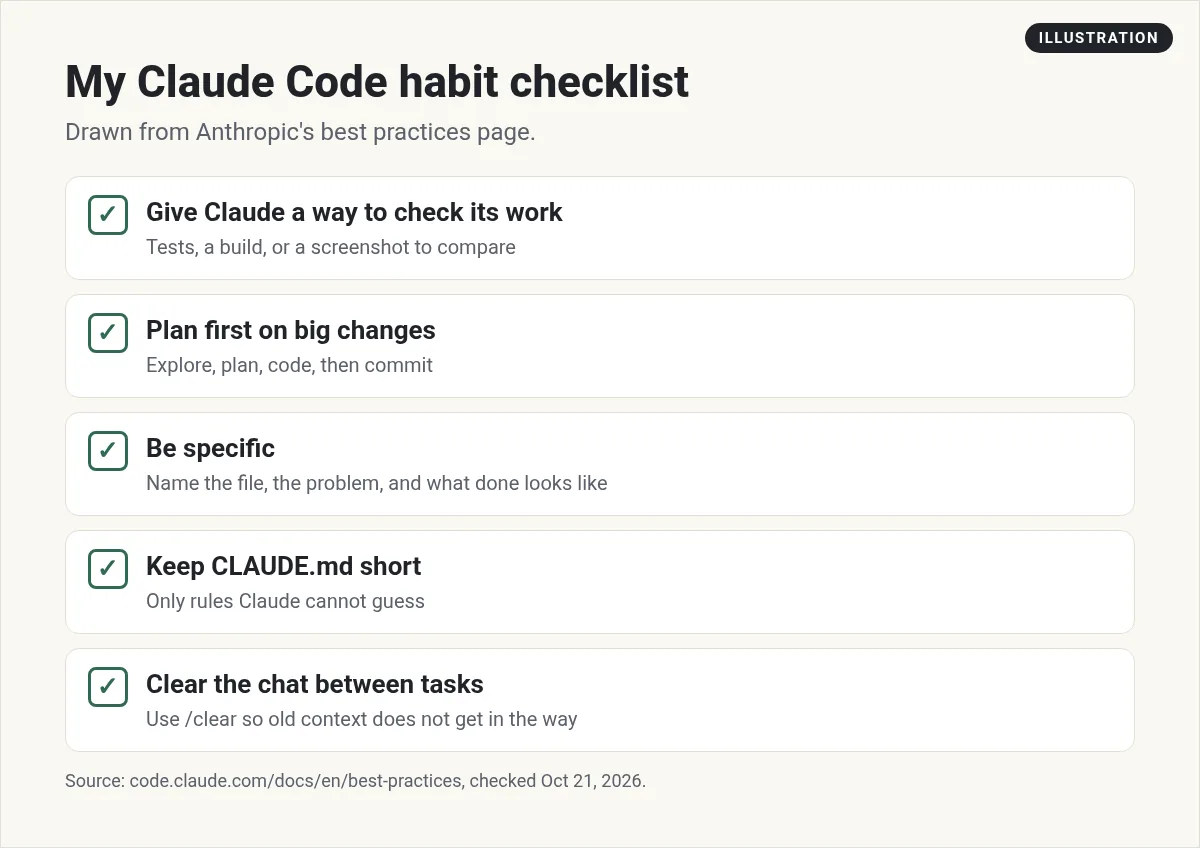
The most important Claude Code best practice is to give Claude a way to check its own work, like tests, a build, or a screenshot. After that: plan before big changes, be specific in your prompts, keep CLAUDE.md short, run /clear between unrelated tasks, stop and correct Claude early, use subagents for research, and lean on checkpoints and Git. Anthropic's guide says most of these come back to one limit: Claude's context window fills up fast, and performance drops as it fills. Checked October 21, 2026.
The one idea behind every tip
Anthropic's guide starts with one key point. Claude's context window fills up fast, and performance degrades as it fills.
The context window is Claude's short term memory. It holds every message, every file Claude reads, and every command result. One long debugging session can use tens of thousands of tokens. When that memory gets crowded, Claude gets worse at following your rules.
Keep that in mind. Almost every habit below is a way to keep that memory clean or to catch mistakes sooner.
1. Give Claude a way to check its work
This is the top tip in Anthropic's guide. Claude stops when the work looks done. Without a real check, looks done is all it has to go on, and you end up catching every mistake by hand.
A check is anything that gives a clear pass or fail. Tests. A build. A screenshot to compare against a design. So instead of just asking Claude to fix the build, you say: here is the error, fix it, and run the build to prove it works.
Also ask Claude to show proof, not just say it worked. The test output or a screenshot is faster for you to review.
2. Explore, plan, then code
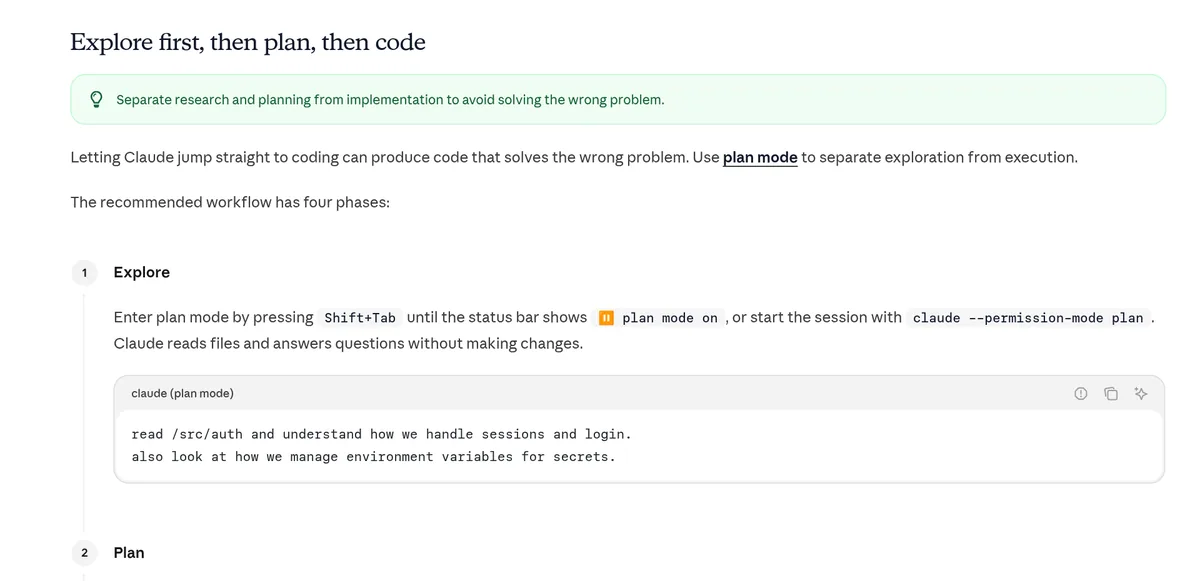
Letting Claude jump straight into code can solve the wrong problem. The guide suggests four steps for bigger changes:
- Explore. Press Shift+Tab until plan mode is on. Claude reads files and answers questions but changes nothing.
- Plan. Ask for a step by step plan. You can edit it before Claude starts.
- Build. Leave plan mode and let Claude code against the plan.
- Save. Ask Claude to commit with a clear message.
Skip the plan for tiny fixes. The guide's rule of thumb: if you could describe the change in one sentence, skip the plan.
3. Be specific in your prompts
Claude can guess what you mean, but it cannot read your mind. Name the file. Say what is wrong. Say what done looks like.
- Vague: fix the login bug.
- Specific: people say login fails after their session times out. Check the login code in src/auth. Write a test that shows the bug, then fix it.
Vague prompts still have a place. When you are just exploring, asking "what would you improve in this file?" can surface ideas you would not think of.
4. Point Claude to the right stuff
Type @ and a file name so Claude reads that file first. Paste screenshots straight into the prompt. Share links to docs. The less Claude has to hunt, the less memory it burns looking.
5. Keep CLAUDE.md short
CLAUDE.md is a file Claude reads at the start of every chat. Run /init to make a starter one, then trim it over time.
The guide gives a great test for each line. Would removing this cause Claude to make mistakes? If not, cut it. A bloated file makes Claude ignore the rules that matter.
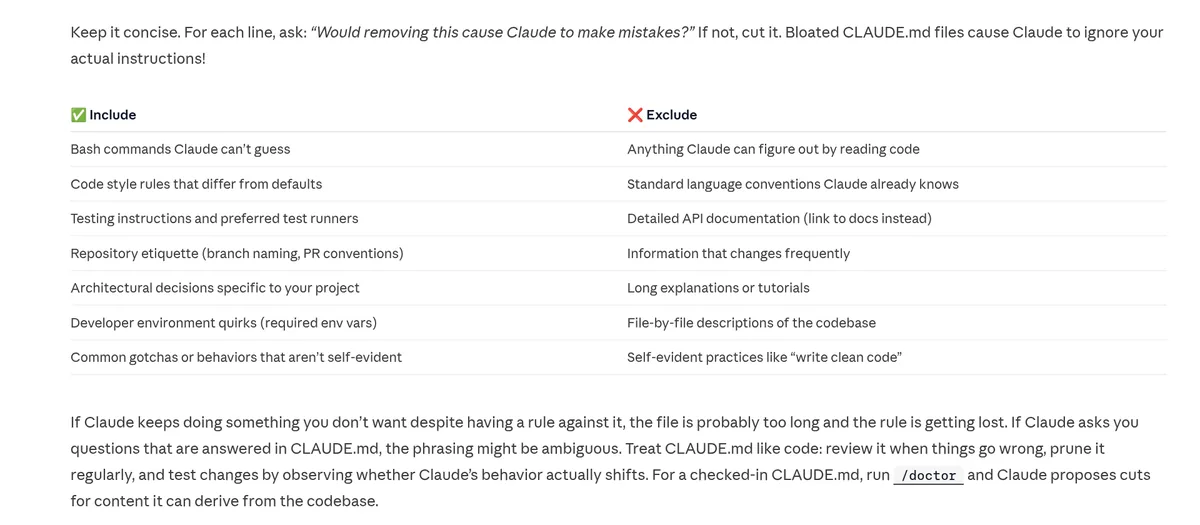
Put in things Claude cannot guess, like the commands to run your tests or your own style rules. Leave out things it can figure out from the code.
6. Clear between unrelated tasks
Finished one task and starting something new? Run /clear. It starts a fresh chat with empty context. Your CLAUDE.md still loads, so Claude keeps your project rules.
The guide calls the opposite mistake the kitchen sink session. You mix three unrelated tasks in one chat, and the memory fills with things that do not matter anymore.
For long chats on one task, /compact sums up the chat to free space. You can even tell it what to keep, like /compact Focus on the API changes.
7. Correct early, and reset after two misses
Press Esc to stop Claude mid-step. Your work so far is kept, so you can point it in a new direction.
Here is the rule I find most useful. If you have corrected Claude more than twice on the same thing, the chat is full of failed tries. The guide says to run /clear and start over with a better prompt that includes what you learned.
8. Send research to subagents
When Claude digs through a codebase, it reads a lot of files. All of that fills your main chat. Instead, ask it to use subagents to look into the question. They do the reading in their own space and send back a summary. You can also make your own subagents for jobs you repeat. My Claude Code subagents guide shows how.
9. Use checkpoints, but keep Git
Every prompt you send makes a checkpoint. Press Esc twice or run /rewind to go back. You can restore the chat, the code, or both.
This means you can let Claude try something risky. If it fails, rewind. But the guide is clear that checkpoints only track edits made by Claude's own file tools. Changes from shell commands are not captured. It is not a replacement for Git.
10. Use hooks for must-do rules
Instructions in CLAUDE.md are advice. Claude usually follows them, but not always. A hook is a script that runs every time, no matter what. Use one for anything that must never be skipped, like running a format check after each edit. See my Claude Code hooks guide to set one up.
A simple routine to put it all together
Here is how these habits fit into one normal work session. This is my own routine based on the guide, not a rule from Anthropic.
- Start clean. Open a new chat for the task. Make sure CLAUDE.md is up to date.
- Explain the goal. Say what you want, which files matter, and how you will know it works.
- Plan if it is big. Use plan mode, read the plan, and fix anything that looks off.
- Let Claude build and check. Ask it to run the tests or the build and show you the result.
- Review and save. Look at the changes, then commit to Git.
- Clear and repeat. Run /clear before the next task.
It feels slow the first few times. After a week, it becomes automatic, and you spend far less time fixing surprise mistakes.
5 traps to avoid
Anthropic's guide lists common failure patterns. Here they are in short form.
- The kitchen sink session. Many unrelated tasks in one chat. Fix: /clear between tasks.
- Correcting over and over. Fix: after two misses, clear and rewrite your prompt.
- A giant CLAUDE.md. Fix: cut anything Claude already does right.
- Trusting without checking. Fix: always give Claude a test or check. If you cannot check it, do not ship it.
- Endless digging. Fix: keep research narrow, or hand it to a subagent.
Just getting started? Read my beginner guide to Claude Code first. Want an honest look at the tool itself? See my Claude Code review.
My video: My full Claude walkthrough for beginners. It covers Claude more broadly, so use this post for the habits.
Any results mentioned in videos are not typical and are not a promise of income. Your results depend on your work and your market.
My Claude Code habits
Nothing you check here is sent or saved. Download it if you want to keep it.
Good habits work best with a clear goal
In my free workshop, I show how regular people pick a simple app idea and build it with AI, step by step.
Join my free AI workshopFree to join. No credit card needed.
Frequently asked questions
What is the most important Claude Code best practice?
Anthropic's guide puts giving Claude a way to check its own work first. Tests, a build, or a screenshot to compare all work.
How long should CLAUDE.md be?
Short. Keep only lines that would cause mistakes if removed. A bloated CLAUDE.md makes Claude ignore the rules that matter.
When should I use /clear in Claude Code?
Between unrelated tasks, and after you have corrected Claude more than twice on the same thing.
Should I always use plan mode?
No. Use it for bigger or unclear changes. If you can describe the change in one sentence, skip the plan.
Do checkpoints replace Git?
No. Checkpoints only track edits made by Claude's file tools, not changes from shell commands. Keep using Git.
What is the difference between CLAUDE.md and hooks?
CLAUDE.md is advice Claude usually follows. Hooks are scripts that run every time, so use them for rules that must never be skipped.
Sources
Checked October 21, 2026. Plans, prices, and rules can change.
