
Build with AI · Setup guide
You do not need a Mac to use Claude Code. It runs right on Windows. Here is the fastest way to install it, which setup to pick, and how to fix the errors that trip people up.
If you are on a Windows PC, you can run Claude Code in a few minutes. You can use PowerShell, the old Command Prompt (CMD), or Linux inside Windows (called WSL).
I went through Anthropic's setup and troubleshooting docs on October 21, 2026. This guide keeps only what a Windows user needs: the right install command, which setup to choose, and quick fixes for the most common errors.
Quick answer
Open PowerShell and run irm https://claude.ai/install.ps1 | iex. In CMD, use the CMD command shown below. You do not need to run as Administrator. When it finishes, open a new terminal and type claude --version, then claude to sign in. You need a paid Claude plan or a Console account, because the free plan does not include Claude Code. Git for Windows is optional, and WSL is only needed if you want Linux tools or sandboxing. Checked October 21, 2026.
What you need first
Anthropic's setup page lists these basics for Windows:
- Windows 10 1809 or newer, or Windows Server 2019 or newer.
- 4 GB of RAM or more and a 64-bit (x64 or ARM64) computer.
- An internet connection, and you must be in a country Anthropic supports.
- A paid Claude account. Claude Code works with Pro, Max, Team, Enterprise, or a Console account. The free plan does not include it.
Claude Pro is $17 a month billed yearly ($200 up front) or $20 billed monthly, checked October 21, 2026. For the full price breakdown, see my Claude Code pricing guide.
Pick your setup: native Windows or WSL
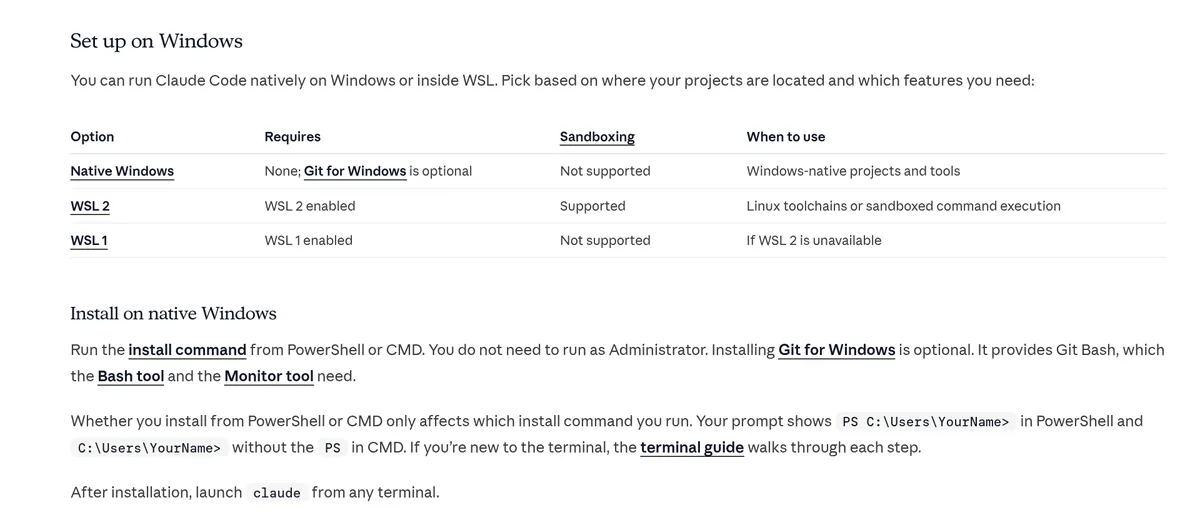
Anthropic gives you three ways to run Claude Code on a Windows PC. Most people should start with native Windows.
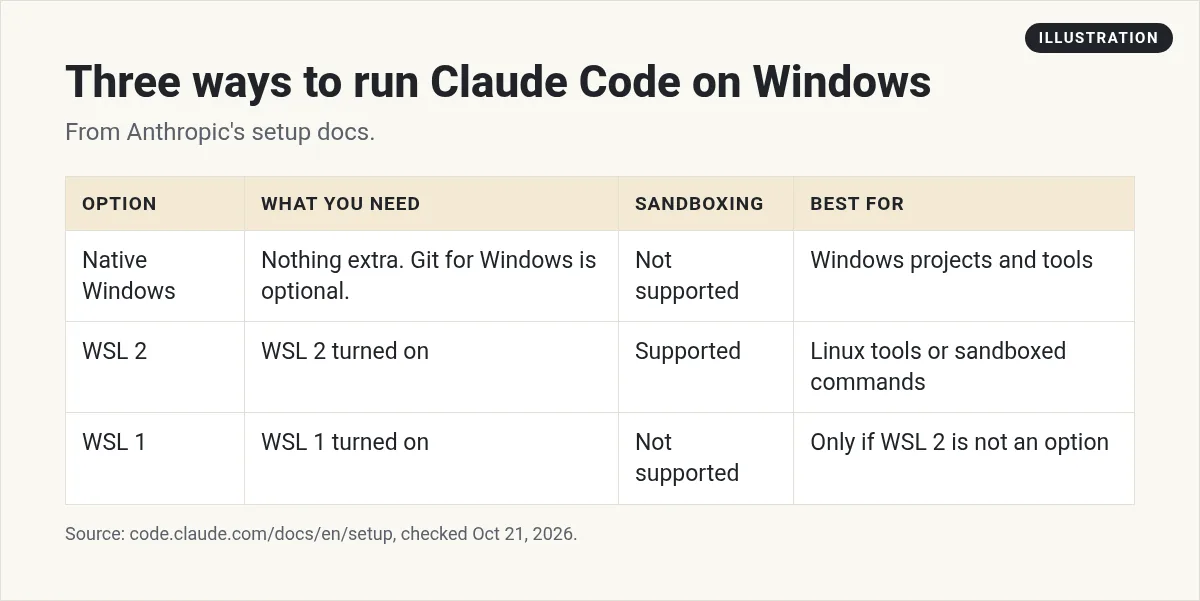
- Native Windows. Nothing extra to install. Best for normal Windows projects. Sandboxing is not supported here.
- WSL 2. Linux running inside Windows. Pick this if your project uses Linux tools, or if you want sandboxed commands.
- WSL 1. Only if WSL 2 is not an option on your machine. No sandboxing.
My advice: if you are new, go native. You can always add WSL later.
How to install Claude Code on Windows
First, figure out which terminal you have open. Anthropic's tip: in PowerShell your prompt starts with PS C:\. In CMD it starts with C:\ and no PS.
In PowerShell (recommended)
irm https://claude.ai/install.ps1 | iexIn CMD
curl -fsSL https://claude.ai/install.cmd -o install.cmd && install.cmd && del install.cmdWith WinGet
winget install Anthropic.ClaudeCodeA few things to know:
- You do not need to run as Administrator.
- The installer shows no progress while it downloads. Give it a minute.
- When it is done, close the window and open a new one. Then type
claude --version. If you see a version number, it worked. - The normal install updates itself in the background. A WinGet install does not. Run
winget upgrade Anthropic.ClaudeCodenow and then.
Start Claude Code and sign in
- Open a terminal in your project folder. In File Explorer, you can type
powershellin the address bar to open one right there. - Type
claudeand press Enter. - Follow the browser prompt to log in with your Claude account.
- Ask a simple question first, like what does this project do? Do not ask it to change anything yet.
New to Claude Code in general? My beginner guide to Claude Code walks through your first session step by step.
Do you need Git for Windows?
No, but it helps. Here is how it works, per Anthropic's docs:
- Without Git for Windows, Claude Code runs commands through PowerShell.
- With Git for Windows, Claude Code also gets Git Bash. That turns on its Bash tool, which many scripts and dev tools expect.
- In WSL, you do not need Git for Windows at all.
If you write code, I would install it. Get it from git-scm.com and pick Add to PATH during setup, then restart your terminal. You will want Git anyway so you can undo changes.
How to use Claude Code in WSL
If you picked WSL, the steps change a little.
- Turn on WSL. Microsoft says to open PowerShell as Administrator, run
wsl --install, then restart. This needs Windows 10 version 2004 or newer, or Windows 11. It installs Ubuntu by default. - Open your Linux terminal. Search for Ubuntu in the Start menu.
- Run the Linux installer inside it. Anthropic says you install and launch Claude Code inside the WSL terminal, not from PowerShell or CMD.
curl -fsSL https://claude.ai/install.sh | bashFix the most common Windows errors
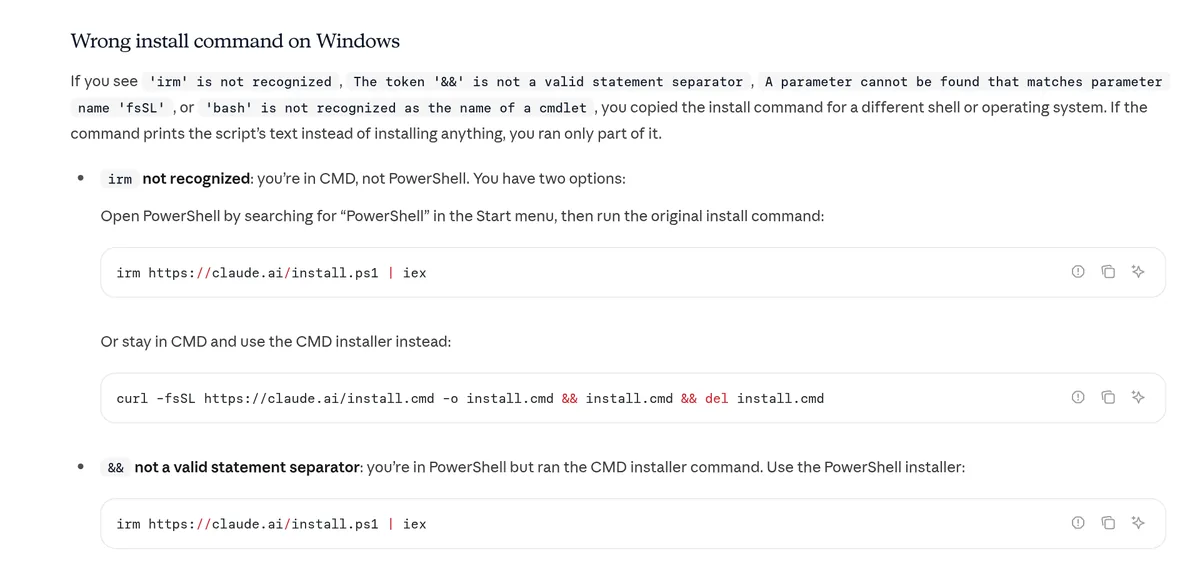
Most install problems on Windows come from using the wrong command for your terminal. Anthropic's troubleshooting page covers each one. Here are the ones I would check first.
"'irm' is not recognized"
You are in CMD, not PowerShell. Open PowerShell from the Start menu and run the PowerShell command. Or stay in CMD and use the CMD command.
"The token '&&' is not a valid statement separator"
The opposite problem. You pasted the CMD command into PowerShell. Use irm https://claude.ai/install.ps1 | iex instead.
"'bash' is not recognized as the name of a cmdlet"
You ran the Mac and Linux command on Windows. The same goes for an error about the fsSL parameter. Use the PowerShell command.
"'claude' is not recognized" after install
The install folder is not on your PATH yet. First, open a brand new terminal and try again. The window you installed from keeps its old settings. If it still fails, the installer puts claude.exe in the .local\bin folder inside your user folder. Follow Anthropic's "Verify your PATH" steps to add it.
"Claude Code does not support 32-bit Windows"
You may have opened Windows PowerShell (x86) by mistake. Close it, open the plain Windows PowerShell entry, and run the install again. If your PC really is 32-bit, Claude Code will not run on it.
Typing claude opens the Claude desktop app
An older Claude Desktop install can take over the claude command. Anthropic's fix is to update Claude Desktop to the latest version.
"Running scripts is disabled on this system"
This shows up with npm installs. The easy fix is to use the PowerShell installer above instead of npm.
How to update or remove it
The normal install keeps itself up to date. Updates download in the background and take effect the next time you start Claude Code. Here is what else to know:
- Check the last update. Run
claude doctorin your terminal. It shows the result of the last update attempt. - Want fewer surprises? Anthropic offers a stable channel. It uses a version that is typically about one week old and skips releases with major problems. You can switch it in
/config. - Installed with WinGet? Update with
winget upgrade Anthropic.ClaudeCode. Windows may lock the file while Claude Code is open, so close it first. - Want to remove it? For a WinGet install, run
winget uninstall Anthropic.ClaudeCode. For the normal install, follow the Uninstall steps on Anthropic's setup page.
One more thing. If you also installed the VS Code extension or the desktop app, uninstall those too. Anthropic notes they keep writing to the same settings folder.
If the terminal feels like too much
That is okay. Anthropic also has a Claude desktop app for Windows that lets you use Claude Code without the terminal. You can also run it inside VS Code. See my guide to Claude Code in VS Code.
Good habits on day one
- Use Git. Commit before you ask for big changes, so you can roll back.
- Start small. Ask it to explain your project before you ask it to edit.
- Run
/doctorwhen something feels off. It checks your setup. - Learn a few commands. My list of Claude Code commands covers the ones beginners use most.
- Add tools later. Once you are set up, my Claude Code MCP guide shows how to connect other apps.
My Claude Code on Windows setup
Nothing you check here is sent or saved. Download it if you want to keep it.
Meet AIM Agent
AIM Agent is an AI Chief of Staff for business owners. You give it a real task, and it brings the work back for you to review. You stay the one who approves.
Meet AIM AgentI am a co-founder of AIM Agent and have a financial interest in the product.
Frequently asked questions
Does Claude Code work on Windows?
Yes. Claude Code runs natively on Windows 10 1809 or newer, and also inside WSL. You can install it from PowerShell, CMD, or WinGet.
Do I need WSL to run Claude Code on Windows?
No. Native Windows works for most people. Use WSL 2 if your project needs Linux tools or you want sandboxed commands.
Do I need Git for Windows?
It is optional. Without it, Claude Code uses PowerShell. With it, Claude Code also gets Git Bash for its Bash tool.
Do I need to run the installer as Administrator?
No. Anthropic's docs say you do not need to run as Administrator. Turning on WSL is different, because that step does need an admin PowerShell window.
Why does Windows say claude is not recognized?
Usually the install folder is not on your PATH yet. Open a new terminal and try again. If it still fails, follow the Verify your PATH steps in Anthropic's troubleshooting docs.
Is Claude Code free on Windows?
No. It needs a paid Claude plan or a Console account. Claude Pro was $17 a month billed yearly or $20 billed monthly when I checked on October 21, 2026.
Sources
Checked October 21, 2026. Plans, prices, and rules can change.
