
GoHighLevel for med spa teams can handle online booking, reminders, missed call texts and Google review requests. Start with one consult calendar and a clear plan for who checks replies. If clients can book treatments online, tie each service to the right staff, room and gear. Before you put client data in the system, check your privacy setup. HighLevel is not HIPAA compliant by default.
Disclosure: I earn a commission if you buy HighLevel through my links, at no extra cost to you. I am not HighLevel and do not speak for it.
Key takeaways
- Give new clients one clear way to book a consult or ask for a call back.
- Test shared rooms and gear before you offer more services online.
- Use one set of reminders and check what happens when a client moves a visit.
- The HIPAA add-on costs $297 a month on the monthly plan and requires a signed BAA.
What should you know about HIPAA when using GoHighLevel for med spa teams?
HighLevel is not HIPAA compliant by default. HighLevel sells a paid HIPAA add-on for the whole agency account. Its pages list $297 a month and $2,970 a year. The package includes a Business Associate Agreement, or BAA. HighLevel signs this agreement with its customer agency. If an outside agency handles patient data for your spa, HighLevel says that agency must also comply with HIPAA to give your spa its own BAA.
HighLevel turns on the package for the agency as soon as the BAA is signed. The agency owner must then turn on HIPAA by hand for each sub-account that needs it. HighLevel says the agency package cannot be canceled, refunded, removed or downgraded once enabled. Once the owner turns it on for a sub-account, they cannot turn it off there either.
Your spa stays responsible for how it handles client data. Have your own compliance advisor look at your forms, booking pages and message tools before you use them with clients. Ask who can see each field and where replies go. Have them review the setup if you add a new form, calendar or chat tool.
What can a med spa front desk do with GoHighLevel?
Start with a clear next step for each client. A person who wants a time can use the consult link. A person who needs help can ask the front desk to call back. Decide who owns each request before you turn on replies.
| Front desk task | HighLevel tool | What to check first |
|---|---|---|
| Let people book a consult | Service Calendar | The right staff and hours show up. |
| List several services | Service Menu | Each service has the right room and gear. |
| Take requests after closing | Form or chat widget | A staff member knows where to find and answer replies. |
| Reply to a missed call | Missed Call Text Back | Repeat calls and consent have been checked. |
| Tell clients about a booking change | Calendar notices | Each message shows the right time. |
| Ask for feedback | Review request workflow | The visit took place and the link goes to the correct profile. |
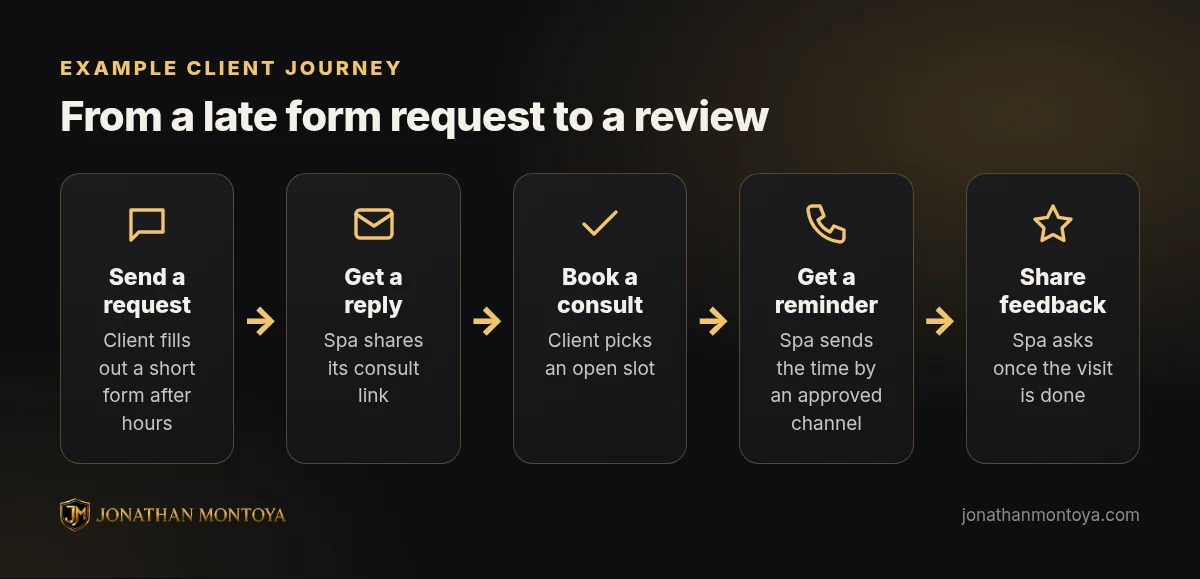
In this example, a client sends a form after hours. The spa shares a consult link. The client books a slot, then gets a reminder by a channel the spa has cleared. After the visit takes place, the spa asks for a review.
Set up service calendars for your med spa
Pick the first visit your spa wants to offer online. A consult is a good place to start if staff need to talk with a client before they book a treatment. In the sub-account, go to Settings > My Staff to add the team members who will take bookings. Set their hours. In Calendar Settings, enable Service Menu in account preferences to turn on service booking. Then create a group for related services.
Create a Service Booking calendar and assign it to the group. Give it a clear name. Set how long the slot lasts and assign the right staff. Then open the advanced settings to assign any room or device that will be in use. Say two services need the same room. Link that room to both. If they also need a shared device, set the number of units on hand. Try to book both services at the same time with test clients. Check that the other calendar accounts for what is already in use.
When the team is ready to offer more choices, create a Service Menu. Use Select Services to choose the grouped calendars you want to show. You might group consults in one place and list other visits on their own. Check the menu on a phone. Read the service names and make sure every option leads to the right slots. Check the invite title too, since HighLevel says clients can see it.
Think about the links your desk sends by hand, too. If a client asks to book a consult, send the direct link to that calendar. Use the menu when the client can pick from a list of visits. If a service needs a staff check first, have the desk take the request and help the client pick a time once that check is done.
Add a booking link to Google Business Profile
Claim or create your Google Business Profile and verify it. HighLevel's guide shows where to add a calendar link under Edit Profile > Booking. If staff screen new clients first, send people from Google to your consult calendar. For a spa with more than one site, open the link from each public profile. Check that it goes to the intended location, with the right staff and hours.
Catch new requests and missed calls after hours
Use a short form or chat widget so people can ask for help while the spa is closed. Ask your advisor which fields you can collect. Give the person a clear next step. A form reply might say 'Thanks for reaching out. Our front desk has your request.' If the person can book on their own, share the consult link. Tell staff where to look for replies at the start of their shift.
HighLevel's med spa guide shows how a form can start a workflow and alert the front desk. Try that with one form first. At the start of a shift, have the desk check who has booked since they wrote in. If a slot is set, have staff check for any open question before they send a second booking link.
For calls that go unanswered, Missed Call Text Back can send a reply. Try plain copy such as 'Thanks for calling our spa. Would you like our front desk to call you back?' HighLevel says the built-in tool can send a text for each missed call, even if the same person calls again. Test two calls from the same line. Check what the client gets and which number sent it, since HighLevel can use another eligible number. If callers get repeat texts, use the Missed Call Text Back recipe in Workflows. HighLevel suggests adding a wait step or using tags to filter repeat calls.
Check consent before you turn on auto texts. For US business texts sent from a local number covered by A2P 10DLC, HighLevel requires Brand and Campaign approval. Wait for the Campaign to be approved. Before you send, check that it is linked to the sending number. Check this for any eligible US local number that can send missed call texts as a fallback. If your chat widget asks to send both updates and promos, use separate consent checkboxes for each. Keep appointment messages free of promos unless your setup and consent cover that use. See the A2P 10DLC guide for the steps.
HighLevel also lists AI as an option for chat replies and calls. If you look at Conversation AI or Voice AI setup, have your advisor review the tool and the channel first. A question about hours can have a set answer. Give health and treatment questions to staff.
Send booking notices and reminders
Open the Notifications tab for the calendar. HighLevel has notices for unconfirmed and confirmed bookings, plus reminders, changes and cancellations. Pick the channel your spa has cleared. Set the reminder timing and check who will get each note. If your spa already has a reminder tool, book a test visit and look for duplicate messages.
Make the words match the state of the booking. An unconfirmed note can say the spa got the request. A confirmed note can give the time and a way to reach the front desk. Move a test visit and check that the next reminder shows the new time. If the change link is blank, HighLevel says to check that the message can access the appointment record.
Try marking one test visit as a no-show. HighLevel says that can send a cancellation notice. Read the template with that in mind. If you leave it on, make sure the copy makes sense when someone missed a visit as well as when they called to cancel.
Pick one alert for staff, too. For example, use an in-app notice when a consult is booked. Ask the person assigned to that calendar to check for it. Then try a slot with a second staff member. This helps you spot cases where the desk thinks someone saw the notice and the person who owns the slot is still waiting for it.
Ask for a Google review after the visit
Use a HighLevel workflow to share your spa's Google review link after a visit. Have the desk check that the visit took place. For example, staff can add a neutral tag after they confirm the visit. Set the workflow to send the request when that tag is added. Start with one approved channel. Test a visit that took place, one that was canceled and one that was missed. Check that only the first gets the request. Check that the request opens the right Google review form.
Ask for honest feedback. Try 'Thanks for visiting our spa. If you would like to share your feedback, here is our Google review link.' Leave service details out. If a review raises a concern, keep any public reply brief and invite the person to contact the spa in private. Have staff handle the rest through the channel your business has cleared.
What should a med spa budget for HighLevel?
HighLevel lists Starter at $97 a month. If you buy your own Starter agency account and add the monthly HIPAA package at $297, those two fees come to $394 a month. If an outside agency runs the account, ask for its price and who pays for texts, calls and email. HighLevel's own phone and email tools can add usage fees. See the usage fees guide for how those charges work.
Want to try the booking flow? Use a made-up client and one consult slot.
Start HighLevelRun a front desk test before launch
Have one staff member play the client and another take the front desk role. Keep a list of what got sent and who got it. Fix gaps before you start to take live bookings. If you change a form or add a service later, run the test again.
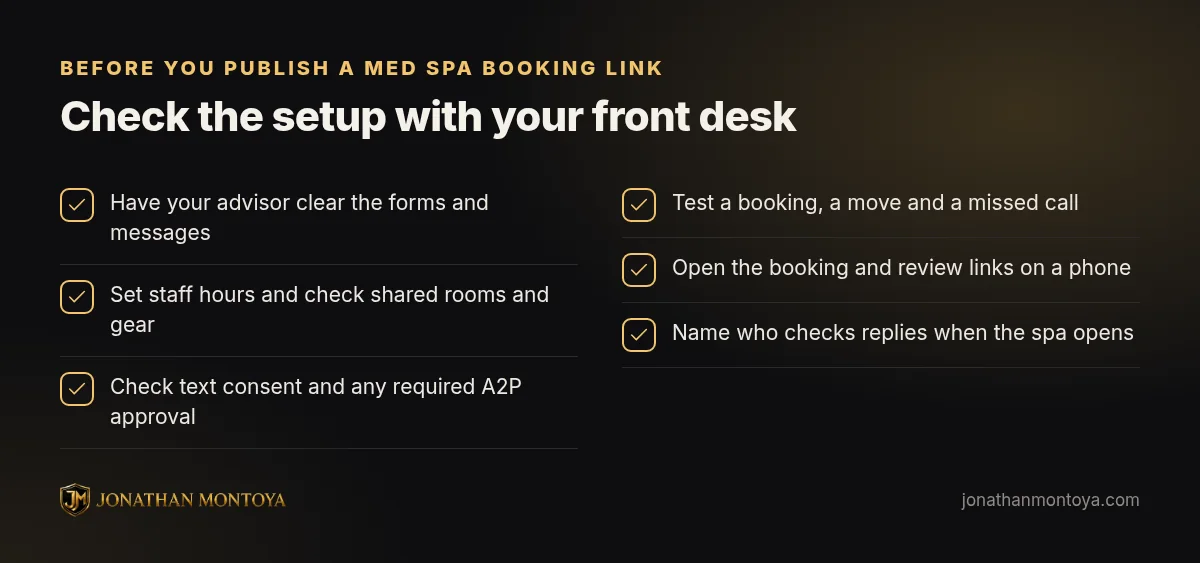
- Have your compliance advisor clear the forms and messages.
- Set staff hours and check shared rooms and gear.
- Check text consent and any required A2P approval. Verify that the sender is linked to the approved Campaign where required.
- Test a booking, a move and a missed call.
- Open both the booking and review links on a phone.
- Assign someone to check replies when the spa opens.
- Start with a made-up client. Send a test form after hours. Check the reply and make sure the front desk knows who should pick it up.
- Try to book the same resource twice. Reserve a slot that needs a shared room or device. Open the link for a second service and check which slots are left.
- Move and cancel a booking. Read each message as the client. Check that links work and that you no longer get a reminder for the old slot.
- Check what goes out after the visit. Try one visit that took place and one that was missed. Verify who gets the review request. Have a staff member check where a reply would go.
Try one med spa booking flow in HighLevel
Set up a consult calendar and book a slot with a made-up client. Check what the front desk sees and read the reminder before you share your link.
When you start HighLevel through my link, you also get my GHL Clone for free. It is a done-for-you affiliate system I spent 11 months building. You can copy it in about 5 minutes, add your own affiliate link and share it. There is no website to build and no emails to write.
Start HighLevelGet the free GHL CloneMy HighLevel link shows a 30-day free trial for new HighLevel customers on HighLevel's own offer page (checked Nov 19, 2026). HighLevel's standard pricing page lists 14 days. Disclosure: I earn a commission if you buy HighLevel through my link, at no extra cost to you. The GHL Clone is my own system, and I earn a commission if you later pay for HighLevel. What anyone earns depends on their own work, and no one can promise a result.
FAQ
Can clients book med spa appointments online with GoHighLevel?
Yes. Share a Service Calendar link for one visit type or use a Service Menu to list several. Start with the visits your team clears for online booking. Check the hours, staff and room before you share the link.
Can two services share one room or device?
Yes. Assign the same room or device to the services that need it. Set the stock count for shared equipment. Book a test slot on one calendar and check the other from the client side.
Is GoHighLevel HIPAA compliant for med spas?
HighLevel is not HIPAA compliant by default. The agency buys the paid HIPAA add-on and signs a BAA with HighLevel. The package turns on for the agency when the BAA is signed. The owner then turns on HIPAA for each sub-account that needs it. Your spa is still responsible for how it handles client data.
How much does GoHighLevel cost for a med spa?
HighLevel lists Starter at $97 a month. If your spa owns the agency account and adds the monthly HIPAA package, those two fees total $394 a month. Texts, calls and email can cost extra.
Can GoHighLevel text people back when the spa is closed?
Yes. Missed Call Text Back can send a text when a call goes unanswered. It can fire for each missed call, so test what happens when the same person calls twice. Check your consent and text setup before you turn it on.
Can I add a HighLevel booking link to my Google Business Profile?
Yes. HighLevel shows how to put a calendar link in the Booking section of a verified profile. For a spa that wants staff to screen treatment requests, use the consult calendar as the public link.
Can GoHighLevel send Google review requests after a visit?
Yes. A workflow can send a text or email with your review link. Check that the visit took place before the request goes out. Use one channel to start and test that the link points to the right spa.
Sources, checked Nov 19, 2026
- HighLevel plans and trial terms
- HighLevel billing and usage fees
- Med spa service calendars, rooms and equipment
- Med spa lead capture after hours
- Google Business Profile booking links for med spas
- Med spa review requests
- HIPAA package, BAA and activation terms
- HIPAA module pricing and business responsibility
- Missed Call Text Back settings and repeat calls
- Calendar reminders and other notices
- A2P registration and consent
- HighLevel offer page for my link
Affiliate disclosure: I earn a commission if you buy HighLevel through my links, at no extra cost to you. Freedom Launch Accelerator and the GHL Clone are my own programs. HighLevel is a trademark of HighLevel, Inc. This site is not run by or affiliated with HighLevel.
