
GoHighLevel for small business makes sense if you need one place to track leads, book visits and follow up. For one business, start by looking at the $97 monthly Starter plan. You can skip it if your only need is a booking link or a place to keep contacts. Texts, calls, email and some AI cost extra.

Disclosure: I earn a commission if you buy HighLevel through my links, at no extra cost to you. I am not HighLevel and do not speak for it.
Key takeaways
- Starter is the lowest-priced plan. It includes three workspaces and unlimited contacts and users.
- Pick the first job to fix. A roofer might start with missed calls. A coach might start with booking.
- Check usage fees and any add-ons before you switch. Health and dental teams should review the HIPAA setup first.
GoHighLevel for small business can cover five jobs
Start with the path a customer takes. They reach out, you reply, and someone on your team takes the next step. That could mean a visit, a quote or a call. If those steps live in different places today, here is what you could bring into HighLevel. For a tour of the platform, see what GoHighLevel does.
1. Catch new leads
Use a form to get the details you need to call someone back. Keep the form short. For a home service job, you might ask what needs work and how to reach the person. Add that lead to a pipeline. A pipeline is a list of steps a deal moves through. Keep the steps plain, like New, Booked and Quote sent. See the GoHighLevel CRM guide for more on contacts and deals.
2. Reply when you miss a call
Missed Call Text Back can send a text when nobody picks up. Think of it as a first reply. A short note can ask what the caller needs and tell them what happens next. Use a number that can send SMS. HighLevel may text from a different number than the one the caller dialed. Check which number sent the text, then reply to it and see who gets the reply. Check what happens if the same person calls twice. The basic feature can text them both times. HighLevel suggests using its workflow recipe if you want to avoid repeat texts.
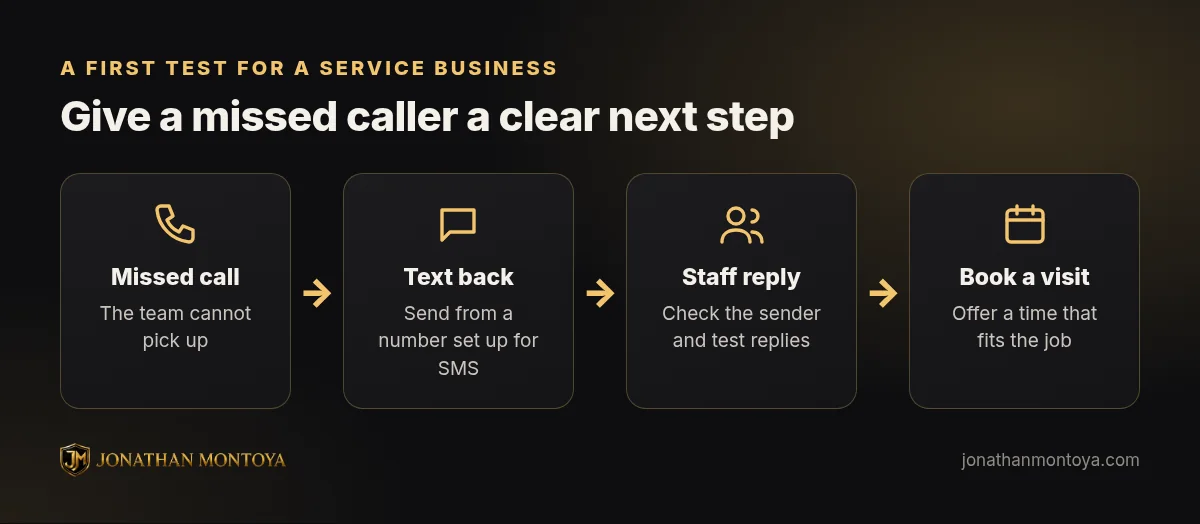
See the Missed Call Text Back guide if that is the first job you want to set up.
3. Book a visit and remind the customer
Give people a link to book a time. Set up a note to confirm the visit, then test the reminder. HighLevel can send notices by email or text for bookings, changes and cancellations. Walk through a change as a customer. If you send reminders from a workflow, start it with an appointment-based trigger. Book a test visit. Check that the link to move the visit shows up and works.
4. Send an estimate and track the answer
List the work and send the estimate from HighLevel. You can see if it is a draft, sent, accepted, declined or invoiced. If a client says yes over the phone, staff can mark it as accepted. You can turn an accepted estimate into an invoice by hand. If you set up a payment schedule, select Send Invoice and turn on Enable Direct Payments. When a client accepts online with those settings, HighLevel makes an invoice and takes them to the payment page.
5. Ask for a review after the work
Enable review requests in your workspace first. For Google reviews, connect the right Google Business Profile. You can also add a link to another review site. Then send one request by hand. Check that the link goes to the right place. If you want to send the request as part of a workflow, HighLevel has a review request action. Decide what should start it. For a service visit, I would ask after the work is done. A new lead or a visit that got moved is too early.
Find your HighLevel use case by industry
Pick the row that sounds like your business. Start with the job where people tend to get stuck. If you already have a tool that does that job well, use the next issue on your list as the test.
| Your business | Where to look first | What to try in HighLevel |
|---|---|---|
| Home services | Calls go to voicemail on a job. | Try Missed Call Text Back and estimates. See the roofers guide. |
| Health and dental | Staff need to confirm visits. | Test calendars and reminders with test data. Check privacy needs first. See the dentists guide. |
| Real estate | New leads sit in email. | Use a form, a CRM pipeline and a buyer call link. |
| Coaches | Leads ask but never book. | Try a calendar and a reminder. See if courses or communities fit. |
| Local retail | Repeat questions or too few reviews. | Set up review requests or try staff-reviewed AI replies. |
Once review requests are set up, a shop can send one by hand. A roofer can start with one missed call. For a real estate team, try moving one test buyer from a form to a booked call. Keep the first test small enough to tell which step needs work.
If you want a bot to help, Conversation AI can answer common questions, ask for lead details and help book a time when set up for it. In Suggestive mode, staff read the drafts and send the replies. In Auto-Pilot, the bot sends replies based on your setup. Test a question the bot should pass to a person before you let it reply on its own.
Which GoHighLevel plan does one business need?
My pick for most owners is Starter at $97 a month. It is the lowest price HighLevel lists. It has the core tools, from a CRM and booking calendars to forms and workflows. A sub-account is a workspace for a business. Starter gives you three. All plans come with unlimited contacts and users, so you can add staff or leads without moving up for that reason.
| Plan | Monthly price | When to look at it |
|---|---|---|
| Starter | $97 | You run one business and want the core tools. |
| Unlimited | $297 | You need more than three workspaces, Basic API access or pass-through billing at cost for supported charges. |
| Founder | $497 | You want SaaS mode to sell software plans or add a markup to supported charges. |
For a local owner, those higher tiers make sense only if you have a use for what they add. If you have several sites, work out which need their own workspace. If a tool you must keep needs a custom link to HighLevel, check how that link works before choosing a plan. HighLevel says you can change plans later.
Want to try one job on Starter? My HighLevel link shows a 30-day free trial for new HighLevel customers on HighLevel's own offer page (checked Nov 18, 2026). HighLevel's standard pricing page lists 14 days.
Start HighLevelWhat costs extra on top of your plan?
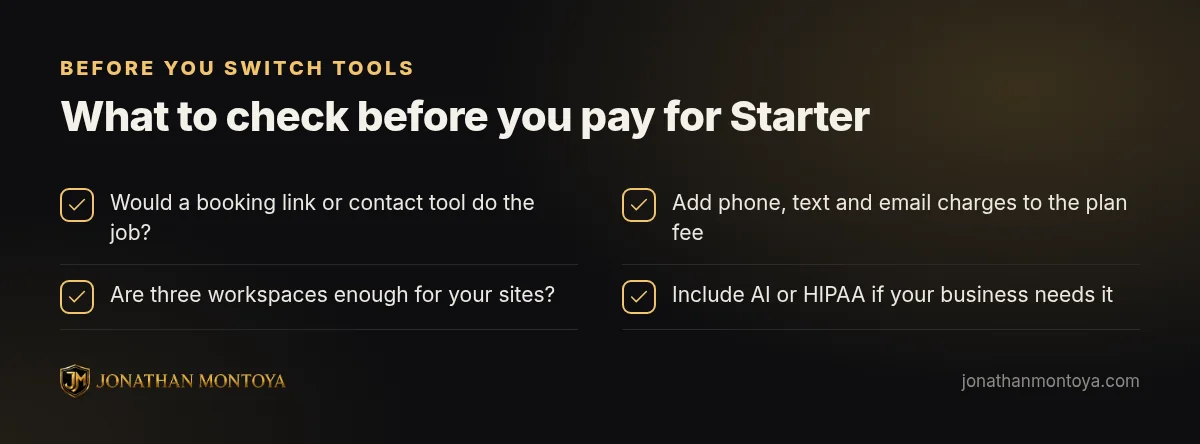
The plan fee covers access to the tools. As you use them, HighLevel can charge for phone numbers, texts, calls, email and paid AI. Usage draws from a wallet. HighLevel charges your card to refill it when it falls below the set minimum. Check the wallet after a test so you can see which parts of your setup add a charge.
- Phone and text. List the numbers you need and think about how often your team calls or texts. If you plan to send business texts from a US local number, check HighLevel's A2P registration guide. It covers consent and how to send your campaign for review. Where A2P applies, check that the sending number is linked to your approved campaign and shows as verified. Budget for registration and monthly campaign fees where they apply.
- Email. HighLevel lists its email service at $0.675 per 1,000 emails on all plans. Think about staff messages, booking notices and any campaigns you plan to send. See the usage fees guide for a closer look at email, phone and text costs.
- AI. Set aside a budget if a bot will talk with customers. Conversation AI is pay per use unless an eligible AI plan covers it. AI Employee Growth costs $50 a month per workspace. AI Employee Unlimited costs $97 a month per workspace. Check what each option covers for the AI tool you want.
When HighLevel is more than you need
If you get a few calls and have a good way to track them, there may be little to fix. The same goes if your booking app works and all you want is a link to send clients. In either case, I would keep the tools your team knows until you can name a job that needs to change.
HighLevel makes more sense if the steps need to work together. Say you need a form for new leads, a booking link and a reminder. A test can show if those steps work as a set. Keep your current tools in place while you check the pieces your team needs each day. For a shop, that might be checkout. For a clinic, it might be the system staff use for patient records.
How to test one job before you switch
Pick a small test that looks like a real day at work. If calls are the issue, make sure your sending number can send SMS. If A2P applies, check that the number is verified on your approved campaign. Ring your test line and let it go unanswered. Check which number sends the text before you test a staff reply. If booking is the issue, book a test visit and move it. Check what shows up for the customer and your team.
- Pick one jobChoose a task that breaks down today. A missed call is a good test if most leads reach you by phone.
- Name the ownerChoose who reads replies and takes the next step. Give that person a say in what each message should say.
- Walk through it as a customerUse your own test details. Check the first reply, the next step and what the staff member sees.
- Check the bill and make the callLook at the wallet and add the plan fee and any add-ons you need. Decide if the tools you would use are worth the cost and setup.
Write down what passed and what you still need to fix. A text that sends but leaves the reply with nobody to read it is a failed test. If the steps work and the costs fit, try your next job. If one tool already gets you there, keep it. HighLevel's standard trial lasts 14 days. Usage fees can apply, and the plan starts billing when the trial ends unless you cancel.
Try HighLevel with one job from your list
Start with the job your team wants to fix. Try it with test details, then check the wallet before you add more.
When you start HighLevel through my link, you also get my GHL Clone for free. It is a done-for-you affiliate system I spent 11 months building. You can copy it in about 5 minutes, add your own affiliate link and share it. There is no website to build and no emails to write.
Start HighLevelGet the free GHL CloneMy HighLevel link shows a 30-day free trial for new HighLevel customers on HighLevel's own offer page (checked Nov 18, 2026). HighLevel's standard pricing page lists 14 days. Disclosure: I earn a commission if you buy HighLevel through my link, at no extra cost to you. The GHL Clone is my own system, and I earn a commission if you later pay for HighLevel. What anyone earns depends on their own work, and no one can promise a result.
FAQ
Is GoHighLevel good for a small business with no agency?
Yes, if you want to handle leads, bookings and follow-up in one place. HighLevel lists Starter for one business or a few clients. If all you need is a way to book calls, I would keep your current tool if it does the job.
What is the cheapest GoHighLevel plan?
Starter is the lowest-priced plan on the pricing page at $97 a month. It includes three sub-accounts. All plans include unlimited contacts and users. Texts, calls, email and paid AI can add to the bill.
Can GoHighLevel send a text when I miss a call?
Yes, if you have a number that can send SMS. HighLevel may send from a different number than the one the caller dialed. Check the sender before you test replies. The basic setup can send one for each missed call, even when the same person calls again. HighLevel points to a workflow recipe you can adjust to avoid repeat texts.
Can GoHighLevel send quotes and turn them into invoices?
Yes. You can send an estimate and track its status. You can turn an accepted estimate into an invoice by hand. For a payment schedule, select Send Invoice and turn on Enable Direct Payments. When the client accepts online, HighLevel makes the invoice and takes them to the payment page.
Can a dentist use GoHighLevel for patient reminders?
HighLevel offers text and email reminders. If your setup handles protected patient data, check it with your privacy lead first. The HIPAA add-on costs $297 a month at the account level. The Business Associate Agreement and settings are part of your compliance setup. Turn HIPAA on in each workspace that needs it. You cannot turn it off there once it is on.
Do I need AI to follow up with leads?
No. Start with a clear reply and a person to take over. If you want a bot to answer common questions or help with bookings, try Conversation AI in Suggestive mode first. Your team can read each draft and decide what to send.
Does GoHighLevel have a free trial?
HighLevel's standard pricing page lists a 14-day trial. Plan billing starts when the trial ends unless you cancel. Usage fees can apply during the trial.
Sources, checked Nov 18, 2026
- HighLevel pricing, features and add-ons
- HighLevel pricing and billing guide
- HighLevel AI product pricing
- HighLevel Conversation AI setup and testing
- HighLevel A2P campaign registration and consent
- HighLevel Missed Call Text Back setup
- HighLevel review request setup
- HighLevel calendar notifications
- HighLevel estimates and invoice setup
- HighLevel HIPAA add-on and BAA
- HighLevel offer page for my link
Affiliate disclosure: I earn a commission if you buy HighLevel through my links, at no extra cost to you. Freedom Launch Accelerator and the GHL Clone are my own programs. HighLevel is a trademark of HighLevel, Inc. This site is not run by or affiliated with HighLevel.
