
Grok Bot · Authors
You want to write. The marketing, research, and admin keep getting in the way. Here is how authors can hand that work to Bots.
Grok Bot for authors works best on everything around the writing. Research, newsletters, launch checklists, reader emails, and social posts can go to Bots. The book stays yours.
I read the Grok Bot docs on files, skills, and routines on November 4, 2026, and watched two author channels that use Bots. Here is a simple setup for writers.
TL;DR
Grok Bot can help authors with research, organizing notes and files, newsletter drafts, launch planning, reader email drafts, and social posts. It works on its own cloud computer, reads files like Word documents and PDFs, and can run jobs on a schedule. Keep the creative writing yours, and keep publishing and sending behind your approval.
The problem: so much work that is not writing
The Novel Marketing podcast put it well in its video on Grok Bot. Authors have long sighed about all the admin, tech, and marketing work and said, I just want to write. Its pitch is simple: hand the non writing tasks to a Bot.
From the Novel Marketing channel (not mine): A short, step by step look at making your first Bot as an author.
I agree with that split. A Bot can save you hours on the business side. But your voice, your story, and your choices on the page are the reason readers buy. Keep those.
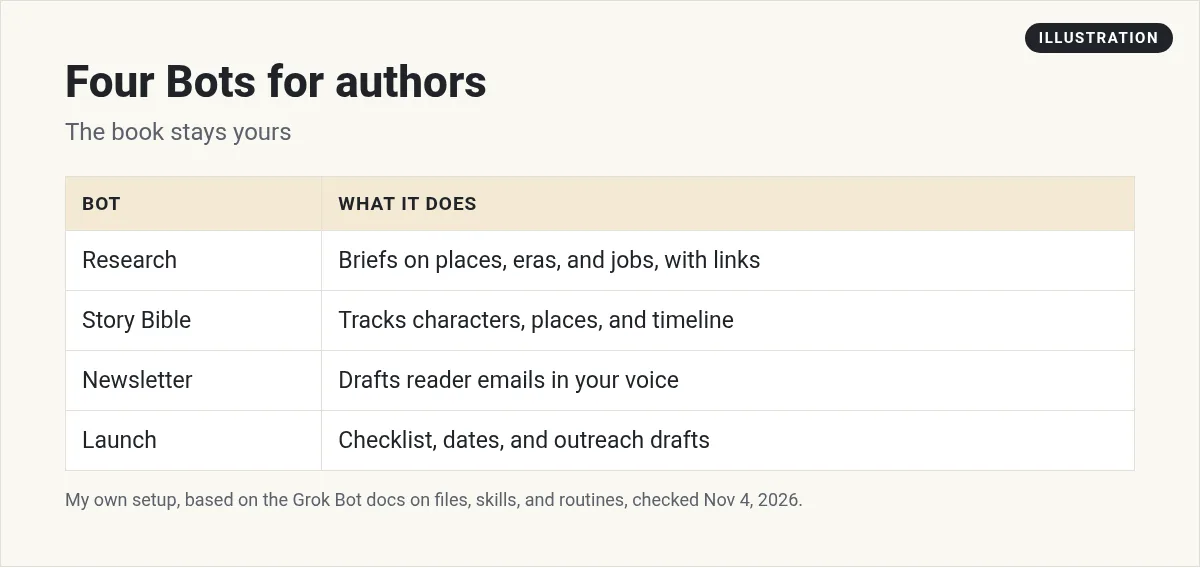
Four Bots for authors
1. Research Bot
Ask it to dig into a time period, a place, a job, or a technical detail for your book. Ask for sources with links so you can check them. My Grok Bot research post covers this.
I am writing a mystery set in a 1950s fishing town in Maine. Find what daily life, jobs, food, and slang were like. Give me a short brief with links to every source. Mark anything you are not sure about.
2. Story Bible Bot
Give it your manuscript files and ask it to keep a list of characters, places, and timeline facts. The docs say you can attach Word, PDF, and plain text files. It can catch the moment a character's eye color changes in chapter 12.
3. Newsletter Bot
Each week it drafts a reader email from your writing updates, in your voice. You edit and send it from your email tool. See my Grok Bot newsletter post.
4. Launch Bot
It builds a launch checklist and keeps track of dates, early readers, and posts. It drafts outreach. You send it.
Working with your manuscript
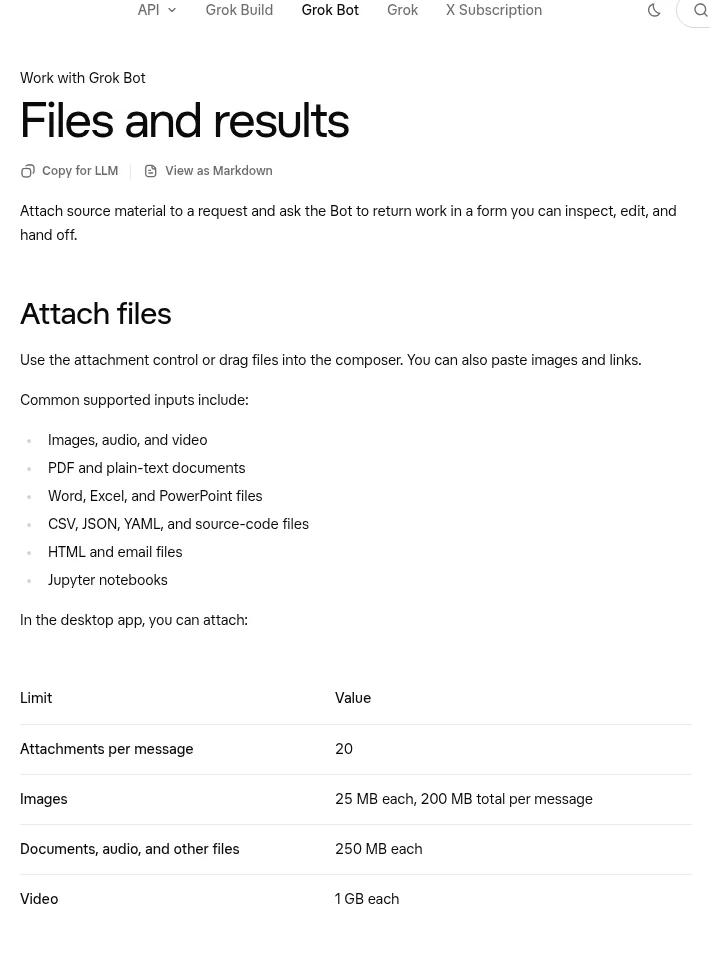
The Grok Bot docs on files say you can attach up to 20 files per message in the desktop app. Documents can be up to 250 MB each. Supported files include PDF, plain text, and Word documents.
Tell the Bot what each file is and how to use it. For example: this is chapter 3, the first draft, please check it against the story bible but do not rewrite anything.
Your Bot can also build a page, like a report or a memo, that you read in its Library. The docs say pages are rolling out gradually.
Teach it your voice for marketing
A skill is a reusable set of instructions shared across your Bots. Use one for your marketing voice, not your fiction voice.
Here are my last five newsletters and three book descriptions. Save a skill called Author voice for marketing. Include my tone, how I sign off, and words I never use. Show me before you save.
The Invisible Pen shows how she sets up Bots in her author workflow and trains them on her creative voice.
From the The Invisible Pen channel (not mine): She shows research, planning, and a surprise fake me. Decide for yourself where a Bot belongs in your process.
Research you can trust
This is my own advice. A Research Bot is only as good as its sources. Ask it to list every link, mark what it is unsure of, and keep quotes word for word. Then spot check two or three links yourself each time. If it ever makes up a source, tell it, and save a rule so it never does that again. For historical details, ask it to prefer museums, archives, and libraries over blogs. That one habit will save you from the kind of mistake readers love to email you about.
A weekly author routine
Routines run in the cloud on a schedule, even while your laptop is closed. A simple week:
- Monday. The Bot sends your word count goal and what is due this week.
- Wednesday. Three social post drafts about your book or your writing life.
- Friday. A newsletter draft from your updates.
- Sunday. A short report on reviews and reader emails, with reply drafts.
See my Grok Bot routines guide to set it up.
Watch outs for authors
- Check every fact. Ask for links and read them. Bots can be wrong.
- Know your publisher's and store's AI rules. Some ask you to disclose AI use.
- Keep reviews honest. Never use a Bot to write fake reviews or pose as readers.
- Back up your book. Keep your own copies of every draft.
Your first week (my plan)
This part is my own advice. Start small so the Bot fits your writing days instead of eating them.
- Day 1. Create a Research Bot and ask it one question about your current book.
- Day 2. Check every link it gives you. Note anything it got wrong.
- Day 3. Give it your outline and character list, and ask for a story bible.
- Day 4. Paste three old newsletters and save your marketing voice as a skill.
- Day 5. Ask for one newsletter draft. Edit it and send it yourself.
After a week you will know which jobs save you time. Keep those and drop the rest.
Where a Bot helps most in a launch
Launches have a lot of moving parts. In my experience, these are the jobs where a Bot helps the most:
- A launch calendar. Dates for the cover reveal, preorders, early readers, and launch day.
- Early reader tracking. Who got a copy and who you still need to thank.
- Post drafts. A short post for each key date, in your voice.
- A weekly recap. What happened, what is next, and what needs you.
A business team for your books
Marketing, launches, and reader emails all need an owner. Writing should be yours.
AIM Agent is an AI Chief of Staff for business owners. It comes with an AI C-suite (COO, CMO, CFO, CRO and CTO), a Business Bot Builder and 100+ business skills, and it runs on AIM OS, a private vault that holds your notes and memory. AIM Agent is a ready-made AI business team that works inside Grok Bot, so you skip the setup and get to work.
Here is what you get:
- An AI Chief of Staff that helps you plan and run your business
- An AI C-suite: COO, CMO, CFO, CRO and CTO
- A Business Bot for each business or project. Give it a real task and it brings the work back for you to review
- 100+ business skills for content, offers, research and more
- Step by step setup guides and email support
So you get more hours to write.

Want an AI team to help run your business? Meet AIM Agent, an AI Chief of Staff for business owners. I am a co-founder of AIM Agent and have a financial interest in the product.
Get a business team inside Grok Bot
AIM Agent gives you an AI Chief of Staff, an AI C-suite, and 100+ business skills, so marketing, launches, and follow up each have an owner.
See AIM AgentFrequently asked questions
Can Grok Bot write my book?
It can draft text, but I suggest keeping the creative writing yours. Use Bots for research, marketing, and admin.
What files can I give Grok Bot?
The docs list PDF, plain text, Word, and more. Documents can be up to 250 MB each in the desktop app.
Can Grok Bot help with book marketing?
Yes. It can draft newsletters, social posts, book descriptions, and launch plans for you to review.
Can it keep track of my characters and timeline?
Yes. Give it your files and ask it to keep a story bible.
Will it publish or send things for me?
Keep those behind your approval. Read and send everything yourself.
Do I need to tell readers I used AI?
Check your publisher's and store's rules. Some ask you to disclose AI use.
Is there a faster way to get a business team?
AIM Agent gives you an AI Chief of Staff, an AI C-suite, and 100+ business skills inside Grok Bot.
Sources
Checked November 4, 2026. Plans, prices, and rules can change.
