
Grok Bot · Comparison
Both take a goal and come back with finished work. The real difference is where the work lives and how you work with it. A fair look from each product's own pages.
Grok Bot vs Claude Cowork is a close match. Both take a goal, work across your files and tools, keep going when you close the laptop, and bring back finished work for review. The difference is in the shape of the thing.
I read the Claude Cowork product page, the Claude help article on getting started with Cowork, and the Grok Bot docs on November 3, 2026. I use Grok Bot every day, so I will tell you where Cowork does some things better too.
TL;DR
Pick Grok Bot if you want named teammates that keep their own memory and jobs, share one cloud computer with a browser and terminal, run routines, and reach you on desktop, phone, X Chat, and Slack. Pick Claude Cowork if you already live in Claude, want it to read and write files right on your own computer through the desktop app, and like grouping tasks into projects with plugins for your role. Both need a paid plan, both run tasks in the cloud, and both ask before risky actions.
What each one is
Claude Cowork is from Anthropic. The help article says it brings Claude Code's agentic skills to knowledge work beyond coding. You describe an outcome, step away, and come back to finished work. There is news on the product page too: Claude Cowork is now part of Claude. When a task needs your files, Claude brings in Cowork's skills on its own.
Grok Bot is from x.ai. The docs describe Bots you keep around: AI teammates with names, jobs, and context that builds over time. Each Bot works on a persistent cloud computer with a browser, files, and a terminal.
Side by side
Where the work runs
This is the biggest difference.
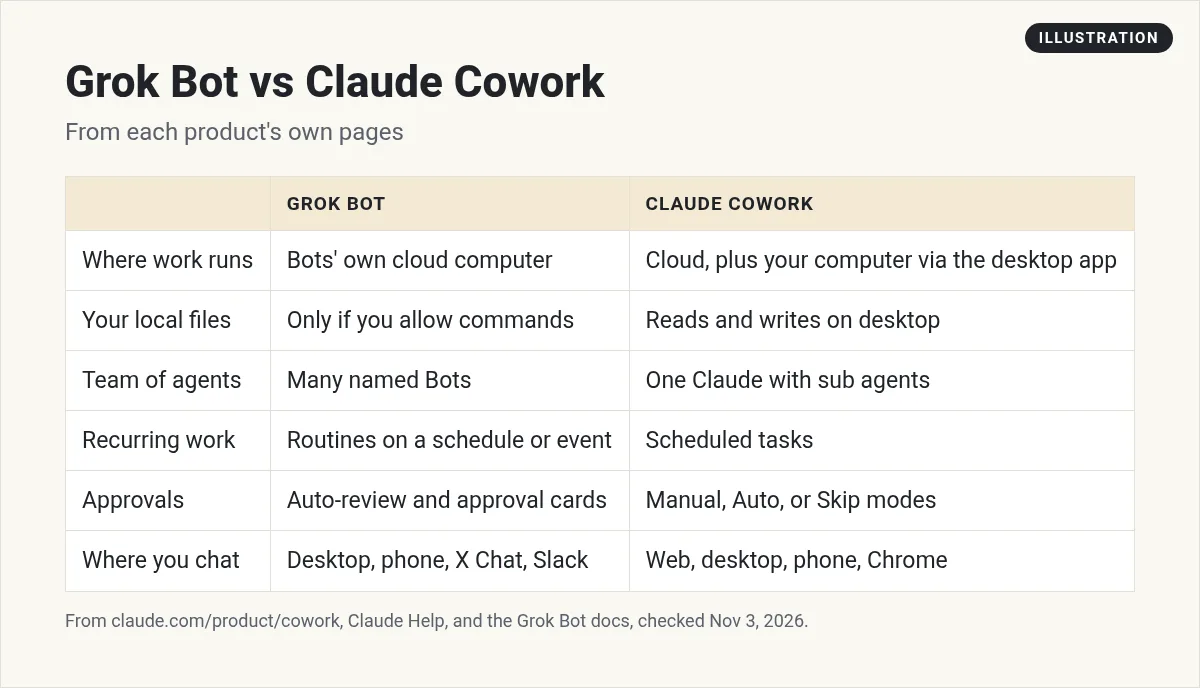
Cowork runs tasks in the cloud on Anthropic's servers, in an isolated space. Your sessions and files live with your Claude account. When a task needs something on your own computer, like a local file or your browser, Claude reaches it through the Claude Desktop app. The help article says that app must be open for local files, browser use, and computer use.
Grok Bot gives your Bots their own cloud computer. All your Bots share it, with the same files, browser logins, and apps. The FAQ says a Bot runs a command on your own desktop only if you allow it, and by default it asks each time.
So Cowork leans toward your own folders. Grok Bot leans toward a computer that belongs to your Bots.
One assistant or a team of Bots
Cowork is one Claude. It splits big jobs into chunks that run at the same time, using sub agents. It has projects, which group tasks with their own files, instructions, and memory. It also shares memory with your Claude chats.
Grok Bot is a team of named Bots. Each one has a job, its own memory, and its own place in the sidebar. They can run at the same time, message each other, and share context in group chats. You can share a Bot with your team as well. My Grok Bot group chats post shows how that works.
Schedules and recurring work
Both do this well. Cowork has scheduled tasks that run in the cloud on any cadence with no device online. Its product page shows a Monday marketing readout built into slides.
Grok Bot has routines. A routine can run on a schedule or when something happens, like a new email or a webhook. My Grok Bot routines guide has examples.
Approvals and control
Cowork has three modes for when it asks you: Manual, Auto, and Skip. You choose the folders and tools. The help article says Claude needs your clear permission before it deletes any files.
Grok Bot uses Auto-review. Sensitive actions can stop for your approval. Bots sign in with saved logins from the Vault without seeing the values. Things like passkeys and CAPTCHAs are handed to you. My Grok Bot safety post covers it.
Where you talk to it
Cowork runs on web, desktop, and mobile, plus a Chrome side panel. Grok Bot has desktop apps for Mac, Windows, and Linux, phone apps, X Chat, and Slack for shared Bots. A Grok Bot can also have its own email address.
Where Cowork is stronger
- Your local files. On desktop it can read and write your own folders with no uploads.
- Office files. It makes spreadsheets with working formulas and slides you can keep editing with Claude for Excel and PowerPoint.
- Role plugins. Plugins bundle skills, connectors, and sub agents, like legal or finance.
- Edit in place. Highlight text in a draft and ask Claude to change just that part.
Where Grok Bot is stronger
- A real team. Separate Bots with separate jobs that hand work to each other.
- Its own computer. A browser, files, and a terminal that stay put between tasks.
- Event triggers. Routines that start from an email, a webhook, or an app event, not only a clock.
- More places to reach it. X Chat, Slack, phone, and a Bot email address.
How to pick
If your work lives in folders on your laptop and you already pay for Claude, try Cowork first. If you want a small team of AI workers that each own a job and work from their own computer, try Grok Bot. Plenty of people will use both.
Two videos worth your time
This short video from AI Readiness Advisory frames it as a question of where the file lives.
From the AI Readiness Advisory channel (not mine): This channel sells AI consulting. The where does the work live idea is the useful part.
AIUnderTheHood compares Grok Bot, Claude Cowork, Gemini Spark, and OpenAI Dots in one video.
From the AIUnderTheHood channel (not mine): Features change fast. Check each product's own page before you decide.
If you pick Grok Bot, skip the blank start
The hardest part of Grok Bot is deciding which Bots to build and teaching each one its job.
AIM Agent is an AI Chief of Staff for business owners. It comes with an AI C-suite (COO, CMO, CFO, CRO and CTO), a Business Bot Builder and 100+ business skills, and it runs on AIM OS, a private vault that holds your notes and memory. AIM Agent is a ready-made AI business team that works inside Grok Bot, so you skip the setup and get to work.
Here is what you get:
- An AI Chief of Staff that helps you plan and run your business
- An AI C-suite: COO, CMO, CFO, CRO and CTO
- A Business Bot for each business or project. Give it a real task and it brings the work back for you to review
- 100+ business skills for content, offers, research and more
- Step by step setup guides and email support
So you get the team without building it from scratch.

Want an AI team to help run your business? Meet AIM Agent, an AI Chief of Staff for business owners. I am a co-founder of AIM Agent and have a financial interest in the product.
Get a Bot team that already knows its jobs
AIM Agent gives you an AI Chief of Staff, an AI C-suite, and 100+ business skills inside Grok Bot.
See AIM AgentFrequently asked questions
Is Claude Cowork the same as Claude?
Claude's product page says Cowork is now part of Claude. When a task needs your files, Claude brings in Cowork's skills on its own.
Does Claude Cowork work when my laptop is closed?
Yes for cloud sessions. For local files, browser use, or computer use, the Claude Desktop app must be open.
Does Grok Bot work when my laptop is closed?
Yes. Bot work runs on its cloud computer, so closing the app or laptop does not stop a task or routine.
Which one is better with my local files?
Cowork on desktop can read and write your local files directly. Grok Bot works on its own cloud computer and runs commands on your desktop only if you allow it.
Can both run scheduled tasks?
Yes. Cowork has scheduled tasks. Grok Bot has routines that run on a schedule or when something happens.
Do they ask before risky actions?
Yes. Cowork has Manual, Auto, and Skip modes and asks before deleting files. Grok Bot uses Auto-review and approval cards.
Is there a faster way to start with Grok Bot?
AIM Agent gives you an AI Chief of Staff, an AI C-suite, and 100+ business skills inside Grok Bot.
Sources
Checked November 3, 2026. Plans, prices, and rules can change.
