
Grok Bot · Chat apps
People keep asking if they can text their Bot on WhatsApp or Telegram. Here is the honest answer, where you can chat with a Bot today, and the three bridges people use.
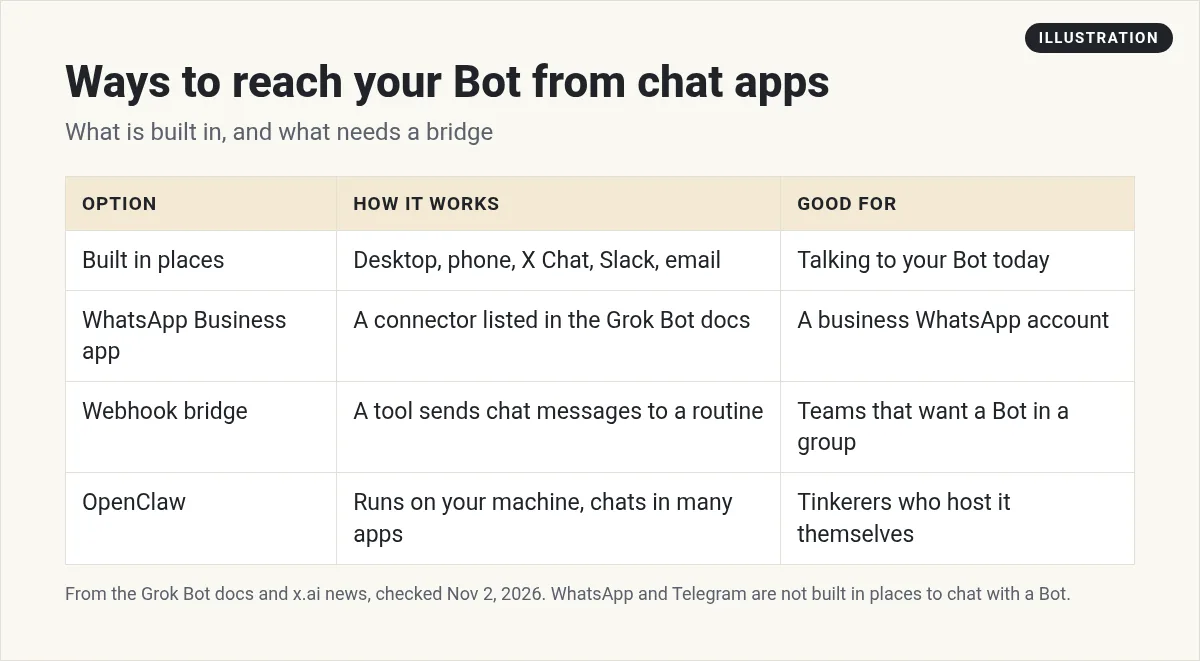
Grok Bot does not have WhatsApp or Telegram built in as a place to chat with your Bot, as of November 2, 2026. You talk to your Bots in the desktop app, the phone app, X Chat, Slack, and email. But there are ways to connect a Bot to chat apps, and one of them is listed right in the Grok Bot docs.
I read the Grok Bot docs, help center, and x.ai news on November 2, 2026, and watched two creators try this. Here is what actually works.
TL;DR
As of November 2, 2026, WhatsApp and Telegram are not built in places to chat with a Grok Bot. The built in places are the desktop and phone apps, X Chat, a shared Bot in Slack, and email to your Bot's own address. You have three options for chat apps. One, the Grok Bot docs list a WhatsApp Business connected app, for business accounts. Two, a third party tool can pass chat messages to a Bot routine through a webhook. Three, OpenClaw, a separate open source agent, chats in WhatsApp and Telegram and can use Grok models.
Where you can chat with a Bot today
The Grok Bot FAQ lists the places you can talk to your Bots:
- The desktop app on Mac, Windows, or Linux.
- The phone app on iPhone or Android. Your Bots and chats sync across devices.
- X Chat, in the X app and on x.com. The docs say it is rolling out gradually.
- Tag @bot on X to hand a post to your Bot.
- Slack, through a shared Bot. See my Grok Bot Slack guide.
- Email. Your Bots can get their own address at mail.grokbot.com and work from email. See my Grok Bot email guide.
WhatsApp, Telegram, Signal, and iMessage are not on that list.
Option 1: The WhatsApp Business connected app
Here is something most people miss. The Grok Bot security docs list WhatsApp Business among the connected apps, with the web addresses a company admin may need to allow. It connects through Meta's business tools.
This is for a WhatsApp Business account, not your personal WhatsApp. It is a way for a Bot to work with your business messages, not a way for you to text your Bot. To see if it is there for you:
- Open Connect apps in the sidebar.
- Search for WhatsApp.
- If it shows up, connect it and ask the Bot to list the tools it got.
Before you connect it, decide what the Bot may do. Sending a message to a customer should always wait for your approval. My Grok Bot safety guide shows how to set that up.
Option 2: A webhook bridge
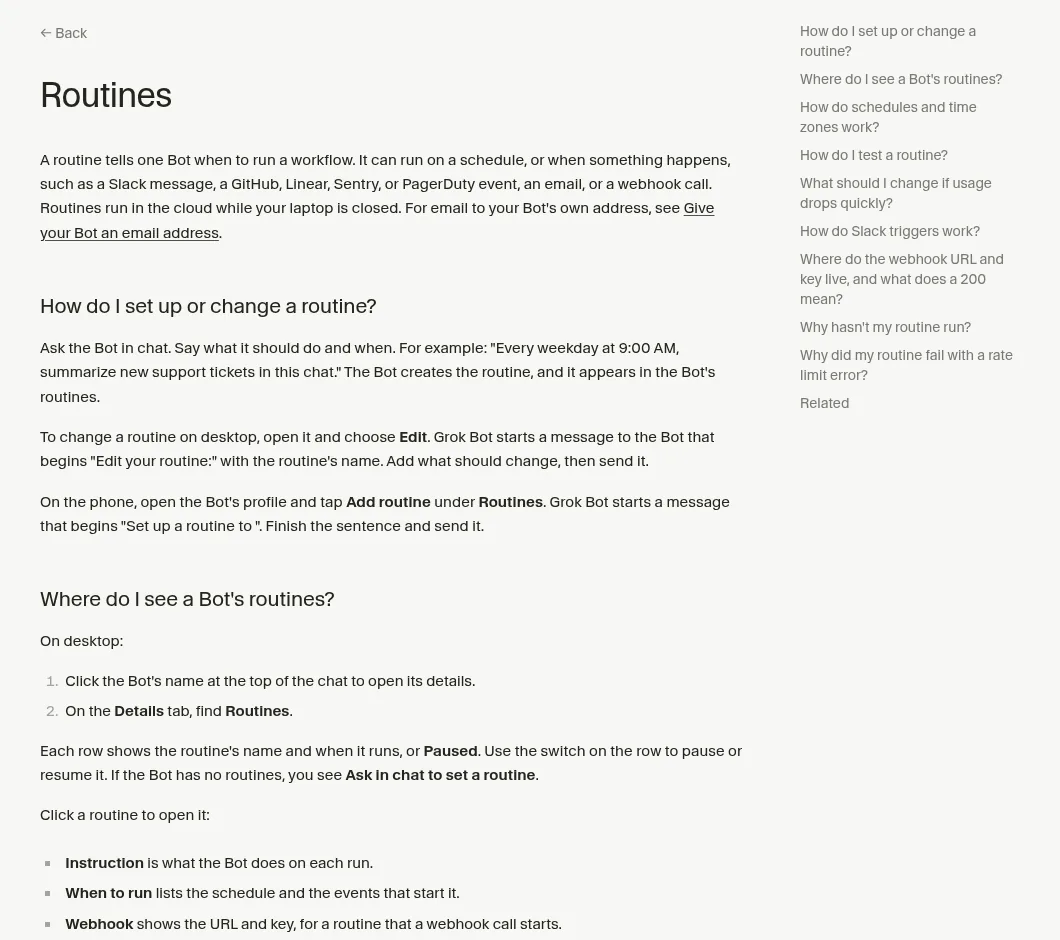
A routine can start when a webhook is called. The help center says a routine can run on a schedule or when something happens, such as a Slack message, an email, or a webhook call. That opens a door. A small tool that lives in your WhatsApp group can send each question to your Bot's routine, then post the answer back.
One creator built exactly that. His colleagues ask the AI in their company WhatsApp group when he is free, and his Bot checks his calendar and replies with an open slot.
From the AI Automate with Shek channel (not mine): The creator built the tool in this video, Skill-Wise, and promotes it. His description also has a referral link for another AI tool. It is still a clear look at the webhook setup and a live WhatsApp test.
He points out two catches. You do not see the WhatsApp chats inside Grok Bot. And at the time he recorded, the routine's run history was only in the phone app.
If you try a bridge like this:
- Keep the webhook key secret. The help center says senders include it in a header. Anyone with it can start your routine.
- Limit what the routine can do. Answering a calendar question is low risk. Sending money or emails is not.
- Remember it is a third party. Your group's messages pass through their service.
Telegram works the same way in theory. Telegram lets you make a bot account, and a small relay could send its messages to your routine. There is no ready made Telegram option in Grok Bot as of today. My Grok Bot webhooks guide covers the routine side.
Option 3: OpenClaw
If chatting in WhatsApp or Telegram is the whole point for you, look at OpenClaw. It is a separate, open source agent that runs on your own machine. The x.ai news post about it says OpenClaw connects to WhatsApp, Telegram, Slack, Discord, Signal, iMessage, and other messaging apps. You can sign in with a SuperGrok or X Premium account to use Grok models in it.
The tradeoff: you host it and keep it running yourself. Grok Bot runs on its own cloud computer, and the company keeps it running. My Grok Bot vs OpenClaw post compares them in detail.
From the Rob Braxman Tech Deep Dive channel (not mine): Rob Braxman compares OpenClaw, Hermes, and Grok Bot from a privacy and tinkerer point of view. It is long, and he leans toward running things yourself. His description links to his own community.
Which option should you pick?
- You just want to message your Bot on the go? Use the Grok Bot phone app, or X Chat if you have it. It is the simplest and safest.
- Your team lives in WhatsApp? Try a webhook bridge for low risk questions, like calendar slots.
- You run a WhatsApp Business account? Check Connect apps for the WhatsApp Business app.
- You want full control and like tinkering? Look at OpenClaw.
Tips for chat app Bots
- One job per Bot. A Bot that only answers calendar questions is easy to trust.
- Short replies. Tell the Bot that answers go to a chat app, so keep them short.
- Privacy first. Group chats can include clients. Tell the Bot what it must never share.
- Check back. This area changes fast. Read the Grok Bot updates each month.
Get a team that is ready for the message
Wherever the message comes from, someone has to know your business well enough to answer it. Building that knowledge into Bots takes time.
AIM Agent is an AI Chief of Staff for business owners. It comes with an AI C-suite (COO, CMO, CFO, CRO and CTO), a Business Bot Builder and 100+ business skills, and it runs on AIM OS, a private vault that holds your notes and memory. AIM Agent is a ready-made AI business team that works inside Grok Bot, so you skip the setup and get to work.
Here is what you get:
- An AI Chief of Staff that helps you plan and run your business
- An AI C-suite: COO, CMO, CFO, CRO and CTO
- A Business Bot for each business or project. Give it a real task and it brings the work back for you to review
- 100+ business skills for content, offers, research and more
- Step by step setup guides and email support
So every message, from any app, lands with a team that already knows your business.

Want an AI team to help run your business? Meet AIM Agent, an AI Chief of Staff for business owners. I am a co-founder of AIM Agent and have a financial interest in the product.
Give your messages a team to land on
AIM Agent gives you an AI Chief of Staff, an AI C-suite, and 100+ business skills, so your Bots know your business when a message comes in.
See AIM AgentFrequently asked questions
Can I chat with Grok Bot on WhatsApp?
Not as a built in option, as of November 2, 2026. Use the phone app, X Chat, Slack, or email, or a third party bridge.
Does Grok Bot work with Telegram?
There is no built in Telegram option. A relay that calls a routine webhook could work, but you would build or buy it.
Is there a WhatsApp Business connector?
The Grok Bot security docs list WhatsApp Business among connected apps. Check Connect apps to see if it is available to you.
Is a webhook bridge safe?
It can be, if you keep the key secret, limit what the routine can do, and trust the bridge company with your messages.
What about OpenClaw?
OpenClaw is a separate open source agent that chats in WhatsApp, Telegram, and more. You host it yourself.
Can my Bot text me on my phone?
Use the Grok Bot phone app with notifications on. See my Grok Bot notifications guide.
Is there a faster way to get a Bot team for my business?
AIM Agent gives you an AI Chief of Staff, an AI C-suite, and 100+ business skills, so you start with a team built for business work.
Sources
Checked November 2, 2026. Plans, prices, and rules can change.
