
AI Tools · Automation
Gumloop lets you build AI agents that work across your apps without code. Here is what it does, what Pro costs, how credits and fees add up, and who it fits.
Gumloop is one of the tools people bring up when they want AI to do real work, not just chat. You build an agent once, connect your apps, and let it run.
I checked Gumloop's site, pricing page, and docs on October 26, 2026. Here is what it is, how the bill works, and where it fits.
Quick answer
Gumloop is an AI agent platform. You build agents that use your tools and data, then run them on triggers, schedules, or the API. As of October 26, 2026, the Pro plan starts at $37 a month with a 14 day free trial and 20,000 credits a month. Credits are worth $0.005 each, Gumloop adds an 8% orchestration fee, and unused credits do not roll over.
What Gumloop is
Gumloop's docs put it simply: "Gumloop is an AI agent platform." The docs say you "Build AI agents that use your tools and data to do real work, then automate them with triggers, schedules, and the API."
An AI agent is a helper that can take steps for you. It can read an email, look something up, and update a sheet. If agents are new to you, my post on agentic AI explains the idea.
Gumloop's home page lists the main parts:
- 400+ connectors. Hook agents up to apps like Slack, Gmail, HubSpot, and Salesforce.
- Triggers and schedules. Run an agent when something happens, or on a timer.
- Skills. Save steps an agent can reuse.
- A real browser. Agents can open sites, click, type, and pull data, even when a site has no API.
The pitch is that the people who know a task can build the agent for it. You do not need to be a coder.
Gumloop pricing as of October 26, 2026
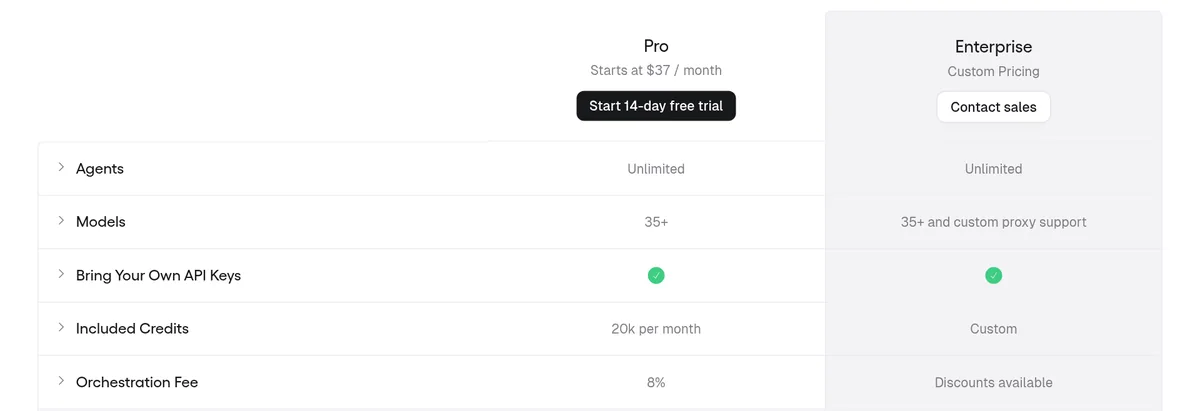
Gumloop's pricing page shows two plans:
- Pro: starts at $37 a month, with a 14 day free trial. It includes 20,000 credits a month, 35+ models, and unlimited agents.
- Enterprise: custom pricing. It adds things like audit logs, role based access, SCIM and SAML support, and more hands on help.
The FAQ says Pro includes "7,400 + 12,600 bonus credits (20,000 total) for $37/month." So part of your monthly credits is a bonus on top.
Pro also has limits worth knowing. The pricing table lists 5 concurrent workflow runs, 25 concurrent agent chats, and 1 hosted MCP server.
How credits and fees work
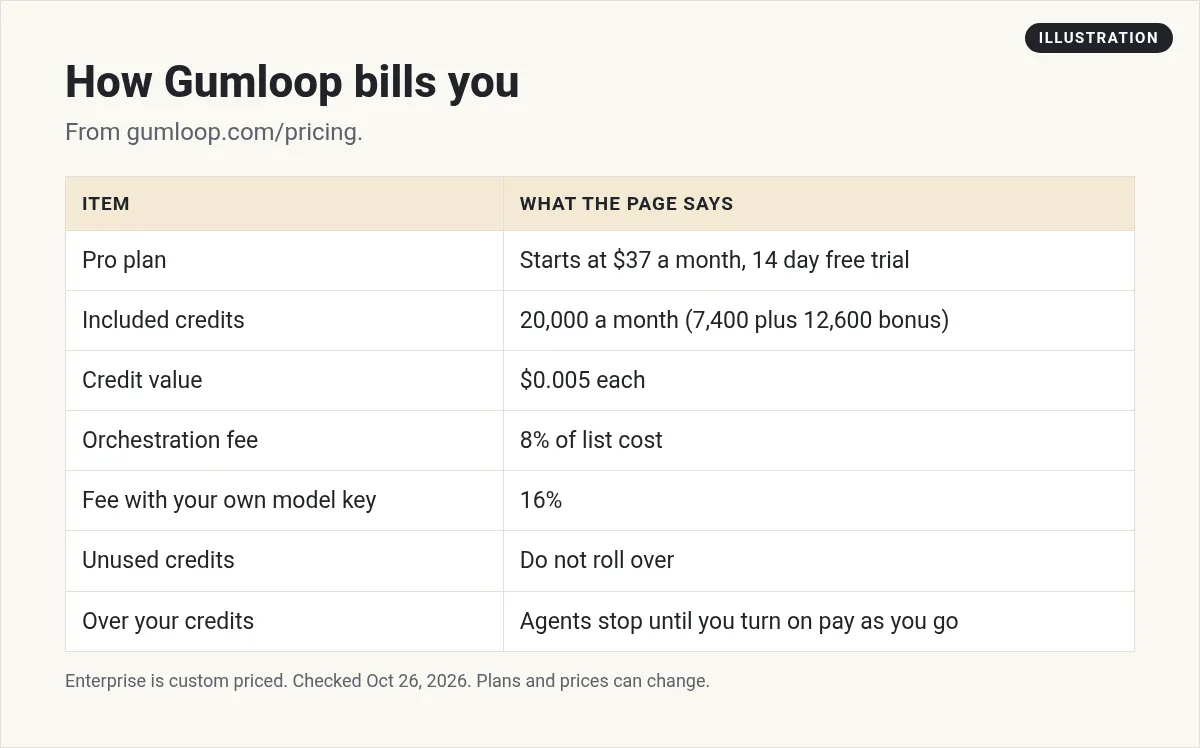
Credits are how Gumloop bills for everything. The FAQ says "Credits are indexed at $0.005 each." So 20,000 credits works out to $100 of usage at list price. That is my math.
When an agent runs, you pay credits for three things at each provider's list price:
- Model tokens. The words the AI model reads and writes.
- Compute. The servers that run the work.
- Paid tool calls. Calls to paid APIs, with a base cost of 1 credit per call.
On top of that, Gumloop "charges you an 8% orchestration fee on the full list cost of the task." That is their cut for running the whole thing.
A simple cost example
Here is a made up example to show how the fee works. This is my math, not a number from Gumloop.
Say one agent run uses 100 credits of tokens, compute, and tool calls at list price. The 8% fee adds 8 credits. So that run costs 108 credits.
With 20,000 credits a month, you could do that run about 185 times before you hit the limit. A bigger run that uses 1,000 credits would cut that to about 18 times.
The point is simple. Your real cost depends on which model you pick and how much work each run does. Smart models and long tasks use more credits. Test first, then plan.
Bringing your own API key
You can plug in your own key from a model company like OpenAI or Anthropic. Then the model's token cost drops to zero credits, because you pay that company directly.
But there is a catch. The FAQ says "the orchestration fee increases from 8% to 16%." And that fee is figured on what the task would have cost without your key.
So your own key can save credits, but it does not make runs free. You now pay two bills: one to the model company and one to Gumloop. Do the math on a real task before you switch.
For MCP tool calls, your own key can cut the cost down to a minimum of 1 credit per call.
What happens when credits run out
This part matters if your agents do important work. The FAQ says if you go past 20,000 credits mid month, "Your agents will stop working."
You get asked to turn on pay as you go to keep going. The FAQ says "Pay as you go is not enabled by default." Once it is on, usage bills at $0.005 a credit.
Also, credits do not carry over. The FAQ says the 20,000 credits are a monthly grant that resets each billing period. You "don't bank what you didn't use."
My advice: watch your usage the first month. If a key agent might stop near month end, turn on pay as you go and set a budget you are fine with.
Teams and sharing
Gumloop is built for teams. The FAQ says team members on Pro and Enterprise can "share credentials, collaborate on agents, and use the same pool of credits."
A team is a shared workspace. People on the same team can see each other's agents and track shared usage. A big company might have one team for sales and another for marketing.
Bigger companies may want Enterprise. The FAQ says it adds the security and compliance tools large teams need, like role based access, audit logs, and incognito mode. It also comes with more hands on support. Pricing is set by talking to sales.
One shared pool is simple, but it also means one busy agent can use up credits for everyone. Keep an eye on who uses what.
What people build with it
Gumloop's site lists use cases that show where it shines. A few of them:
- Lead work. Lead generation and lead qualification agents.
- Sales prep. Meeting prep and CRM agents that keep records clean.
- Support. Support agents and call analysis.
- Marketing. Content creation, SEO automation, and ad campaign management.
- Stores. Agents for Shopify stores.
The common thread is work that touches many apps and needs some judgment. That is where an agent beats a plain if this, then that rule.
Who Gumloop is for
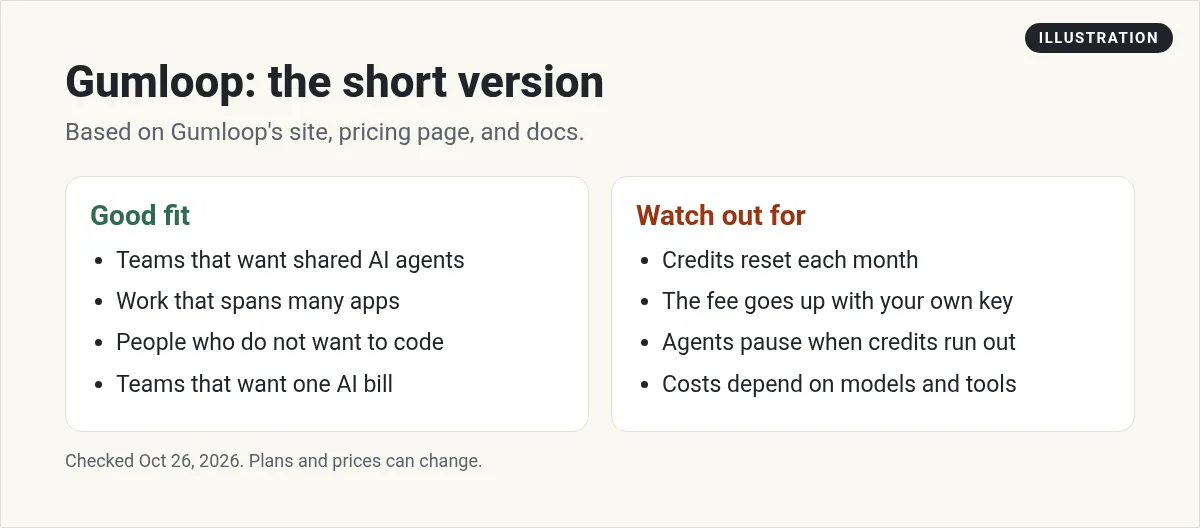
Gumloop fits best if you want AI agents that work across many apps, and you would rather not write code. It is a good match for small teams in sales, support, and marketing who want one place to build and share agents.
It may not be the best pick if you just need simple app to app steps, like copying a form into a sheet. A classic tool can do that for less. See my Zapier pricing guide and my Zapier alternatives list.
If you like to tinker and host things yourself, look at n8n. And if you want to build an agent from scratch, my guide on how to build an AI agent walks through it.
How to try Gumloop
- Start the trial. Sign up for the 14 day Pro trial.
- Pick one task. Choose one boring task you do every week.
- Connect two apps. Keep the first agent small.
- Run it by hand first. Check the output before you put it on a schedule.
- Check credit use. See how many credits one run takes, then guess your month.
That last step tells you if $37 a month is enough, or if you will need pay as you go.
Before you pay for Gumloop
Nothing you check here is sent or saved. Download it if you want to keep it.
See how I use AI agents in my business
Want to see the AI tools I use to save time each week? Join my free AI workshop. I walk through it step by step.
Join my free AI workshopFree to join. No credit card needed.
Frequently asked questions
What is Gumloop?
Gumloop is an AI agent platform. You build AI agents that use your tools and data, then run them on triggers, schedules, or the API.
How much does Gumloop cost?
As of October 26, 2026, Gumloop Pro starts at $37 a month with a 14 day free trial and 20,000 credits a month. Enterprise is custom priced.
How much is a Gumloop credit worth?
Gumloop's pricing FAQ says credits are indexed at $0.005 each.
Do Gumloop credits roll over?
No. The 20,000 credits are a monthly grant that resets each billing period.
What happens if I run out of Gumloop credits?
Your agents stop working until you turn on pay as you go. It is not on by default. Then usage bills at $0.005 a credit.
Can I use my own API key with Gumloop?
Yes. Model token costs drop to zero credits, but the orchestration fee rises from 8% to 16% of the full list cost.
Sources
Checked October 26, 2026. Plans, prices, and rules can change.
