
AI Coding · Explained
Kiro is an AI coding agent built by AWS. It turns your idea into a written plan before it writes code. Here is how specs work, what each plan costs, and how credits get used.
Most AI coding tools jump straight into writing code. Kiro starts with a plan. It writes down what the app must do, how it will be built, and the steps to get there. Then its agents do the work.
I checked Kiro's home page, docs, and pricing page on October 26, 2026. Here is what it is, how it compares to plain vibe coding, and what you pay.
Quick answer
Kiro is an AI coding agent from AWS that works in an IDE, a CLI, the web, and a mobile app. Its big idea is spec-driven development: it turns your prompt into requirements, a design, and tasks before it builds. Kiro's site says you do not need an AWS account to use it. On October 26, 2026, the Free tier included 50 credits a month. Paid plans were Pro at $20, Pro+ at $40, Pro Max at $100, and Power at $200, each per user a month, billed monthly, with 1,000 to 10,000 credits.
What Kiro is
Kiro's docs say: "Kiro is an AI-powered development environment that helps you build software from prototype to production." One agent "powers every surface (IDE, CLI, Web, and Mobile)."
The home page says Kiro is "Built and operated by AWS." But you do not need to be an AWS customer. The FAQ says: "You do not need an AWS account to use Kiro." You can log in "with GitHub, Google, AWS Builder ID, or AWS IAM Identity Center."
The IDE will feel familiar if you have used VS Code. The FAQ says "Kiro is based on Code OSS," so you can import your VS Code settings, themes, and Open VSX plugins.
The four ways to use it
- Kiro IDE: "for active, local development with real-time agent collaboration"
- Kiro CLI: "for terminal-based workflows, custom agents, and deployment pipelines"
- Kiro Web: sessions run in cloud sandboxes and keep going when you close your laptop. The pricing FAQ says Web is "Available to Kiro Pro, Pro+, Pro Max, and Power users."
- Kiro Crew: an "open-source development workspace that runs on your machine"
How specs work
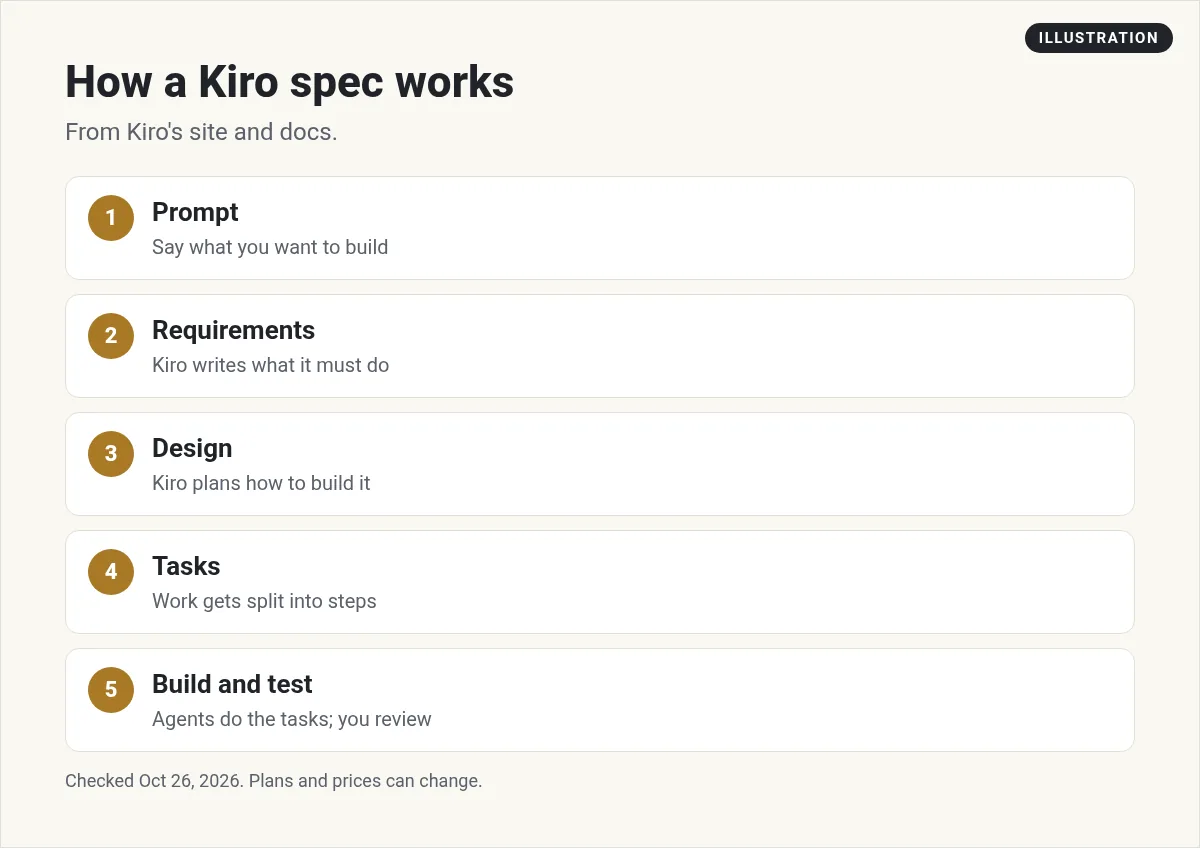
Specs are what make Kiro different. The home page says: "Kiro turns your prompts into requirements, architectural designs, and sequenced tasks, then implements them with parallel agents."
In plain words, it works like this:
- You describe the feature. For example, add a login page with email and password.
- Kiro writes requirements. What the feature must do, and the edge cases.
- Kiro writes a design. How it will be built.
- Kiro splits it into tasks. Small steps, in order.
- Agents build and test it. You review the work.
The FAQ explains why. It says vibe coding "can require too much guidance on complex tasks or when building on top of large codebases, and it can misinterpret context." Specs write the decisions down, so you and your team can see them. New to the term? See my guide to what vibe coding is.
Checking the code matches what you meant
Kiro also tests in a special way. The home page says it "checks your requirements for contradictions and gaps using automated reasoning techniques." It then uses property-based tests, which it compares to fuzz testing. These try many inputs to find bugs that normal tests can miss.
Kiro pricing
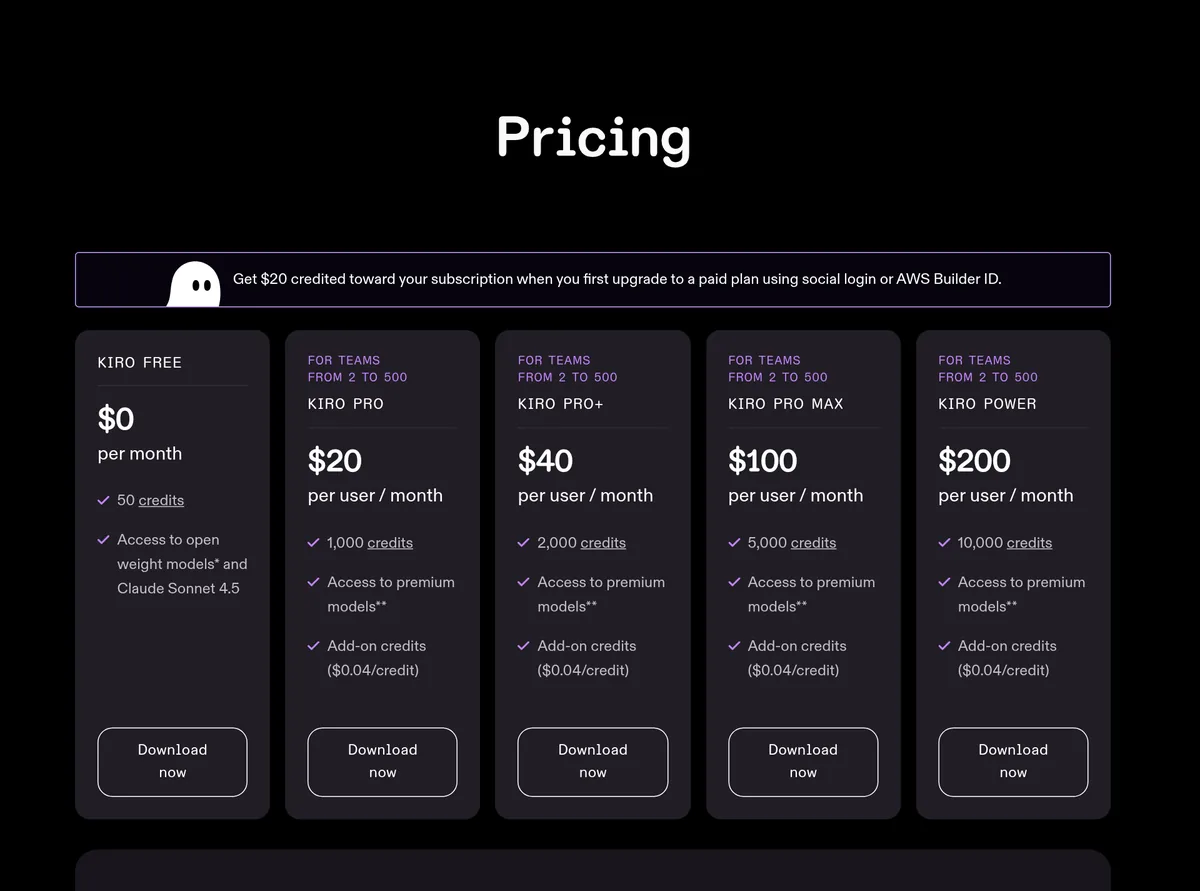
Here are the plans from Kiro's pricing page on October 26, 2026. Paid plans are priced per user, per month. The FAQ says "Kiro processes paid subscriptions on the 1st day of each calendar month."
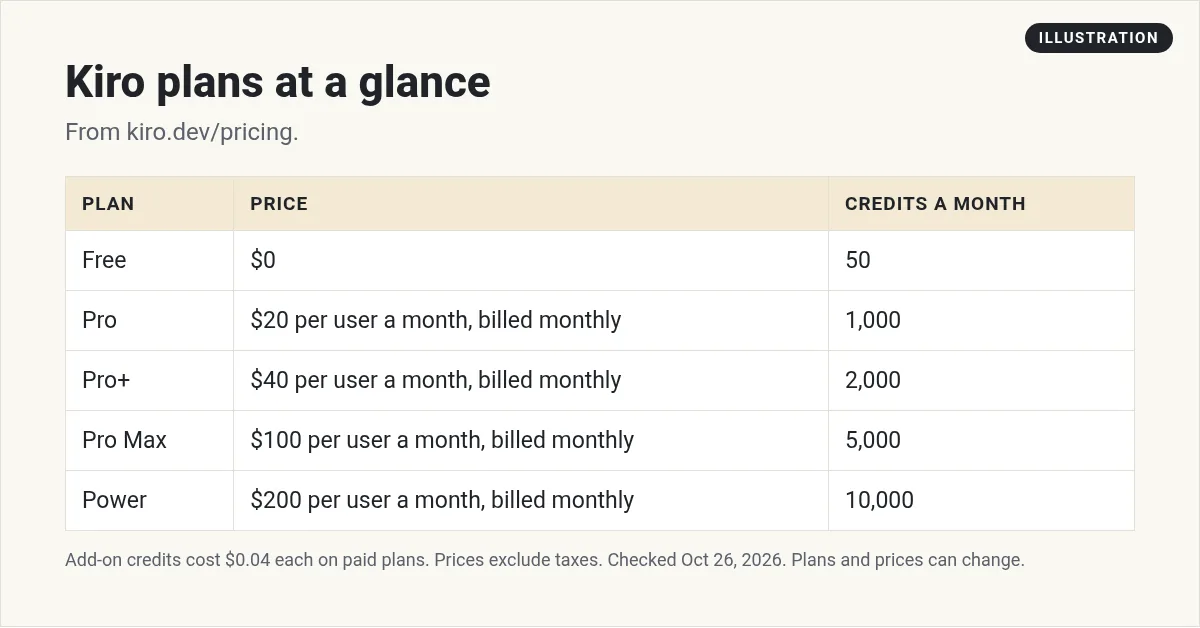
- Free: $0 a month, 50 credits. The FAQ calls it "the perpetual Kiro Free tier." It includes open weight models and Claude Sonnet 4.5, "with limits."
- Pro: $20 per user a month, billed monthly, 1,000 credits
- Pro+: $40 per user a month, billed monthly, 2,000 credits
- Pro Max: $100 per user a month, billed monthly, 5,000 credits
- Power: $200 per user a month, billed monthly, 10,000 credits
Paid plans include premium models. The page says that includes "Auto, Claude Sonnet 5 and Claude Opus 5." It adds that "Not all premium models are available in all countries/regions."
Prices do not include tax. The page says "Prices are exclusive of applicable taxes and duties, including VAT and applicable sales tax." In AWS GovCloud (US) Regions, pricing is "approximately 20% higher."
The sign-up credit
The first time you upgrade to a paid plan using social login or Builder ID, Kiro credits $20 toward your subscription. Because billing runs on the 1st of the month, the credit is prorated. The FAQ gives an example: upgrade to Pro on June 15, and you get $10 for June, then pay $10 on July 1.
How Kiro credits work
The FAQ says: "A credit is a unit of work in response to user prompts. Simple prompts can consume less than 1 credit. More complex prompts, such as executing a spec task, typically cost more than 1 credit."
A few more rules:
- What uses credits. Prompts "in vibe mode or spec mode," spec refinement, task execution, and agent hook execution.
- Models cost different amounts. The FAQ says a task that costs X credits in Auto "will cost you 1.3X credits to execute via Sonnet 4.6."
- Small tasks. Credits are metered to two decimals, so the smallest charge is 0.01 credits.
- No rollover. "Unused credits do not roll over to the next month."
- Add-ons. On paid plans, extra credits "cost $0.04 each." Packs "range from $5 (125 credits) to $100." Add-on credits "expire 12 months from the date of purchase."
- Tracking. Your dashboard shows credits used and left. Usage "is updated at least every 5 minutes."
The home page says Kiro has "no daily or weekly rate limits and pre-paid overages." That makes your monthly cost easier to predict.
Rules to know
- One person, one plan. The FAQ says "each developer needs their own subscription."
- Use it in Kiro's own tools. Subscriptions work with Kiro IDE, CLI, Web, Crew, ACP compatible IDEs, and CI/CD automation. The FAQ says use through third-party harnesses, "such as OpenClaw," that route requests outside Kiro's own interfaces is not allowed.
- Card required for paid. "Upgrading to a paid subscription requires a valid credit card."
How to start with Kiro
- Download Kiro from kiro.dev, or sign in on the web with a paid plan.
- Log in with GitHub, Google, or AWS Builder ID.
- Import your VS Code settings during setup, if you use VS Code.
- Try a small spec. Ask for one feature and read the requirements and design before it builds.
- Watch your credits in the dashboard for the first week.
Which Kiro plan to pick
Here is my math from the pricing page. Every paid plan works out to the same rate: $20 for 1,000 credits is 2 cents a credit, and so is $200 for 10,000. Add-on credits cost $0.04 each, which is twice that rate.
So if you keep buying add-ons every month, the next plan up is likely cheaper. For example, on Pro, 1,000 extra credits in add-ons would cost $40. Moving to Pro+ adds the same 1,000 credits for $20 more a month.
Start on Free. Move to Pro once you hit the 50 credit limit, and watch how many credits a normal week uses before you go higher.
Kiro vs other AI coding tools
Kiro suits you if you like to plan before you build, or you work on a big codebase with a team. If you want to type a prompt and see an app right away, a vibe coding builder may feel faster.
Compare it with my guides to Cursor alternatives, Claude Code alternatives, and vibe coding tools.
Before you start with Kiro
Nothing you check here is sent or saved. Download it if you want to keep it.
Meet AIM Agent
AIM Agent is an AI Chief of Staff for business owners. You give it a real task, and it brings the work back for you to review. You stay the one who approves.
Meet AIM AgentI am a co-founder of AIM Agent and have a financial interest in the product.
Frequently asked questions
What is Kiro AI?
Kiro is an AI coding agent built and operated by AWS. It works in an IDE, a CLI, the web, and a mobile app, and it plans work with specs before it writes code.
Is Kiro free?
Yes, there is a perpetual Free tier with 50 credits. It includes open weight models and Claude Sonnet 4.5, with limits.
How much does Kiro cost?
On October 26, 2026, Pro was $20, Pro+ $40, Pro Max $100, and Power $200, each per user a month, billed monthly. Prices exclude taxes.
Do I need an AWS account to use Kiro?
No. Kiro's FAQ says you do not need an AWS account. You can log in with GitHub, Google, AWS Builder ID, or AWS IAM Identity Center.
Do Kiro credits roll over?
Monthly credits do not roll over. Add-on credits, which cost $0.04 each, expire 12 months from the date of purchase.
What is spec-driven development in Kiro?
Kiro turns your prompt into requirements, an architectural design, and sequenced tasks, then builds them with agents.
Sources
Checked October 26, 2026. Plans, prices, and rules can change.
