
AI Tools · Local AI
Ollama lets you run open AI models on your own computer, free. It also has a cloud with paid plans. Here is how to set it up, what your computer needs, and what the plans cost.
Ollama is one of the easiest ways to run AI on your own computer. You download it, pick a model, and start chatting. No monthly bill is needed for that part.
I checked Ollama's download page, docs, and pricing page on October 26, 2026. Here is how it works, what you need, and when the paid cloud plans make sense.
Quick answer
Ollama is a free app for macOS, Windows, and Linux that runs open AI models on your own computer. Ollama's pricing FAQ says running models on your own hardware is always unlimited. It also has cloud models with plans: Free at $0, Pro at $20 a month or $200 a year, Max at $100 a month, and Team at $500 a month in early access, as of October 26, 2026.
What Ollama is
Ollama is an app that runs open AI models. Open models are ones anyone can download and use, like Gemma or gpt-oss.
It runs them in two ways. Ollama's download page puts it simply: "Locally, on this computer." Or "In Ollama's cloud." Cloud models run on Ollama's servers, so they are fast on any computer and need no download.
Why run AI locally? A few reasons:
- It is free. Ollama's FAQ says "Running models on your own hardware is always unlimited."
- Your data stays with you. Local models run on your machine.
- It works offline once the model is downloaded.
- It plugs into other tools. Apps and coding agents can talk to it.
If you want a point and click app for the same job, compare it with LM Studio.
How to set up Ollama
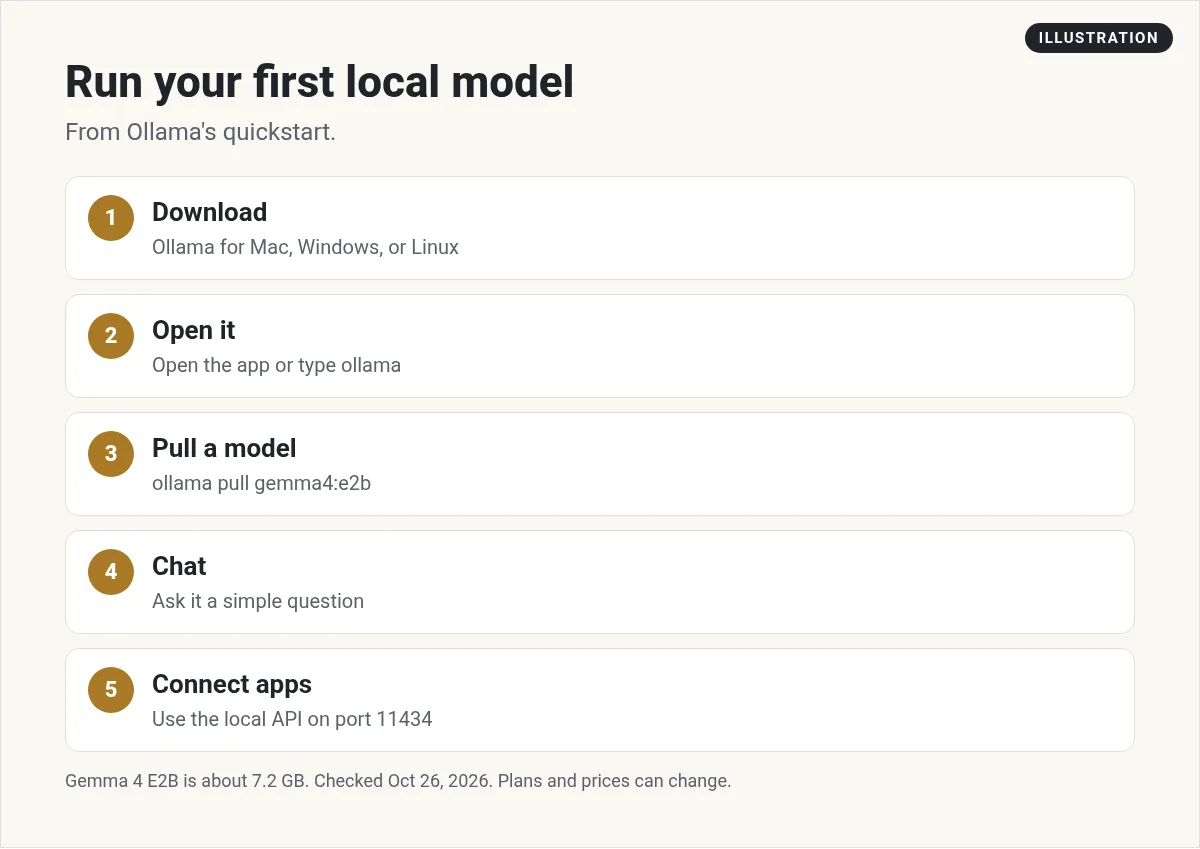
Ollama's quickstart makes this easy. Here are the steps.
- Download it. Get Ollama for macOS, Windows, or Linux from the download page.
- Open it. Open the app, or type
ollamain your terminal. Follow the setup prompts. - Pick local or cloud. The docs say to sign in to use cloud models, or choose a local model.
- Pull a model. The quickstart uses
ollama pull gemma4:e2bto download a small Gemma 4 model. - Ask it something. Start with a simple question to make sure it works.
On Linux, the quickstart says to start the server with ollama serve if it is not already running.
Once a model is loaded, the FAQ says it stays in memory for 5 minutes by default. That makes the next answer faster.
What your computer needs
This is the big question for local AI. Bigger models need more memory.
For the small Gemma 4 E2B model, the quickstart says the download is about 7.2 GB. It says "We recommend 8 GB of available VRAM, or unified memory on a Mac."
VRAM is the memory on your graphics card. Newer Macs share one pool of memory, which works too.
What if you have less? The docs say Ollama can use system RAM, "but responses may be slower." The download page also warns that large models are slow on a computer without a strong GPU.
My advice: start with a small model. If it runs well, try a bigger one. If your laptop struggles, use a cloud model instead.
Ollama cloud pricing as of October 26, 2026
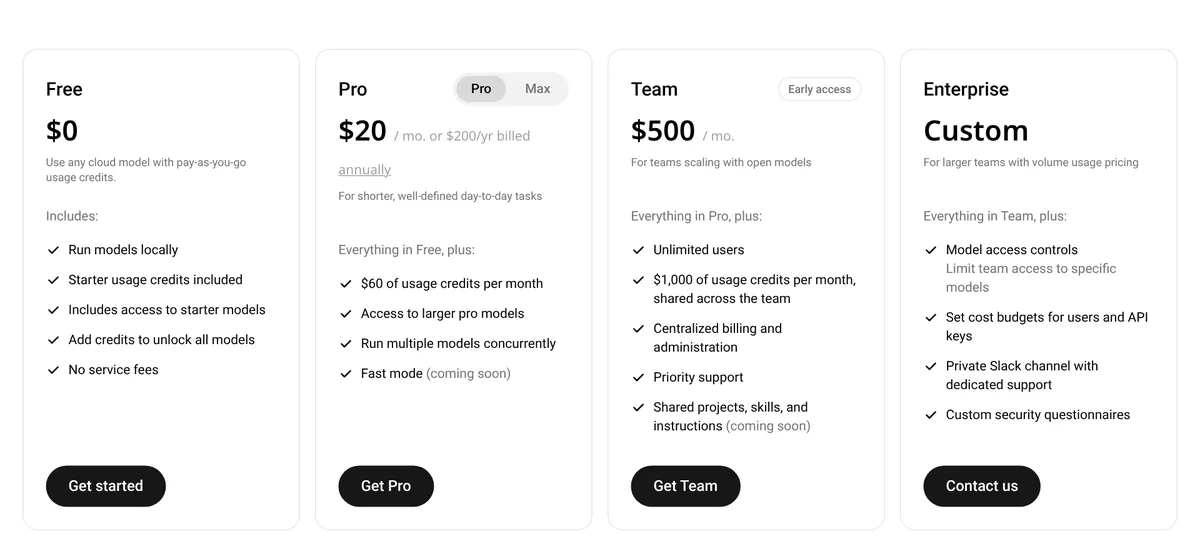
Running models locally is free. The paid plans are for Ollama's cloud models. Here is what the pricing page shows:
- Free: $0. Run models locally, plus starter usage credits for starter models.
- Pro: $20 a month, or $200 a year billed annually. Includes $60 of usage credits per month and access to larger pro models.
- Max: $100 a month. Includes $300 of usage credits per month and early access to the newest models.
- Team: $500 a month, in early access. Unlimited users and $1,000 of usage credits per month, shared across the team.
- Enterprise: custom pricing, with model access controls and cost budgets.
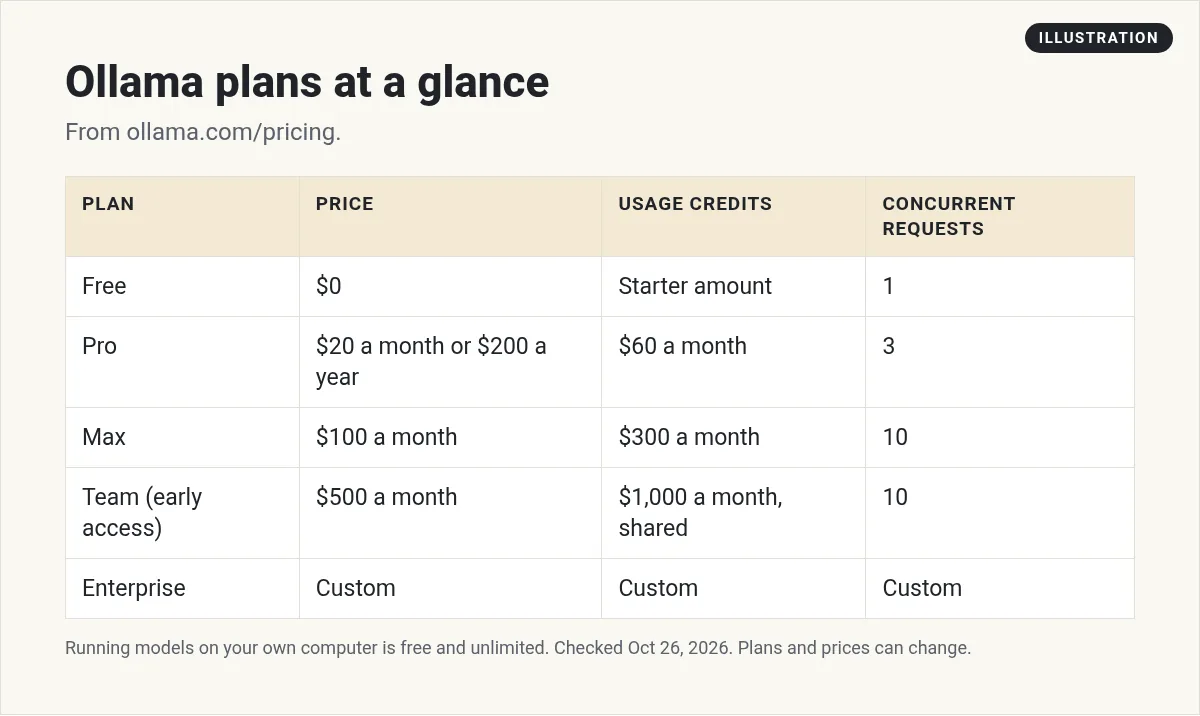
The plans also differ on how many requests run at once. The FAQ says "Free includes 1 concurrent request, Pro 3, and Max and Team 10." Extra requests wait in a queue.
How usage credits work
Cloud usage is measured in tokens, which are small chunks of text. Each model has its own price per million tokens on the pricing page.
A few examples from the table, per million tokens: gpt-oss:20b is $0.07 for input and $0.30 for output. gemma4 is $0.14 for input and $0.40 for output. Bigger models cost more.
Some models also have off peak prices. The page says off peak pricing applies outside 12:00 and 18:00 UTC on weekdays and all day on weekends.
Here is how the credits flow:
- Plan credits first. Ollama uses your included credits, then any credits you bought.
- No rollover. The FAQ says unused included usage does not roll over. It refreshes each month.
- A heads up. On paid plans, Ollama emails you at 90% of your included monthly usage.
- Buying credits. Every plan, including Free, can buy usage credits, which unlocks all models.
If you are on the Free plan, the download page says to start with gemma4:cloud, which the free plan includes. It says most other cloud models need a paid plan or purchased credits.
Team plan billing
The Team plan is for groups that want shared usage and one bill. The FAQ says Team starts at $500 a month with unlimited users and $1,000 of usage credits included each month.
Usage past that draws from a shared team balance, billed as you go. The FAQ says you can add a set amount to the balance and turn off automatic usage billing. That is a good way to cap spend.
When you join a team, Ollama makes a separate team account. You switch between team and personal with the same login. Ollama is one account per person.
Privacy and where data goes
For local models, your prompts stay on your computer.
For cloud models, Ollama's FAQ says "Prompt or response data is never logged or trained on." It also says Ollama hosts models primarily in the United States, and may route to Europe for more capacity.
The FAQ adds that when Ollama works with hosting partners, it requires no logging, no training, and zero data retention policies.
Using Ollama with coding agents and apps
This is where Ollama gets fun. The quickstart shows commands to launch coding agents with Ollama models:
ollama launch claudefor Claude Codeollama launch codexfor Codex CLI, after you install itollama launch opencodefor OpenCode
On macOS, you can also connect Ollama to the Claude and ChatGPT desktop apps from the Apps menu.
For your own projects, local Ollama runs an API at localhost on port 11434. For cloud models, you create an API key and send requests to ollama.com. The docs say to keep your key on your server, outside browser code and source control.
My guides on Codex CLI and Cline show how coding agents work. If you want many cloud models behind one key, see OpenRouter.
Tips for getting good results
- Match the model to the job. Small models are fine for quick notes and summaries. Use bigger ones for hard reasoning.
- Close heavy apps. Local AI needs memory. Fewer open apps means faster answers.
- Try the cloud for big jobs. If a local model is slow, switch to a cloud model for that task only.
- Watch your queue. On Free, only 1 cloud request runs at a time.
Who should use Ollama
Ollama is a great fit if you want to try AI for free, keep data on your own machine, or build apps on open models. It is also handy for coding agents.
The paid cloud plans fit people who want bigger, faster models without buying a powerful computer. Start with Free, then move up only if you hit the limits.
If you are new to AI tools in general, my list of AI tools for small business is a good place to start.
Ollama starter checklist
Nothing you check here is sent or saved. Download it if you want to keep it.
Meet AIM Agent
AIM Agent is an AI Chief of Staff for business owners. You give it a real task, and it brings the work back for you to review. You stay the one who approves.
Meet AIM AgentI am a co-founder of AIM Agent and have a financial interest in the product.
Frequently asked questions
Is Ollama free?
Yes. Ollama is free to download, and its pricing FAQ says running models on your own hardware is always unlimited. Paid plans are for cloud models.
How much does Ollama cost?
As of October 26, 2026, Ollama cloud plans are Free at $0, Pro at $20 a month or $200 a year, Max at $100 a month, and Team at $500 a month in early access.
What computer do I need for Ollama?
It depends on the model. For Gemma 4 E2B, the docs say the download is about 7.2 GB and recommend 8 GB of available VRAM, or unified memory on a Mac.
Does Ollama work offline?
Local models run on your own computer, so they can work without the internet once downloaded. Cloud models need a connection.
Is Ollama private?
Local models stay on your computer. For cloud models, Ollama says prompt or response data is never logged or trained on.
Do Ollama cloud credits roll over?
No. Ollama says unused included usage does not roll over and refreshes each month.
Sources
Checked October 26, 2026. Plans, prices, and rules can change.
