
AI Tools · Local AI
LM Studio is a free app that runs AI models on your own computer, even with no internet. Here is what it does, what the paid plans add, and the computer you need.
Most AI chat apps send your words to a company's servers. LM Studio is different. It downloads an AI model to your own computer and runs it there.
That means your chats can stay on your machine. I checked LM Studio's home page, pricing page, docs, and system requirements on October 26, 2026. Here is what you need to know.
Quick answer
LM Studio is a free desktop app for Mac, Windows, and Linux that runs open AI models, like Llama, Qwen, and gpt-oss, on your own computer. Its docs say it "can operate entirely offline" once you download model files. The Free plan ($0) includes the Bionic agent and local models. Bionic+ ($20 USD a month) adds US-hosted cloud models and web search. Pro ($100 USD a month) adds 5x usage limits.
What LM Studio is
LM Studio is an app you install like any other program. Inside, you search for an open AI model, download it, and chat with it. The docs say you can "Download and run local LLMs like gpt-oss or Llama, Qwen."
An LLM, or large language model, is the type of AI behind tools like ChatGPT. Open models are ones their makers let you download and run yourself.
The docs list what you can do with it:
- Chat with models in a simple window
- Search and download models (through Hugging Face)
- Connect MCP servers and use them with local models
- Chat with your documents, offline
- Serve local models on OpenAI-like endpoints, for your own apps
New to MCP? My guide to MCP servers explains it in plain words.
What Bionic is
In 2026, LM Studio's home page leads with something called Bionic. It calls it "LM Studio's agent for open models."
An agent does more than chat. The home page says you can "Work with Bionic to create and edit documents" and that it "also excels at coding tasks, automations, and computer control."
It also has voice typing. The home page says "Your voice and audio data is processed locally and never leaves your device."
The pricing FAQ sums it up: "LM Studio Bionic combines local AI features with optional cloud inference." So you can stay fully local, or add cloud models when your computer is not strong enough.
LM Studio pricing
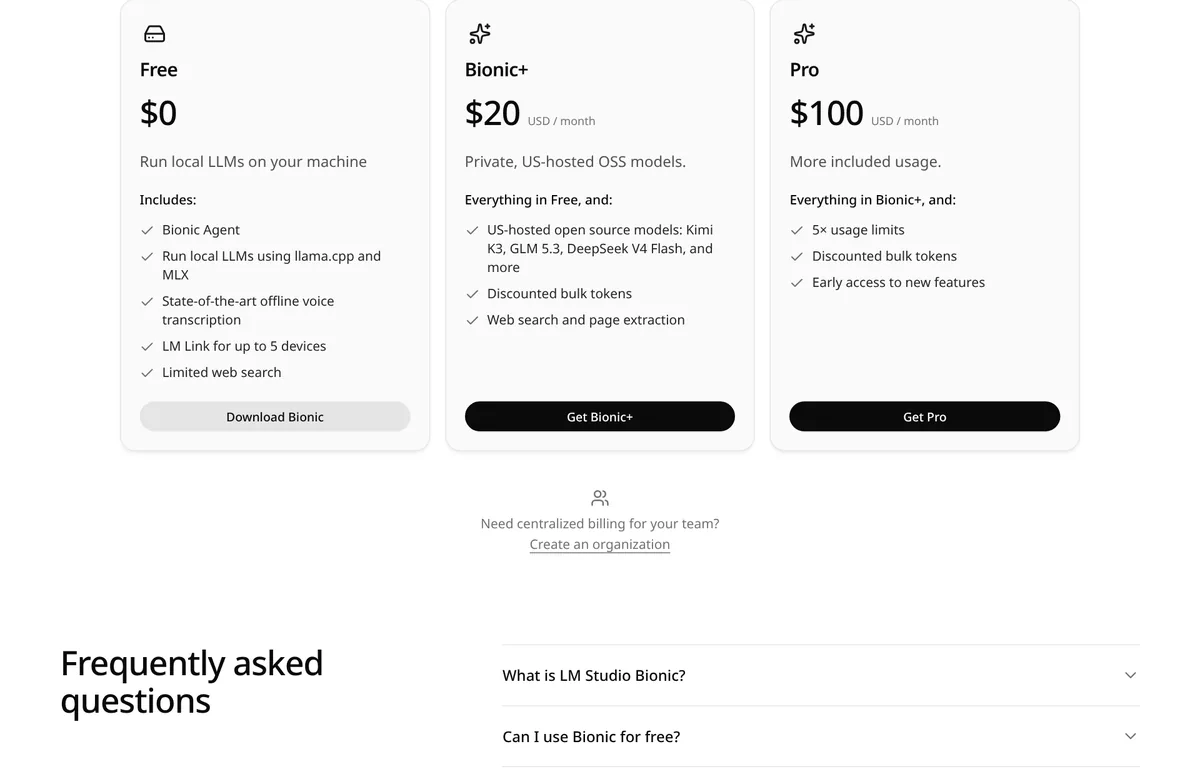
LM Studio has three plans. Prices below are from the pricing page on October 26, 2026.
Free: $0
The Free plan is for running models on your own machine. It includes the Bionic Agent, local models using llama.cpp and MLX, offline voice transcription, LM Link for up to 5 devices, and limited web search.
Bionic+: $20 USD a month
Bionic+ adds "Private, US-hosted OSS models." The page lists Kimi K3, GLM 5.3, and DeepSeek V4 Flash. It also adds web search and page extraction, plus discounted bulk tokens.
Pro: $100 USD a month
Pro includes everything in Bionic+ and adds "5× usage limits," discounted bulk tokens, and early access to new features.
The page says cloud credits "cover usage beyond the allowance included with your plan." For teams, the FAQ says LM Studio offers "centralized billing for teams using inference credits," with team subscription plans "coming soon."
On privacy, the pricing page says "Bionic cloud inference is US-hosted, with Zero data retention (ZDR)." The FAQ explains that this "means your prompts and responses are not stored by the provider."
The computer you need
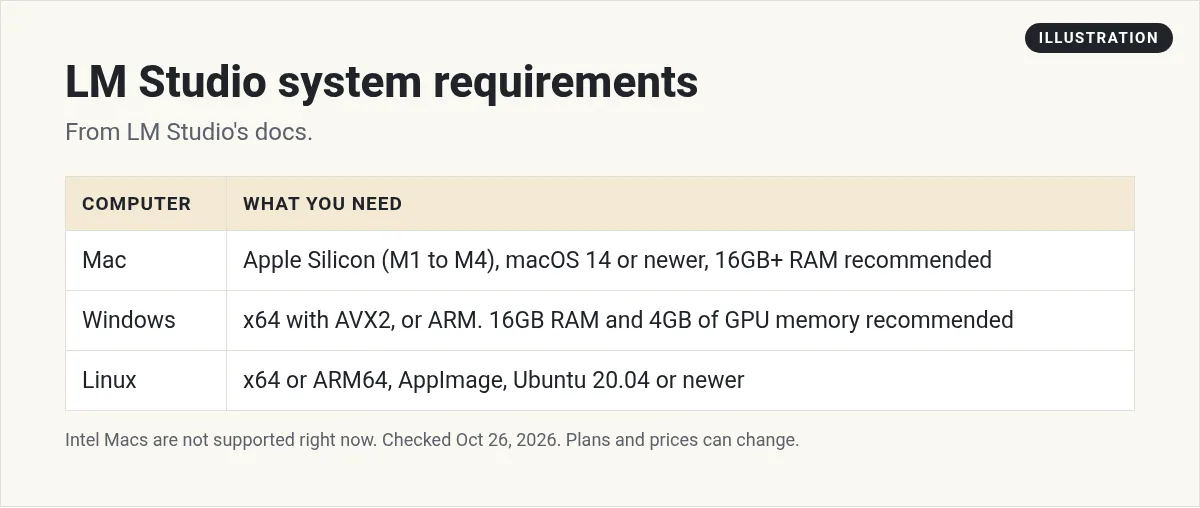
Check this before you download. Local AI uses your computer's memory and chip. Here is what the system requirements page says.
Mac
- Apple Silicon (M1, M2, M3, or M4). "Intel-based Macs are currently not supported."
- macOS 14.0 or newer.
- 16GB or more of RAM is recommended. You may still use an 8GB Mac, but the page says to "stick to smaller models and modest context sizes."
Windows
- x64 or ARM (Snapdragon X Elite) systems.
- On x64, "AVX2 instruction set support is required."
- At least 16GB of RAM is recommended.
- A GPU with at least 4GB of dedicated VRAM is recommended.
Linux
- x64 and ARM64 systems, shipped as an AppImage.
- Ubuntu 20.04 or newer is required.
A simple rule: the more memory you have, the bigger the model you can run. Bigger models are usually smarter, but slower on weaker machines. Start small and move up.
How to run your first local model
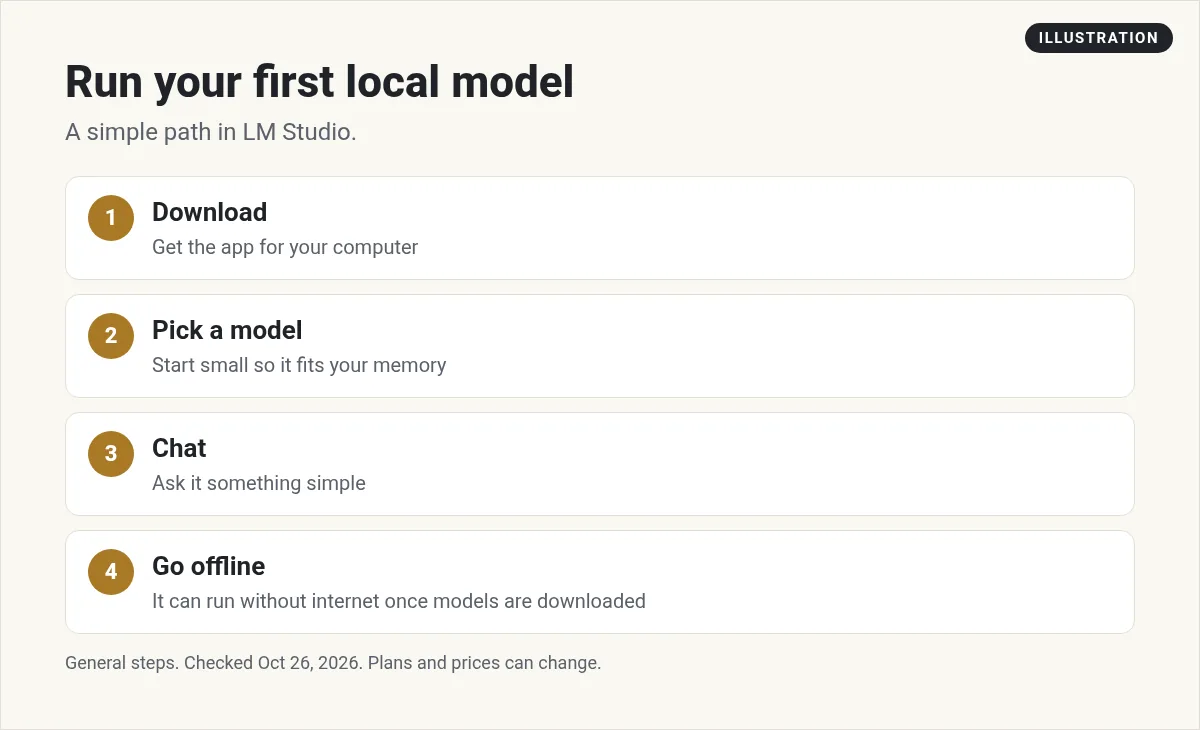
- Check your computer. Compare it to the list above before you download.
- Download LM Studio. Get it from lmstudio.ai. The docs say it "is available for macOS, Windows, and Linux."
- Pick a small model first. Search inside the app. The docs say: "To run an LLM on your computer you first need to download the model weights."
- Load it and chat. Ask it a simple question to see the speed on your machine.
- Try it offline. Once the model is downloaded, turn off Wi-Fi and chat again. The docs say LM Studio "can operate entirely offline, just make sure to get some model files first."
Model files can be large, so check your free disk space before you download several.
Local AI vs cloud AI: what changes
Running a model on your own computer is not the same as using a chat site. Here is what changes when you switch:
- Cost. Local models on the Free plan have no per message cost. You pay with your computer's power and time instead.
- Privacy. With a local model, your prompts are processed on your own machine. That is useful for private notes, client files, or drafts you do not want to share.
- Speed. Speed depends on your hardware. A strong machine can feel quick. An older laptop can feel slow, even with a small model.
- Quality. Smaller open models can handle summaries, rewrites, and simple questions. For hard reasoning or long coding tasks, test before you rely on them.
- Setup. You pick, download, and update models yourself. Chat sites do that for you.
LM Studio also has a feature called LM Link. The Free plan includes it for up to 5 devices. The docs say it lets you "route local AI workloads across devices and preferred machines." So a strong desktop can do the work while you type on a lighter laptop.
For builders: the local API
LM Studio can also act like a mini AI server on your machine. The docs say it provides "a REST API that you can use to interact with your local models from your own apps and scripts." It also has an OpenAI compatible API.
That means a tool built for an online AI service can often talk to a model on your own computer instead. The docs list integrations with Codex, Claude Code, OpenClaw, and MCP tools.
There is also a headless version called llmster. The docs say it is "ideal for servers, CI environments, or any machine where you don't need a GUI."
If you use AI coding tools, my guide to Claude Code alternatives covers other options.
Is LM Studio worth it?
LM Studio is a good fit if you want privacy, want to use AI with no internet, or want to try open models without paying per message. The Free plan covers all of that.
It may not fit if your computer is older or low on memory. Local models also may not match the top paid cloud models on hard tasks. If that is you, a cloud plan may be easier. See my guides to ChatGPT pricing and Claude Pro vs Max.
You can also use both: a local model for private notes and quick drafts, and a cloud model for the hardest work.
Before you install LM Studio
Nothing you check here is sent or saved. Download it if you want to keep it.
Meet AIM Agent
AIM Agent is an AI Chief of Staff for business owners. You give it a real task, and it brings the work back for you to review. You stay the one who approves.
Meet AIM AgentI am a co-founder of AIM Agent and have a financial interest in the product.
Frequently asked questions
Is LM Studio free?
Yes. The Free plan is $0 and includes the Bionic Agent and local models. Paid plans are Bionic+ at $20 USD a month and Pro at $100 USD a month.
Does LM Studio work offline?
Yes. The docs say LM Studio can operate entirely offline once you download some model files.
What computer do I need for LM Studio?
On Mac, Apple Silicon and macOS 14.0 or newer. On Windows, x64 with AVX2 or ARM (Snapdragon X Elite). On Linux, Ubuntu 20.04 or newer. 16GB of RAM is recommended.
Does LM Studio work on Intel Macs?
No. The system requirements page says Intel-based Macs are currently not supported.
What is LM Studio Bionic?
Bionic is LM Studio's agent for open models. The pricing FAQ says it combines local AI features with optional cloud inference.
Can I use LM Studio with my own apps?
Yes. The docs say LM Studio provides a REST API and an OpenAI compatible API for your local models.
Sources
Checked October 26, 2026. Plans, prices, and rules can change.
