
AI Tools · Explained
OpenRouter lets you use hundreds of AI models with one account and one API key. Here is how it works, what it costs, and how to try it for free.
Most AI companies give you their own account, their own key, and their own bill. If you want to try Claude, GPT, and Gemini side by side, that means three sign ups and three bills.
OpenRouter puts them behind one door. I checked its home page, pricing page, quickstart, and FAQ on October 26, 2026. Here is what it is and what you pay.
Quick answer
OpenRouter is one API and one account for many AI models. Its pricing page lists 500+ models from 80+ providers. OpenRouter says it passes through model prices with no markup and charges a fee when you buy credits: 5.5% on the Standard plan and 8% on Business. A Free plan gives you 25+ free models with a limit of 50 requests a day. There is no subscription.
What OpenRouter is
OpenRouter calls itself "The Unified Interface For Every Model." Its tagline is "Better prices, better uptime, no subscriptions."
Here is the simple version. You put money into one OpenRouter account. You get one API key. Then you can send requests to models from Anthropic, OpenAI, Google, and many more, all through that one key.
On October 26, 2026, the home page listed these numbers:
- 500+ models
- 80+ providers
- 10M+ global users
- 700T+ monthly tokens
It also says its API is "Fully OpenAI compatible." That means code written for OpenAI's API can often point at OpenRouter by changing the address and the key.
Why people use it
The home page gives three reasons:
- Higher availability. It can "Fall back to other providers when one goes down."
- Price and performance. It says it runs at the edge for low delay.
- Data policies. You can set rules so prompts "only go to the models and providers you trust."
For me, the biggest plus is testing. You can try the same prompt on several models and compare. You do not need a new account for each one.
Coding tools use it too. The home page lists Cline and Replit as featured agents. My guide to Claude Code Router shows one way people connect coding tools to other models.
OpenRouter pricing
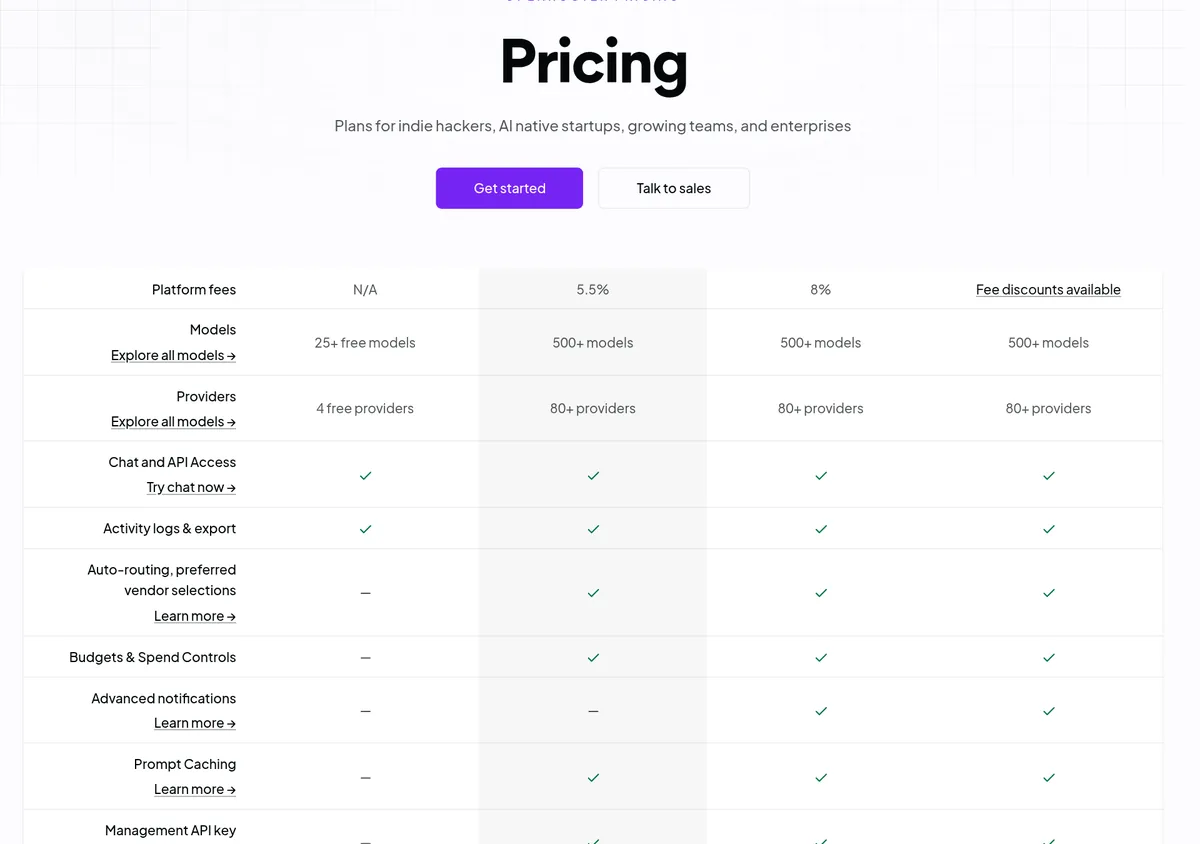
OpenRouter has four plans. None has a monthly subscription fee. You pay for what you use.
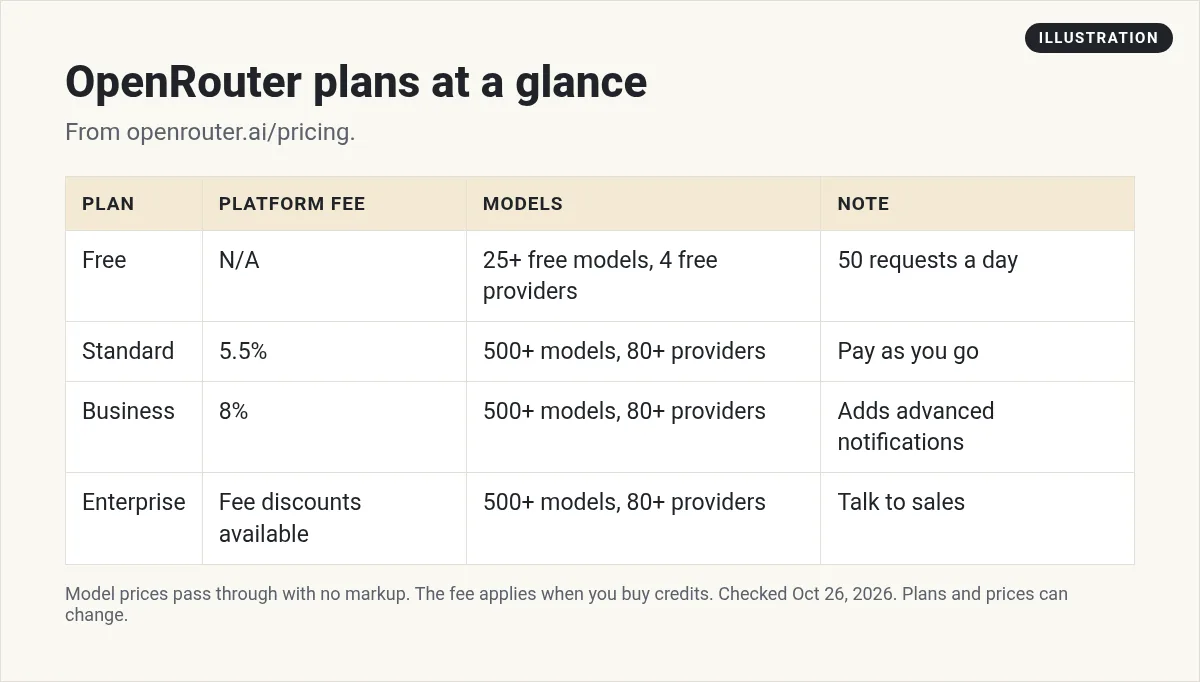
Free
The Free plan has 25+ free models from 4 free providers. It has a limit of 50 requests a day. It does not include budgets, prompt caching, or auto routing.
Standard: 5.5% platform fee
Standard is pay as you go. You get all 500+ models and 80+ providers. The platform fee is 5.5%. You can pay by "Credit card, crypto & more."
Business: 8% platform fee
Business is also pay as you go, with an 8% fee. It adds things like advanced notifications, EU and US in-region routing, and a workspace limit of 1,000 instead of 5.
Enterprise: talk to sales
Enterprise lists "Fee discounts available," plus SSO, contract SLAs, and invoicing.
How the fee works
This is the part to understand before you spend. The FAQ says: "We pass through the pricing of the underlying providers; there is no markup on inference pricing (however we do charge a fee when purchasing credits)."
So the model price per token is the same as the list price from the model maker. The fee is added when you load money into your account.
Here is a simple example using the 5.5% Standard fee. If you buy $100 of credits, the fee is $5.50. My math, based on the pricing page. The final amount is shown at checkout, so check it there.
Two more rules from the FAQ:
- Refunds. You can ask for a refund of unused credits within 24 hours of buying. After that, unused credits are "non-refundable." The FAQ adds that "the platform fees are non-refundable" and "cryptocurrency payments are never refundable."
- Expiry. The FAQ says OpenRouter may "expire unused credits after one year of purchase."
Since credits do not last forever, buy a small amount first. Top up as you learn what you need.
Free models on OpenRouter
You can start without paying. The FAQ says "All new users receive a small free allowance to test out OpenRouter."
Free models have their own limits. The FAQ says they "have low rate limits (50 requests per day total) and are usually not suitable for production use." If you have bought at least 10 credits, the limit goes up to 1,000 requests a day.
There is also a Free Models Router. You set the model to openrouter/free and it picks a free model for you.
Free models are fine for learning and small tests. For a real app with users, plan on paid models.
Bring your own key (BYOK)
If you already pay a provider like OpenAI or Anthropic, you can plug in your own key. OpenRouter then routes your calls with that key.
On Standard and Business, the pricing page lists "$25,000 of list price inference / month with no fees, 5% fee after." For most beginners, that allowance is far more than you will use.
How to make your first call
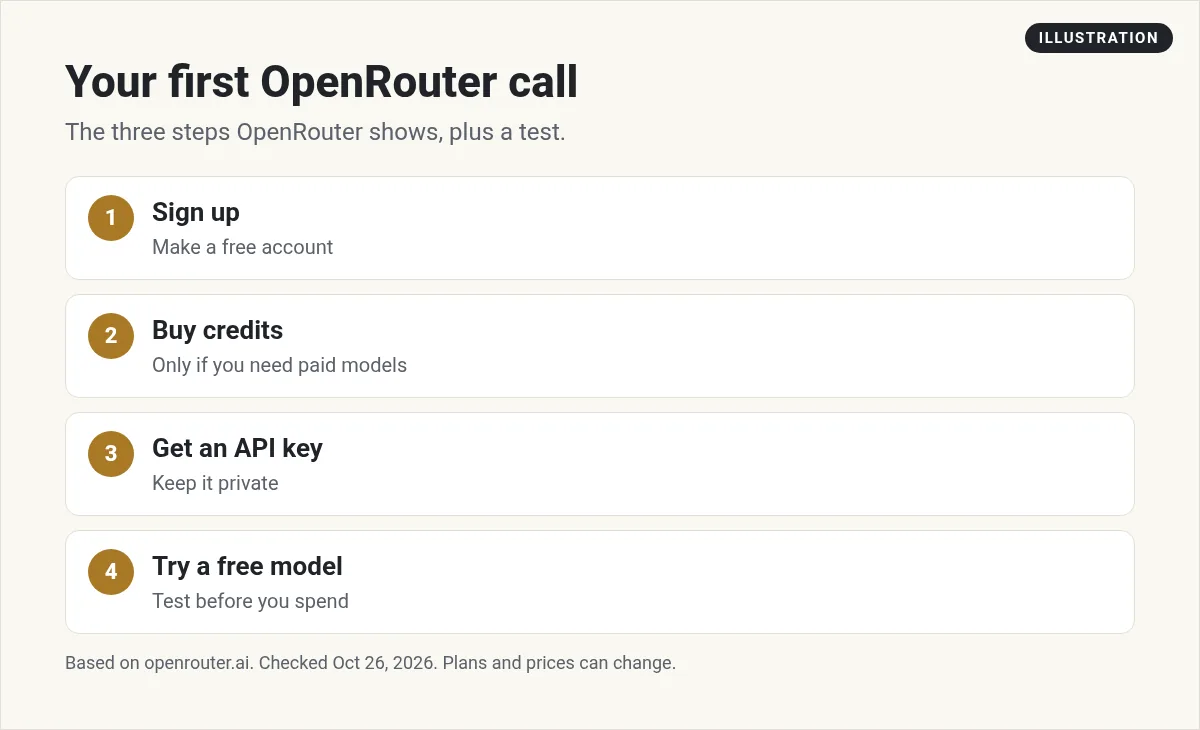
The home page shows three steps: sign up, buy credits, and get your API key. Here is how I would do it:
- Sign up. Make a free account at openrouter.ai.
- Try a free model first. Use the chat on the site to test a free model before you spend.
- Buy a small amount of credits. Only when you need paid models.
- Create an API key. Keep it private, like a password.
- Send a request. The quickstart says to send requests to the
/api/v1/chat/completionsendpoint. Any language that can make a web request works.
The quickstart examples use a model name like ~openai/gpt-sol-latest. It says this alias "always resolves to the newest model in the OpenAI GPT Sol family." You can swap in any model from the catalog at openrouter.ai/models.
Not sure which model to pick? I compare the big three here.
My video: I compare Claude, Gemini, and GPT and where each one is strong. Recorded in June 2026, so some models have changed since. Use this post for current OpenRouter details.
Any results mentioned in videos are not typical and are not a promise of income. Your results depend on your work and your market.
Things to watch before you build on it
OpenRouter is simple to start with, but a few details matter once real money is involved:
- Set a budget. Standard and Business include budgets and spend controls. Set a limit on each API key so a bug in your code cannot drain your balance.
- Check each model's price. Every model has its own price per token. A large model can cost many times more than a small one for the same prompt. Look at the model page before you pick one.
- Check the data policy. Different providers handle your prompts in different ways. If you work with client data, use the data policy settings to limit which providers can see it.
- Watch the Activity page. The FAQ says the Activity page lets you "view their historic usage and filter the usage by model, provider and api key." Check it often in your first week.
- Keep your key out of public code. Never paste your API key into a public website or a public GitHub repo. Anyone who finds it can spend your credits.
These steps take a few minutes and can save you from a surprise bill.
Is OpenRouter worth it?
It makes sense if you want to test many models, want a backup when one provider is down, or want one bill for all your AI use.
It may not be worth it if you only ever use one model. In that case, the model maker's own API avoids the credit fee. Compare the 5.5% fee to the time you save on extra accounts.
If you mostly chat with AI instead of building apps, a regular plan may fit better. See my guide to ChatGPT pricing or Claude Pro vs Max.
Before you add credits to OpenRouter
Nothing you check here is sent or saved. Download it if you want to keep it.
Meet AIM Agent
AIM Agent is an AI Chief of Staff for business owners. You give it a real task, and it brings the work back for you to review. You stay the one who approves.
Meet AIM AgentI am a co-founder of AIM Agent and have a financial interest in the product.
Frequently asked questions
What is OpenRouter?
OpenRouter is one API and one account for many AI models. On October 26, 2026, its pricing page listed 500+ models from 80+ providers.
Is OpenRouter free?
There is a Free plan with 25+ free models and a limit of 50 requests a day. Paid models need credits.
How much does OpenRouter charge?
OpenRouter says there is no markup on model prices. It charges a fee when you buy credits: 5.5% on Standard and 8% on Business. Enterprise lists fee discounts.
Do OpenRouter credits expire?
The FAQ says OpenRouter reserves the right to expire unused credits after one year of purchase.
Can I get a refund on OpenRouter credits?
The FAQ says you can request a refund for unused credits within 24 hours. Platform fees are not refundable, and crypto payments are never refundable.
Does OpenRouter work with OpenAI code?
The home page says the API is fully OpenAI compatible. You change the address and the key to point your code at OpenRouter.
Sources
Checked October 26, 2026. Plans, prices, and rules can change.
