
AI Coding · Explained
Cline is a free, open source AI coding agent that works in your editor, your terminal, or its own desktop app. You only pay for the AI it uses. Here is how it works and how to set it up.
Cline reads your code, writes changes, and runs commands, and it asks before each step. It works inside editors like VS Code, in the terminal, and in its own desktop app.
The app itself is free. What you pay for is the AI model behind it. I checked Cline's home page, pricing page, docs, and GitHub repo on October 26, 2026. Here is how it all fits together.
Quick answer
Cline is an open source AI coding agent. Its pricing page says: "Cline is free for individual developers. Pay only for AI inference on a usage basis." You can pay through the Cline provider (pay as you go), use your own API keys from providers like Anthropic or OpenAI, run local models, or choose ClinePass, which Cline's docs list as a flat $9.99 a month subscription for open coding models. Enterprise pricing is custom.
What Cline is
Cline's docs say: "Cline is an AI coding agent that lives in your editor and your terminal. It can read and write files, run terminal commands, use a browser, and help you build features through natural conversation."
The next line is the key part: "Every action requires your explicit approval." You see each file edit and command before it happens, unless you turn on auto-approve.
Cline's home page says it is "Trusted by 11M+ developers." The code is public on GitHub.
Where you can use it
- Editor extension. The docs list "VS Code, Cursor, Windsurf, JetBrains (IntelliJ, PyCharm, WebStorm), Antigravity, and Zed, Neovim via ACP mode."
- CLI. For the terminal, "with interactive chat or fully headless automation for CI/CD and scripting."
- Desktop app. Cline for Desktop is newer. Its install docs say it is "Available for macOS and Windows (Windows is currently in beta)." The home page also showed a Download for Linux button on October 26, 2026, so check the download page for your system.
- SDK. For developers who want to build their own agents on Cline's engine.
What Cline can do
Here are the main features, from Cline's home page and GitHub repo:
- Plan and Act. "Toggle Plan mode to align on a strategy, then Act to execute." In Plan mode it explores and asks questions. In Act mode it does the work.
- Multi-file edits. It makes changes across files, with "diffs, checkpoints, and one-click undo on every step."
- Terminal commands. It runs commands and "reacts to output as it appears."
- Project rules. You can add .clinerules files to "teach the agent your coding standards, architecture, and deployment conventions."
- MCP. You can "Plug in MCP servers for databases, APIs, and infrastructure." See my guide to MCP servers if that term is new.
What Cline costs
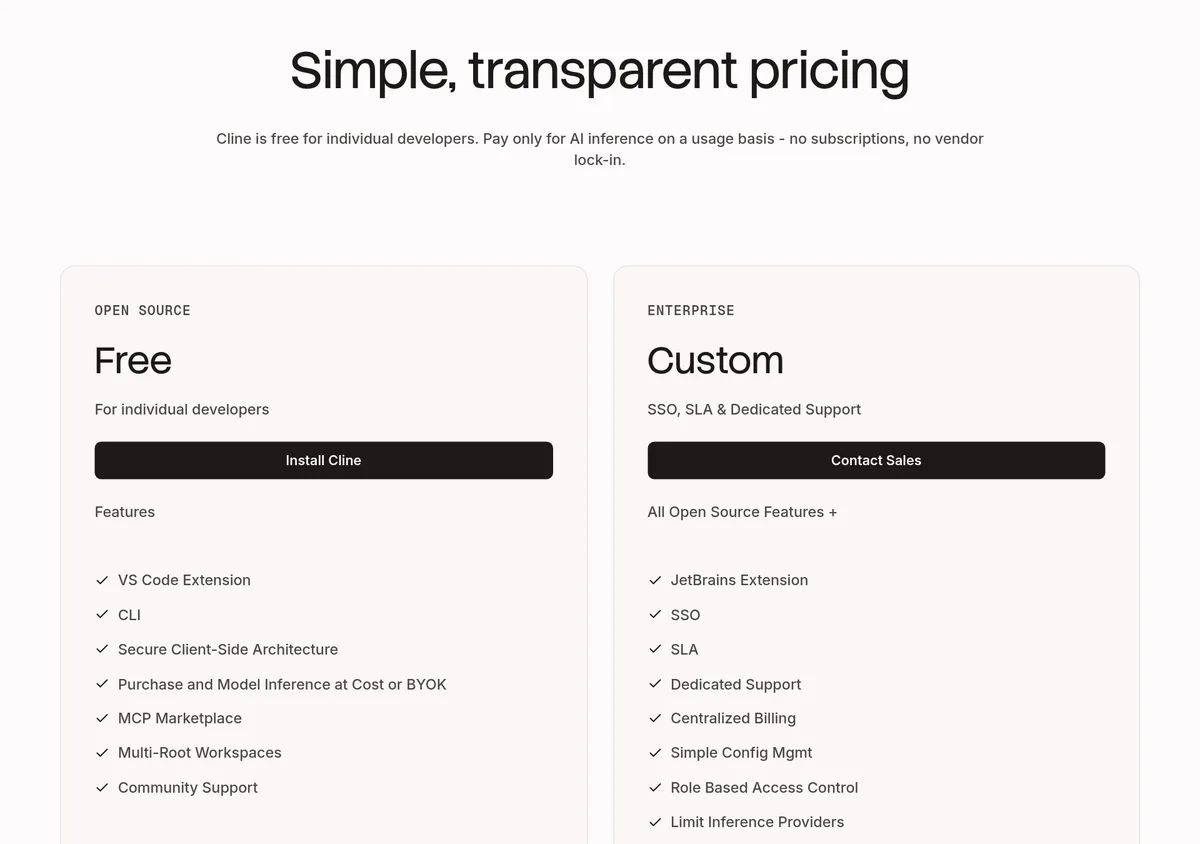
Cline's pricing page has two plans:
- Open Source: Free. "For individual developers." It includes the VS Code extension, the CLI, the MCP Marketplace, and community support.
- Enterprise: Custom. It adds SSO, SLA, dedicated support, centralized billing, and the JetBrains extension.
There is one thing to note. The pricing page lists the JetBrains extension under Enterprise. But Cline's home page, docs, and GitHub repo also offer a JetBrains install for everyone. If you use JetBrains, check the marketplace listing before you count on it.
The pricing FAQ says: "There are no subscriptions or seat fees for the open source version."
How you pay for the AI
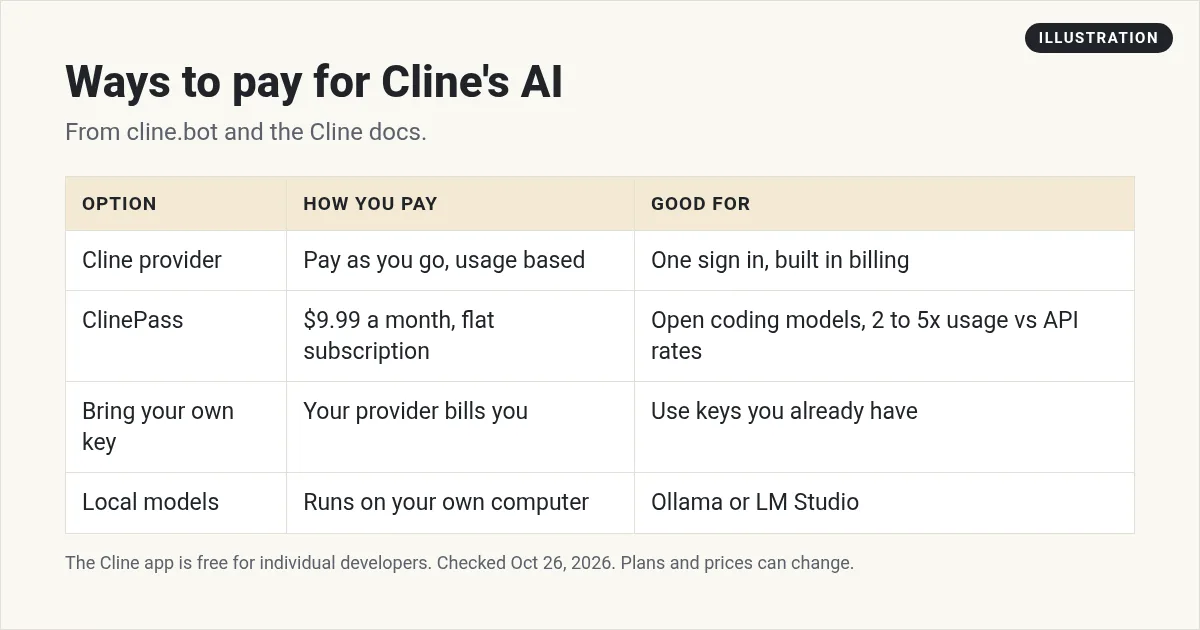
Cline needs an AI model to think with. Its docs list three main ways to get one:
1. The Cline provider: pay as you go
The docs call it the "Fastest setup path with one sign-in, built-in billing, and free model options." You buy credits and pay for what you use.
2. ClinePass: $9.99 a month
The docs describe ClinePass as a "Flat $9.99/month subscription that offers 2-5x the usage on popular open coding models compared to standard API rate." It is optional. Note that the pricing page talks about "no subscriptions," which refers to the app itself. ClinePass is an extra way to pay for model use.
3. Bring your own key
The pricing FAQ says: "You can bring your own API keys from providers like OpenAI, Anthropic, Google, and others." Then that provider bills you directly. Cline also works with OpenRouter, AWS Bedrock, GCP Vertex, and more.
Bonus: local models
Cline's home page lists "local Ollama / LM Studio" as options. A local model runs on your own computer, so there is no per message bill, but it needs a strong machine.
Your real cost depends on the model and how much you use it. Bigger models cost more per task. Start with a small budget and watch your usage.
How to set up Cline in VS Code
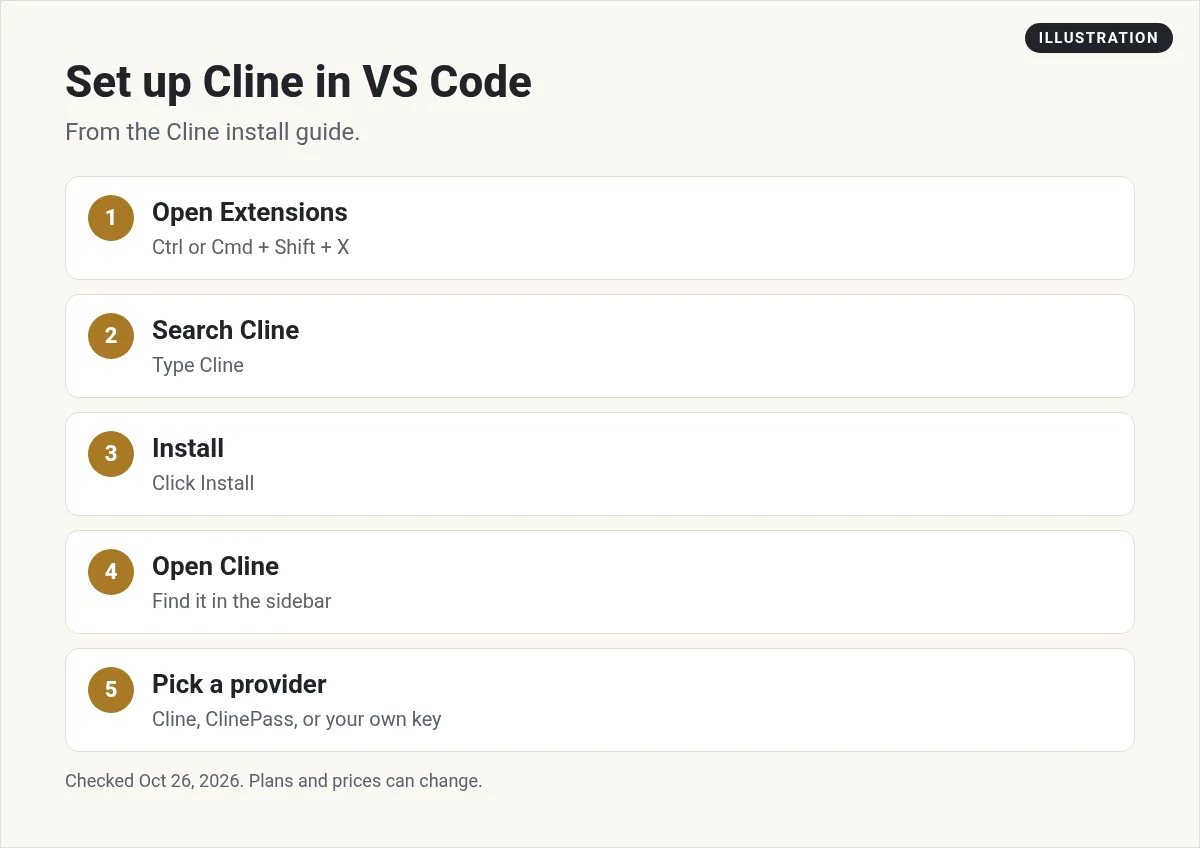
These steps are from Cline's install guide. They work the same in VS Code, Cursor, Windsurf, VSCodium, and Antigravity.
- Open Extensions. Press Ctrl/Cmd + Shift + X.
- Search for Cline.
- Install it. Click Install on the Cline extension.
- Open Cline. Find it in the extension sidebar.
- Set up a provider. The guide says to "Use the Cline Provider for pay-as-you-go access, ClinePass for a flat monthly subscription, or bring your own provider key."
The docs note that "Windsurf and VSCodium use Open VSX. The install flow is the same."
Prefer the terminal?
The CLI needs Node.js 20 or newer (22 recommended). Then the docs show three commands:
npm install -g cline
cline auth
cline
Your first task in Cline
Start in Plan mode. Ask Cline to explain your project, or to plan one small change. Read the plan. If it makes sense, switch to Act mode and let it work.
Keep approvals on at first. Watch each edit and command. Turn on auto-approve only for steps you trust, like reading files.
Add a .clinerules file early. Put in your basic rules, like which folders not to touch and how you name things. Cline will follow them each time.
Before any big change, save a version of your code with Git. Cline has checkpoints and undo, but Git gives you a second safety net.
Extras for bigger projects
Once you are comfortable, Cline has a few tools for larger work. You do not need them on day one, but it helps to know they exist.
Kanban board. The install guide lists Kanban as a preview. The docs say it lets you "Run many agents in parallel from a web-based task board with per-card worktrees, auto-commit, and dependency chains." In plain words, you can give several agents separate jobs and track them like cards on a board.
Chat apps and CI. The home page says you can "Chat with the agent from Slack, Discord, Telegram, or Linear." It can also run "headlessly inside GitHub Actions, GitLab, or any pipeline." That means Cline can do tasks when code changes, without you at the keyboard.
Agent teams on a schedule. The home page says "Coordinator agents delegate to specialists with their own tools and context." You can "Run them on cron for recurring automations," which means on a set schedule.
Teams. For companies, the docs list SSO, role-based access control, and "model and tool controls per team." Those are part of Enterprise, with custom pricing.
Each of these runs on the same agent core as the editor extension, so your rules and habits carry over.
Cline vs other AI coding tools
Cline's big selling points are that the app is open source and that you can pick any model. Tools like Cursor bundle the editor, the AI, and the bill into one plan. Claude Code and Codex CLI come from Anthropic and OpenAI, and they sign in with those companies' plans.
If you want one plan that covers everything, see my guides to Cursor pricing and Claude Code pricing. For more options, see my list of Claude Code alternatives.
Before you start with Cline
Nothing you check here is sent or saved. Download it if you want to keep it.
Meet AIM Agent
AIM Agent is an AI Chief of Staff for business owners. You give it a real task, and it brings the work back for you to review. You stay the one who approves.
Meet AIM AgentI am a co-founder of AIM Agent and have a financial interest in the product.
Frequently asked questions
Is Cline free?
Yes, for individual developers. Cline's pricing page says the open source extension is free, and you only pay for AI inference on a usage basis.
How much does ClinePass cost?
Cline's docs list ClinePass as a flat $9.99 a month subscription that offers 2 to 5x the usage on popular open coding models compared to standard API rates.
Can I use my own API key with Cline?
Yes. The pricing FAQ says you can bring your own API keys from providers like OpenAI, Anthropic, Google, and others.
What editors does Cline work with?
Cline's docs list VS Code, Cursor, Windsurf, JetBrains (IntelliJ, PyCharm, WebStorm), Antigravity, and Zed, plus Neovim via ACP mode.
Does Cline ask before making changes?
Yes. Cline's docs say every action requires your explicit approval. You can turn on auto-approve if you choose.
Can Cline use local models?
Yes. Cline's home page lists local Ollama and LM Studio as options, along with any OpenAI compatible endpoint.
Sources
Checked October 26, 2026. Plans, prices, and rules can change.
