
Overskill · Planning
The best way to save credits and time is to tell the AI exactly what you want before it builds. Here is a simple 5-part brief you can fill in for any app.
Most bad AI apps start with a bad first message. "Build me a client portal" leaves the AI to guess almost everything. Then you spend hours and credits fixing guesses.
A short app brief fixes that. It is a few lines that say who the app is for, what they need to get done, and how you will know it works. Overskill (I earn a commission if you buy through this link) publishes a guide on exactly this. Below, I walk you through its 5-part template, a worked example, and how to check what the AI builds. I checked the guide on October 17, 2026.
Quick answer
A good Overskill app brief names one user, one job, the information they need, and a test that proves the job works. Write it in five parts: Person, Job, Records, Access, and Proof. Build only the first useful journey, then check it with a definition of done before you add more.
Why a brief beats "build me an app"
Overskill's Learn guide "How to write an AI app brief that gets built" puts it in one line. An effective brief "names one user, one job, the information they need, and a test that proves the job works."
My old engineering boss would always say, "If it's garbage in, you're going to get garbage out." Same with AI. The AI is fast, but it is not a mind reader. A clear brief is the cheapest way to get a clear app.
It also saves money. Overskill's guide says a smaller brief is "easier to evaluate and less expensive to revise." Every fix costs credits, so fewer guesses means fewer fixes.
Start with the smallest useful promise
Overskill's guide compares two starting points:
| Vague | Clear |
|---|---|
| "Build a client portal" | "A design agency's clients can submit a request, see its status, and approve the final file. Each client sees only their own workspace." |
Both quotes from Overskill's Learn guide, updated September 8, 2026, checked October 17, 2026.
The clear version names an audience, a useful action, and a privacy rule. That is the whole trick.
Then pick one core journey. Overskill says a portal does not need invoicing, a social feed, an AI assistant, and a marketplace to prove that clients can submit and approve work. Put those ideas on a "later" list.
The 5-part app brief
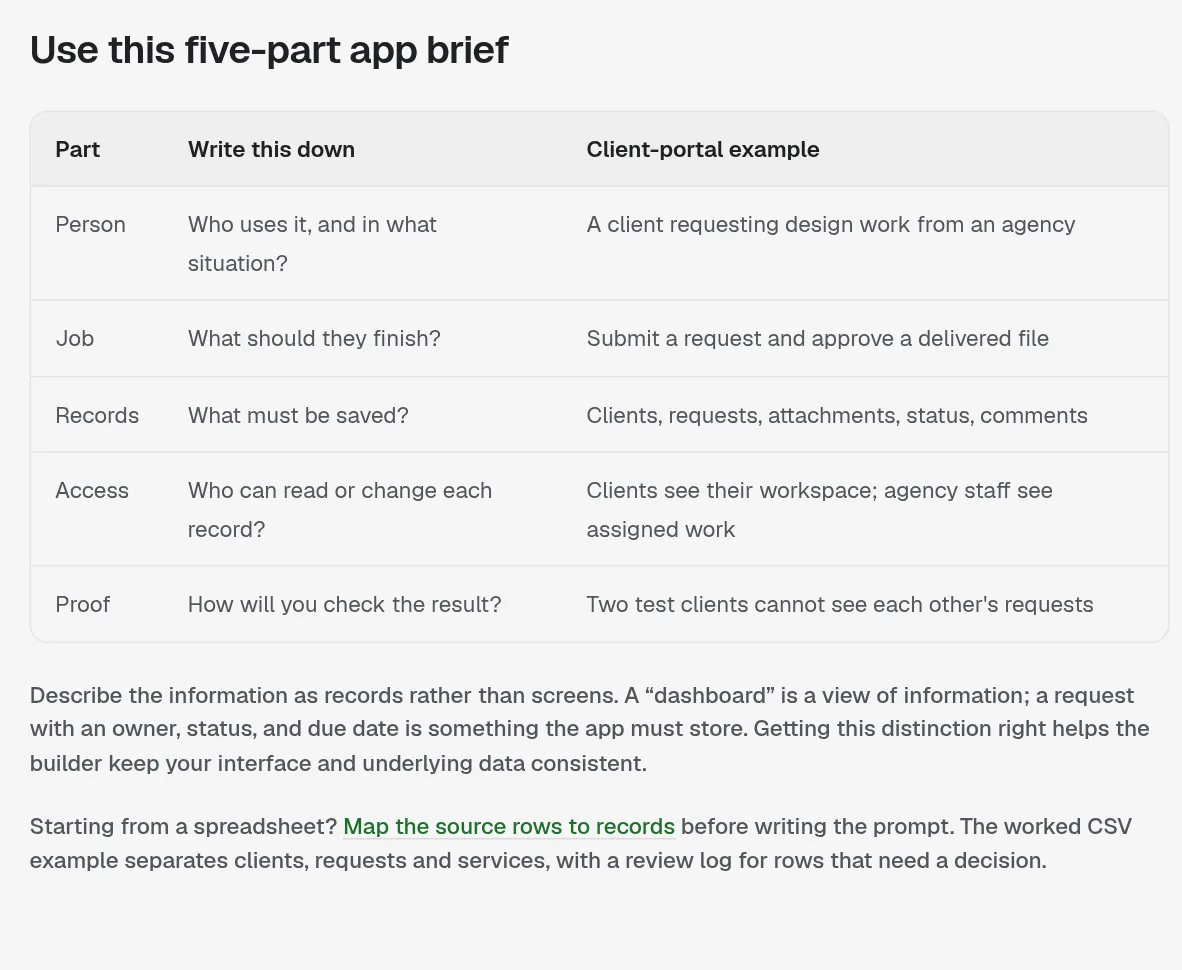
Here is Overskill's template, with its client portal example:
| Part | Write this down | Client portal example |
|---|---|---|
| Person | Who uses it, and in what situation? | A client requesting design work from an agency |
| Job | What should they finish? | Submit a request and approve a delivered file |
| Records | What must be saved? | Clients, requests, attachments, status, comments |
| Access | Who can read or change each record? | Clients see their workspace; agency staff see assigned work |
| Proof | How will you check the result? | Two test clients cannot see each other's requests |
From Overskill's Learn guide "How to write an AI app brief that gets built," checked October 17, 2026.
The part most people get wrong: Records
Overskill's guide says to describe information as records, not screens. A dashboard is just a view. A request with an owner, a status, and a due date is something the app has to store. When you list records, the AI builds the right data under the screens.
Think of records as the columns in a spreadsheet. If you already keep this info in a spreadsheet, Overskill suggests mapping those rows to records before you write the prompt.
A filled-in example
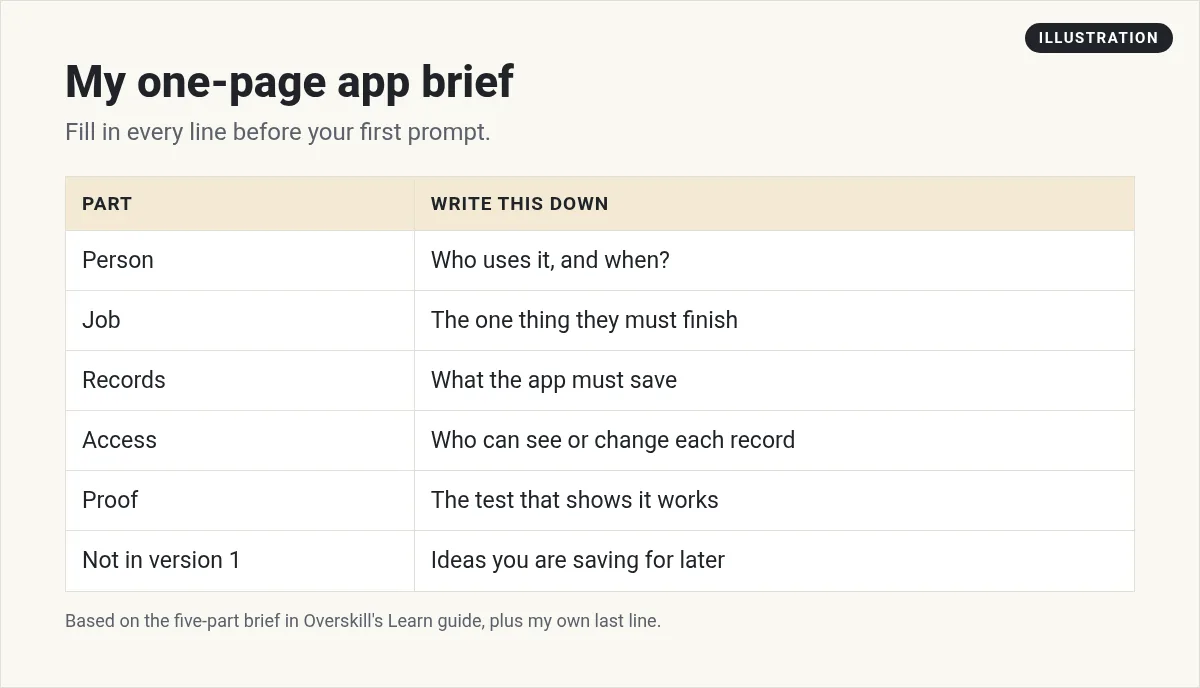
Here is a made-up example so you can see the template in action. It is not a real customer, just practice.
| Part | Dog groomer booking app |
|---|---|
| Person | A pet owner booking a grooming slot from their phone |
| Job | Pick a service and time, and get a confirmation |
| Records | Services (name, length, price), time slots, bookings (owner, pet name, service, time, status) |
| Access | Owners see only their own bookings. The groomer sees all bookings. |
| Proof | Two test owners book the same day. Neither sees the other's booking. A full slot cannot be booked twice. |
Notice what is missing: reviews, a loyalty program, text reminders, payments. Those go on the later list. Version one proves people can book.
Turn the brief into your first prompt
Overskill's guide includes a full worked prompt for the agency portal. Here is how it opens, word for word:
"Build a client portal for a small design agency. First useful journey: a signed-in client creates a design request, adds a brief, sees its status, and approves the final deliverable."
It then lists the records, the access rules, and the screens. It ends with lines I would copy into every first prompt:
"Build only this journey first. Use clearly labeled sample content. Do not add real customer data, take payments, or send external messages. Explain which parts need configuration and give me a test checklist."
Here is a simple order to follow for your own prompt:
- One sentence: what the app is and who it is for.
- The first useful journey, in one line.
- Records, as a short list with their fields.
- Access rules: who can read and change what.
- Screens: just the ones the journey needs.
- Scope limits: build only this, use sample data, give me a test checklist.
Overskill also has a free app brief builder (I earn a commission if you buy through this link). Its guide says your draft stays in your browser until you choose to copy it.
Fix what comes back, one thing at a time
Your first build will not be perfect. That is normal. Overskill's guide says to work through the app in the order your user would, and give the AI three things: what you saw, what you expected, and what not to touch.
Its example is a good model to copy:
"On a narrow phone screen, the New request button moves below the fold. Keep the request list unchanged, but place that primary action beside the page title and verify that its label fits without truncation."
The guide also warns against asking for a full redesign while you are fixing a save problem. Fix one thing, check it, then move on. And save a working version before you change the workflow.
Give the builder a definition of done
A screen that looks right is not the same as an app that works. Overskill's guide lists the checks to run:
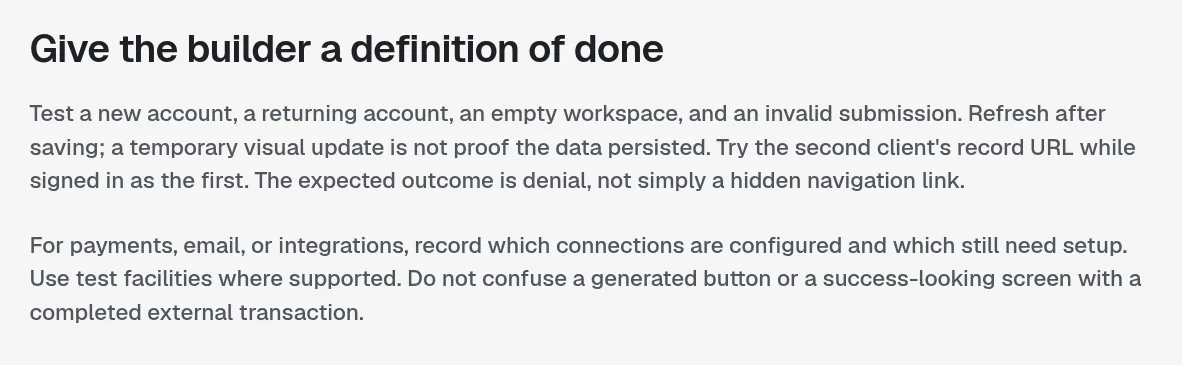
- Test a new account, a returning account, an empty workspace, and a bad form entry.
- Refresh after saving. Overskill says a quick visual update is not proof the data was saved.
- While signed in as one client, try the second client's record link. The right result is "denied," not just a hidden link.
- For payments, email, or other connections, write down which are set up and which still need setup.
Put your Proof line from the brief at the top of this list. If it passes, version one is done.
How I think about building with AI
I made this video on the "vibe coding" method: describing software in plain words and letting AI build it. It pairs well with the brief template above.
My video: the vibe coding method I use to build software with AI by describing what I want in plain words, step by step.
Any results mentioned in videos are not typical and are not a promise of income. Your results depend on your work and your market.
If you are still picking what to build, my AI app ideas list can help. Brand new? Read how to build an app with no coding experience or my Overskill tutorial for beginners.
Need an idea to write a brief for? Start with what to build with Overskill. A clear brief also helps you save Overskill credits.
App brief checklist
Nothing you check here is sent or saved. Download it if you want to keep it.
Meet AIM Agent
AIM Agent is an AI Chief of Staff for business owners. You give it a real task, and it brings the work back for you to review. You stay the one who approves.
Meet AIM AgentI am a co-founder of AIM Agent and have a financial interest in the product.
Ready to build? Start with Overskill (I earn a commission if you buy through this link.)
Frequently asked questions
What is an app brief?
An app brief is a short plan you give the AI before it builds. Overskill says a good one names one user, one job, the information they need, and a test that proves the job works.
What should an Overskill app brief include?
Use five parts: Person, Job, Records, Access, and Proof. Records are what the app must save. Access is who can read or change each record. Proof is how you will check it works.
Is an app brief the same as a PRD?
It does the same job as a product requirements document, but shorter. For a first version built with AI, a few lines covering the five parts is usually enough.
Does Overskill have an app brief template?
Yes. Overskill's Learn guide has a 5-part template and a free app brief builder. The guide says your draft stays in your browser until you copy it.
Why should my first prompt build only one journey?
Overskill says a smaller brief is easier to check and less expensive to revise. Build the core journey first, then add features from your later list.
How do I know my Overskill app is done?
Run a definition of done: test new and returning accounts, refresh after saving, try another user's record link, and confirm your Proof test passes.
Sources
Checked October 17, 2026. Plans, prices, and rules can change. Links to overskill.com carry my referral code. I earn a commission if you buy through those links.
