

Build with AI · Pricing
Windsurf is now called Devin Desktop. The plans are simple, but the way usage works changed this year. Here is what you pay and what you get.
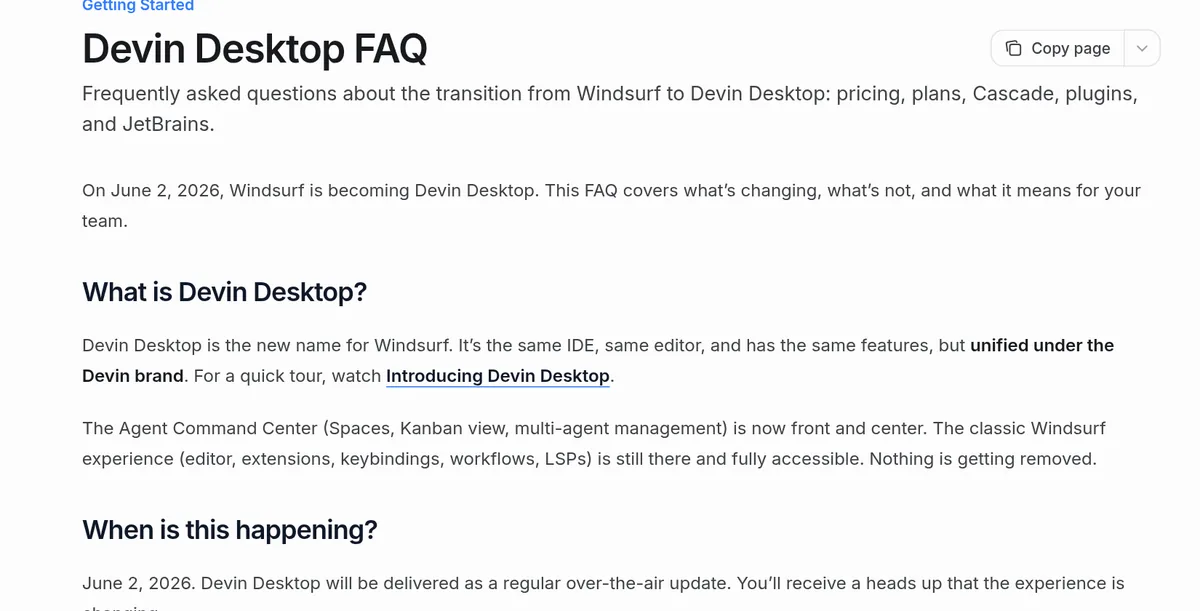
If you search for Windsurf pricing today, you land on a page for Devin Desktop. That is not a mistake. On June 2, 2026, Windsurf was renamed Devin Desktop. It is the same editor with the same features under a new name.
On October 22, 2026, I went through the pricing page and the Devin Desktop docs on quotas, usage, and the rename. Here is what each plan costs, how the usage limits work, and how to pick a plan.
Quick answer
Windsurf, now called Devin Desktop, has five plans. Free is $0 per month. Pro is $20 per month. Max is $200 per month. Teams is $80 per month for the team plan plus $40 per month for each full dev seat. Enterprise is custom. Paid plans include a daily and weekly usage quota, and you can buy extra usage at API pricing. Checked October 22, 2026.
Windsurf (Devin Desktop) plans at a glance
All prices below come from windsurf.com/pricing, which now opens devin.ai/pricing. Checked October 22, 2026.
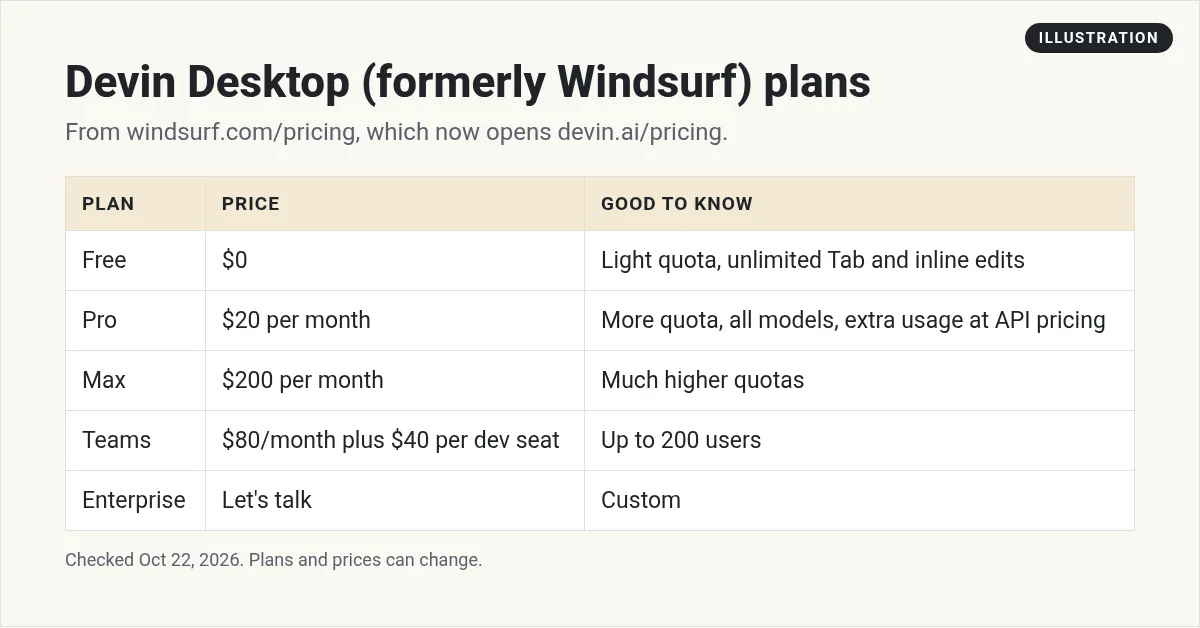
- Free: $0 per month. A light quota to code with agents, limited models, unlimited inline edits, and unlimited Tab completions.
- Pro: $20 per month. Higher quotas, all models, free use of SWE-2, cloud agents (Devin Cloud), and extra usage at API pricing.
- Max: $200 per month. Everything in Pro with "significantly higher quotas."
- Teams: $80 per month for the team plan, plus $40 per month per full dev seat. Up to 200 users, shared billing, an admin dashboard, and priority support.
- Enterprise: custom pricing. SSO, dedicated account help, and a dedicated deployment option.
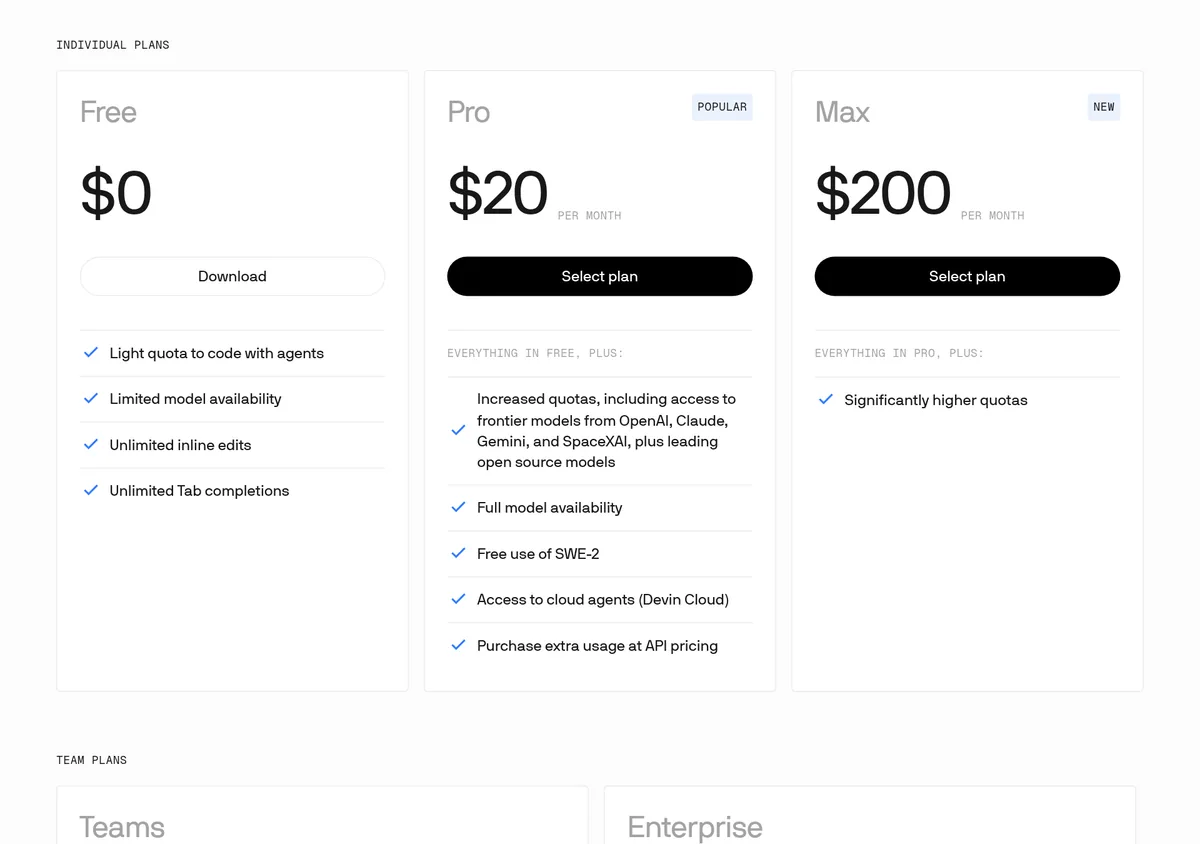
The pricing page shows one price per plan, with no yearly discount listed. I did not see a yearly option, so I am only quoting the per month prices.
Windsurf is now Devin Desktop
The Devin Desktop FAQ says, "Devin Desktop is the new name for Windsurf. It’s the same IDE, same editor, and has the same features, but unified under the Devin brand."
The big question for most people is cost. The FAQ answers it directly: "Your current plan continues to work exactly as it does today. Pricing is unchanged."
Your settings carry over on their own, and your Windsurf rules still work.
How the usage quotas work
This is the part that changed the most. The docs say, "In March 2026, Devin Desktop replaced the credit-based system with a quota-based usage system."
Here is how it works in plain words:
- Each plan gets a usage allowance that refreshes every day and every week.
- Your usage is based on how many tokens the AI model uses for each request.
- Bigger requests, with lots of files in context, use more.
- Free models don't count against your quota at all.
- The daily quota is more than one seventh of the weekly quota, so weekend coders can still use their full week.
The pricing page says, "For the majority of users, this quota will be enough to fully cover all agent usage."
What happens when you hit your limit
It depends on your plan:
- Free: you wait for the next daily or weekly reset.
- Pro, Teams, or Max: you can buy extra usage and keep working.
Extra usage is billed at API list prices for the model you use. Fast or priority versions of models cost more. You can check what is left from the usage meter in the app or on your plan page.
Plan cost math
Here is simple math with the October 22, 2026 prices. These are plan costs only, before any extra usage.
- Solo on Pro: $20 per month, or $240 over 12 months.
- Solo on Max: $200 per month, or $2,400 over 12 months.
- Team of 3 full seats: $80 + (3 × $40) = $200 per month.
- Team of 10 full seats: $80 + (10 × $40) = $480 per month.
The Teams math uses the pricing page wording: "$80 /MONTH FOR TEAM PLAN + $40/MO PER FULL DEV SEAT." Ask sales if you are not sure how seats are counted for your team.
Old Windsurf prices: are you grandfathered?
If you signed up before the switch to quotas, you may pay less than today's prices. The docs say:
- Existing Pro subscribers at $15 per month are "grandfathered in at $15/mo indefinitely."
- Existing Teams subscribers keep $30 per month per Developer seat.
Old add-on credits were turned into extra usage dollars at the rate you paid. The docs say you can ask support for a refund of your unspent extra usage balance.
Trials, refunds, and canceling
- No free trials. The usage docs say free trials of paid plans are not offered. You can ask for a refund before you use the plan if you change your mind.
- Cancel anytime. Individual users cancel from their plan settings. You keep access until the end of the billing period, then drop to Free.
- Teams: only the admin can cancel the plan.
How to make your quota last longer
The docs give these tips:
- Be precise with your instructions and remove extra context.
- Use the lower cost SWE models for routine tasks.
- Avoid long sessions when a quick prompt will do.
- Stick with one frontier model, since repeat requests to the same model use caching.
What one task can use: the token example
Quotas are measured in tokens, which are small chunks of text the AI reads and writes. The docs walk through one example with Claude Opus 4.6. A user asks the agent to refactor one function. The agent reads the code, makes a plan, asks to continue, then edits two files.
That one small job used about 200k tokens in total. Most of it was input: the agent rereading the chat history, your editor context, and the files each step.
The lesson is simple. Each extra step in a task resends a lot of context. Short, focused tasks use far less of your quota than one long chat that does everything.
Devin Desktop vs Devin Cloud
The new name can make the plans confusing, so here is the short version from the FAQ:
- Devin Desktop is the editor on your computer. It is what Windsurf used to be.
- Devin Cloud runs agents in the cloud. Pro includes access to cloud agents.
- You do not need to use Devin Cloud to use Devin Desktop. Local agents work on their own.
- On Teams, adding a full seat unlocks Devin Desktop and $40 per month of usage across all Devin products.
How the price compares to Cursor
Many people choosing Windsurf are also looking at Cursor. As checked October 22, 2026, Cursor plans are $0, $8, $30, $100, and $200 per month. Devin Desktop has fewer steps: $0, $20, and $200 per month for individuals.
So if you want something between $20 and $200, Cursor has more in between options. If you want one simple paid plan, Devin Desktop Pro keeps it easy. I compare the two editors in more depth in my Windsurf vs Cursor post. If you are weighing Cursor against plain VS Code, see Cursor vs VS Code.
Which plan should you pick?
- Just trying it: start on Free. Tab completions and inline edits are unlimited.
- Building most days: Pro at $20 per month is the normal choice.
- Running agents all day: look at Max only if you keep hitting Pro limits and paying for extra usage.
- A small dev team: Teams, if you need shared billing and admin tools.
See Cursor pricing. If you are not a coder at all, an app builder may fit better. See the best vibe coding tools.
My video: My vibe coding walkthrough. It shows the kind of building these tools are for.
Any results mentioned in videos are not typical and are not a promise of income. Your results depend on your work and your market.
Before you pay for Devin Desktop
Nothing you check here is sent or saved. Download it if you want to keep it.
Want to build with AI without the guesswork?
In my free workshop, I show how regular people use AI tools to build simple online businesses.
Join my free AI workshopFree to join. No credit card needed.
Frequently asked questions
How much does Windsurf cost?
Checked October 22, 2026: Free is $0 per month, Pro is $20 per month, Max is $200 per month, and Teams is $80 per month plus $40 per month per full dev seat. Enterprise is custom.
Is Windsurf now Devin Desktop?
Yes. On June 2, 2026, Windsurf was renamed Devin Desktop. The docs say it is the same editor with the same features, and pricing is unchanged.
Does Windsurf still use credits?
No. In March 2026 it moved from credits to a quota system. Each plan gets a daily and weekly allowance that refreshes on its own.
What happens when I run out of quota?
On Free, you wait for the next reset. On Pro, Teams, or Max, you can buy extra usage billed at API list prices.
Is there a Windsurf free trial?
Not for paid plans. The docs say free trials are not offered, but you can request a refund before you use the plan.
I pay $15 a month for Windsurf Pro. Will that go up?
The docs say existing Pro subscribers at $15 per month are grandfathered in at that price indefinitely.
Sources
Checked October 22, 2026. Plans, prices, and rules can change.
