
Build with AI · Cursor
Cursor started as a copy of VS Code. Today they feel close, but they cost different amounts and run different AI. Here is how to choose.
If you are learning to build with AI, you will hear about two code editors again and again: Cursor and VS Code. They look almost the same. That is not an accident.
On October 22, 2026, I checked Cursor's pricing page, Cursor's guide for moving from VS Code, the VS Code home page, and GitHub's Copilot plans. Here is what is the same, what is different, and how to pick without wasting money.
Quick answer
Cursor is built on the VS Code code base, so the two feel almost the same. The big difference is the AI and the price. VS Code is free and open source, and you add AI with GitHub Copilot (free, or $10 to $100 per user per month) or other agents. Cursor has its AI built in, with plans from $0 to $200 per month. Pick VS Code if you want free and flexible. Pick Cursor if you want AI at the center of the editor. Checked October 22, 2026.
How Cursor and VS Code are related
Cursor's own docs say it plainly: "Cursor is based upon the VS Code codebase." The team took the open source VS Code editor and built their AI tools on top of it.
That is why the two look and feel so much alike. The menus, the file panel, the terminal, and most of the shortcuts match. Most VS Code extensions work in Cursor too.
VS Code is made by Microsoft. Its home page now calls it "The open source AI code editor." So both editors now sell themselves as AI tools. The question is how the AI is added and what it costs.
Cursor vs VS Code at a glance
Here is the short version. Prices are per month and were checked October 22, 2026.
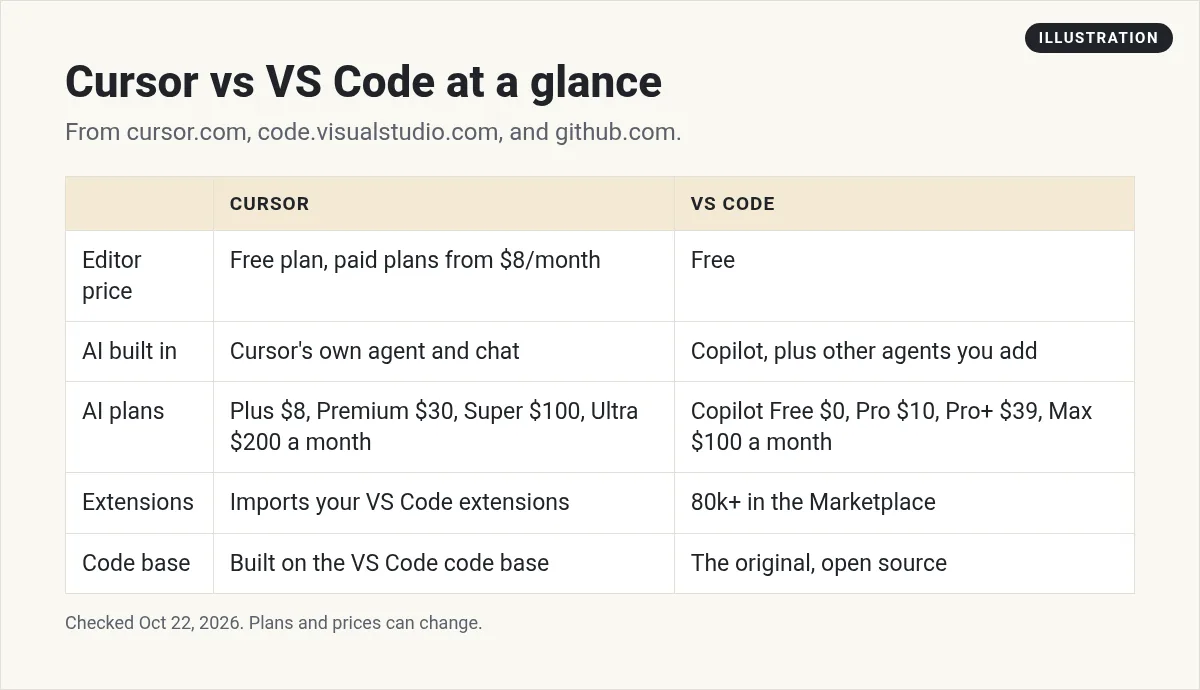
- Editor price: VS Code is free. Cursor has a free plan, and paid plans start at $8 per month.
- AI built in: Cursor has its own agent and chat. VS Code uses GitHub Copilot, plus other agents you can add.
- AI plans: Cursor Plus is $8, Premium $30, Super $100, and Ultra $200 per month. Copilot Free is $0, Pro $10, Pro+ $39, and Max $100 per user per month.
- Extensions: VS Code lists "80k+ extensions" in its Marketplace. Cursor can import the ones you use.
- Code base: VS Code is the original. Cursor is built on top of it.
What VS Code gives you for free
VS Code costs nothing to download and use. You get the editor, the terminal, Git tools, and the extension store at no charge.
For AI, VS Code now leans on agents. Its home page says you can "Run agents locally or in the cloud, with Copilot or third-party providers like Claude and OpenAI." It also says you can "bring your own key to use any model from any provider."
In plain words: VS Code is the free shell, and you choose which AI to plug in. Many people start with GitHub Copilot because it is made to work with VS Code.
GitHub Copilot plans
These are GitHub's Copilot plans, checked October 22, 2026:
- Free: $0, with 2,000 completions per month and access to Haiku 4.5 and GPT-5 mini.
- Pro: $10 per user per month. It includes $15 in monthly total credits and access to third party agents like Claude Code and Codex.
- Pro+: $39 per user per month, with $70 in monthly total credits and premium models.
- Max: $100 per user per month, with $200 in monthly total credits.
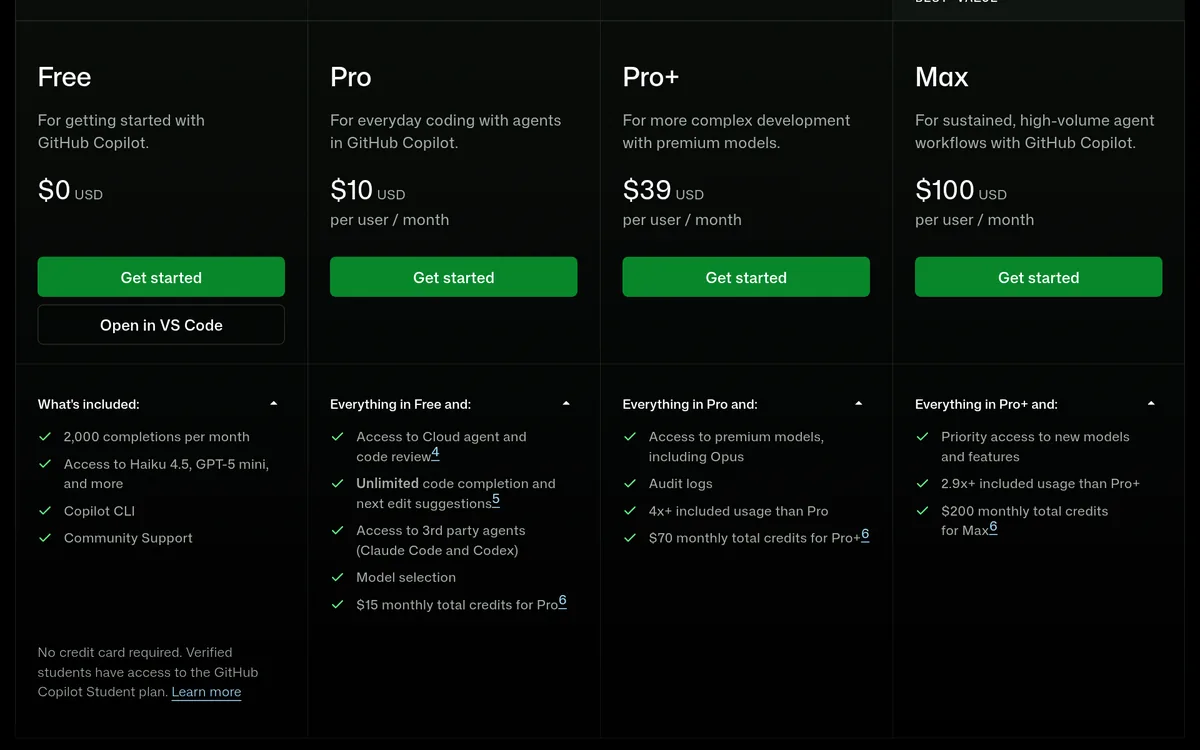
GitHub also says no credit card is needed for Free, and verified students can get a Copilot Student plan.
What Cursor costs
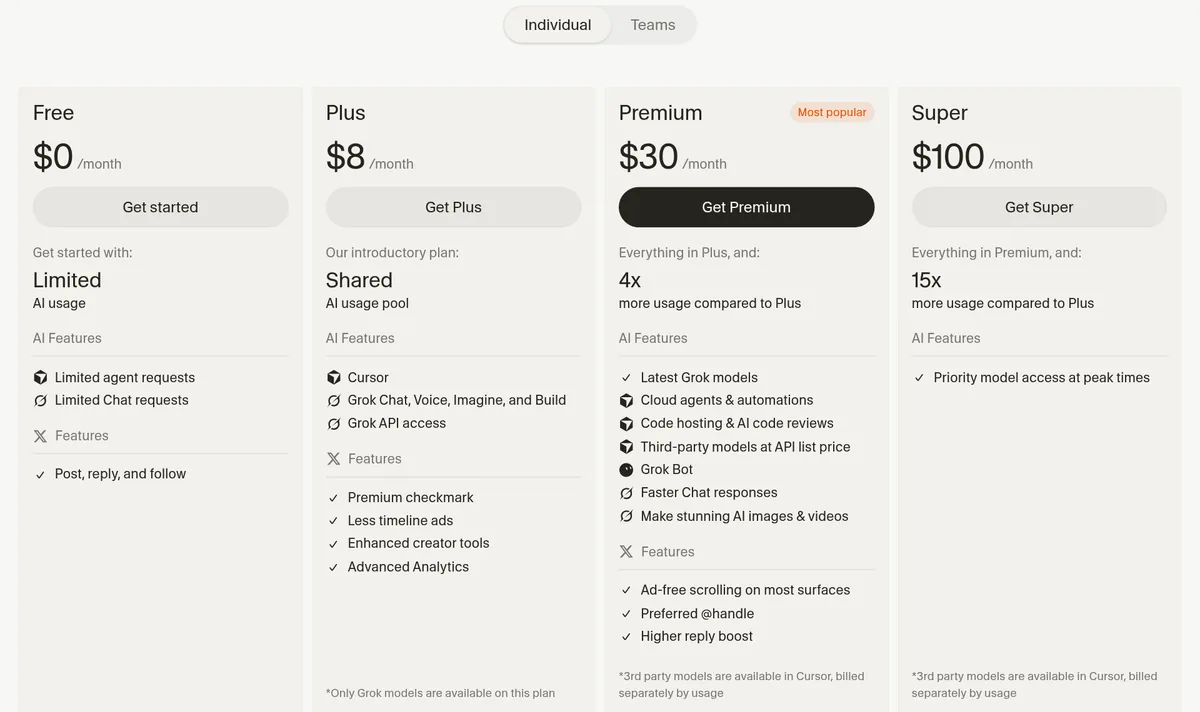
Cursor's pricing changed a lot this year. Its plans now come bundled with Grok and X features. Here is what the Individual tab showed on October 22, 2026, all billed per month:
- Free: $0, with limited agent and chat requests.
- Plus: $8 per month. The page notes, "Only Grok models are available on this plan."
- Premium: $30 per month, with 4x the usage of Plus. Models from other companies are billed at API list price on top.
- Super: $100 per month, with 15x the usage of Plus.
- Ultra: $200 per month.
Teams start at $30 per user per month, and Enterprise is custom. You can cancel anytime, but Cursor says to do it "at least 24 hours prior to renewal" to avoid another charge.
For the full breakdown, including yearly prices and how the usage pool works, see my Cursor pricing guide.
What each setup really costs
Here is simple plan cost math for three common setups. These are monthly list prices, checked October 22, 2026.
- Just trying AI coding: VS Code with Copilot Free costs $0. Cursor Free also costs $0. Both have tight limits.
- Light, steady use: VS Code with Copilot Pro is $10 a month. Cursor Plus is $8 a month, but only with Grok models.
- Want Claude or GPT models inside the editor: Copilot Pro at $10 includes some credits for other models. In Cursor, you need Premium at $30, and outside models are billed by usage on top.
So for most beginners, VS Code with Copilot is the cheaper way to get many models. Cursor costs more but puts more AI tools in one place.
How to move from VS Code to Cursor
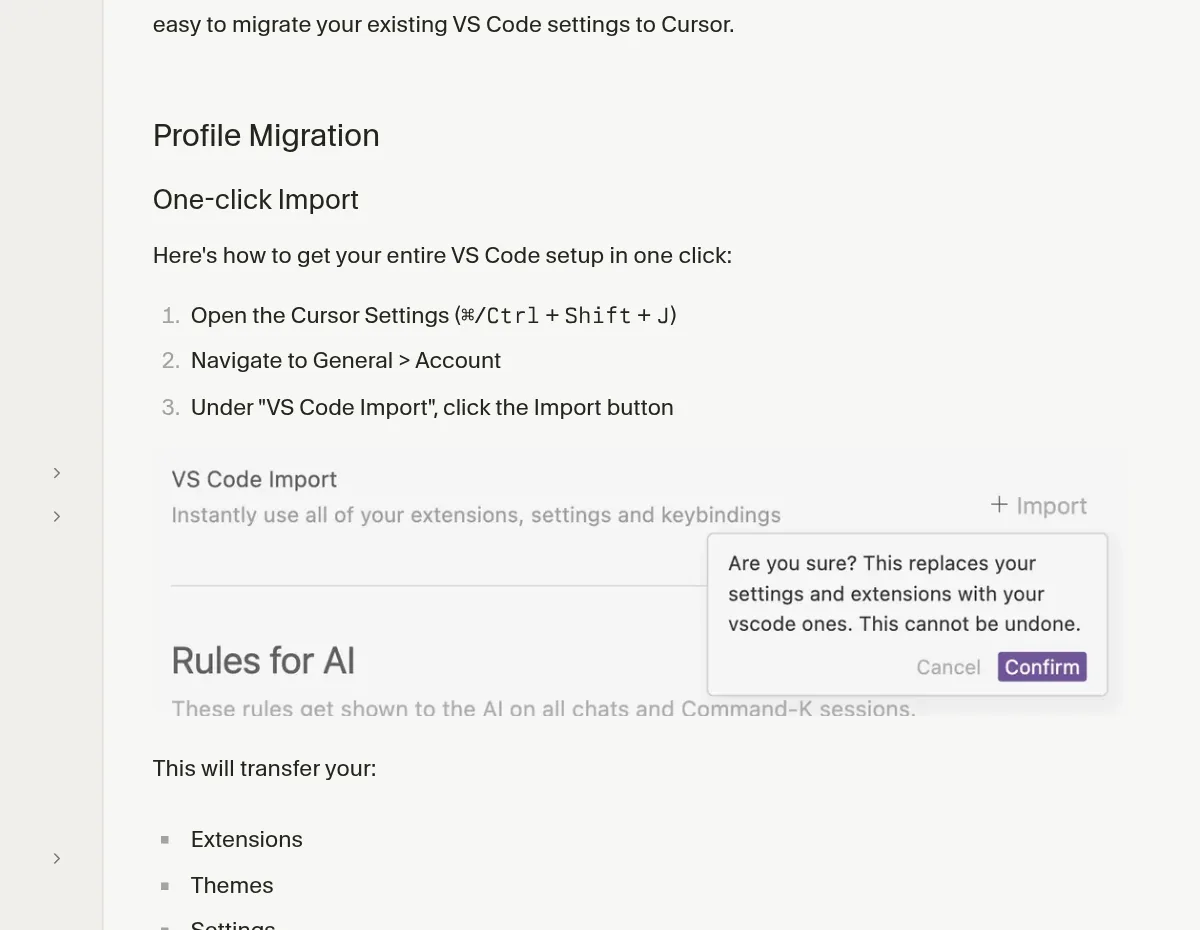
This part is easy. Cursor has a one-click import. Its docs list these steps:
- Open Cursor Settings with Ctrl+Shift+J (Cmd+Shift+J on a Mac).
- Go to General, then Account.
- Under "VS Code Import", click the Import button.
The docs say this moves your extensions, themes, settings, and keybindings.
Moving between computers
If you want more control, you can move a profile by hand. In VS Code, open the Command Palette and search for "Preferences: Open Profiles (UI)". Click the menu next to your profile and choose Export Profile. Then import that file in Cursor the same way.
Small differences that surprise people
- Updates come later in Cursor. Cursor's docs say it "often uses slightly older VS Code versions" to stay stable. A brand new VS Code feature may take a while to show up in Cursor.
- The side bar is different. Cursor made the activity bar horizontal to make room for AI chat. To change it back, open Settings and set workbench.activityBar.orientation to vertical, then restart Cursor.
- Two settings menus. Cursor has its own Cursor Settings plus the normal VS Code settings. If you can't find an AI option, check Cursor Settings.
Which one should you pick?
Here is how I would decide:
- Pick VS Code if you want to spend $0 to $10 a month, you like choosing your own AI, or you already use GitHub a lot.
- Pick Cursor if you want the AI agent to be the main way you work, and you are fine paying more for it.
- Try both if you are not sure. They share settings, so switching takes a few minutes.
If you don't want to work in a code editor at all, look at a chat style app builder instead. I compare those in Lovable vs Replit vs Bolt vs Cursor.
My video: My honest take on Cursor, Lovable, and Bolt. Prices have changed since I recorded it, so use this post for current plans.
Any results mentioned in videos are not typical and are not a promise of income. Your results depend on your work and your market.
Other editors worth a look
Cursor and VS Code are not the only choices. Windsurf, now called Devin Desktop, is another VS Code style editor. I compare it in Windsurf vs Cursor and list its plans in Windsurf pricing. You can also run Claude Code inside VS Code. See how to use Claude Code in VS Code and GitHub Copilot vs Claude Code.
For more options, see my list of Cursor alternatives.
Picking between Cursor and VS Code
Nothing you check here is sent or saved. Download it if you want to keep it.
Learn to build with AI, step by step
In my free workshop, I show how regular people use AI tools to build simple online businesses.
Join my free AI workshopFree to join. No credit card needed.
Frequently asked questions
Is Cursor just VS Code?
Cursor is built on the VS Code code base, so it looks and works much the same. Cursor adds its own AI agent, chat, and plans on top.
Is VS Code free?
Yes. VS Code is free and open source. You can add AI with GitHub Copilot, which has a free plan with 2,000 completions per month, or other agents.
Is Cursor better than VS Code?
It depends on how you work. Cursor puts AI at the center and costs more. VS Code is free and lets you pick your own AI tools.
Can I use my VS Code extensions in Cursor?
Yes. Cursor has a one-click import under Cursor Settings, General, Account. It brings over your extensions, themes, settings, and keybindings.
How much does Cursor cost compared to Copilot?
Checked October 22, 2026: Cursor plans are $0, $8, $30, $100, and $200 per month. Copilot plans are $0, $10, $39, and $100 per user per month.
Can I go back to VS Code after trying Cursor?
Yes. Your VS Code install stays as it was. You can export your Cursor profile and import it into VS Code if you want to keep changes.
Sources
Checked October 22, 2026. Plans, prices, and rules can change.
