
AI Automation · Guide
An AI chatbot can answer questions on your site day and night. Here is how they work, what the main tools cost, and how to set one up so it helps instead of annoys.
Some visitors leave a website with a question they never ask. A good AI chatbot catches that question, answers it from your own info, and helps the person take the next step.
I checked the pricing pages for four options on October 25, 2026. Here is how these bots work, what they cost, and the setup steps I use.
Quick answer
An AI chatbot for your website is a chat box that answers visitor questions using your own content, like your pages, prices, and policies. On October 25, 2026, Chatbase started at $32 a month billed yearly, Tidio's Starter plan was $24.17 a month billed yearly, Intercom's Fin AI Agent was $0.99 per outcome, and HighLevel's AI Employee add on started at $50 a month per sub-account on top of a HighLevel plan. To set one up, feed it your facts, set limits, add a way to reach a human, and test it.
How a website AI chatbot works
Old chatbots followed a script. You clicked a button, and it showed a canned answer. AI chatbots are different. They read your content and write an answer in plain words.
Here is the basic idea:
- You give the bot your info. That can be your web pages, a FAQ, PDFs, or notes.
- A visitor types a question in the chat box.
- The bot finds the parts of your info that match and writes a reply.
- If it cannot help, it can hand off to a person or collect the visitor's email.
Some bots can also take action, like booking a call or creating a support ticket. That is where they start to act like an AI agent, not just a chat box.
What a chatbot is good for
- Answering the same questions about hours, prices, shipping, and returns.
- Booking calls while you sleep.
- Capturing leads by asking for an email before the visitor leaves.
- Helping people find the right page on a big site.
It is not good for everything. A bot should not give legal, medical, or money advice, and it should never guess at a price it does not know.
What website AI chatbots cost
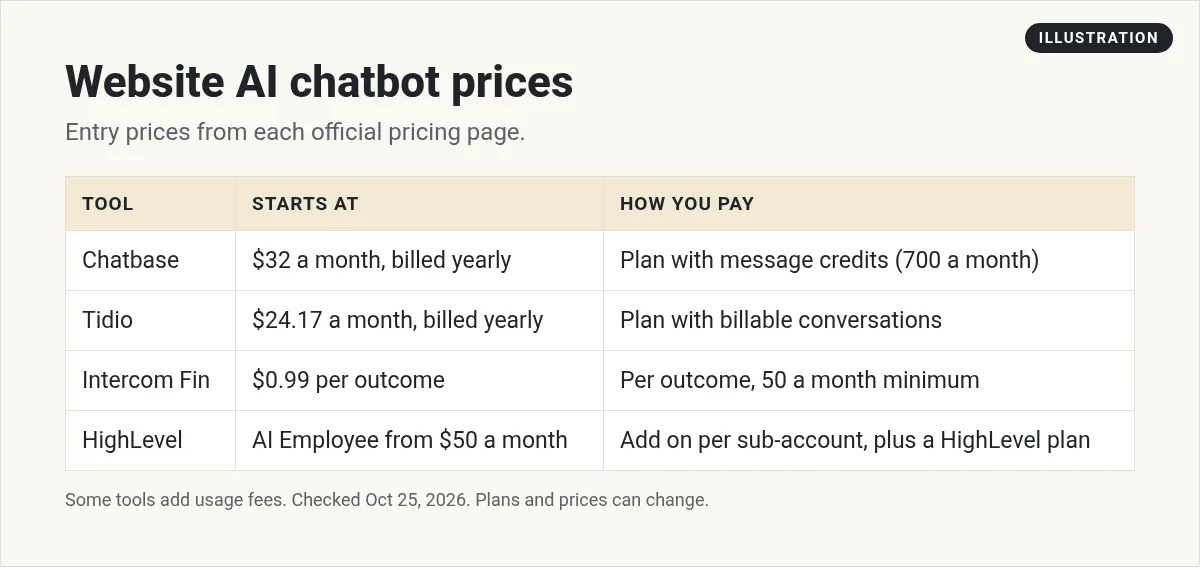
Prices are set in very different ways. Some charge a flat plan. Others charge per conversation or per answer. Here is what I found on each official pricing page on October 25, 2026.
Chatbase
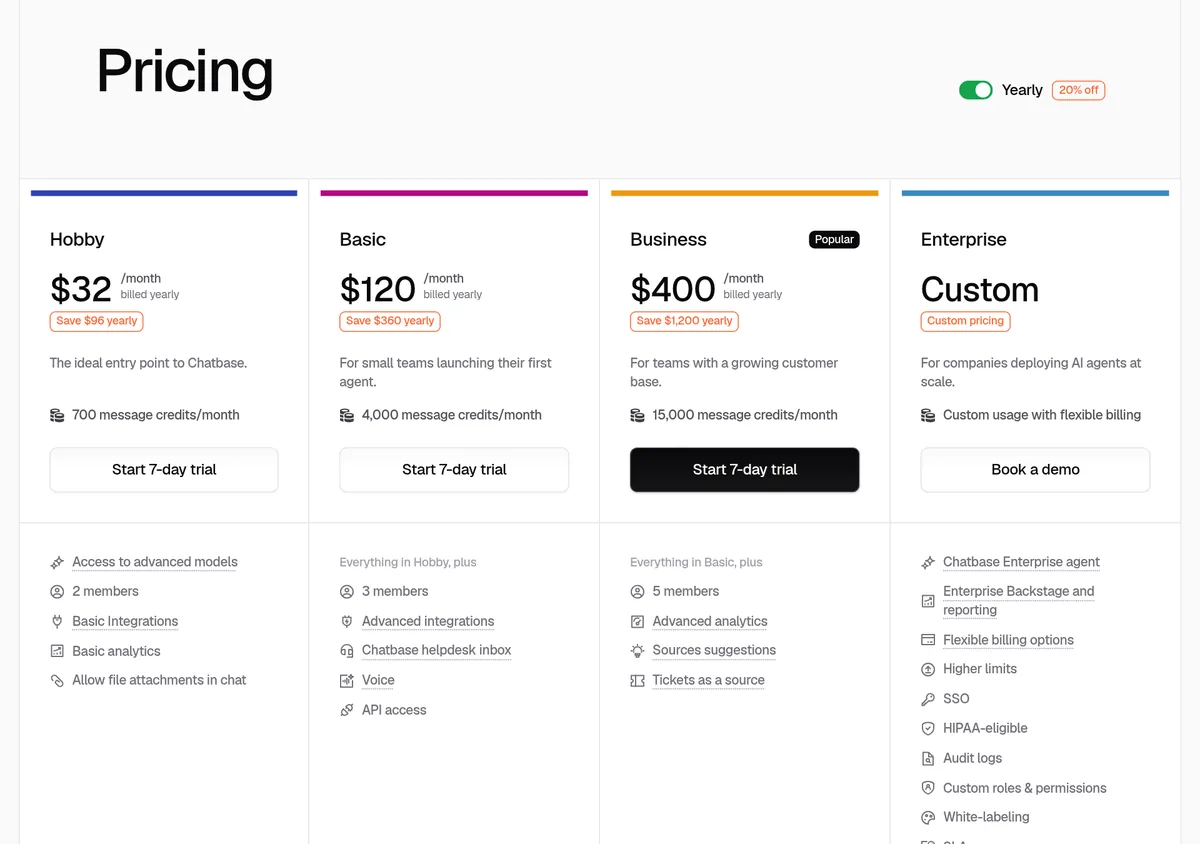
Chatbase lets you build an AI agent trained on your content and put it on your site. With yearly billing selected, it listed:
- Hobby: $32 a month, billed yearly. 700 message credits a month.
- Basic: $120 a month, billed yearly. 4,000 message credits.
- Business: $400 a month, billed yearly. 15,000 message credits.
- Enterprise: custom.
Each paid plan has a 7 day trial. Extra credits are $40 per 1,000, and removing the Chatbase branding is an add on at $1,188 a year.
Tidio
Tidio mixes live chat with its Lyro AI Agent. With yearly billing selected (the page says "2 months free"):
- Free: $0, with 50 billable conversations and 50 Lyro AI conversations one time.
- Starter: $24.17 a month, with 100 billable conversations.
- Growth: from $49.17 a month, from 250 billable conversations.
- Plus: from $300 a month plus monthly usage.
Lyro AI Agent is also sold on its own, from $32.50 a month. Paid plans list a 7 day free trial.
Intercom Fin
Fin is Intercom's AI agent. It is priced per outcome: $0.99 each, with a minimum of 50 outcomes a month if you use your own help desk. With Intercom's help desk, it is $0.99 per outcome plus a help desk seat. On the Essential plan, a seat was $19 a month billed annually or $29 billed monthly (new customer prices).
Intercom says "You're only charged at most once per conversation, even if Fin takes multiple actions or answers multiple questions." This model fits bigger support teams more than a small site.
HighLevel
HighLevel is an all in one marketing platform. Its pricing page lists Conversation AI as a core feature, with usage based charges. It also sells an AI Employee add on at $50 a month per sub-account (Growth) or $97 a month per sub-account (Unlimited).
You need a HighLevel plan as well. Starter is $97 a month billed monthly ($970 billed yearly), and there is a 14 day free trial. This makes the most sense if you also want the CRM, booking calendar, and follow up texts and emails in one place.
Watch: installing an AI chatbot on a site
My video: In this 2024 video, I install an AI chat widget on a site using Funnel Freedom, which is built on HighLevel, and set it up to answer questions and book calls. Menus may look a little different today.
Any results mentioned in videos are not typical and are not a promise of income. Your results depend on your work and your market.
How to set up a website chatbot the right way
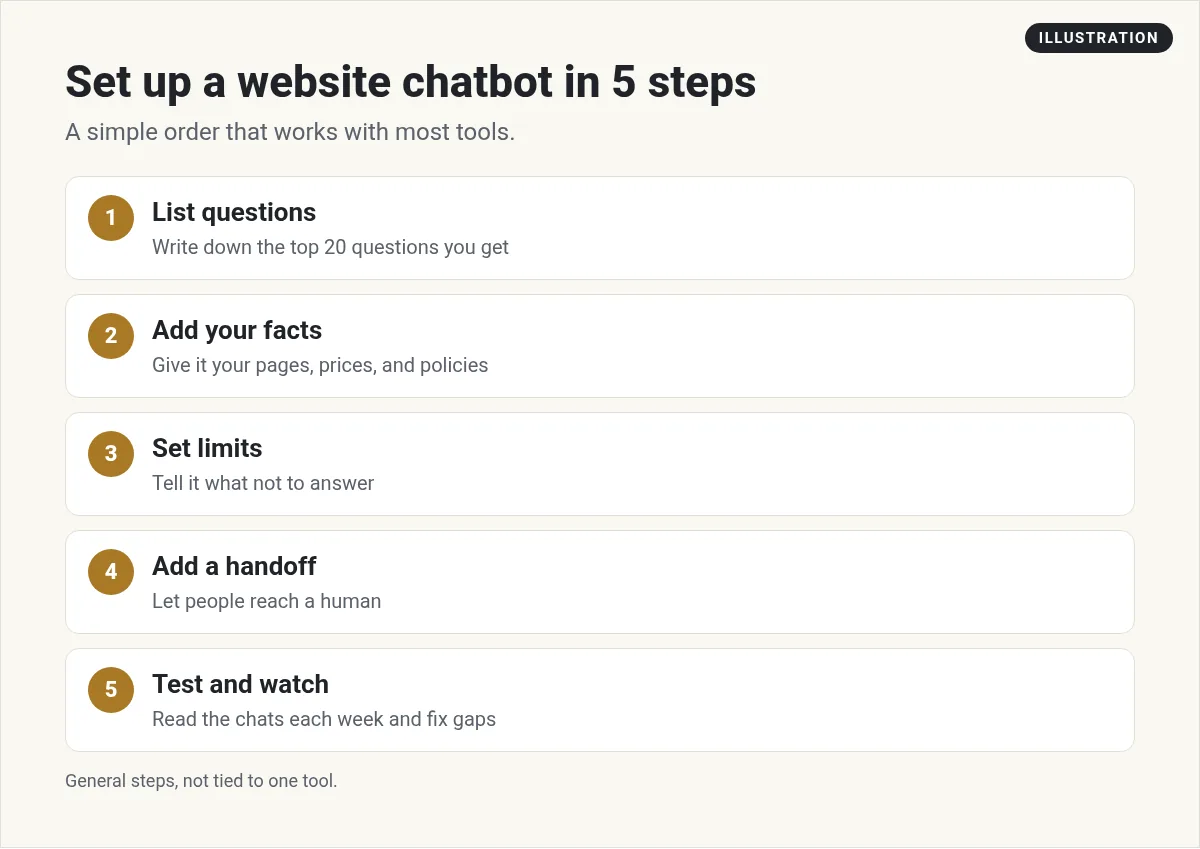
- List your top questions. Look at your inbox and DMs. Write down the 20 questions people ask most.
- Feed it real facts. Add your pages, prices, hours, and policies. Fix any page that is out of date first.
- Set limits. Tell the bot what not to answer. For example, no refunds promised, no legal advice, no made up prices.
- Add a handoff. Give people a way to reach a human, or leave an email for a reply.
- Test it hard. Ask tricky questions. Ask things it should not answer. See what it says.
- Read the chats each week. Find the questions it got wrong and add the missing info.
Write clear instructions for your bot
Most tools let you give the bot a set of instructions. This is where you shape how it talks and what it avoids. Here is a simple starting point you can copy and change:
You are the helper for [business name]. Answer only from the info you were given. Keep answers short and friendly. If you do not know, say so and offer to connect the visitor with our team. Never promise refunds, discounts, or dates. Do not give legal, medical, or money advice. When someone wants to book, share the booking link.
Short and plain works best. If you want to get better at this, my guide to prompt engineering covers the basics.
AI chatbot vs live chat
These two get mixed up. Live chat means a person on your team answers in real time. An AI chatbot answers on its own.
Some tools do both. The bot takes the easy questions, and a person steps in for the hard ones. For a small business, that mix can work well. You are not glued to the chat box, and people still get a human when they need one.
If nobody can watch live chat, say so. Show hours, or let people leave an email for a reply. Silence is worse than a clear "we will get back to you."
Which tool should you pick?
Chatbase if you want a simple bot trained on your content and do not need live chat.
Tidio if you want live chat and AI in one, with a free plan to start.
Intercom Fin if you run a support team with lots of tickets.
HighLevel if you want the bot tied to your CRM, calendar, and follow up. I use it for this. If you serve local businesses, my guides to AI receptionist software and AI services for local businesses go deeper.
Common mistakes to avoid
- Launching without testing. A bot that gives one wrong price can cost you trust.
- Hiding the human. Always give visitors a way to reach a person.
- Old info. The bot is only as good as the content you give it.
- Popping up too fast. Let people read the page first.
Before your chatbot goes live
Nothing you check here is sent or saved. Download it if you want to keep it.
Want the chatbot tied to your CRM?
If you want a website chatbot that also books calls and follows up by text and email, HighLevel puts it all in one place. Start with the free trial and set up one bot first.
Try HighLevel freeI earn a commission if you buy through this link. Plans and AI usage fees can change, so check the live pricing page before you buy.
Want an AI team to help run your business? Meet AIM Agent, an AI Chief of Staff for business owners. I am a co-founder of AIM Agent and have a financial interest in the product.
Frequently asked questions
What is an AI chatbot for a website?
It is a chat box on your site that answers visitor questions using your own content, like your pages, prices, and policies. It can also collect leads or book calls.
How much does a website AI chatbot cost?
On October 25, 2026, Chatbase started at $32 a month billed yearly, Tidio Starter was $24.17 a month billed yearly, Intercom Fin was $0.99 per outcome, and HighLevel's AI Employee add on started at $50 a month per sub-account.
Is there a free AI chatbot for websites?
Tidio has a Free plan with 50 billable conversations and 50 Lyro AI conversations one time. Chatbase offers a 7 day trial on paid plans.
Can an AI chatbot book appointments?
Yes, many can. HighLevel can connect a chatbot to its booking calendar, and some other tools offer booking through add ons or integrations.
Will a chatbot give wrong answers?
It can. Give it accurate, current info, tell it what not to answer, and read its chats each week to fix gaps.
How do I add an AI chatbot to my website?
Most tools give you a short code snippet or a plugin. You paste it into your site, train the bot on your content, and turn it on.
Sources
Checked October 25, 2026. Plans, prices, and rules can change.
