
Grok Bot · GTM
An enterprise sales lead at xAI shared exactly how she runs her work with a team of Bots. Here is her setup, step by step, in plain words.
Grok Bot GTM means using your Bots for go to market work: prospecting, meeting prep, account research, forecasting, and slides. xAI published a guide called Grok Bot for GTM on August 16, 2026. It was written by Krista Letz, who works on enterprise sales.
I read the whole guide on November 4, 2026. Below is her Bot team, her tips, and my own notes, which I mark as mine.
TL;DR
In the Grok Bot GTM guide, one sales lead runs a team of Bots. A Chief of Staff handles meeting prep and the inbox and directs the others. Other Bots handle prospecting, one strategic account each, data analysis, deep product questions, 1:1 prep, forecast notes, slides, and call coaching. She connects her daily tools first, then teaches each Bot like a new hire.
The guide in one picture
The author says Grok Bot feels different because it is not just a thinking partner. She trusts it to go off and do things from start to finish. She also says it learns more about how she works every week.
Before any Bots, she connects her daily tools. Her list includes Salesforce, Gmail, Calendar, Sheets, Drive, Slack, Notion, Granola for meeting notes, Figma for slides, X, and LinkedIn.
She points out three things that make this work:
- Its own computer. The Bot has a computer that runs 24/7, so work keeps going when your laptop is shut.
- Memory. Bots remember your preferences and learn your writing style.
- Mobile and voice. She gives Bots tasks from her phone when she is away from her desk.
Her Bot team
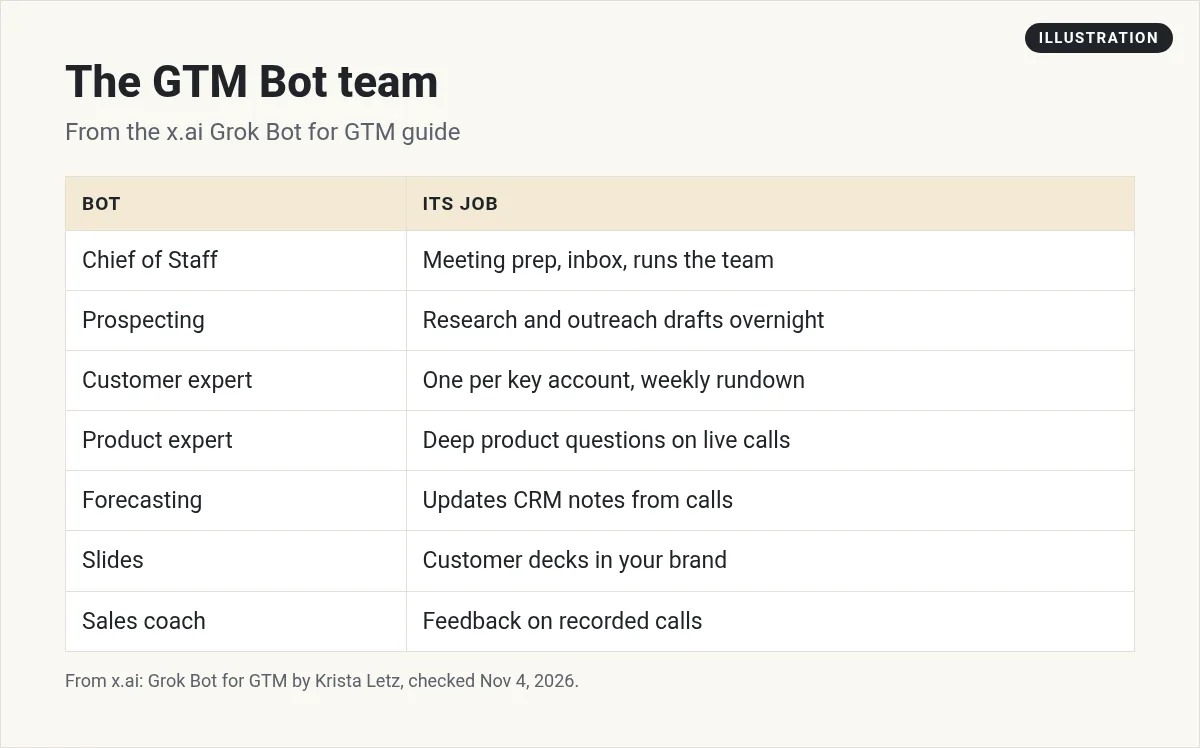
Chief of Staff
This is the Bot she uses most, so she pins it. It owns meeting prep, the inbox, and drafts after calls. It also directs the rest of the team and can spin up other Bots.
Daily meeting prep
A routine preps her for each day's meetings. It pulls from her tools, or does online research for a new contact. She likes a short summary she can read on her phone on the way to work.
Prospecting Bot
It builds pipeline plans and does deep research. It watches online talks, listens to podcasts, and scans posts on LinkedIn and X. Then it drafts messages in her voice in Gmail. She likes to run it overnight.
Customer expert
She makes one Bot per strategic account. It watches the right Slack channels, digests calls and emails, and sends a weekly media rundown on the account. The guide shares her full prompt for that rundown. A smart detail: before the first run, the prompt tells the Bot to ask her which topics and roles matter, then save the answers.
The rest of the prompt is a good model for any research Bot:
- Look only for new content, like recorded events, podcasts, talks, and posts on X.
- Actually consume each item. Get the transcript or watch the video.
- Give 3 to 6 key takeaways, plus notable quotes with timestamps.
- Send one weekly roundup. If nothing is new, send one line saying so.
- If a transcript cannot be found, say so and use the show notes.
Product expert
She calls this one her 10x engineer. It is connected to the codebase. When a customer asks a hard technical question on a call, she asks this Bot instead of pinging an engineer.
Forecasting, 1:1, slides, and coaching
- Forecasting Bot. Pulls from call notes, Slack, and email, and updates Salesforce opportunity notes in her format.
- 1:1 agent. Preps her weekly sync with her manager and sets reminders.
- Slides Bot. Owns customer decks in Figma using her brand system. It can even translate decks.
- Sales coach. Watches her recorded calls and tells her what went well and what to improve.
Her favorite trick: she stops the meeting recording 5 or 10 minutes before a call ends. Then the slides Bot builds a slide from what the customer just said, so she can wrap up the call with it.
Her tips, in plain words
- Onboard it like a new teammate. The first time, she shows the Bot the task on its computer, then has it turn the recording into a skill.
- Feed it your writing. Have it scan your sent mail and build a style profile before it drafts.
- Make rules for bad output. She keeps an anti slop skill and adds to it each time she corrects the Bot.
- Run work in parallel. Ask the Bot to spin up several cloud agents at once.
- Ask for an audit. Have your Chief of Staff look at all your Bots and routines and suggest what to clean up.
- Use group chats. Bots can work together, and one Bot can call another.
My Grok Bot group chats post shows how group chats work, and my Grok Bot skills post covers skills.
Two videos worth watching
This Cursor workshop has Krista Letz walking through the same GTM setup live.
From the Cursor channel (not mine): The best companion to the guide. Watch the prospecting and slides parts closely.
Eric Siu shows advanced Bot workflows for sales, recruiting, and content, plus how he keeps them useful over time.
From the Leveling Up with Eric Siu channel (not mine): Strong ideas for reviewing Bot output. Skip any talk of revenue and focus on the steps.
Any results mentioned in videos are not typical and are not a promise of income. Your results depend on your work and your market.
My own advice
This part is my opinion, not from the guide. Do not build all ten Bots in week one. Start with the Chief of Staff and the daily meeting prep routine. Those save time on day one and teach you how your Bots think. Add the prospecting Bot next, and read every draft before it goes out. A Bot that writes in your voice is still writing for you, so you own every word that gets sent.
Also, keep customer data tight. Only connect the tools each Bot really needs. My Grok Bot safety post covers approvals and access.
Skip building the team from scratch
The GTM guide shows what a good Bot team looks like. Building one yourself takes weeks of setup and tuning.
AIM Agent is an AI Chief of Staff for business owners. It comes with an AI C-suite (COO, CMO, CFO, CRO and CTO), a Business Bot Builder and 100+ business skills, and it runs on AIM OS, a private vault that holds your notes and memory. AIM Agent is a ready-made AI business team that works inside Grok Bot, so you skip the setup and get to work.
Here is what you get:
- An AI Chief of Staff that helps you plan and run your business
- An AI C-suite: COO, CMO, CFO, CRO and CTO
- A Business Bot for each business or project. Give it a real task and it brings the work back for you to review
- 100+ business skills for content, offers, research and more
- Step by step setup guides and email support
So you skip the setup and get to work.

Want an AI team to help run your business? Meet AIM Agent, an AI Chief of Staff for business owners. I am a co-founder of AIM Agent and have a financial interest in the product.
Get a ready made team inside Grok Bot
AIM Agent gives you an AI Chief of Staff, an AI C-suite, and 100+ business skills, so you skip the setup and get to work.
See AIM AgentFrequently asked questions
What does GTM mean?
GTM means go to market. It covers the work of finding, winning, and keeping customers, like prospecting, sales calls, and account management.
What Bots does the GTM guide use?
A Chief of Staff, a prospecting Bot, a customer expert for each key account, a data analysis Bot, a product expert, a 1:1 agent, a forecasting Bot, a slides Bot, and a sales coach.
Which tools does the guide connect?
Salesforce, Gmail, Calendar, Sheets, Drive, Slack, Notion, Granola, Figma, X, LinkedIn, and more.
Can Grok Bot write in my voice?
The guide says Bots learn your writing style. It suggests having the Bot scan your sent mail and build a style profile first.
Does Grok Bot work when my laptop is closed?
Yes. The guide says the Bot has its own computer that runs 24/7.
Where do I start?
My advice is to start with a Chief of Staff and a daily meeting prep routine, then add more Bots one at a time.
Is there a faster way to get a working team?
AIM Agent gives you an AI Chief of Staff, an AI C-suite, and 100+ business skills inside Grok Bot.
Sources
Checked November 4, 2026. Plans, prices, and rules can change.
