
Grok Bot · Notion
Connect Notion once and your Bots can find pages, update databases, and write notes where your team already works. Add a webhook and a Notion board can even hand jobs to your Bots.
Grok Bot works with Notion once you connect it. Your Bots can search your pages, read your databases, write new pages, and update rows, all from a plain chat message. And with one webhook, a Notion board can send jobs to your Bots without you opening a chat.
I read the Grok Bot connect apps help page, the Notion MCP docs, and the Notion webhook help page on November 2, 2026, and watched a creator build the board version. Here is how to set it up and what I would use it for.
TL;DR
In Grok Bot, choose Connect apps in the sidebar, search for Notion, and add it. Finish the Notion sign in in your browser and pick what to share. Confirm Notion shows under Installed. Now ask your Bot to find, read, create, or update Notion pages and databases. The Bot can only do what your Notion account can already do. For hands free work, add a webhook trigger to a Bot routine, then use a Notion database automation with the Send webhook action, which needs a paid Notion plan.
What Grok Bot can do with Notion
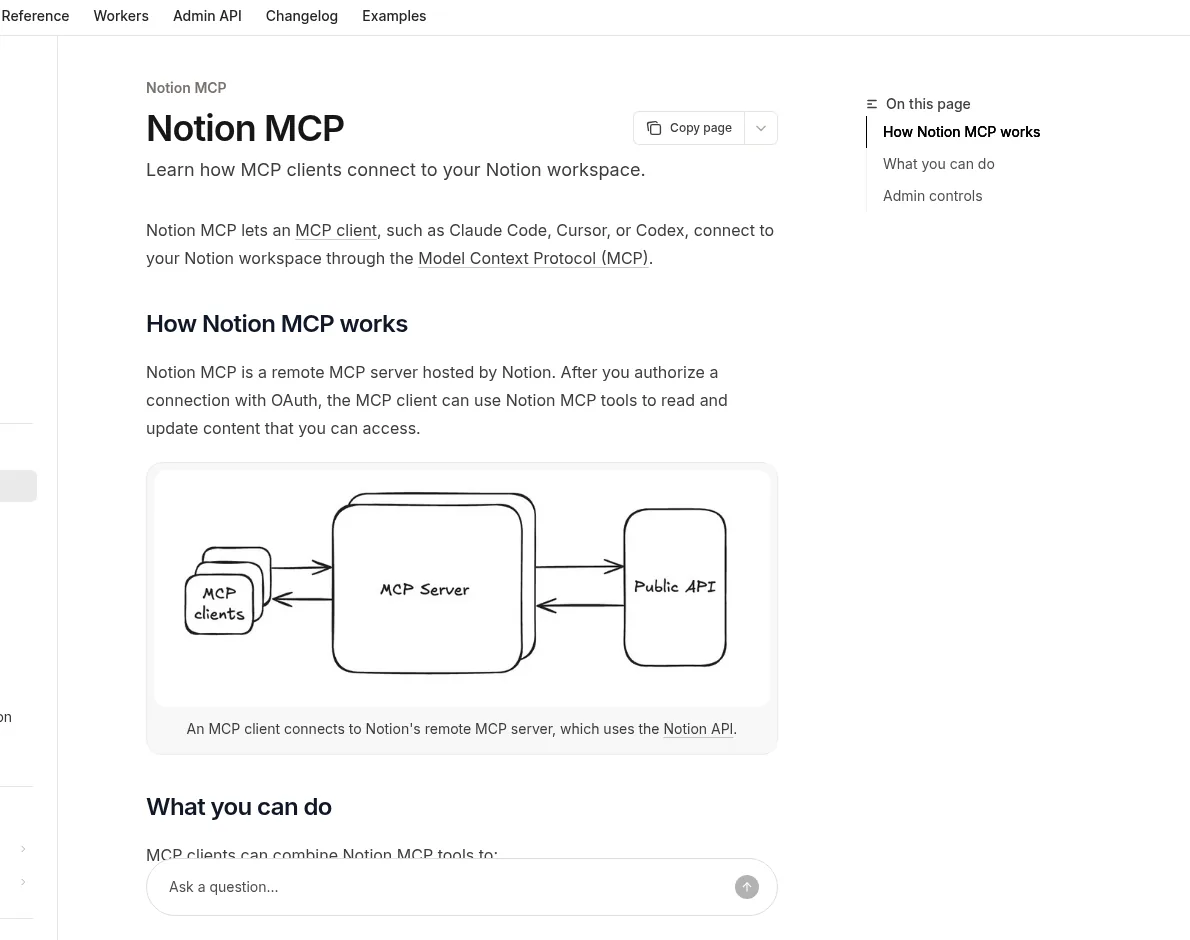
Notion is where many teams keep their notes, docs, and task lists. Once you connect it, your Bots can work in it just like a teammate with a login. Notion's own docs say its MCP server lets AI tools search, read, create, and update pages and databases.
In plain words, that means you can say things like:
- Find my launch plan page and give me the open tasks.
- Add a row to the Content database for this week's video, with the title and due date.
- Turn this call summary into a new page under Clients.
- Read the brand guide in Notion before you write the email.
The Grok Bot changelog also shows small helpers. Bots accept Notion links you paste in chat. Link cards show the real title of private Notion pages you can see. And when you copy a Bot's reply, the headings, lists, and links stay in place when you paste into Notion.
How to connect Notion
- In Grok Bot on desktop, choose Connect apps in the sidebar. On the phone, tap your avatar at the top left, then Connect apps.
- Search for Notion and add it.
- When it asks you to Authorize, finish the Notion sign in in your browser. Pick the workspace and pages you want to share.
- If the sign in does not finish, choose Reconnect on the app.
- Check that Notion shows under Installed.
You can also just ask your Bot to connect Notion. It will show a Connect card in the chat. App connections belong to your account, so once Notion is connected on your computer, it works from your phone too. For the bigger picture, see my Grok Bot connectors guide.
One note for work accounts. The help page says that if you use Grok Bot through a Cursor team, your admin controls which apps are on. And Notion's docs say workspace owners can manage which AI tools may connect. If Notion is blocked, ask your admin.
What the Bot can and cannot touch
The help page is clear on this. A connected app uses the account you authorize. It can only do what that account can already do. It cannot raise your access, and it cannot change sharing.
So if you do not want a Bot editing your finance pages, do not share them, or connect a Notion account that cannot see them. I like to give Bots access to a few team spaces first, then add more once I trust the work.
For more on keeping Bots safe, read my Grok Bot safety guide.
Five Notion jobs I would hand a Bot first
- Meeting notes to tasks. After a call, the Bot writes the summary to a page and adds each action item to your task database.
- Weekly status page. A Friday routine reads your task board and writes a short status page for the team.
- Content calendar. The Bot adds new post ideas as rows with a title, a status, and a source link.
- Client hub. When a new client signs, the Bot makes a client page from your template.
- Clean up. The Bot finds rows with no owner or no due date and lists them for you.
The official Grok Bot guides use Notion the same way. One engineering guide tracks Bot work in a Notion database and moves rows between stages. A performance marketing guide has a Bot write creative briefs in Notion. You can see more ideas in my Grok Bot use cases post.
Run your Bots from a Notion board
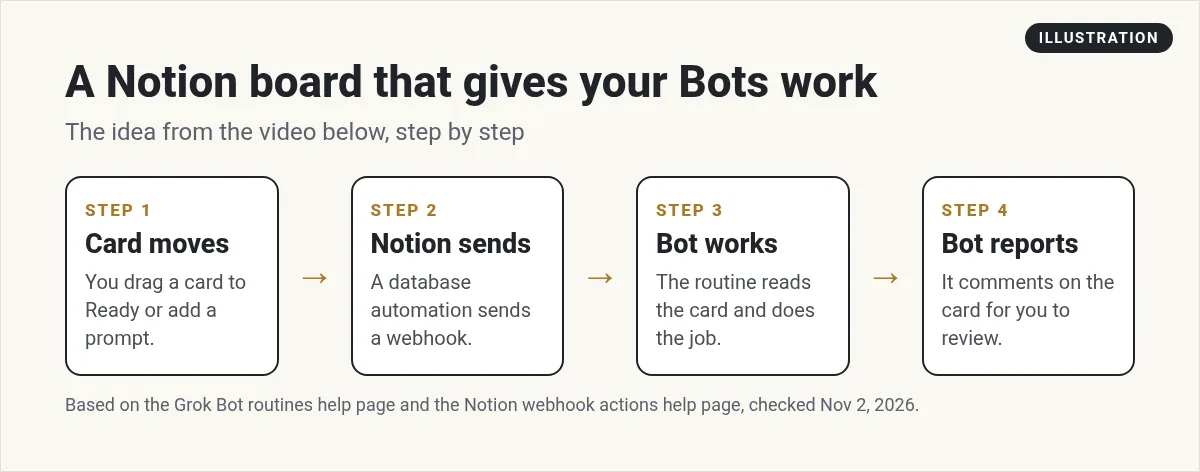
Here is the fun part. Once you have more than a few Bots, the jobs you want to give them can get lost in chats. A Notion board fixes that. You move a card, and the right Bot picks it up.
It works with two pieces:
- A Grok Bot routine with a webhook trigger. Ask your Bot to add one. The routine gets its own web address and key. My Grok Bot webhooks guide shows where to find them.
- A Notion database automation. Notion's help page says the Send webhook action sends a web request to any address when a trigger fires, like a status change. You can add a custom header, which is where the routine's key goes.
So the flow is: a card moves to Ready, Notion sends the card details to your routine, the Bot does the job, and then it comments on the card or moves it to Review. You check the work in Notion.
A few limits from Notion's help page. Webhook actions need a paid Notion plan. Each automation can have up to five webhook actions. They only send page properties, not the page content, so put the brief in a property, like a Prompt field. If a webhook fails, Notion pauses the automation until you turn it back on.
From the Xavier Caffrey GTM channel (not mine): Xavier Caffrey builds this exact setup: a Grok Bot webhook, a Notion board the Bot makes for him, a Notion automation, and a Prompt field so you can brief a Bot from any card.
Prompts that work well with Notion
Be specific about the page or database. Bots do better with names and links than with vague hints.
Open the Content Calendar database in Notion. For every row with status Idea and no owner, write a two line pitch in the Notes field. Do not change the status.
Read the page Client Onboarding SOP in Notion. Then make a checklist page for Acme under Clients that follows it.
Notice the guard rails. Tell the Bot what not to change. That one line saves a lot of clean up. For more patterns, see my Grok Bot prompts guide.
If Notion is not working
- The Bot cannot find a page. The page was likely not shared during sign in. Reconnect Notion and add it.
- Disabled by team admin. Your Cursor team admin has turned Notion off. Ask them to enable it.
- The board does not trigger. Check that the Notion automation is not paused and that the routine is active. Then check the key in the header.
- The wrong account. The changelog says you can connect a second account for some apps. Tell the Bot which one to use.
Still stuck? My Grok Bot not working page covers more fixes.
Give your Notion board a team to work it
A board full of tasks is only useful if someone does them. Most owners end up with a long list and no time.
AIM Agent is an AI Chief of Staff for business owners. It comes with an AI C-suite (COO, CMO, CFO, CRO and CTO), a Business Bot Builder and 100+ business skills, and it runs on AIM OS, a private vault that holds your notes and memory. AIM Agent is a ready-made AI business team that works inside Grok Bot, so you skip the setup and get to work.
Here is what you get:
- An AI Chief of Staff that helps you plan and run your business
- An AI C-suite: COO, CMO, CFO, CRO and CTO
- A Business Bot for each business or project. Give it a real task and it brings the work back for you to review
- 100+ business skills for content, offers, research and more
- Step by step setup guides and email support
So the cards you move in Notion land with Bots that know your business, and you just review the work.

Want an AI team to help run your business? Meet AIM Agent, an AI Chief of Staff for business owners. I am a co-founder of AIM Agent and have a financial interest in the product.
Put a business team behind your board
AIM Agent gives you an AI Chief of Staff, an AI C-suite, and 100+ business skills, so the jobs in your Notion board get done.
See AIM AgentFrequently asked questions
How do I connect Notion to Grok Bot?
Choose Connect apps in the sidebar, search for Notion, add it, and finish the Notion sign in in your browser. Then check that it shows under Installed.
What can a Bot do in Notion?
It can search, read, create, and update pages and databases, but only what your Notion account can already do.
Can a Notion board start a Bot?
Yes. Add a webhook trigger to a Bot routine, then use a Notion database automation with the Send webhook action and put the key in a custom header.
Do Notion webhooks cost extra?
Notion's help page says webhook actions are for paid Notion plans.
Why can't my Bot see a page?
The page was likely not shared when you signed in. Reconnect Notion and share it.
Does it work on my phone?
Yes. App connections belong to your account, so Notion works on desktop and phone once connected.
Is there a faster way to get a Bot team for my business?
AIM Agent gives you an AI Chief of Staff, an AI C-suite, and 100+ business skills, so you start with a team built for business work.
Sources
Checked November 2, 2026. Plans, prices, and rules can change.
