
Grok Bot · Video
Grok Bot can make short clips and help you plan and prep your edits. Here is what it does well, what it is not built for, and how to set it up.
Grok Bot video editing help comes in two parts. First, the Bot can make short new clips from a description or your images. Second, it can do the prep and planning around your own edits, like scripts, shot lists, and notes, on its own computer.
I read the Grok Bot help page on images and videos and the files docs on November 3, 2026, and watched two creators who built video crews from Bots. Here is the plain picture.
TL;DR
Grok Bot can create video clips 1 to 15 seconds long, 6 seconds by default, at 480p or 720p, saved as MP4 files. The help center says these clips look filmed and are not made for motion graphics, title cards, slideshows, app demos, or anything that needs exact text or timing. In the desktop app you can attach videos up to 1 GB each, and the Bot works on its own cloud computer with a command line and files.
What Grok Bot can make
The Grok Bot help page Create images and videos says your Bot can make a clip from:
- A description of the scene.
- One image you share, which becomes the first frame.
- Two images, one for the start and one for the end. Use the same image twice to make a loop.
- Up to 14 reference images that show how people, objects, clothing, or places should look.
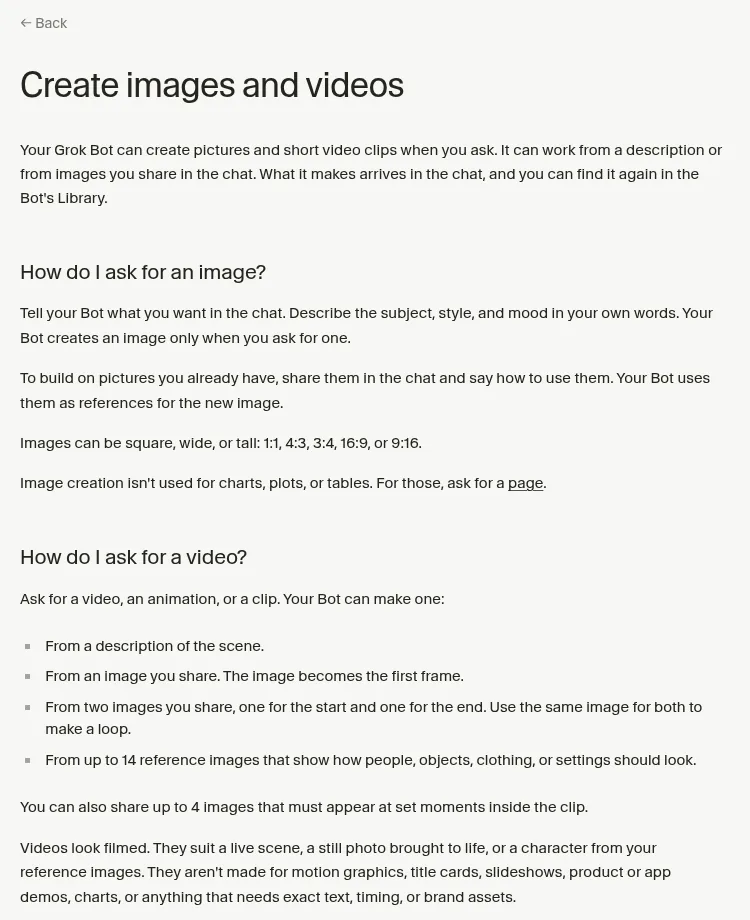
You can also share up to 4 images that must show up at set moments in the clip. Making a video can take a few minutes.
My Grok Bot images and videos post covers image prompts too. This post is about video work.
Clip sizes and limits
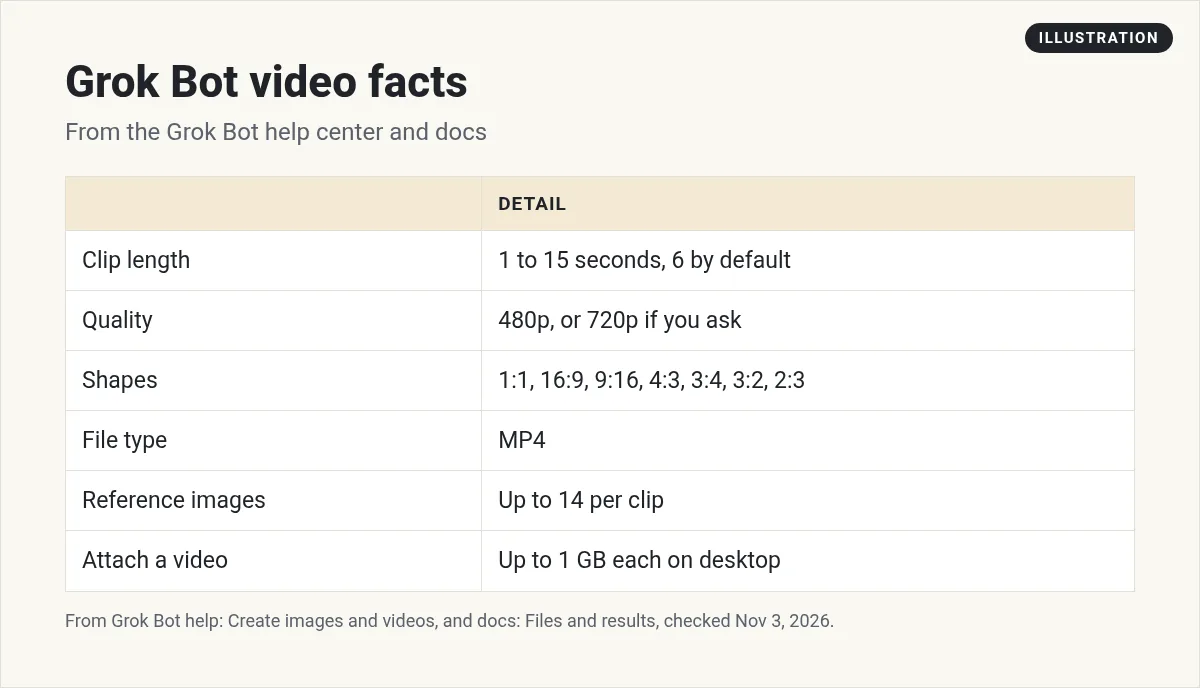
The help page lists these facts. Clips run 1 to 15 seconds, and the default is 6. They are 480p unless you ask for 720p. Shapes include square, wide 16:9, and tall 9:16 for Reels and Shorts. Each clip is saved as an MP4 file.
You find everything later in the Bot's Library. On desktop, click the Bot's name at the top of the chat and open the Library tab.
What it is not built for
This part matters. The help page says the clips look filmed. They suit a live scene, a still photo brought to life, or a character from your reference images.
It says they are not made for motion graphics, title cards, slideshows, product or app demos, charts, or anything that needs exact text, timing, or brand assets. So do not expect it to cut your talking head video like a full editor would just from the clip tool.
The help page also says naming trademarked characters, brands, or real people often causes a block. Describe the subject in your own words instead.
Working with your own footage
The files docs say you can attach images, audio, and video. In the desktop app, a video can be up to 1 GB, and you can attach up to 20 files per message.
Your Bot also has its own cloud computer with a browser, a command line, and files. So ask it what it can do with your clip on that computer. Start small:
Here is my raw video. Tell me what you can do with it on your computer. If you can, list the parts where I pause or repeat myself, with times.
Write five hooks for the first three seconds of this video, and a short caption for Instagram and TikTok.
Then do the final cut in your editor. That is the same split the creators below use.
How creators build a video crew
Two creators I watched split video work across several Bots, each with one job.
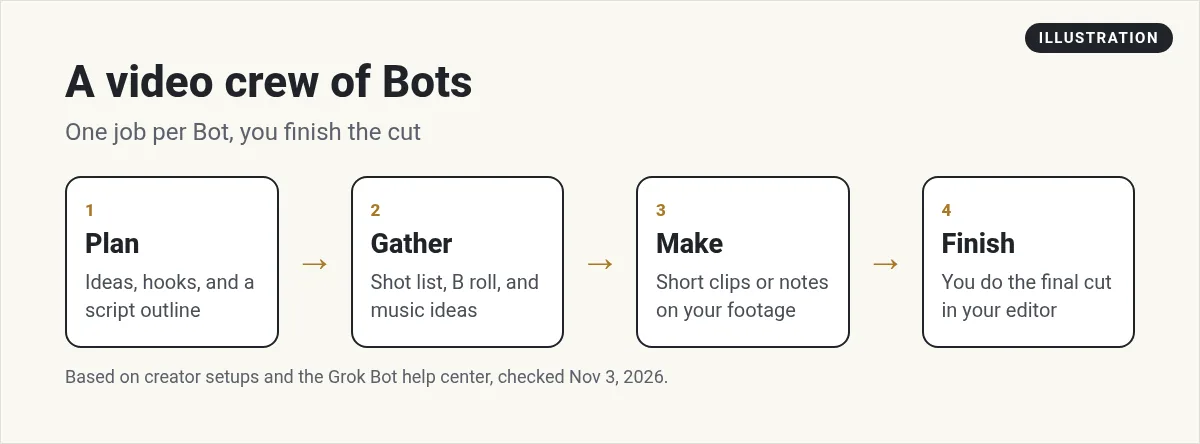
Liam Casey says in his video description that he uses three Bots: a creative director for scripts, hooks, and quality checks, an asset scout for B roll, music, and sound effects, and a video editor Bot for cuts, captions, and zooms.
From the Liam Casey channel (not mine): Liam sells a book and coaching in his description. Watch for the setup, not the pitch.
Any results mentioned in videos are not typical and are not a promise of income. Your results depend on your work and your market.
Mira AI builds a filmmaking crew of four Bots: a Story Master, a Production Designer, a Cinematographer, and a Video Prompt Master. She connects them to an image and video tool through MCP, then brings the clips into an editor to finish.
From the Mira AI channel (not mine): She links to an outside media tool in her description. You can use Grok Bot's own clip maker too.
My Grok Bot MCP post explains how to connect outside tools like that.
Example: a short Reel from one photo
Here is a simple way to try the clip tool, based on the help page:
- Share a photo you own, like your product on a table.
- Say what should happen, like a slow camera push in with soft morning light and steam rising from the cup.
- Ask for 9:16 and 720p so it fits Reels and Shorts.
- Ask for 6 seconds, the default, or up to 15.
- Download the MP4 from the chat and add your text and music in your editor.
The help page says the photo you share becomes the first frame. To make a loop, share the same image for the start and the end.
Tips for better clips
The help page says to describe the subject, style, and mood in your own words. A few more tips from my own tests with AI video tools:
- One action per clip. Short clips do best with one clear move.
- Name the camera move, like push in, pan left, or still.
- Use reference images when a person or product must look the same in every clip.
A weekly video routine
Every Monday, look at my last five YouTube videos and their titles. Suggest three new video ideas, write a short script outline for each, and list the B roll shots I need. Save it as a page.
See my Grok Bot routines guide to schedule it, and my Grok Bot for YouTube post for more.
Watch outs
- Short clips only. 15 seconds is the max per clip.
- No exact text. Add titles and captions in your editor.
- Admins can turn it off. On a team, model or privacy settings can block video creation.
- Check rights. Only use music and B roll you have the right to use.
A content team behind your videos
Ideas, scripts, posts, and follow up are all part of the job. A team gives each one an owner.
AIM Agent is an AI Chief of Staff for business owners. It comes with an AI C-suite (COO, CMO, CFO, CRO and CTO), a Business Bot Builder and 100+ business skills, and it runs on AIM OS, a private vault that holds your notes and memory. AIM Agent is a ready-made AI business team that works inside Grok Bot, so you skip the setup and get to work.
Here is what you get:
- An AI Chief of Staff that helps you plan and run your business
- An AI C-suite: COO, CMO, CFO, CRO and CTO
- A Business Bot for each business or project. Give it a real task and it brings the work back for you to review
- 100+ business skills for content, offers, research and more
- Step by step setup guides and email support
So your videos are part of a plan.

Want an AI team to help run your business? Meet AIM Agent, an AI Chief of Staff for business owners. I am a co-founder of AIM Agent and have a financial interest in the product.
Get a content team inside Grok Bot
AIM Agent gives you an AI Chief of Staff, an AI C-suite, and 100+ business skills, so content, marketing, and planning each have an owner.
See AIM AgentFrequently asked questions
Can Grok Bot edit videos?
It can make short new clips and help you plan and prep edits. The help center says clips are not made for title cards, motion graphics, or exact text.
How long can a Grok Bot video be?
1 to 15 seconds per clip. The default is 6 seconds.
What quality are Grok Bot videos?
480p unless you ask for 720p, saved as MP4.
Can I make vertical videos for Reels and Shorts?
Yes. 9:16 is one of the listed shapes.
How big a video can I attach?
In the desktop app, up to 1 GB per video.
Why did my video request get blocked?
Naming brands, trademarked characters, or real people often causes a block. Describe the subject in your own words.
Is there a faster way to get a content team?
AIM Agent gives you an AI Chief of Staff, an AI C-suite, and 100+ business skills inside Grok Bot.
Sources
Checked November 3, 2026. Plans, prices, and rules can change.
