
Grok Bot · Explained
Same family name, very different jobs. The Grok app is where you ask. Grok Bot is where you hand off work. Here is the plain difference, plus where Grok Build fits.
Grok Bot vs Grok comes down to this: the Grok app is a chat assistant you ask questions, and Grok Bot gives you AI teammates that do work on their own cloud computer. The Grok Bot docs say it directly. They are two different apps.
I read the Grok Bot docs FAQ and overview, the x.ai Grok page, and the Grok Build page on November 3, 2026. Here is how they differ and when to use each one.
TL;DR
No, Grok Bot is not the Grok app. Grok is the chat app for writing, research, search, images, video, and voice. Grok Bot gives you named Bots that each work on a persistent cloud computer with a browser, files, and a terminal. They use your connected apps, run routines while your laptop is closed, and ask before big actions. Grok Build is a third product: a coding agent that runs on your computer. Grok Bot signs in with your Cursor account. On The X Subscription, where new customers start, its usage comes from one weekly pool shared with Grok and Cursor.
The short answer from the docs
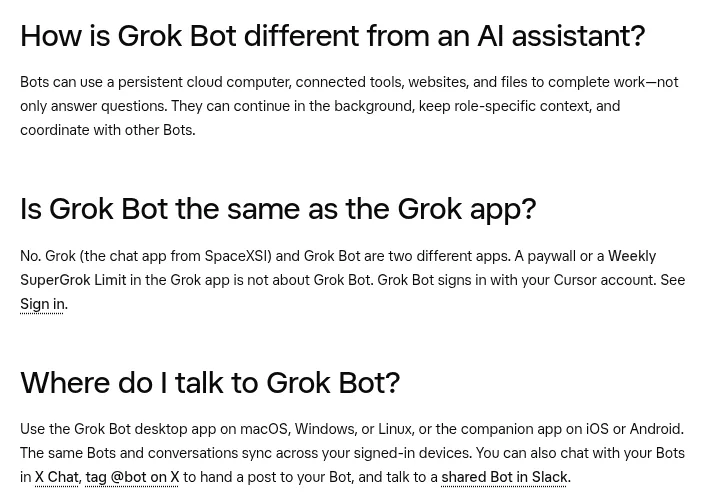
The Grok Bot FAQ has a question for exactly this: Is Grok Bot the same as the Grok app? The answer is no. Grok, the chat app, and Grok Bot are two different apps. A paywall or a limit message in the Grok app is not about Grok Bot. Grok Bot signs in with your Cursor account.
What the Grok app is for
The x.ai Grok page calls it AI that is useful for everyone. It covers:
- Chat for writing, research, and quick recaps.
- Search of the web and X, live, with citations.
- Multi agent mode, where several agents work on parts of a hard question at once.
- Imagine for images and short videos from text or photos.
- Voice conversations, file and PDF analysis, and memory across chats.
It is great when you want an answer, a draft, or a picture right now. You ask, it replies, you take it from there.
What Grok Bot is for
The Grok Bot docs describe Bots you keep around: AI teammates with names, jobs, and context that builds over time. The big difference is the computer.
- Each Bot has a computer. A persistent cloud computer with a browser, files, and a terminal. Tasks finish in your real tools, not as chat drafts.
- Setup is a message. Create a Bot, describe the job, and grant access as it asks.
- Bots work together. They can run at the same time, message each other, and share context in group chats.
- Work keeps going. Closing your laptop or phone does not stop a task or a routine.
- Context builds. A named Bot keeps its memory, files, and preferences across sessions.
You can reach your Bots from the desktop app on Mac, Windows, or Linux, the phone app, X Chat, and Slack for shared Bots. My Grok Bot explained post goes deeper.
Side by side
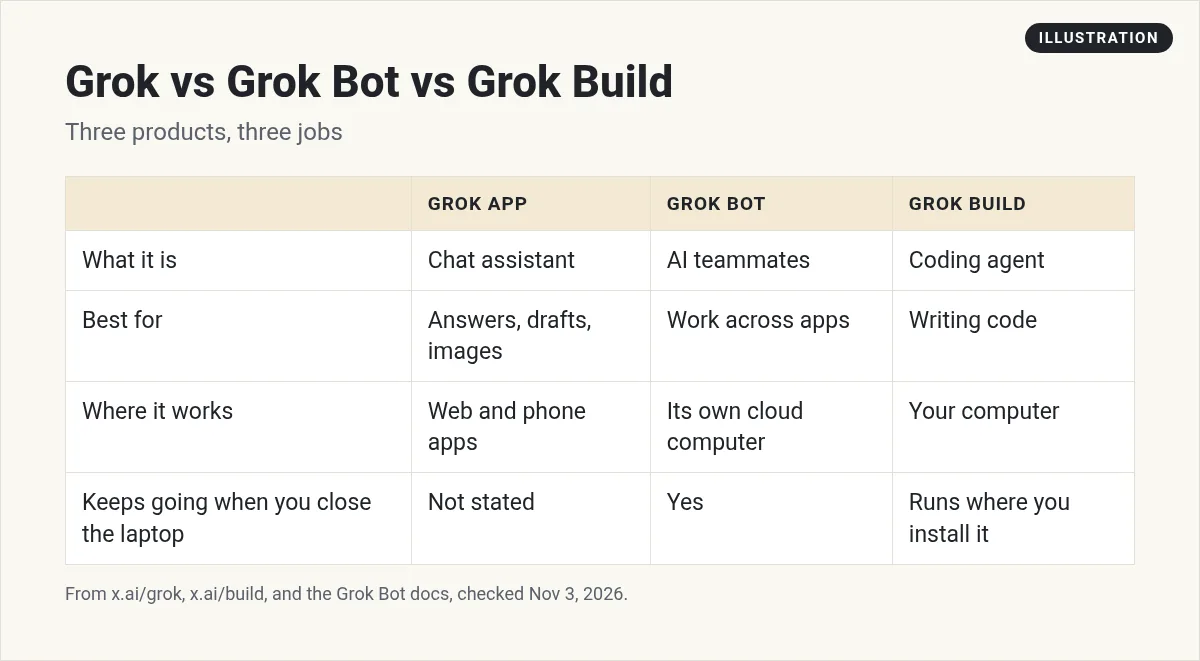
A simple way to remember it: Grok answers. Grok Bot does.
Where Grok Build fits
There is a third product with a similar name. The x.ai Grok Build page calls it a coding agent for complex work that you bring to your own computer. It works with skills, plugins, hooks, and MCP servers. It is for developers writing code. Grok Bot can do coding too, but it is built for all kinds of work on its own cloud computer. My Grok Bot for coding guide compares the options.
Does Grok Bot use Grok?
Not in a way you control. The Grok Bot FAQ says there is no model picker. Grok Bot picks the model for each task, and that can be a first party x.ai model or a model from another provider. My Grok Bot models post explains more.
When to use each one
Use the Grok app when you want a fast answer, a draft, a quick image, or a chat about the news on X.
Use Grok Bot when the job has steps across apps, needs to run on a schedule, or should keep going after you close the laptop. Good first jobs:
- A weekday morning brief from your email and calendar.
- Weekly research with sources, saved to a doc.
- Sorting an inbox and drafting replies you approve.
Every weekday at 7:30 AM, read my inbox and calendar. Send me a short list: meetings, emails that need me, and anything due this week. Do not reply to anyone.
A quick test to feel the difference
Try the same job in both. Ask the Grok app: what are three ideas for a newsletter about my local bakery? You get a fast list in the chat. Good.
Now ask a Grok Bot: every Friday at 9 AM, look at our Instagram posts from this week, pick the three best, and draft a short newsletter in a Google Doc for me to review. The Bot asks for access to the apps it needs. Then it does the job every week, saves the draft where you can find it, and tells you when it is ready.
The first is a conversation. The second is a job with a schedule and a finish line. If you catch yourself copying chat answers into other apps over and over, that is a sign the work belongs with a Bot.
Why people mix them up
The names are close, and both come from x.ai. The bigger reason is accounts. The Grok Bot FAQ says a paywall or a Weekly SuperGrok Limit in the Grok app is not about Grok Bot. Usage depends on your plan. On The X Subscription, Grok, Grok Bot, and Cursor share one weekly pool, and you check it under Usage at grok.com/dashboard. On a legacy Cursor plan, Grok Bot usage is metered on your Cursor account and shows in Grok Bot under Settings, Usage & Billing. If something is not working, my Grok Bot not working guide covers sign in problems.
Two videos worth your time
The official launch video shows what Grok Bot is in under two minutes.
From the Grok channel (not mine): This is the official launch video from the Grok team, so it shows the product at its best.
Kacper Rutkiewicz gives one Grok Bot access to Claude Code, Codex, and Grok Build, which shows how the coding tools differ from the Bot itself.
From the Kacper Rutkiewicz | AI Made Simple channel (not mine): Kacper links to his own community in his description. The side by side test is the useful part.
Watch outs
- Do not mix up accounts. Grok Bot signs in with a Cursor account.
- Do not expect chat speed for big jobs. A Bot doing real work takes longer than a chat reply.
- Do not skip approvals. A Bot can act. Keep sends and payments on approval.
Skip the blank Bot
Once you know Grok Bot is where work gets done, the next question is what team to build.
AIM Agent is an AI Chief of Staff for business owners. It comes with an AI C-suite (COO, CMO, CFO, CRO and CTO), a Business Bot Builder and 100+ business skills, and it runs on AIM OS, a private vault that holds your notes and memory. AIM Agent is a ready-made AI business team that works inside Grok Bot, so you skip the setup and get to work.
Here is what you get:
- An AI Chief of Staff that helps you plan and run your business
- An AI C-suite: COO, CMO, CFO, CRO and CTO
- A Business Bot for each business or project. Give it a real task and it brings the work back for you to review
- 100+ business skills for content, offers, research and more
- Step by step setup guides and email support
So you start with Bots that already know their jobs.

Want an AI team to help run your business? Meet AIM Agent, an AI Chief of Staff for business owners. I am a co-founder of AIM Agent and have a financial interest in the product.
Start with a team, not a blank chat
AIM Agent gives you an AI Chief of Staff, an AI C-suite, and 100+ business skills, so your Grok Bot has a team from day one.
See AIM AgentFrequently asked questions
Is Grok Bot the same as Grok?
No. The Grok Bot docs say Grok, the chat app, and Grok Bot are two different apps.
What does Grok Bot do that Grok does not?
Grok Bot gives you Bots that work on a persistent cloud computer with a browser, files, and a terminal, and keep working after you close the laptop.
Is Grok Build the same as Grok Bot?
No. Grok Build is a coding agent for your own computer. Grok Bot is for all kinds of work on its own cloud computer.
Do I sign in to Grok Bot with my Grok account?
The FAQ says Grok Bot signs in with your Cursor account.
Does a limit in the Grok app affect Grok Bot?
No. The FAQ says a paywall or limit in the Grok app is not about Grok Bot.
Can I pick the Grok model in Grok Bot?
No. Grok Bot picks the model for each task, and there is no model picker.
Is there a faster way to get a Bot team for my business?
AIM Agent gives you an AI Chief of Staff, an AI C-suite, and 100+ business skills, so you start with a team built for business work.
Sources
Checked November 3, 2026. Plans, prices, and rules can change.
