
Grok Bot · Models
Grok Bot models are one of the most asked about topics since the news that it can use other companies' models. Here are the plain facts from the official pages, and what they mean for you.
Grok Bot models are a hot topic, because people want to know which AI is actually doing the work. Is it only Grok? Can it use other top models? Can you pick one? The answers are a little surprising.
I checked the official help page Which AI models power Grok Bot, the Grok Bot FAQ, and the security docs on October 29, 2026. Here is what they say, in plain words, plus what it means for how you use your Bots.
TL;DR
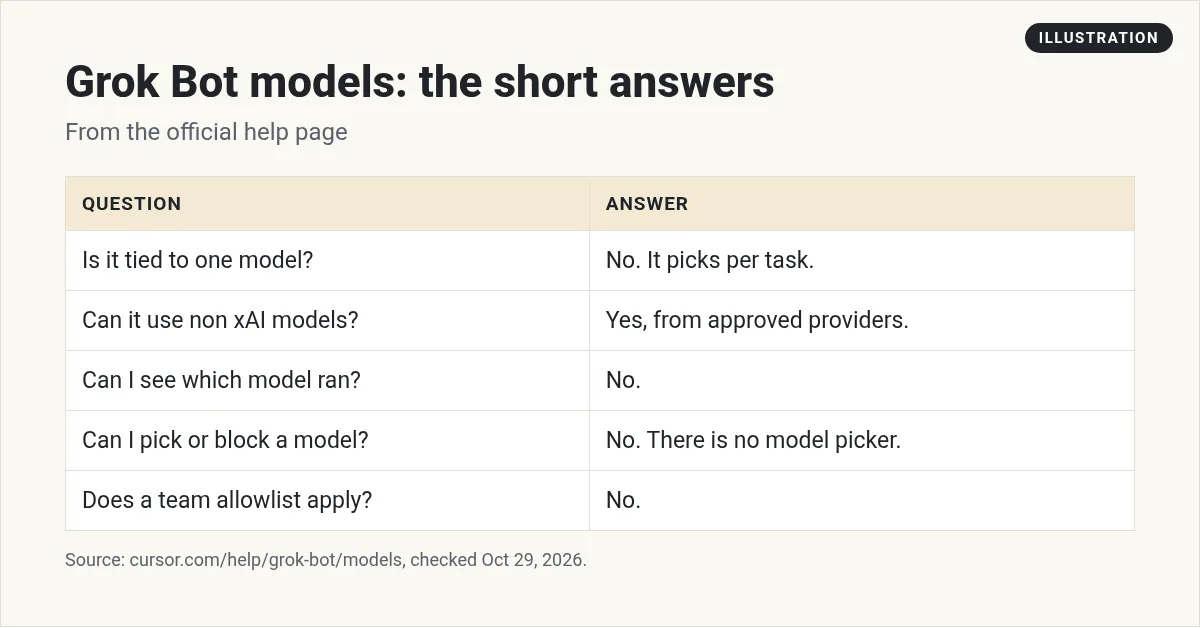
Grok Bot is not tied to one model. For each task, it uses the model most likely to give the best result, which can be an xAI model or a third party model from a provider on its sub-processor list, and it can change from one request to the next. You cannot pick, request, or block a model, there is no model picker, and Grok Bot does not show which model handled a request. Your usage shows as Grok Bot usage, not by model. Your results depend more on clear jobs and good instructions than on the model. AIM Agent gives you a ready business team with those jobs set up.
The short answer
The help page starts with this line: Grok Bot is not tied to a single model.
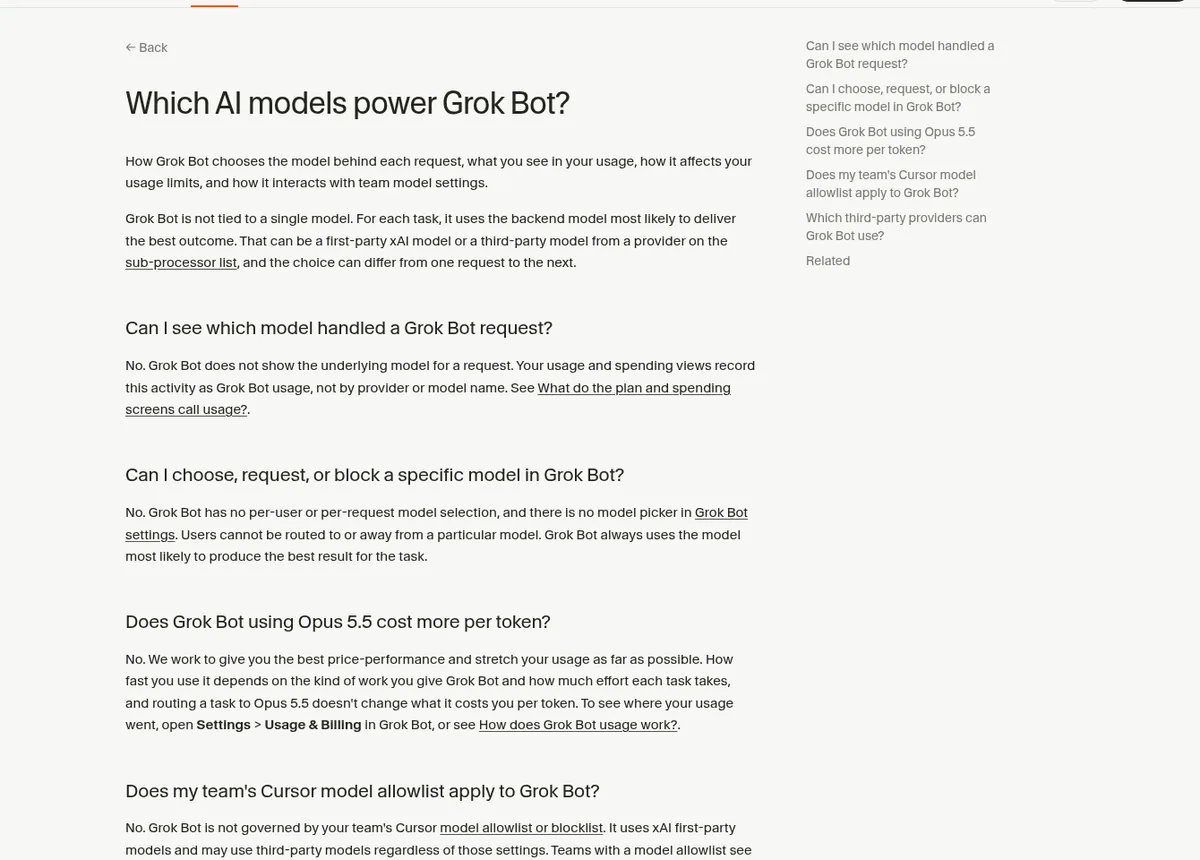
For each task, it uses the backend model most likely to give the best outcome. That can be a first party xAI model, or a third party model from a provider on its sub-processor list. And the choice can be different from one request to the next.
New to Grok Bot itself? Start with my Grok Bot explained post.
Can you choose a model?
No. This is the question I get the most, so here is the exact wording from the help page: Grok Bot has no per-user or per-request model selection, and there is no model picker in Grok Bot settings
.
You cannot route your work to a model, or away from one. Grok Bot always picks the model it thinks will do the job best.
That is different from many AI chat apps, where you pick a model from a menu. If you are coming from one of those, it can feel strange at first. My Grok Bot vs ChatGPT and Grok Bot vs Claude posts compare how these tools work.
Can you see which model ran?
Also no. The help page says Grok Bot does not show the underlying model for a request. Your usage and spending screens record the activity as Grok Bot usage, not by provider or model name.
What about Opus 5.5?
Many creators talked about Grok Bot using other top models, like Claude Opus 5.5. This video breaks down the news and what the creator thinks it means.
From the Brock Mesarich | AI for Non Techies channel (not mine): A creator explains the news that Grok Bot is no longer limited to Grok's own models, and what it could mean.
The help page answers the cost question directly. It says routing a task to Opus 5.5 does not change what it costs you per token. How fast you use your plan depends on the kind of work you give Grok Bot and how much effort each task takes.
To see where your usage went, open Settings, then Usage and Billing in Grok Bot.
For teams: allowlists and data
If your company uses Cursor with a model allowlist, read this part carefully. The help page says Grok Bot is not governed by your team's model allowlist or blocklist. It uses xAI first party models and may use third party models no matter what those settings say. Teams with a model allowlist see a notice when they turn on Grok Bot.
Which third party providers? The help page says only providers on the sub-processor list, and that list is the official reference. The set of models changes over time.
The security docs add a few points on data:
- There is no customer facing model picker, and the mix of models can change over time.
- For team members, the team's privacy mode applies. With Privacy Mode on, customer data is not used for training.
- If your contract limits which providers can handle your data, contact your account team.
If you handle sensitive data, read the security page yourself before you connect anything. My Grok Bot safety guide covers approvals and safe setup.
What this means for you
Here is my honest take. For most business owners, not picking a model is a good thing. You do not have to keep up with which model is best this week. You give the Bot a job, and it picks.
The trade off is control. If you need a specific model for a legal or company reason, Grok Bot does not let you choose. In that case, a tool with a model picker may fit better. My Grok Bot vs Hermes post compares Grok Bot with an open source agent where you pick the model.
Either way, the model is not the main thing that decides your results. These matter more:
- A clear job. One Bot, one job. See my Grok Bot use cases post.
- Good instructions. Tell it what good looks like. My Grok Bot prompts post has examples.
- Saved skills. Teach it a process once. See Grok Bot skills.
- Memory. Let it learn how you like things. See Grok Bot memory.
Common myths
- Myth: Grok Bot only uses Grok. The help page says it may use third party models too.
- Myth: There is a hidden setting to pick a model. There is no model picker.
- Myth: Asking for a model in your prompt works. Users cannot be routed to or away from a model.
- Myth: Third party models cost more per token. The help page says routing to Opus 5.5 does not change the per token cost.
Where to check for changes
Models change fast. The help page Which AI models power Grok Bot and the sub-processor list are the places to check. The x.ai Grok Bot changelog is also worth a look each week. My Grok Bot updates post sums up the big changes from October 2026.
Spend your time on jobs, not models
Since Grok Bot picks the model for you, your edge comes from the jobs, rules, and skills you give your Bots. That is the slow part to build.
AIM Agent is an AI Chief of Staff for business owners. It comes with an AI C-suite (COO, CMO, CFO, CRO and CTO), a Business Bot Builder and 100+ business skills, and it runs on AIM OS, a private vault that holds your notes and memory. AIM Agent is a ready-made AI business team that works inside Grok Bot, so you skip the setup and get to work.
Here is what you get:
- An AI Chief of Staff that helps you plan and run your business
- An AI C-suite: COO, CMO, CFO, CRO and CTO
- A Business Bot for each business or project. Give it a real task and it brings the work back for you to review
- 100+ business skills for content, offers, research and more
- Step by step setup guides and email support
So instead of building those from blank Bots, you start with an AI Chief of Staff and a business team with skills already made.

Want an AI team to help run your business? Meet AIM Agent, an AI Chief of Staff for business owners. I am a co-founder of AIM Agent and have a financial interest in the product.
Get a ready AI team for your business
AIM Agent gives you an AI Chief of Staff, an AI C-suite, and 100+ business skills, so your Bots have real jobs from day one.
See AIM AgentFrequently asked questions
Which model does Grok Bot use?
It picks a model for each task. That can be an xAI model or a third party model from a provider on its sub-processor list.
Can I choose the model in Grok Bot?
No. There is no model picker, and you cannot request or block a model.
Does Grok Bot use Claude Opus 5.5?
The help page mentions routing tasks to Opus 5.5, and says it does not change what you pay per token.
Can I see which model handled my request?
No. Usage shows as Grok Bot usage, not by provider or model name.
Does my team's model allowlist apply?
No. The help page says Grok Bot is not governed by your team's Cursor model allowlist or blocklist.
Is my data used for training?
For team members with Privacy Mode on, the security docs say customer data is not used for training. Read the security page for details.
Is there a faster way to get a business Bot team?
AIM Agent gives you an AI Chief of Staff, an AI C-suite, and 100+ business skills, so you start with a team built for business work.
Sources
Checked October 29, 2026. Plans, prices, and rules can change.
