
AI Tools · Assistants
Lindy is an AI teammate that lives in Slack, email, and your other apps. Here is what it does, what it costs per user, how credits work, and who it fits.
Lindy AI calls itself an AI employee. You ask it for help in Slack, email, or iMessage, and it does the work across your apps.
I checked Lindy's home page and pricing page on October 26, 2026. Here is what it does, what you pay, and the billing details that are easy to miss.
Quick answer
Lindy is an AI assistant for teams that connects to 1,500+ apps and works in Slack, email, and iMessage. As of October 26, 2026, you can start free with $50 in credits that last 7 days, no card needed. The Team plan starts at $29.99 a month per active user with 3,000 credits each, shared in one pool. Some visitors see a $49.99 Team price with 5,000 credits, so check the live page. Extra credits cost $10 per 1,000.
What Lindy AI does
Lindy's home page says "Lindy is the AI employee that plugs into your tools, learns how you work, and takes real work off your plate."
In plain words, it is an AI helper for your whole team. You @mention it in Slack, text it, or let it run on a schedule. It pulls info from your apps and does the task.
Here is what the site says it can do:
- Connect to your apps. Gmail, Slack, Notion, HubSpot, and 1,500+ more. It also supports MCP, a standard way to plug AI into tools. My MCP server guide explains it.
- Handle meetings. Record calls, take notes, prep, and send follow ups.
- Run on a schedule. A morning brief, a Monday report, a Friday nudge.
- Use skills. It comes with 40+ skills like research, data analysis, decks, and dashboards. You can teach it new ones.
- Manage email. It can sort your inbox and draft replies in your voice.
One nice touch: its memory lives in plain files you can open and edit. So you can see what it remembers and fix it.
How Lindy is different from a chatbot
A chatbot answers questions in a chat box. You copy the answer and do the work yourself.
Lindy is built to do the work too. Its home page says it is "More than a chatbot." It can pull numbers from your tools, write up a report, and file it where your team will see it.
It also remembers how you like things. It saves notes like when your weekly report goes out, or which project is the priority. That context means you explain less each time.
And it works where your team already talks. Lindy says it is ready in Slack, iMessage, email, or your browser. You do not need to open a new app to ask for help.
Lindy pricing as of October 26, 2026
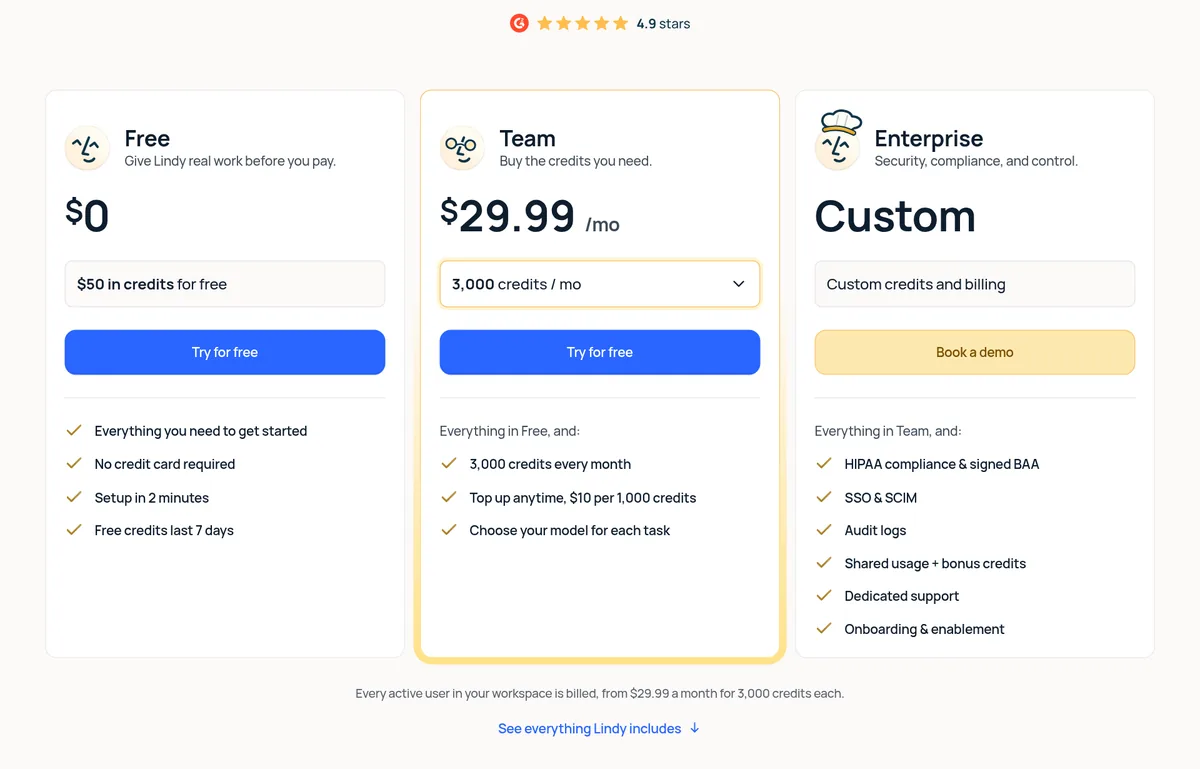
Lindy's pricing page shows three plans:
- Free: $0, with $50 in credits. No credit card. The free credits last 7 days.
- Team: from $29.99 a month per active user, with 3,000 credits each every month. You can top up any time at $10 per 1,000 credits.
- Enterprise: custom pricing. It adds HIPAA with a signed BAA, SSO and SCIM, audit logs, and dedicated support.
The key line is this one: "Every active user in your workspace is billed, from $29.99 a month for 3,000 credits each." So a team of 3 active users would be about $90 a month, or about $150 at the $49.99 tier. That is my math.
The page also says you can pick bigger monthly credit amounts. The largest tier I saw lists 1,750,000 credits.
How Lindy credits work
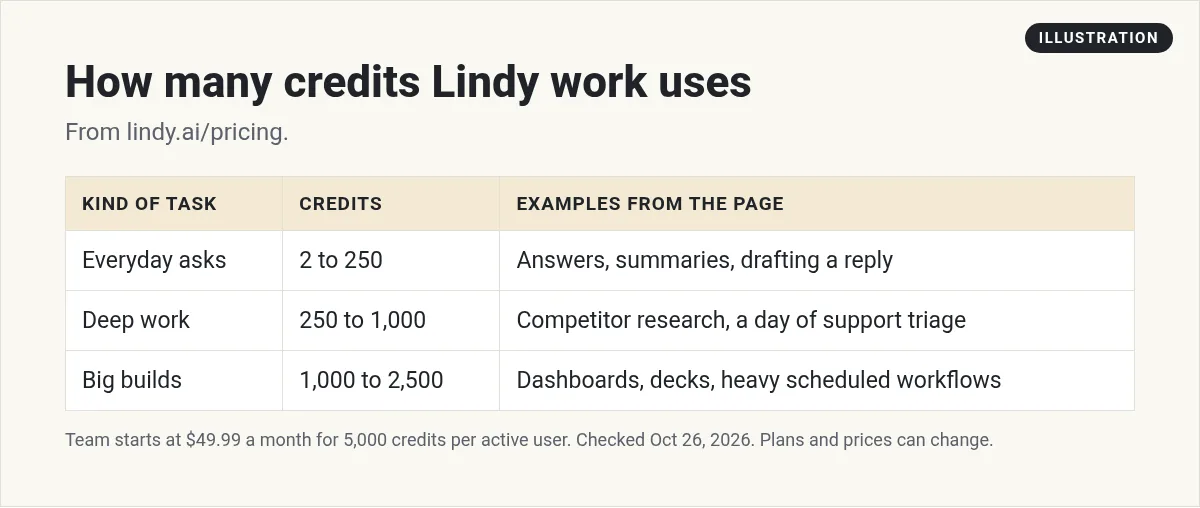
Lindy says "Credits measure the work Lindy does." You only use them while it is working, and bigger jobs use more.
The pricing page gives three rough sizes:
- Everyday asks, 2 to 250 credits. Answers, summaries, lookups, and drafting a reply.
- Deep work, 250 to 1,000 credits. Researching a competitor, triaging a day of support, turning a week of calls into a proposal.
- Big builds, 1,000 to 2,500 credits. Dashboards, decks built from your data, and heavy scheduled workflows.
So 3,000 or 5,000 credits could cover a lot of quick asks, or just a few big builds. Watch your first week to see where you land.
You also pick the model for each task. Lindy says most major models are available. Smarter models may use more credits, so save them for hard jobs.
Shared pool, rollover, and running out
Every seat adds its credits to one shared pool. Anyone on the team can use it when they need more.
Credits do not stack up month to month. The FAQ says monthly credits "don't roll over." But "Top-up credits are yours until you use them."
If you run out, nothing breaks. The FAQ says "Lindy pauses credit-using actions until your credits reset" at the start of your next cycle. Admins can top up or move to more monthly credits.
That is a nice safety net. You will not get a surprise bill. But it also means work can stop mid month if you do not watch the pool. Admins can set credit limits per seat to help.
Seats and billing details to know
This is where people get caught. Here is what the FAQ says:
- Anyone who uses Lindy takes a seat. That includes people who sign up, join your workspace, or @mention Lindy in Slack.
- Slack joiners get a trial. New teammates who join through Slack get a 7 day free trial. Direct sign ups are billed right away.
- The free week is one time. If someone leaves and comes back, they go straight onto a billed seat.
- No mid cycle refunds. If you remove a seat, it stays active through the cycle you paid for, with no proration.
- Canceling. Your workspace stays active through the paid cycle. After that, credit using actions stop.
My tip: if you add Lindy to a big Slack, tell your team how seats work first. Every person who @mentions it may become a paid seat after the trial.
Approvals and data
Lindy asks before it does anything that reaches outside. The FAQ says anything "with outside impact waits for approval," like sending an email, updating a ticket, or posting to another channel. Read only lookups do not need approval.
That is a good default. It keeps a human in charge of what goes out.
On data, the FAQ says your data is encrypted, never sold, and "never used to train models." Lindy says it is SOC 2 and GDPR compliant.
Who Lindy is for
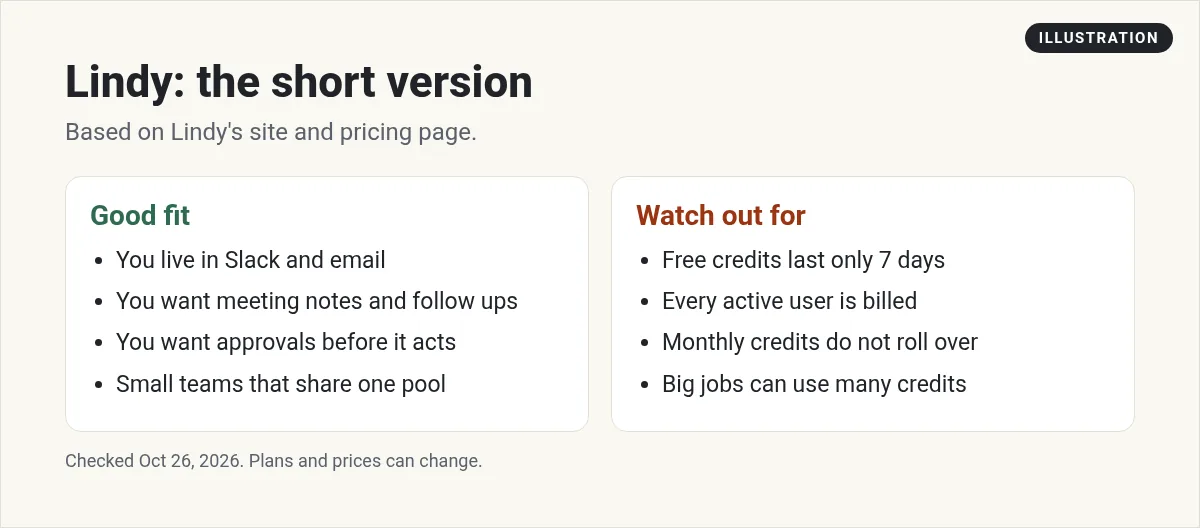
Lindy fits small teams that live in Slack and email and want a helper for meetings, follow ups, and reports. It is built for people who do not want to build workflows step by step.
If you would rather build your own agents with more control, compare it with a builder tool like Gumloop, or read my guide on how to build an AI agent. For simple app to app automation, see my Zapier alternatives list.
One thing I noticed: the feature list mentions computer use on Pro and Max plans, but the pricing page only shows Free, Team, and Enterprise. Ask Lindy which plan you need for that feature before you count on it.
What a normal week could look like
Here is a simple example of how a small team might use it. These are tasks from Lindy's own pages, put into one week.
- Every morning. A daily brief lands in Slack with what needs your attention.
- After each call. Notes and follow ups are drafted and waiting for your OK.
- Mid week. Someone asks it to research a competitor and write a short report.
- Friday. It builds the marketing report from your data.
Most of that is everyday asks and some deep work. A week like this is a good test of whether your monthly credits per person are enough.
How to try Lindy
- Start free. Sign up and use your $50 in credits within 7 days.
- Connect two apps. Start with email and your calendar.
- Give it one real task. Try meeting notes or a daily brief.
- Check credit use. See how many credits each task took.
- Decide on seats. Count who will really use it before you add the team.
Before you pay for Lindy
Nothing you check here is sent or saved. Download it if you want to keep it.
See how I use AI helpers in my business
Want to see the AI tools I use to save time each week? Join my free AI workshop. I walk through it step by step.
Join my free AI workshopFree to join. No credit card needed.
Frequently asked questions
What is Lindy AI?
Lindy is an AI assistant for teams. It connects to 1,500+ apps and works in Slack, email, and iMessage to handle tasks like meeting notes, follow ups, and reports.
How much does Lindy AI cost?
As of October 26, 2026, the Team plan starts at $29.99 a month per active user with 3,000 credits each. Enterprise is custom priced.
Is Lindy AI free?
You can start free with $50 in credits and no credit card. The free credits last 7 days.
Do Lindy credits roll over?
Monthly credits do not roll over. Top up credits stay until you use them.
What happens if Lindy runs out of credits?
Lindy pauses credit using actions until your credits reset. Admins can top up at $10 per 1,000 credits.
Does Lindy act without approval?
No. Lindy says anything with outside impact, like sending an email, waits for approval.
Sources
Checked October 26, 2026. Plans, prices, and rules can change.
