
Grok Bot · API
People search for a Grok Bot API a lot. Here is what actually exists today, what does not, and the simple ways to connect your Bots to other tools.
Grok Bot API is a top search, and the honest answer is a little different from what most people expect. In the Grok Bot docs I read, there is no public API for chatting with your Bots from your own code. But there are several ways in and out, and one of them is probably what you need.
I read the Grok Bot docs and the xAI API overview on November 4, 2026. Here is a plain map of each option and when to use it.
TL;DR
The Grok Bot docs I read do not describe a public API for sending a Bot a message from your own app. What they do offer: webhook triggers that start a routine with an HTTP POST, MCP servers and connectors so a Bot can call other tools, a secure secret card for API keys you give a Bot, and an Organization API that admins use to manage Bot computers. The xAI Grok API at docs.x.ai is a separate product for developers who build their own apps on Grok models.
The short answer
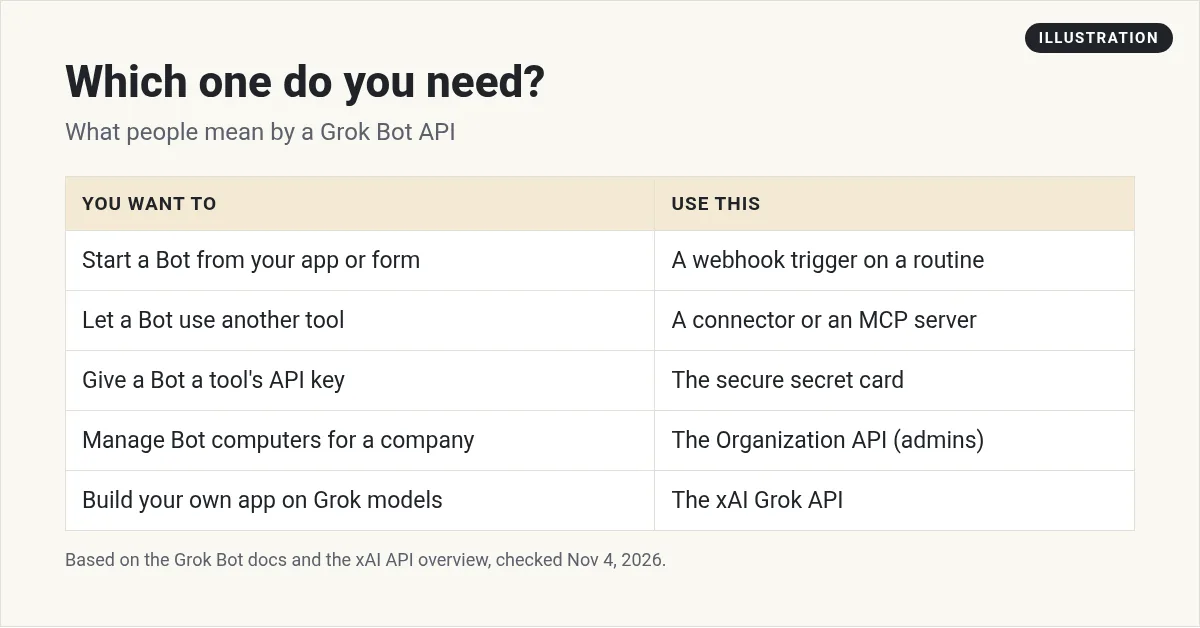
When people search for a Grok Bot API, they usually mean one of three things:
- I want my app or a tool like Zapier to start a Bot.
- I want my Bot to use another tool's API.
- I want to build my own app on Grok.
Each one has a different answer. The first is a webhook. The second is a connector, an MCP server, or an API key you hand the Bot. The third is the xAI Grok API, which is not Grok Bot at all.
1. Start a Bot from another app: webhooks
This is the closest thing to a Grok Bot API in the docs. A routine is a job your Bot runs on a schedule or when something happens. The Grok Bot docs say a routine can start from a webhook call, as well as from Slack, GitHub, Linear, Sentry, PagerDuty, or an email to your Bot's own address.
Here is how the docs say it works:
- Ask the Bot to add a webhook trigger to a routine, then open the routine on desktop.
- The Webhook section shows a POST to URL, a key, and a ready to copy header.
- Your app sends an HTTP POST to that URL with the header, and an optional JSON body.
- The Bot receives the body along with the routine's instruction.
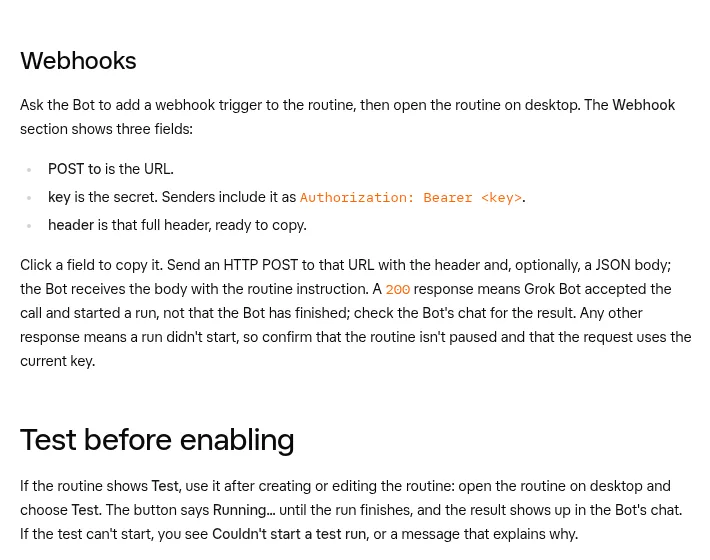
One detail matters a lot. The docs say a 200 response means Grok Bot accepted the call and started a run, not that the Bot has finished. You check the Bot's chat for the result. Any other response means a run did not start, so check that the routine is not paused and that you used the current key.
A simple example:
Add a webhook trigger to a routine called New lead. When it runs, read the JSON body, look up the company on the web, and send me a short brief in this chat. Do not contact the lead.
Then point your form tool or automation tool at the webhook URL. My Grok Bot webhooks post walks through setup, and my Grok Bot routines post covers schedules.
2. Let your Bot use other APIs
This is the other half of the question. Your Bot can reach other tools in a few ways.
Connectors and plugins
The docs list app connections like Gmail, Slack, and Notion under Connect apps. A connector is the most reliable path when one exists. The FAQ says to use a connector when one is available for a more structured and reliable integration. My Grok Bot connectors post has the list.
MCP servers
MCP is an open standard that lets AI apps talk to outside tools. If an app has an MCP server, your Bot can add it. My Grok Bot MCP post shows the steps.
Your own API keys
Sometimes a tool only has a plain API. Then your Bot needs a key. The docs are clear on how to hand it over:
- Do not send a password, one time code, or API key in ordinary chat.
- When a Bot asks for a key, use the secure secret card. The field is masked.
- Choose Save securely. The docs say the value is not written into the chat or shown to the Bot.
- On a shared Bot, owners can add a secret with an environment variable name, a short description, and the value. The description is visible to the Bot, and the value is not.
The docs add a warning for shared Bots: secrets are used in every teammate's chat, so only add keys you are happy for everyone who chats with the Bot to use. My Grok Bot vault post covers logins and keys.
The X plugin
One more note from the docs: the X plugin needs X API credits on your X developer account. So if you want a Bot to work with X through the plugin, plan for that.
3. The admin API for Bot computers
There is one real API in the Grok Bot docs, but it is for admins, not chat. The Manage Grok Bot computers page says organization admins can recreate, terminate, or delete member computers through the Organization API.
- It needs an Organization API key with the admin scope.
- The API and the dashboard share a limit of one operation per team at a time.
- Endpoints and error codes are in Cursor's Organization API reference.
Most small business owners will never need this. It is for IT teams running Grok Bot for a whole company. See my Grok Bot enterprise post for the rest of the admin tools.
4. The Grok API is a different product
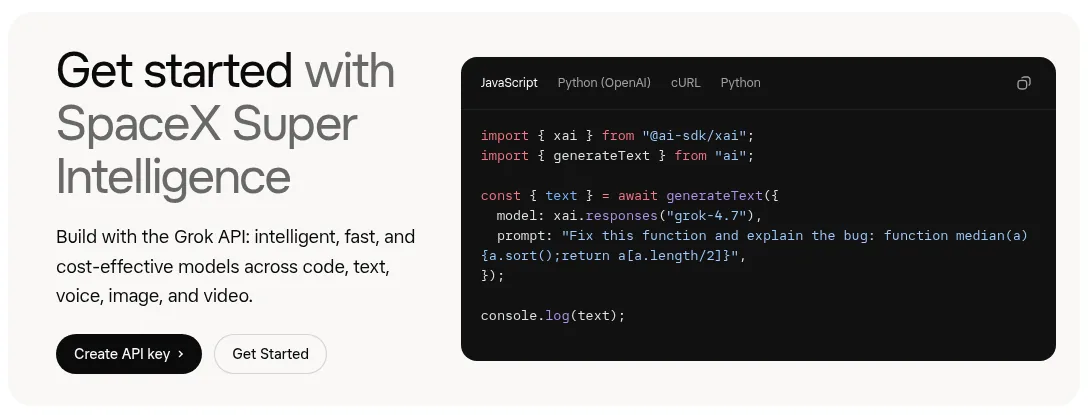
The xAI docs at docs.x.ai have their own API overview. It says you can build with the Grok API using models for code, text, voice, image, and video. You create an API key in the xAI console and call the models from your own code.
That is a developer tool. It does not give you your Bots, their computer, their memory, or their routines. It gives you raw models to build your own app.
So here is my simple rule:
- You want work done for your business? Use Grok Bot and talk to your Bots.
- You want to build your own software on Grok models? Use the Grok API.
- You want both to work together? Use a webhook to start a Bot from your app.
My Grok Bot vs Grok post explains how the Grok products fit together.
Two videos worth your time
GEEKrar shows how to get a Grok API key in the xAI console, add credits, and manage keys. Remember, that is for the Grok API, not for Grok Bot itself.
From the GEEKrar channel (not mine): Use this if you are building your own app on Grok models. Keep any key you create private.
Nate Herk explains the main Grok Bot ideas in plain words, which helps you see where webhooks and connectors fit.
From the Nate Herk | AI Automation channel (not mine): A good overview for beginners. His description includes sponsor links, so treat those as ads.
Any results mentioned in videos are not typical and are not a promise of income. Your results depend on your work and your market.
My own advice
This part is my opinion, not from the docs. If you are not a developer, skip the API question at first. Start with one Bot and one connector. Add a webhook only when a real tool in your business needs to kick off a Bot, like a new lead form. Most of the time a schedule or an email trigger does the job with no code at all.
Skip the wiring, get the team
You do not need an API to get real work out of Grok Bot. You need Bots that already know their jobs.
AIM Agent is an AI Chief of Staff for business owners. It comes with an AI C-suite (COO, CMO, CFO, CRO and CTO), a Business Bot Builder and 100+ business skills, and it runs on AIM OS, a private vault that holds your notes and memory. AIM Agent is a ready-made AI business team that works inside Grok Bot, so you skip the setup and get to work.
Here is what you get:
- An AI Chief of Staff that helps you plan and run your business
- An AI C-suite: COO, CMO, CFO, CRO and CTO
- A Business Bot for each business or project. Give it a real task and it brings the work back for you to review
- 100+ business skills for content, offers, research and more
- Step by step setup guides and email support
So you can skip the technical setup and get to work.

Want an AI team to help run your business? Meet AIM Agent, an AI Chief of Staff for business owners. I am a co-founder of AIM Agent and have a financial interest in the product.
Get a ready made team inside Grok Bot
AIM Agent gives you an AI Chief of Staff, an AI C-suite, and 100+ business skills, so you skip the setup and get to work.
See AIM AgentFrequently asked questions
Does Grok Bot have an API?
The Grok Bot docs I read do not describe a public API for chatting with a Bot. You can start a Bot's routine with a webhook, and admins have an Organization API for Bot computers.
How do I trigger Grok Bot from Zapier or my app?
Add a webhook trigger to a routine, then send an HTTP POST to its URL with the key in the header. A 200 means a run started.
Is the Grok API the same as Grok Bot?
No. The Grok API at docs.x.ai is for developers building their own apps on Grok models. Grok Bot is the app with Bots, a computer, and routines.
How do I give my Bot an API key?
Use the secure secret card when the Bot asks. Never paste keys in ordinary chat.
Can my Bot use other apps' APIs?
Yes. Use a connector or an MCP server when one exists, or give the Bot a key through the secure secret card.
Does the X plugin cost extra?
The docs say the X plugin needs X API credits on your X developer account.
Is there a faster way to get a working team?
AIM Agent gives you an AI Chief of Staff, an AI C-suite, and 100+ business skills inside Grok Bot.
Sources
Checked November 4, 2026. Plans, prices, and rules can change.
