
Grok Bot · Coaches
Coaching is personal. The admin around it does not have to be. Here is how coaches can hand the busywork to Bots and keep the real work.
Grok Bot for coaches is about getting your time back for the sessions that matter. A Bot can prep you before each call, draft the recap after, send check in drafts, and turn your best ideas into content. You stay the coach.
I read the Grok Bot docs on use cases, skills, and routines, plus the x.ai guide Grok Bot for Work, on November 4, 2026. I also watched two coaches build Bots. Here is a setup any coach can copy.
TL;DR
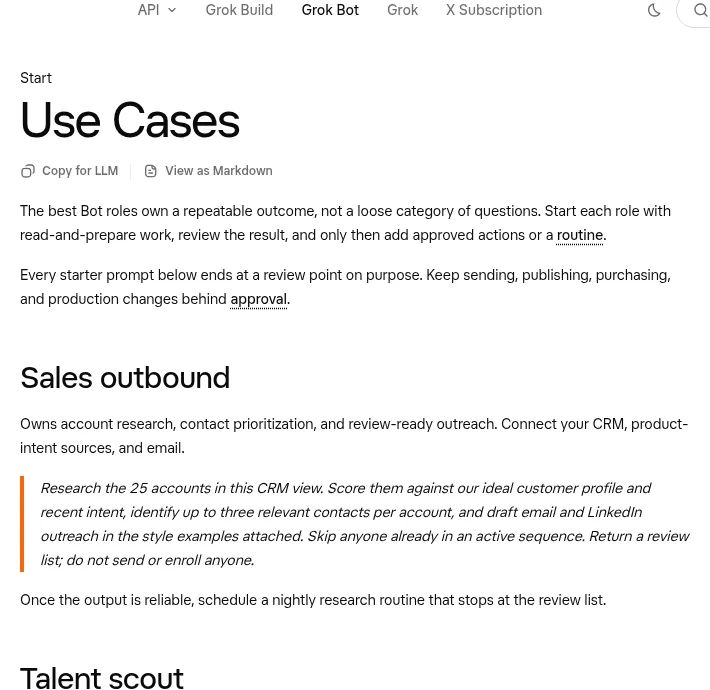
Grok Bot can help coaches with session prep, call recaps, client check ins, follow up drafts, scheduling, and content. The Grok Bot docs say the best Bot roles own a repeatable outcome, start with read and prepare work, and keep sending and publishing behind approval. So a coaching Bot drafts and you send.
Why coaches are a good fit
Most coaches I know love the sessions and hate the admin. Notes, recaps, reminders, check ins, and content eat whole days. That work repeats every week, which is exactly what Bots are good at.
The Grok Bot docs say the best Bot roles own a repeatable outcome, not a loose category of questions. For a coach that might be a recap for every client within an hour of each call, or a Friday check in for every client.
Four Bots worth setting up
1. Session Prep Bot
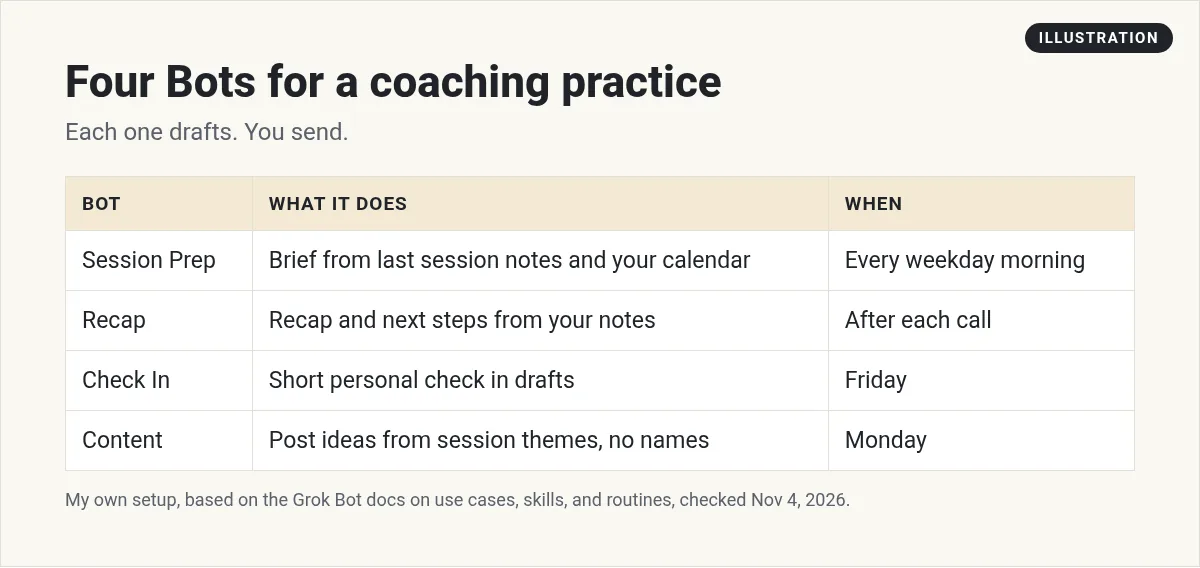
Before each call, it reads your notes from the last session and your calendar, then sends you a short brief: goals, wins, what they promised to do, and two questions to ask.
Every weekday at 7 AM, look at today's calendar. For each client call, read my notes from our last session and send me a short brief: their goal, what they said they would do, and two questions to open with. Do not contact anyone.
2. Recap Bot
After a call, paste your notes or a transcript. The Bot writes a recap in your voice with next steps. You read it and send it.
3. Check In Bot
Once a week, it drafts a short, personal check in for each client based on their goal. It never sends on its own.
4. Content Bot
It turns themes from your sessions, with no names or private details, into post ideas and email drafts.
The x.ai Grok Bot for Work guide adds one more idea. Its author found that several Bots pinging him added mental load, so he made a Bot Boss that all the others report to. For a coach, one Chief of Staff Bot can roll everything into one morning message. My Grok Bot chief of staff post shows how.
Teach it your coaching voice
A skill in Grok Bot is a reusable set of instructions for how to do a task. Skills are shared across your Bots. The docs say a good skill states when to use it, the inputs it needs, the steps, how to check the result, what to return, and what needs approval.
Here are five recaps I wrote to clients. Save a skill called Coaching recap. Include my tone, the structure I use, and the rule that you never send a recap without my okay.
My Grok Bot skills post goes deeper.
Put the weekly rhythm on routines
A routine tells a Bot when to run a job, on a schedule or when something happens, like an email. The docs say routines run in the cloud while your laptop is closed. A new routine waits for its next scheduled time, so use Test to try it right away.
A simple coaching week:
- Every weekday morning. Session briefs for today's calls.
- After each call. A recap draft once you paste notes.
- Friday. Check in drafts for every client.
- Monday. Three content ideas from last week's themes.
See my Grok Bot routines guide to set these up.
For fitness coaches
Debbie O'Brien built a personal fitness coach Bot. In her video description she says it sets goals with real limits, builds workouts from photos of her home gym, and tracks protein from food labels.
From the Debbie O'Brien channel (not mine): This is a coach for herself, but the same ideas work for your clients' plans.
Matt Lamborne shows how to set up a Bot as an online fitness coach.
From the Matt Lamborne channel (not mine): He shares his own prompt in the description. Read any prompt before you use it.
Client privacy comes first
Clients trust you with personal things. Treat their data with care:
- Share only what the Bot needs. First names and goals are often enough.
- Keep health details out unless you must. If you are a licensed health pro, check your own rules first.
- Remember the computer is shared. The docs say all your Bots share one computer, files, and logins.
- Never auto send. Every message a client reads, you read first.
Let a Bot guard your calendar
Coaches live by their calendar. The x.ai Grok Bot for Work guide describes a Calendar EA Bot that manages the author's calendar, flags conflicts, and sends invites for him. Over time it learned his habits, like guarding deep focus time.
For a coach, that could mean a Bot that protects your prep time before each session and warns you when a week is too full. Start it in read only mode. Let it suggest changes, and you accept them. My Grok Bot calendar post covers the setup.
Your first week (my plan)
This part is my own advice, not from the docs. Do not build all four Bots on day one.
- Day 1. Create the Session Prep Bot. Give it your notes from three past sessions.
- Day 2. Run it before every call. Note what it gets wrong.
- Day 3. Fix its instructions, not the brief. Save your recap style as a skill.
- Day 4. Paste notes after a call and let it draft your recap. Edit it and send it yourself.
- Day 5. Turn the morning brief into a routine and test it.
By week two you will know if it saves you time. If it does, add the Check In Bot next.
What to keep for yourself
Some parts of coaching should never go to a Bot. The real conversation, the hard feedback, and the moment a client opens up are yours. So is the decision about what a client needs next. A Bot can help you remember and prepare. It cannot replace the trust your clients have in you.
A business team for your coaching practice
Sessions are your job. Marketing, sales, and follow up need owners too.
AIM Agent is an AI Chief of Staff for business owners. It comes with an AI C-suite (COO, CMO, CFO, CRO and CTO), a Business Bot Builder and 100+ business skills, and it runs on AIM OS, a private vault that holds your notes and memory. AIM Agent is a ready-made AI business team that works inside Grok Bot, so you skip the setup and get to work.
Here is what you get:
- An AI Chief of Staff that helps you plan and run your business
- An AI C-suite: COO, CMO, CFO, CRO and CTO
- A Business Bot for each business or project. Give it a real task and it brings the work back for you to review
- 100+ business skills for content, offers, research and more
- Step by step setup guides and email support
So you can spend your time coaching.

Want an AI team to help run your business? Meet AIM Agent, an AI Chief of Staff for business owners. I am a co-founder of AIM Agent and have a financial interest in the product.
Get a business team inside Grok Bot
AIM Agent gives you an AI Chief of Staff, an AI C-suite, and 100+ business skills, so marketing, sales, and follow up each have an owner.
See AIM AgentFrequently asked questions
Can Grok Bot help coaches?
Yes. It can prep you for sessions, draft recaps and check ins, and turn session themes into content. You send everything yourself.
Will Grok Bot message my clients on its own?
Only if you set it up that way. The docs say to keep sending behind approval, and I recommend you send every client message yourself.
Can it learn my coaching style?
Yes. Paste examples of your recaps and save them as a skill.
Can Grok Bot work while I'm coaching?
Yes. Routines run in the cloud while your laptop is closed.
Is it good for fitness coaches?
Creators have built fitness coach Bots that plan workouts and track food. Check your own rules for health data.
How many Bots should a coach start with?
One. Start with session prep, then add more when it runs well.
Is there a faster way to get a business team?
AIM Agent gives you an AI Chief of Staff, an AI C-suite, and 100+ business skills inside Grok Bot.
Sources
Checked November 4, 2026. Plans, prices, and rules can change.
