
Grok Bot · Personal Assistant
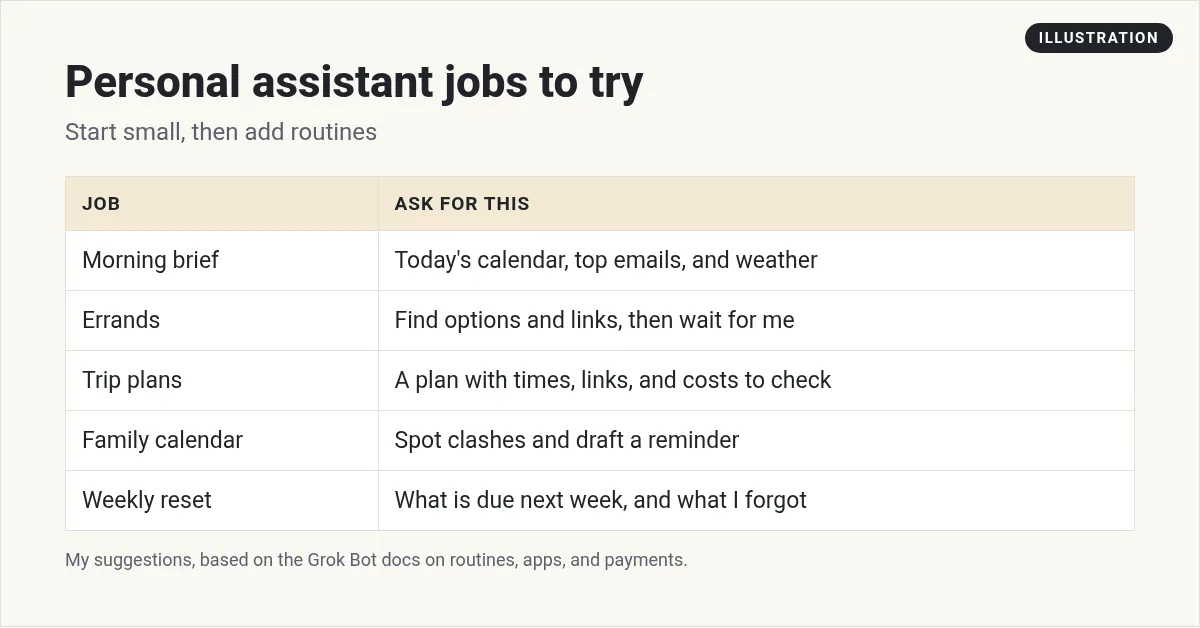
Grok Bot as a personal assistant is where a lot of people start, and it is a great first use. Here are five everyday jobs to try, and the payment and login rules I would set first.
Grok Bot can work as a personal assistant for your everyday life, not just your business. It can brief you each morning, look things up, plan a trip, and even shop for you. Because it has its own computer, it can do more than answer questions. It can actually get things done.
I checked the Grok Bot docs, help center, and changelog on October 29, 2026. Here is how I would use it as a personal assistant, and the safety rules that matter most when money and logins are involved.
TL;DR
To use Grok Bot as a personal assistant, make one Bot for your personal life, connect only what it needs, like your calendar and email, and give it small daily jobs: a morning brief, errands with links, trip plans, a family calendar check, and a weekly reset. Set the daily ones as routines. For anything with money, be careful: a card saved in Vault fills in at checkout without asking each time, so do not save a card if you want to approve every payment. Never paste passwords in chat. AIM Agent gives you a ready business team if you also want help at work.
Why Grok Bot makes a good personal assistant
Grok Bot is an AI helper from xAI. New to it? Start with my Grok Bot explained post.
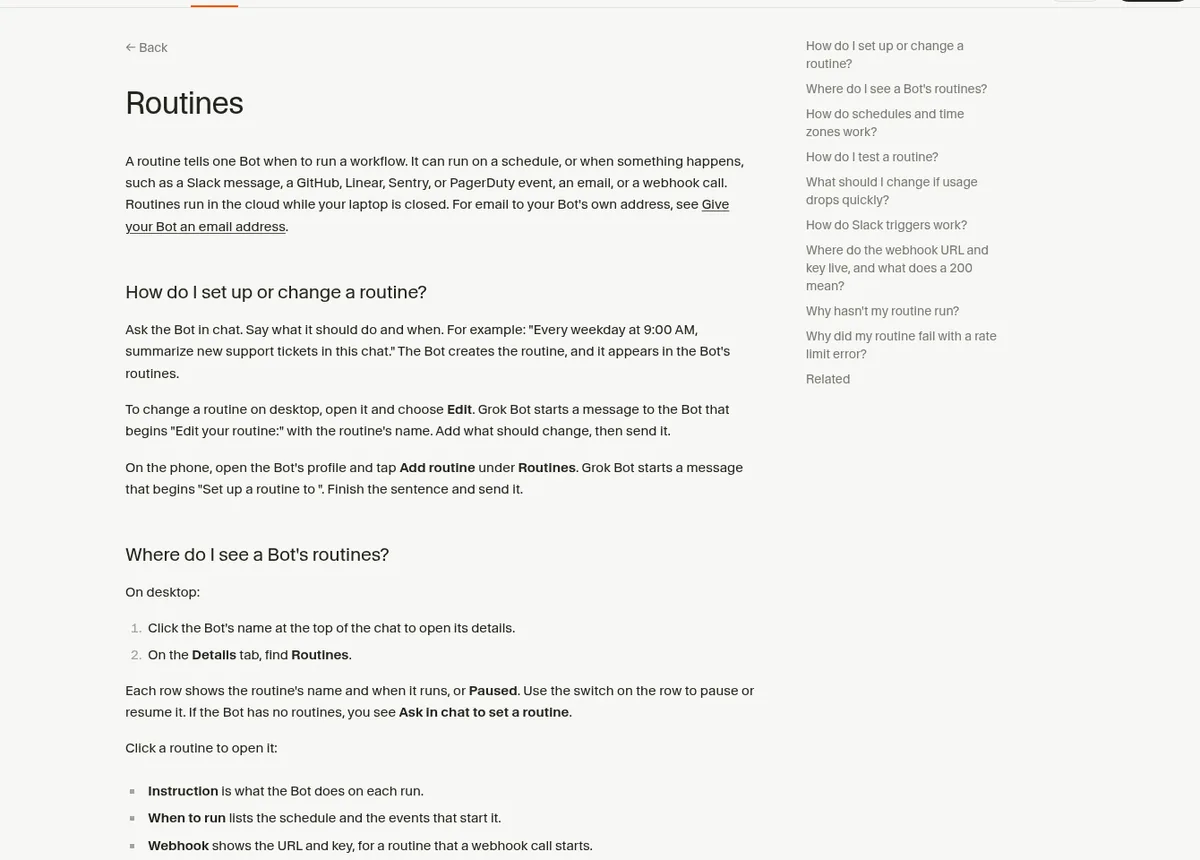
Two things make it feel like a real assistant. First, it has its own computer, so it can open websites and do steps for you. Second, it can run routines, which are jobs on a schedule. The help center says routines run in the cloud while your laptop is closed.
If you want an assistant for your work day, read my Grok Bot chief of staff guide. This post is about everyday life.
Five everyday jobs to try
1. A morning brief
This is the best first job. Ask for it once, then make it a routine:
- Every weekday at 7 AM, tell me what is on my calendar today, any emails that need me, and anything I should leave early for.
The help center says schedules use the time zone in Settings, under Bot. After you set it up, open the routine and check When to run, so you know it matches what you meant. My Grok Bot routines guide covers the details, and my Grok Bot calendar guide covers connecting your calendar.
2. Errands
Errands are things like finding a plumber, comparing two products, or checking store hours. Ask for options with links, and tell it to wait for you before it books or buys anything.
- Find three well reviewed plumbers near me who can come this week. Give me their links and ratings. Do not contact anyone.
The changelog says Bots use built in guides with direct links and steps for popular travel, food, shopping, and shipping sites. That helps with this kind of job.
3. Trip plans
Give it your dates, budget, and what you like. Ask for a plan with times and links. Then you check and book, or approve each booking.
- Plan a three day trip to San Diego for two adults in March. We like food and beaches. Give me a day by day plan with links. Do not book anything.
4. Family calendar
If you share a calendar with family, ask your Bot to spot clashes and draft reminders. Keep messages to family as drafts. Grok Bot shows email and Slack messages as drafts you can edit, then choose Send or Discard.
5. A weekly reset
Every Sunday, ask what is coming up next week, what bills or renewals are due, and what you said you would do but have not. This one feels like magic once your Bot has a few weeks of memory. My Grok Bot memory guide explains how it remembers.
See a daily setup
This beginner tutorial shows how to get Grok Bot, make your first Bot, connect apps, and put it to work on its own computer, plus the Bot team the creator uses every day.
From the Max Rohowsky channel (not mine): A beginner tutorial on getting Grok Bot, making your first Bot, connecting apps, and a daily Bot team.
Shopping with Grok Bot
Grok Bot can shop for you. The changelog says shopping with a Bot shows products as cards with photos, rating, price, and store. On a product page, Buy now starts an order you approve. After you order, the Bot tracks it and tells you when it ships or arrives.
There is also a template in the changelog called Try it, don't pay for it. It starts a free trial for you and cancels it, or reminds you, before it bills. That is a handy one.
The money rule you need to know
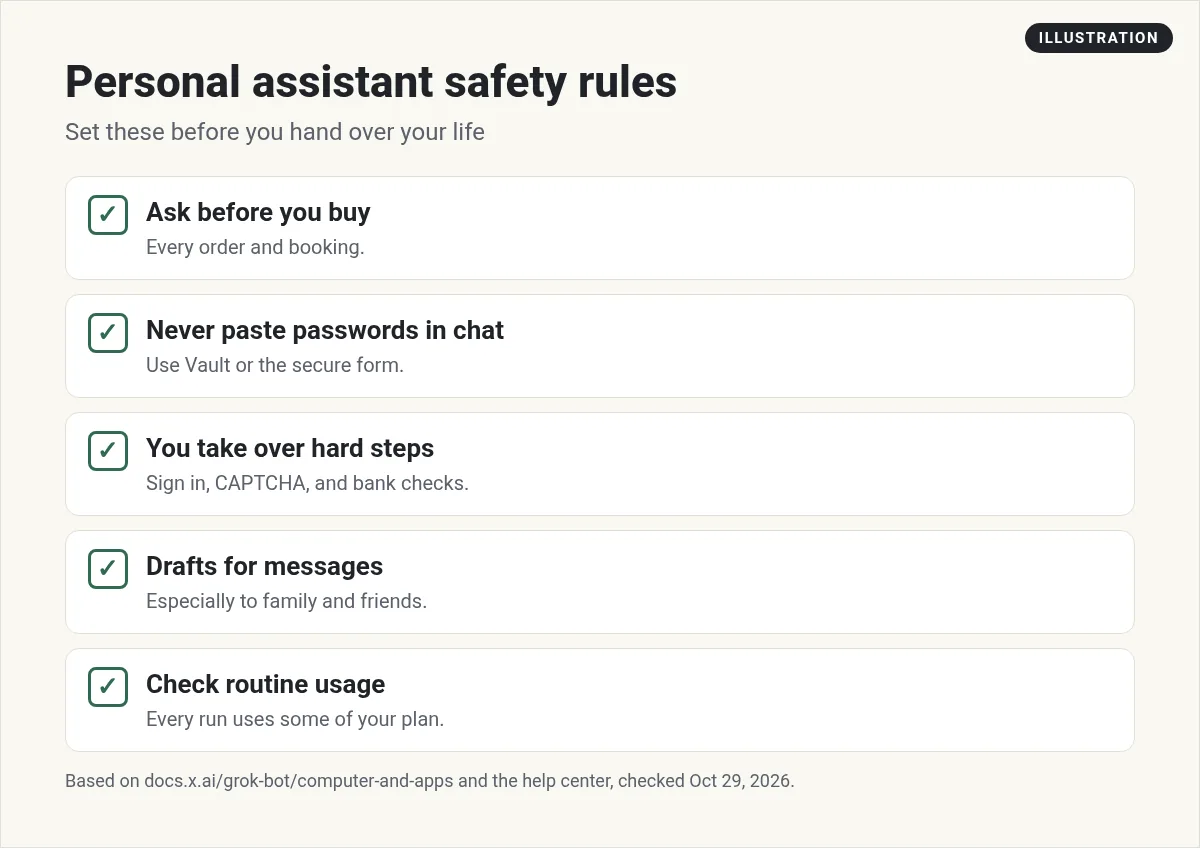
This is the most important part of this post. The docs say A card saved in Vault fills in at checkout without asking you each time, and no setting requires your approval for each use.
The changelog for version 0.77.0 sounds softer. It says you still approve every purchase.
The two official pages do not match, so I follow the safer one. If you want to approve every payment yourself, do not save your card. The docs explain how:
- When a Bot asks for a card with a Secure Form at checkout, leave Securely save to Bot's vault unchecked. The card is used only in that chat.
- If you already saved a card, open Settings, then Vault, select it, and choose Remove.
Logins and hard steps
To sign in, a Bot uses a login saved in Vault first, then a connected password manager, then asks you with a Secure Form. The docs say values from Vault and the Secure Form are filled into the page without the Bot seeing them.
Some steps need you. The Bot hands you the computer for things like a passkey, a CAPTCHA it cannot get past, a QR code, a bank card check, or a site that requires a human. You open the computer, do just that step, and tell the Bot to continue.
And one rule from the docs I want to repeat: Never paste passwords or one-time codes into ordinary chat.
My Grok Bot computer use guide explains how the Bot's computer works.
Use it from your phone
A personal assistant is most useful in your pocket. The Grok Bot phone app lets you message your Bots, get notifications, and voice chat. See my Grok Bot mobile app guide and my Grok Bot voice chat guide. If you use X a lot, you can also hand posts to your Bot with @bot. See Grok Bot on X.
How I would start this week
- Make one personal Bot. Tell it about your week, your family calendar, and how you like updates.
- Connect your calendar and email. Keep messages as drafts.
- Set up the morning brief routine.
- Try one errand with links only.
- Decide on your card rule before you ever let it check out.
For more ideas, see my Grok Bot use cases post. For your inbox, see Grok Bot email.
A ready team for your business, too
Once a personal Bot saves you time at home, the next question is your business. That needs more than one assistant: a planner, a writer, a numbers person, and someone to run them.
AIM Agent is an AI Chief of Staff for business owners. It comes with an AI C-suite (COO, CMO, CFO, CRO and CTO), a Business Bot Builder and 100+ business skills, and it runs on AIM OS, a private vault that holds your notes and memory. AIM Agent is a ready-made AI business team that works inside Grok Bot, so you skip the setup and get to work.
Here is what you get:
- An AI Chief of Staff that helps you plan and run your business
- An AI C-suite: COO, CMO, CFO, CRO and CTO
- A Business Bot for each business or project. Give it a real task and it brings the work back for you to review
- 100+ business skills for content, offers, research and more
- Step by step setup guides and email support
So instead of building those from blank Bots, you get an AI Chief of Staff and a business team with skills already made.

Want an AI team to help run your business? Meet AIM Agent, an AI Chief of Staff for business owners. I am a co-founder of AIM Agent and have a financial interest in the product.
Get a ready AI team for your business
AIM Agent gives you an AI Chief of Staff, an AI C-suite, and 100+ business skills, so your Bots have real jobs from day one.
See AIM AgentFrequently asked questions
Can Grok Bot be my personal assistant?
Yes. It can brief you each morning, run errands with links, plan trips, check your calendar, and shop for you with your approval.
Does Grok Bot work when my laptop is closed?
Routines run in the cloud while your laptop is closed, according to the help center.
Will Grok Bot ask before it pays?
Not always. The Vault docs say a saved card fills in without asking each time, while the changelog says you approve every purchase. To be safe, do not save your card if you want to approve every payment.
Can Grok Bot shop for me?
Yes. It shows products as cards, and Buy now starts an order you approve. It can also track the order.
Should I give Grok Bot my passwords?
Never paste passwords or one-time codes into chat. Use Vault, a password manager, or the Secure Form.
What should I set up first?
A morning brief routine. It is useful every day and does not spend money or send anything.
Is there a faster way to get a business Bot team?
AIM Agent gives you an AI Chief of Staff, an AI C-suite, and 100+ business skills, so you start with a team built for business work.
Sources
Checked October 29, 2026. Plans, prices, and rules can change.
