
Grok Bot · X
Grok Bot on X sounds like one feature, but it is really three. Here is how tagging @bot works, how to use your Bots in X Chat, and why @bot sometimes stays quiet.
Grok Bot on X is one of the newest ways to give your Bots work. You can reply to a post with @bot and a request, and your Bot gets to work. You can chat with your Bots inside the X app. And you can connect X so a Bot can search posts and check your mentions.
I checked the Grok Bot docs, the help center, and the x.ai news post on October 29, 2026. Here is how each one works, and how to fix the most common problem: @bot not replying.
TL;DR
There are three ways to use Grok Bot on X. Tag @bot in a post or reply to hand that post to your main Bot as a task. @bot posts only a short confirmation on X, and the work stays in your Bot's chat. Chat with your Bots in X Chat, in the X app or on x.com, if your plan includes Grok Bot and the feature has reached you. Or connect X in Grok Bot so a Bot can search posts, read your timeline, and check mentions. Tagging needs a Bot of your own and is not yet available in some regions. AIM Agent gives you a ready business team to hand that work to.
Three ways Grok Bot works with X
Grok Bot is an AI helper from xAI that works on its own computer. New to it? Start with my Grok Bot explained post.
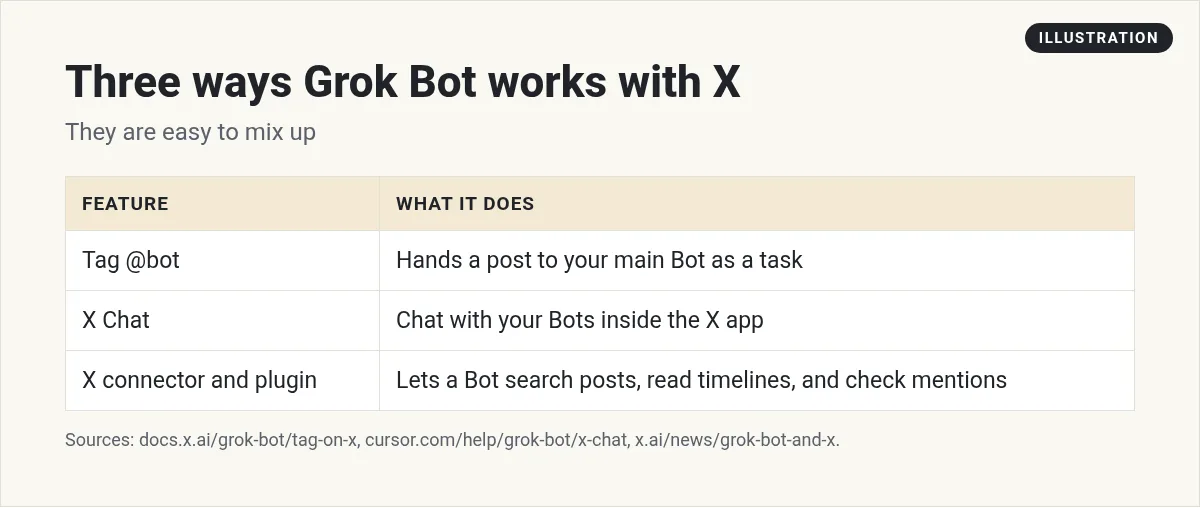
The short version: tagging sends a post to your Bot. X Chat lets you talk to your Bots inside X. The connector lets a Bot work with X for you. Let us go one at a time.
1. Tag @bot on X
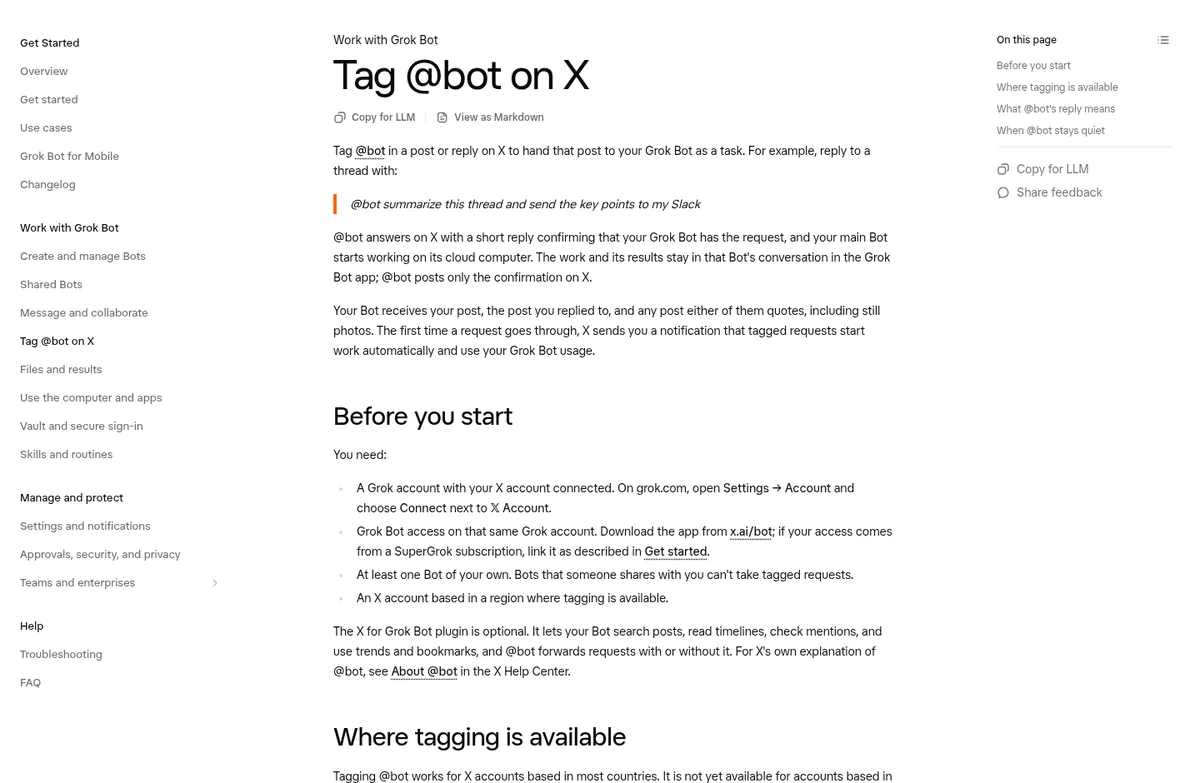
The docs explain it like this: tag @bot in a post or reply on X to hand that post to your Grok Bot as a task.
Their example reply is:
@bot summarize this thread and send the key points to my Slack
Here is what happens next:
- @bot replies on X with a short line confirming your Bot has the request.
- Your main Bot starts working on its cloud computer.
- The work and the results stay in that Bot's chat in the Grok Bot app. @bot only posts the confirmation on X.
Your Bot gets your post, the post you replied to, and any post either of them quotes, including still photos. The first time, X sends you a notice that tagged requests start work on their own and use your Grok Bot usage.
What you need first
- A Grok account with your X account connected. On grok.com, open Settings, then Account, and choose Connect next to X Account.
- Grok Bot access on that same Grok account.
- At least one Bot of your own. Bots someone shared with you cannot take tagged requests.
- An X account based in a region where tagging is available.
One note. In the October 18 update video, the presenter said you had to install the X plugin first. The current docs say the X for Grok Bot plugin is optional, and @bot forwards requests with or without it. Go with the docs.
From the Matt Palmer channel (not mine): The Oct 18, 2026 Grok Bot update: a faster computer, highlighted draft edits, tagging @bot on X, and reading X Chat DMs.
Good things to ask @bot
- @bot save this for my research list
- @bot summarize this thread and give me three takeaways
- @bot check if this claim is true and send me sources
Then open Grok Bot to see the result. My Grok Bot research guide shows how to ask for research you can trust.
Why @bot stays quiet
The docs are clear: if @bot does not reply, your Bot did not get the request.
- Your region. Tagging is not yet available for X accounts based in Australia, the United Kingdom, the European Union, Iceland, Liechtenstein, or Norway. X goes by the country it has on record for your account, so a VPN does not change it.
- You did not tag it yourself. Replying in a thread that already has @bot is not enough.
- The post also tags @grok.
- A video or GIF. In your post, the post you replied to, or a quoted post.
- Moderation. The post did not pass internal checks.
- Setup or usage. Grok Bot is not linked to your Grok account, or your weekly usage is used up.
And if @bot replies with a sign up link, your X account is not connected to a Grok account. If it says Grok Bot is not set up yet, you need to create a Bot of your own first. My Grok Bot setup guide walks through that. For other problems, see Grok Bot not working.
2. Grok Bot in X Chat
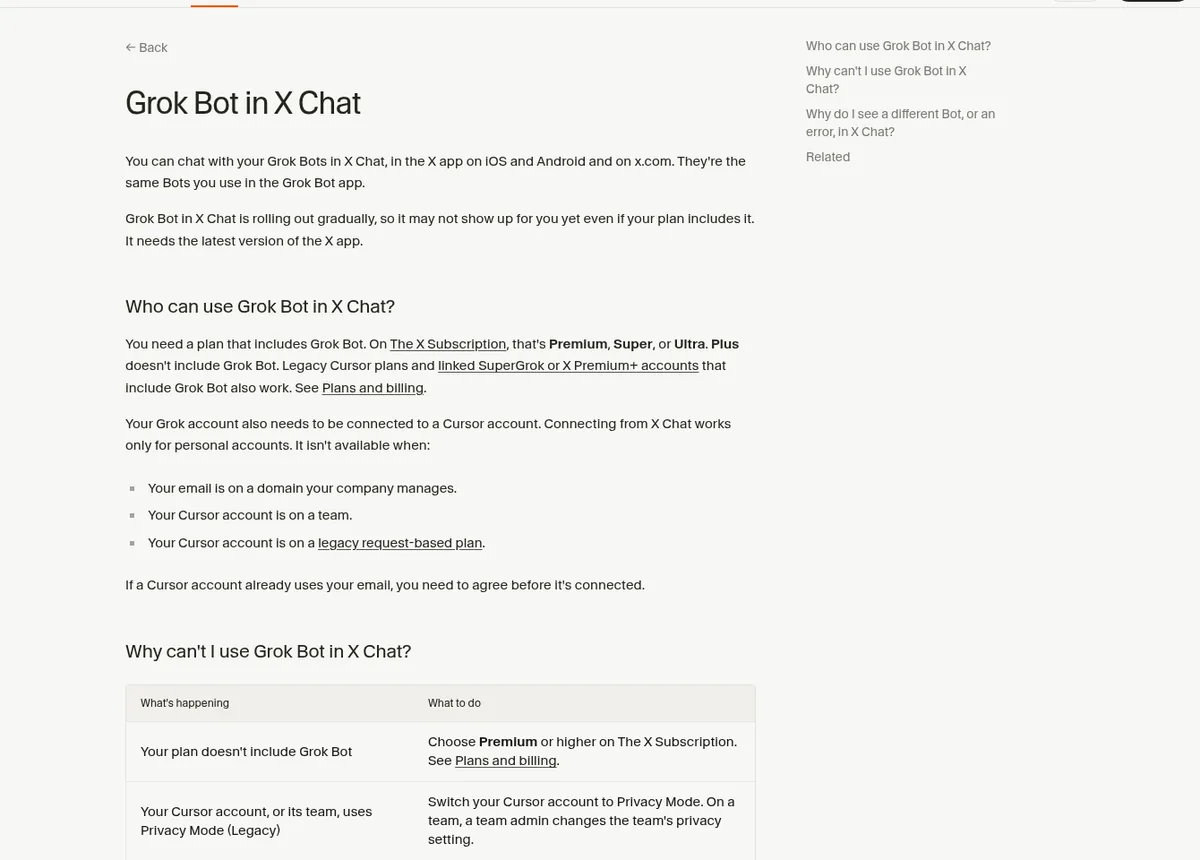
The help center says you can chat with your Grok Bots in X Chat, in the X app on iOS and Android and on x.com. They're the same Bots you use in the Grok Bot app.
A few things to know:
- It is rolling out bit by bit, so you may not see it yet. It needs the latest X app.
- You need a plan that includes Grok Bot. The help page lists which plans qualify.
- Your Grok account needs to be connected to a Cursor account, and connecting from X Chat works only for personal accounts. It is not available if your email is on a company managed domain or your account is on a team.
If you see a new Bot instead of your own, your X account may be connected to a different Grok account. The help page has steps to connect the right one.
In the October 18 update video, the presenter also says Bots can now read and respond to your X Chat DMs for you, with limits, and adds a fair warning not to abuse it. I would keep replies as drafts at first.
3. Connect X so your Bot can work with posts
In August 2026, xAI announced that Grok Bot works with X. You connect your X account in Grok Bot, and xAI says it creates a developer account for you if you do not have one. Paid Grok Bot users get free X API credits to start.
Then you can ask a Bot to search posts, read your timeline, check mentions, or pull together what is happening on X. There is also an X plugin to search posts, read timelines, pull trends, and manage bookmarks.
Good jobs for this:
- A morning summary of your mentions.
- Tracking what people say about your product or niche.
- Saving good posts as content ideas. See Grok Bot for content creators.
Set that up as a daily routine. My Grok Bot routines guide shows how.
Stay safe on X
- Anything your Bot posts is public. Keep posting and replies on approval. My Grok Bot safety guide explains Ask first rules.
- Tagged requests use your usage. Do not tag @bot on every post you read.
- Do not use it to spam people. X has limits, and it is bad for your name.
For more ways to connect apps, see my Grok Bot connectors post. If you mostly use your phone, read my Grok Bot mobile app guide.
A ready team behind every @bot
Tagging @bot is easy. The value comes from what your main Bot does next, and that depends on the jobs and skills you gave it.
AIM Agent is an AI Chief of Staff for business owners. It comes with an AI C-suite (COO, CMO, CFO, CRO and CTO), a Business Bot Builder and 100+ business skills, and it runs on AIM OS, a private vault that holds your notes and memory. AIM Agent is a ready-made AI business team that works inside Grok Bot, so you skip the setup and get to work.
Here is what you get:
- An AI Chief of Staff that helps you plan and run your business
- An AI C-suite: COO, CMO, CFO, CRO and CTO
- A Business Bot for each business or project. Give it a real task and it brings the work back for you to review
- 100+ business skills for content, offers, research and more
- Step by step setup guides and email support
So instead of building that from a blank Bot, you start with an AI Chief of Staff and a business team with skills already made.

Want an AI team to help run your business? Meet AIM Agent, an AI Chief of Staff for business owners. I am a co-founder of AIM Agent and have a financial interest in the product.
Get a ready AI team for your business
AIM Agent gives you an AI Chief of Staff, an AI C-suite, and 100+ business skills, so your Bots have real jobs from day one.
See AIM AgentFrequently asked questions
How do I use @bot on X?
Tag @bot in a post or reply with your request. Your main Bot gets the task, and @bot posts a short confirmation.
Where do @bot results show up?
In your Bot's chat in the Grok Bot app. @bot only posts the confirmation on X.
Why is @bot not replying?
Common causes are your region, not tagging it yourself, also tagging @grok, a video or GIF, or no Bot or usage left.
Do I need the X plugin to tag @bot?
The current docs say the plugin is optional. @bot forwards requests with or without it.
Can I use Grok Bot inside X Chat?
Yes, if your plan includes Grok Bot and the rollout has reached you. They are the same Bots as in the Grok Bot app.
Can a shared Bot take @bot requests?
No. You need at least one Bot of your own.
Is there a faster way to get a business Bot team?
AIM Agent gives you an AI Chief of Staff, an AI C-suite, and 100+ business skills, so you start with a team built for business work.
Sources
Checked October 29, 2026. Plans, prices, and rules can change.
