
Grok Bot · LinkedIn
Yes, a Bot can help you show up on LinkedIn every week. But LinkedIn has clear rules about bots. Here is the safe way to split the work.
Grok Bot LinkedIn help works best when the Bot writes and you post. A Bot can research, draft posts in your voice, and prepare outreach notes. LinkedIn's own rules say no to bots that automate activity on its site, so the clicking stays with you.
I read LinkedIn's help page on prohibited software, the x.ai guide on founder led sales, and the Grok Bot docs on November 3, 2026. Here is the split I recommend and the prompts to copy.
TL;DR
Use Grok Bot to research, draft posts, and prepare outreach for LinkedIn, then post and send by hand. LinkedIn's help center says it does not permit bots or browser extensions that scrape, change, or automate activity on its website, and members who use them risk having their accounts restricted or shut down. The x.ai founder led sales guide uses the same split: LinkedIn is read and draft only, and the founder posts by hand.
What LinkedIn says about bots
LinkedIn has a help page called Prohibited software and extensions. It says LinkedIn does not permit third party software, including crawlers, bots, browser plug ins, or browser extensions that scrape, modify the appearance of, or automate activity on its website.
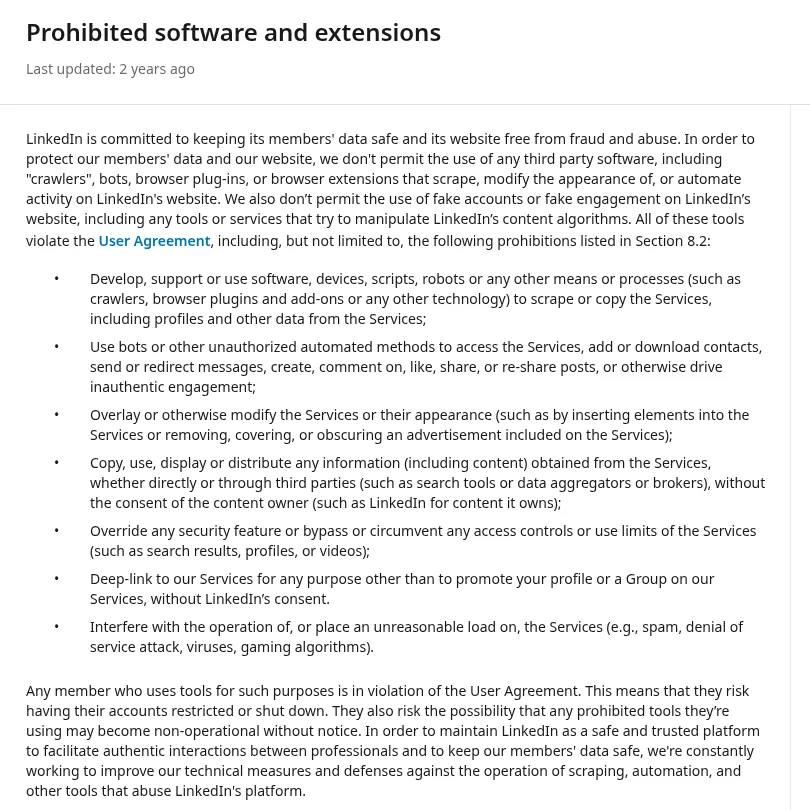
The page lists things like using bots to add contacts, send messages, or create, comment on, like, or share posts. It says members who use tools like these risk having their accounts restricted or shut down.
That is clear enough for me. I do not let a Bot click around LinkedIn for me. Your account is worth more than a few saved minutes.
The safe split: the Bot drafts, you post
The x.ai guide on founder led sales shows the same idea. The founder connects LinkedIn and X as read and draft only, and posts by hand. A Content Bot drafts LinkedIn and X posts in the founder's voice. An Outreach Bot stages LinkedIn notes next to cold emails each morning.
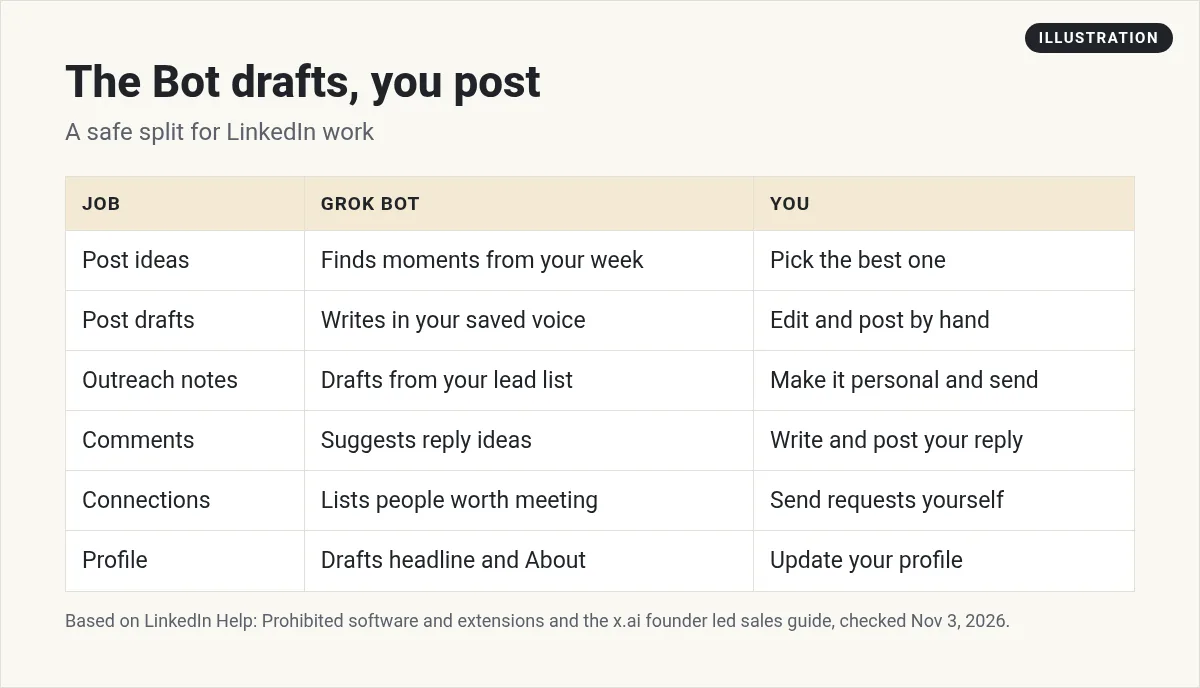
The x.ai enterprise post describes sales Bots that leave LinkedIn and email drafts for morning review. Same pattern. The Bot does the thinking and writing. A person does the sending.
Prompts for LinkedIn posts
Teach it your voice first. Paste five of your best posts and ask the Bot to save your style as a skill. My Grok Bot skills post shows how.
Here are five of my best LinkedIn posts. Study the hooks, line length, and tone. Save a skill called LinkedIn voice with the rules you see. Show me the rules before you save.
Then make it weekly.
Every Monday at 7 AM, look at my calendar, sent email, and notes from last week. Find three moments worth a LinkedIn post. Draft each one with my LinkedIn voice skill. Put them in a Google Doc and send me the link. Do not post anything.
My Grok Bot routines guide explains how scheduled jobs work.
Prompts for outreach
The Grok Bot docs give a sales starter that ends with drafts:
Research the 25 accounts in this CRM view. Score them against our ideal customer profile and recent intent, identify up to three relevant contacts per account, and draft email and LinkedIn outreach in the style examples attached.
Keep the ending clear. Tell the Bot to stop at drafts. Then copy each note into LinkedIn yourself and make it personal.
For research, give the Bot what you already have, like a CRM export, a list from a tool such as Clay, or the company's own website. My Grok Bot Clay post covers lead lists.
Use it for your profile too
- Headline ideas. Give it your offer and who you help. Ask for ten short headlines.
- About section. Paste your current one and ask for a clearer version at a sixth grade reading level.
- Featured posts. Ask which of your past posts best show what you do.
Comments and replies
Comments are where many people get in trouble with tools. Do not let a Bot comment for you. Instead, paste a post you want to reply to and ask for three short reply ideas. Pick one, change it, and post it yourself. It still saves time, and it stays real.
Two videos worth your time
Debbie O'Brien tries Grok Bot for the first time, including a LinkedIn Bot.
From the Debbie O'Brien channel (not mine): Debbie lets her Bot post to LinkedIn in this video. LinkedIn's rules say not to automate activity on its site, so I would keep posting by hand.
AI Data House shares a warning about using LinkedIn from a Bot's cloud computer.
From the AI Data House channel (not mine): This is one creator's experience. His point is that a sign in from a data center can look unusual to LinkedIn. I have not tested it.
A simple weekly LinkedIn plan
This is my own advice, not from a guide. It keeps the Bot busy and keeps you in charge.
- Monday. The Bot sends three post drafts from your week. You pick one, edit it, and post it.
- Tuesday. The Bot drafts five outreach notes from your lead list. You read each one, change a line so it sounds like you, and send it.
- Wednesday. Paste three posts from people you follow. Ask for reply ideas. Write your own comments.
- Thursday. Post your second draft of the week.
- Friday. Paste your post stats and ask the Bot what worked. Save the lesson in its memory so next week is better.
That is about 15 minutes a day of your time. The Bot does the blank page part, which is the hard part for most people.
What to give the Bot instead of a login
A Bot does not need to sign in to LinkedIn to help. Give it things like these:
- Your best past posts, copied as text.
- A CSV export of your leads from your CRM.
- Notes from your calls and your calendar.
- Screenshots of your post stats.
That is enough for strong drafts, and your account stays safe.
Watch outs
- No auto posting, no auto messaging. Post and send by hand.
- Do not sign your Bot's browser in to LinkedIn. Give it what it needs another way.
- Keep claims true. Read every draft before it goes out with your name on it.
A content team, not just a writer
One Bot that drafts LinkedIn posts is helpful. A team that plans, writes, and tracks results is better.
AIM Agent is an AI Chief of Staff for business owners. It comes with an AI C-suite (COO, CMO, CFO, CRO and CTO), a Business Bot Builder and 100+ business skills, and it runs on AIM OS, a private vault that holds your notes and memory. AIM Agent is a ready-made AI business team that works inside Grok Bot, so you skip the setup and get to work.
Here is what you get:
- An AI Chief of Staff that helps you plan and run your business
- An AI C-suite: COO, CMO, CFO, CRO and CTO
- A Business Bot for each business or project. Give it a real task and it brings the work back for you to review
- 100+ business skills for content, offers, research and more
- Step by step setup guides and email support
So your weekly posts come with a plan behind them.

Want an AI team to help run your business? Meet AIM Agent, an AI Chief of Staff for business owners. I am a co-founder of AIM Agent and have a financial interest in the product.
Get a marketing team inside Grok Bot
AIM Agent gives you an AI Chief of Staff, an AI C-suite, and 100+ business skills, so content, outreach, and planning each have an owner.
See AIM AgentFrequently asked questions
Can Grok Bot post on LinkedIn for me?
I would not let it. LinkedIn's help center says it does not permit bots that automate activity on its website, and accounts can be restricted.
What can Grok Bot do for LinkedIn safely?
Research, draft posts in your voice, write outreach notes, and help with your profile. You post and send by hand.
How do I teach the Bot my LinkedIn voice?
Paste a few of your best posts and ask it to save your style as a skill.
Can the Bot write LinkedIn outreach?
Yes, as drafts. The Grok Bot docs have a sales starter that drafts email and LinkedIn outreach.
Does x.ai let Bots post on LinkedIn in its guides?
In the founder led sales guide, LinkedIn is read and draft only, and the founder posts by hand.
Should I sign my Bot's browser in to LinkedIn?
I would not. Give it the info it needs another way.
Is there a faster way to get a marketing Bot team?
AIM Agent gives you an AI Chief of Staff, an AI C-suite, and 100+ business skills inside Grok Bot.
Sources
Checked November 3, 2026. Plans, prices, and rules can change.
