
Claude Code · Developers
Anthropic renamed the Claude Code SDK to the Claude Agent SDK. Here is what changed, how to install the new package, and how to run your first agent.
If you searched for the Claude Code SDK, you may have found old tutorials with package names that no longer match. That is because Anthropic renamed it.
I read Anthropic's migration guide, overview, and quickstart on October 25, 2026. Here is what the SDK is now, what changed, and a simple first agent you can run.
Quick answer
The Claude Code SDK is now called the Claude Agent SDK. Anthropic's docs say, "The Claude Code SDK has been renamed to the Claude Agent SDK." It lets you build AI agents in Python or TypeScript with the same tools and agent loop that power Claude Code. Install it with pip install claude-agent-sdk or npm install @anthropic-ai/claude-agent-sdk, then set your ANTHROPIC_API_KEY.
What is the Claude Code SDK?
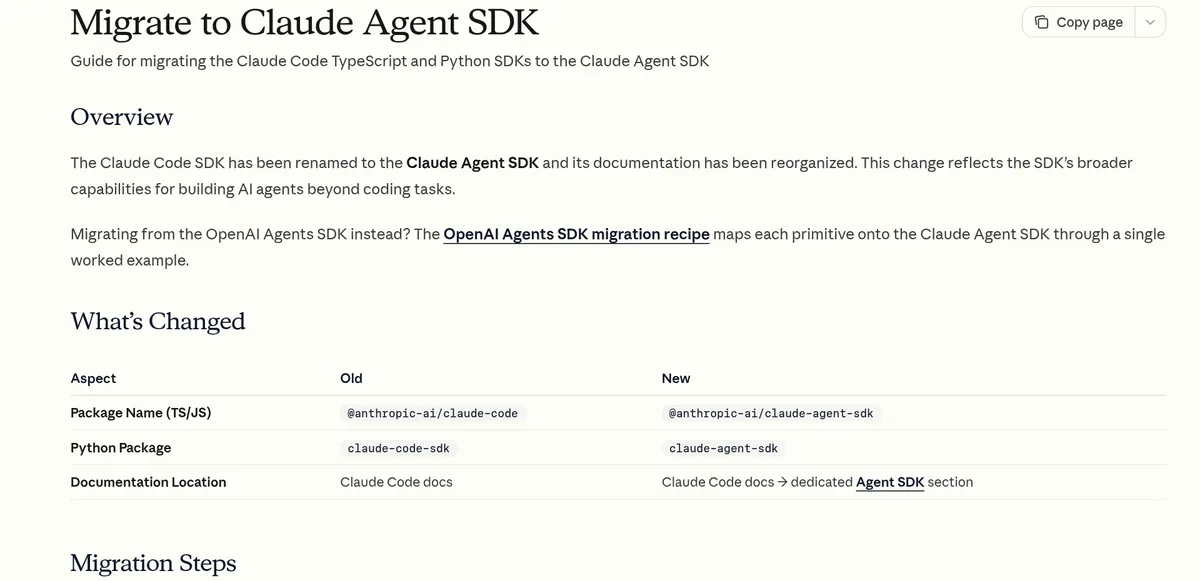
The Claude Code SDK was Anthropic's library for using Claude Code from your own code. It now has a new name. Anthropic's migration guide says:
"The Claude Code SDK has been renamed to the Claude Agent SDK and its documentation has been reorganized."
The reason, per the guide: the change "reflects the SDK's broader capabilities for building AI agents beyond coding tasks."
The overview page describes it as "Build production AI agents with Claude Code as a library." It says the SDK "gives you the same tools, agent loop, and context management that power Claude Code, programmable in Python and TypeScript."
New to Claude Code itself? Start with how to use Claude Code.
What changed in the rename
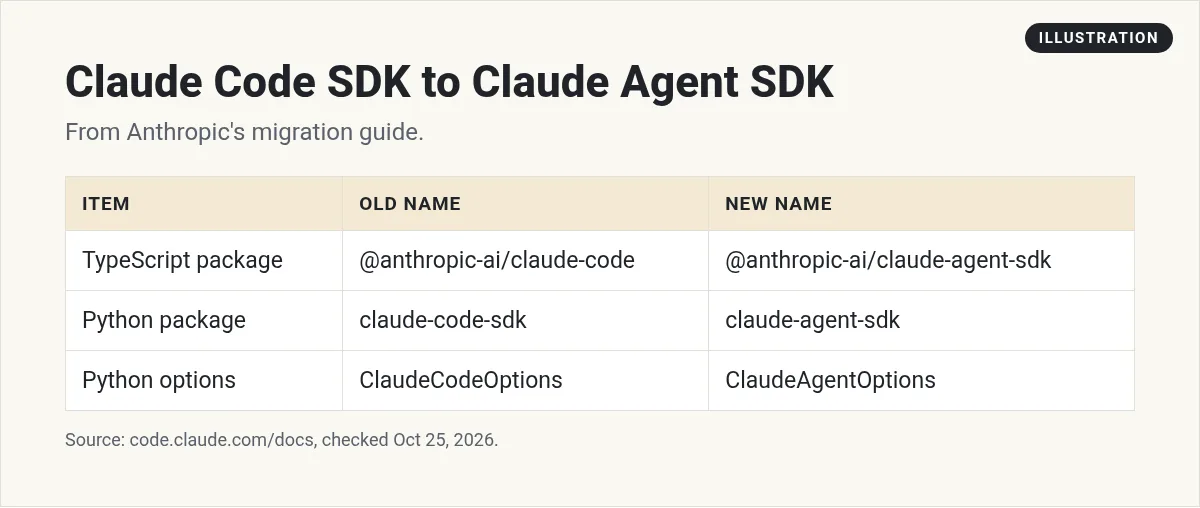
If you have old code, here are the changes from the migration guide:
- TypeScript package: @anthropic-ai/claude-code is now @anthropic-ai/claude-agent-sdk.
- Python package: claude-code-sdk is now claude-agent-sdk.
- Python options: ClaudeCodeOptions is now ClaudeAgentOptions.
The guide also lists breaking changes. Two to know:
- System prompt. "The SDK no longer uses Claude Code's system prompt by default." If your agent acted like Claude Code before, you may need to set that up on purpose now.
- Settings sources. The guide says this default "was briefly changed in v0.1.0" and "then reverted, so no migration action is needed." Today, if you leave it out, the SDK loads your user, project, and local settings, "matching the CLI."
How to move old code to the new SDK
The migration guide gives the same short list for both languages:
- Uninstall the old package. For Python, that is claude-code-sdk.
- Install the new package. For Python, that is claude-agent-sdk.
- Update your imports. Change claude_code_sdk to claude_agent_sdk, and ClaudeCodeOptions to ClaudeAgentOptions.
- Update package.json (TypeScript only) to the new package name.
- Review the breaking changes above, mostly the system prompt.
pip uninstall claude-code-sdk
pip install claude-agent-sdk
Then run your tests. If your agent suddenly acts less like Claude Code, the system prompt change is the first place to look.
What the Claude Agent SDK can do
The overview lists these built in features:
- Built in tools: "Read, write, edit files, run commands, and search the web."
- Hooks: "Run custom code at key points in the agent lifecycle."
- Subagents: "Spawn specialized agents for focused subtasks."
- MCP: "Connect external tools and data sources via the Model Context Protocol."
- Plugins: package skills, agents, hooks, and MCP servers.
If those terms are new, I have guides on Claude Code hooks, subagents, and MCP in Claude Code.
Agent SDK vs CLI vs Client SDK vs Managed Agents
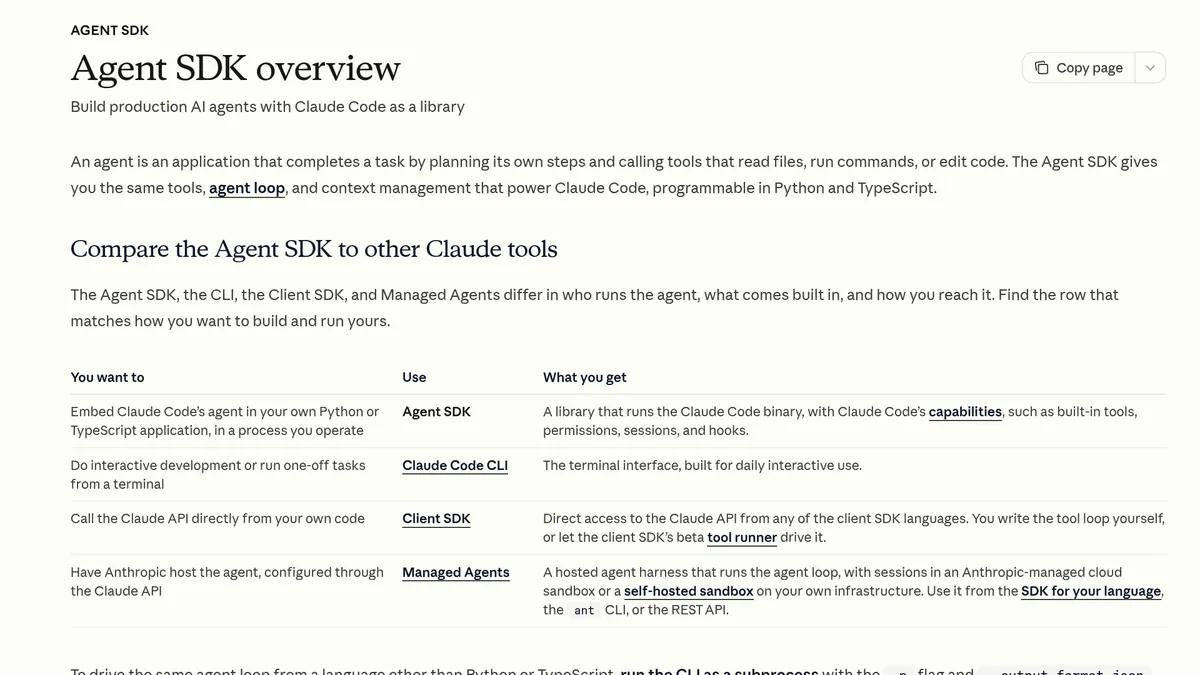
Anthropic's overview compares four ways to build. In plain words:
- Agent SDK: put Claude Code's agent inside your own Python or TypeScript app, "in a process you operate."
- Claude Code CLI: the terminal tool, "built for daily interactive use."
- Client SDK: call the Claude API directly. "You write the tool loop yourself."
- Managed Agents: Anthropic hosts the agent loop for you, in a cloud sandbox or your own.
Pick the Agent SDK if you want Claude Code's tools and loop, but inside your own product or script.
How to install the Claude Agent SDK
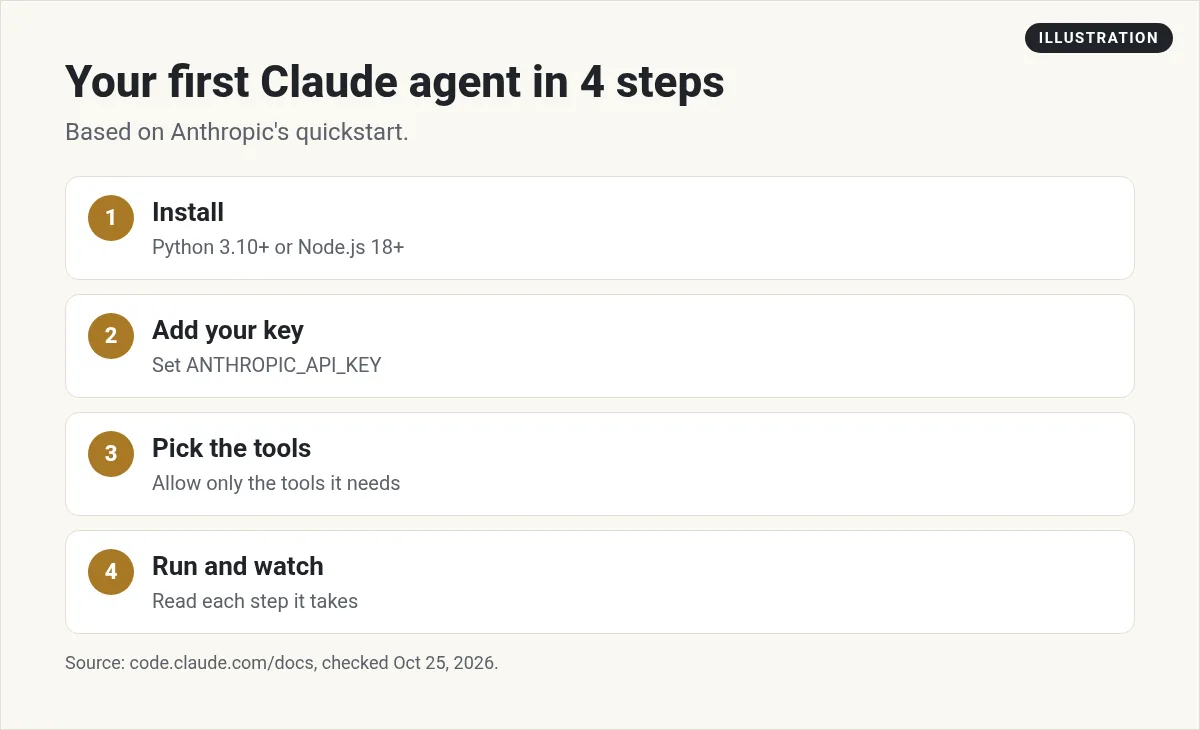
Per the quickstart, you need Node.js 18+ or Python 3.10+.
Python:
pip install claude-agent-sdk
TypeScript:
npm install @anthropic-ai/claude-agent-sdk
The quickstart says both SDKs "bundle a native Claude Code binary, so most installs need no separate Claude Code install." There are a few edge cases, like some ARM64 Windows installs, where you need to install Claude Code on its own.
Then set your API key:
export ANTHROPIC_API_KEY=your-api-key
The docs also list settings for Amazon Bedrock, Google Cloud, and Microsoft Foundry, if you use Claude through one of those.
On PyPI, the latest version when I checked was claude-agent-sdk 0.2.174, released October 23, 2026.
Your first agent, in Python
Here is the core of the quickstart example, trimmed. It asks Claude to find and fix crash bugs in a file called utils.py.
import asyncio
from claude_agent_sdk import query, ClaudeAgentOptions

async def main():
    async for message in query(
        prompt="Review utils.py for bugs that would cause crashes. Fix any issues you find.",
        options=ClaudeAgentOptions(
            allowed_tools=["Read", "Edit", "Glob"],
            permission_mode="acceptEdits",
        ),
    ):
        print(message)

asyncio.run(main())
What each part does:
- query starts the agent loop and streams messages as Claude works.
- allowed_tools lists the tools Claude can use without asking. Here it can read, edit, and find files.
- permission_mode="acceptEdits" lets it save file edits on its own.
Try it on a copy of your code first. An agent that can edit files can also make mistakes in them.
Can users log in with their Claude account?
Not by default. The overview says, "Unless previously approved, Anthropic does not allow third party developers to offer claude.ai login or rate limits for their products, including agents built on the Claude Agent SDK."
So plan to use API key sign in, as the quickstart shows. That means you pay for usage through the API.
What does the Claude Agent SDK cost?
The SDK package is free to install. You pay for the Claude API usage your agent creates. Pricing depends on the model and how much text goes in and out.
The SDK can report a cost, but read the fine print. Anthropic's cost tracking page says the total_cost_usd fields "are client-side estimates, not authoritative billing data." For real billing, the page says to use "the Usage and Cost API or the Usage page in the Claude Console." It adds, "Do not bill end users or trigger financial decisions from these fields."
For plan and API prices, see my guide to Claude Code pricing.
Who should use the Agent SDK?
The Agent SDK is for people who write code. You will need to be comfortable with a terminal, Python or TypeScript, and API keys.
It is a good fit if you want to build a tool that reviews code, sorts files, answers questions about a codebase, or runs a task on a schedule. Anthropic's rename note points to agents "beyond coding tasks," so research and data tasks are fair game too.
If you do not code and just want to build an app, a chat based builder is a better start. See my guide to vibe coding tools.
Tips for building with the Agent SDK
- Allow only the tools you need. Start with read only tools, then add edit tools.
- Run on a copy. Use a test folder or a git branch.
- Log every step. Print each tool call so you can see what it did.
- Set a budget. Watch your API spend in the console, not just the SDK estimate.
- Isolate it in production. The migration guide says you can pass setting_sources=[] in Python to run without your local settings files. It says this matters for "CI/CD pipelines, deployed applications, test environments, and multi-tenant systems."
- Update old tutorials. Swap in the new package names before you copy code.
Want to see a bigger picture of agents? Read how to build an AI agent.
Before you run your first Claude agent
Nothing you check here is sent or saved. Download it if you want to keep it.
Meet AIM Agent
AIM Agent is an AI Chief of Staff for business owners. You give it a real task, and it brings the work back for you to review. You stay the one who approves.
Meet AIM AgentI am a co-founder of AIM Agent and have a financial interest in the product.
Frequently asked questions
What happened to the Claude Code SDK?
Anthropic renamed it to the Claude Agent SDK. The Python package is now claude-agent-sdk and the TypeScript package is @anthropic-ai/claude-agent-sdk.
How do I install the Claude Agent SDK?
Run pip install claude-agent-sdk for Python or npm install @anthropic-ai/claude-agent-sdk for TypeScript. You need Python 3.10+ or Node.js 18+.
Do I need Claude Code installed to use the SDK?
Usually not. The quickstart says both SDKs bundle a native Claude Code binary, with a few edge cases that need a separate install.
What replaced ClaudeCodeOptions?
In Python, ClaudeCodeOptions was renamed to ClaudeAgentOptions, per Anthropic's migration guide.
Can my users sign in with claude.ai in my agent?
Not unless Anthropic approves it. The docs say to use API key sign in instead.
Is the Claude Agent SDK free?
The package is free to install. You pay for the Claude API usage your agent creates. The SDK cost numbers are estimates, not billing data.
Sources
Checked October 25, 2026. Plans, prices, and rules can change.
