
AI Coding · Review
Cursor is still one of the strongest AI code editors. But the plans changed a lot after the SpaceX deal. Here is what it does well, what to watch, and who it really fits.
I reviewed Cursor on video back in February 2026, next to Lovable and Bolt. A lot has changed since then. In August 2026, Cursor announced it had been acquired by SpaceX, and the plans now look very different.
So I went back to Cursor's site and docs on October 21, 2026. This review covers what Cursor is, what I like, what to watch out for, and who should pick something else. If you only care about cost, my Cursor pricing guide goes deeper on each plan.
Quick answer
Cursor is worth it if you are comfortable working with real code files and want a strong AI agent inside a full code editor. Its agent can edit files, run terminal commands, and save checkpoints you can roll back to. Watch the plans closely. On October 21, 2026, Plus was $8 a month but only includes Grok models. Premium at $30 a month adds cloud agents, Bugbot code reviews, and other companies' models, which are billed separately by usage. If you want to build an app without touching code, a no-code builder will likely fit you better.
What Cursor is
Cursor is a code editor with an AI agent built in. You open your project folder, and the agent can read your code, make changes, and run commands for you.
Cursor's docs describe the agent as an assistant that can complete complex coding tasks on its own, run terminal commands, and edit code. You can also hand a bigger job, like a new feature, to a Project, where one agent plans the work and passes parts to other agents.
In August 2026, Cursor posted that it had been acquired by SpaceX. That is why the plans now include Grok models and some X features.
What a first session looks like
If you have never used an AI code editor, here is the basic flow:
- Download Cursor and sign in.
- Open your project folder. This can be a brand new empty folder.
- Open the agent. Cursor's docs say you can open it in the side pane with
Ctrl+I. - Ask for one small thing. For example, add a contact form to my home page.
- Watch it work. It searches your files, edits them, and may run commands.
- Review the changes and keep or undo them.
That loop of ask, watch, and review is most of the job. The better your request, the better the result.
What I like about Cursor
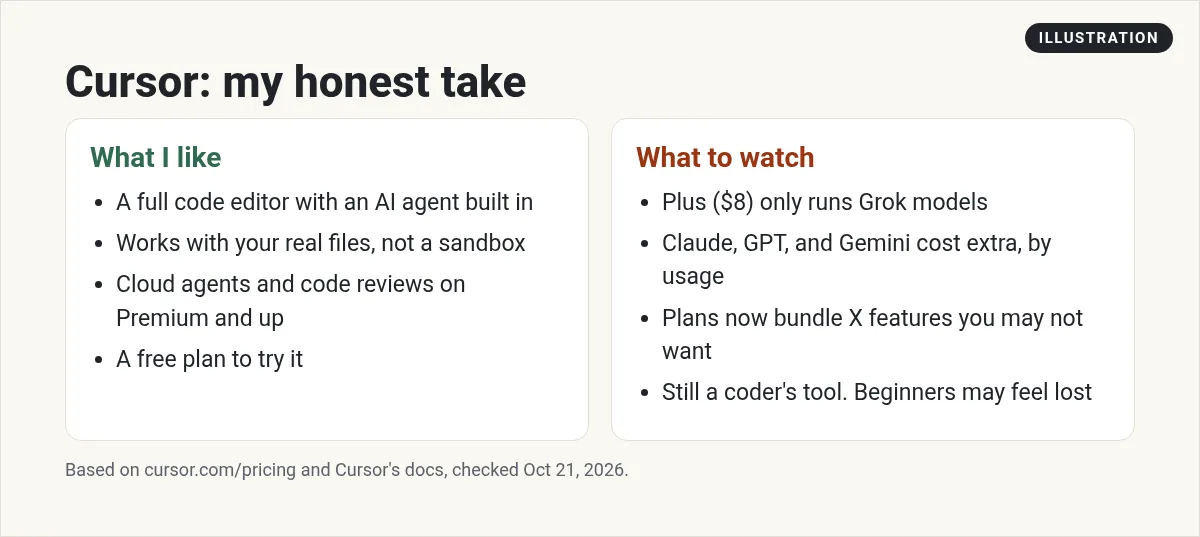
Here are the four things I like, in text:
- A full editor with an agent inside. You see every file and every change. Nothing is hidden behind a chat box.
- Real files on your computer. Your code is yours. You can move it to another tool any time.
- Cloud agents and code reviews on Premium and up. You can hand off work and get reviews on your changes.
- A free plan to try it. It has limited agent and chat requests, which is enough to see if you like it.
Checkpoints save you from bad changes
This is my favorite safety feature for beginners. Cursor's docs say the agent saves a checkpoint before it makes big changes. If it takes a wrong turn, you click a checkpoint and restore your files. The docs also say checkpoints are separate from Git, so still use Git for your real version history.
You can steer the agent while it works
While the agent works, you can queue your next message or send one right away to change its direction. That makes it feel more like working with a teammate.
What to watch out for
And here are the four things to watch:
- Plus is $8 a month, but Grok models only. The pricing page marks this clearly. If you want Claude, GPT, or Gemini, you need Premium or higher.
- Other models cost extra. Premium and up include third-party models at API list price, billed separately by usage. That cost is not in the monthly price.
- The plans bundle X features. Things like a Premium checkmark and ad-free scrolling are part of the plans. Some people will like that. Others will not care.
- It is still a coder's tool. You will see code, files, and a terminal. If that scares you, start somewhere easier.
You can teach it how you work
Cursor lets you shape how the agent behaves. Its docs list rules, skills, subagents, hooks, and MCP under customizing. In plain words:
- Rules tell the agent how you like things done, like which style to follow. My Cursor rules guide shows how to write them.
- Skills are saved instructions for jobs you repeat.
- MCP connects the agent to outside tools and data.
These ideas work much like they do in other AI coding tools. If you want to see them in a terminal tool, read my guides to Claude Code skills and Claude Code hooks.
For teams, the Teams plans add things like centralized billing, usage analytics, and team-wide privacy settings, based on the plan comparison on the pricing page.
Cursor plans at a glance
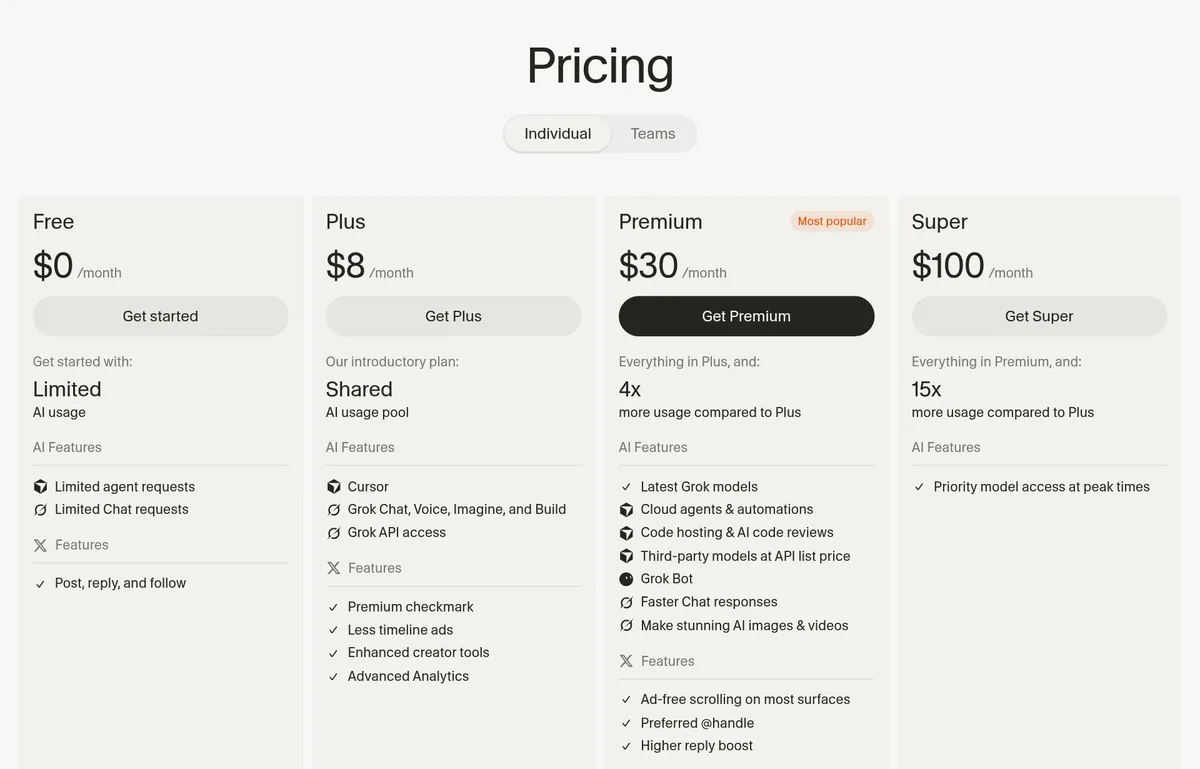
Checked October 21, 2026, monthly prices for individuals, before tax:
- Free: $0 a month, limited agent and chat requests.
- Plus: $8 a month. Only Grok models.
- Premium: $30 a month. 4x the usage of Plus, cloud agents, Bugbot code reviews, and third-party models at API list price.
- Super: $100 a month. 15x the usage of Plus and priority model access at peak times.
- Ultra: $200 a month. 50x the usage of Plus.
For the full breakdown, including Teams, see my Cursor pricing guide.
Bugbot code reviews
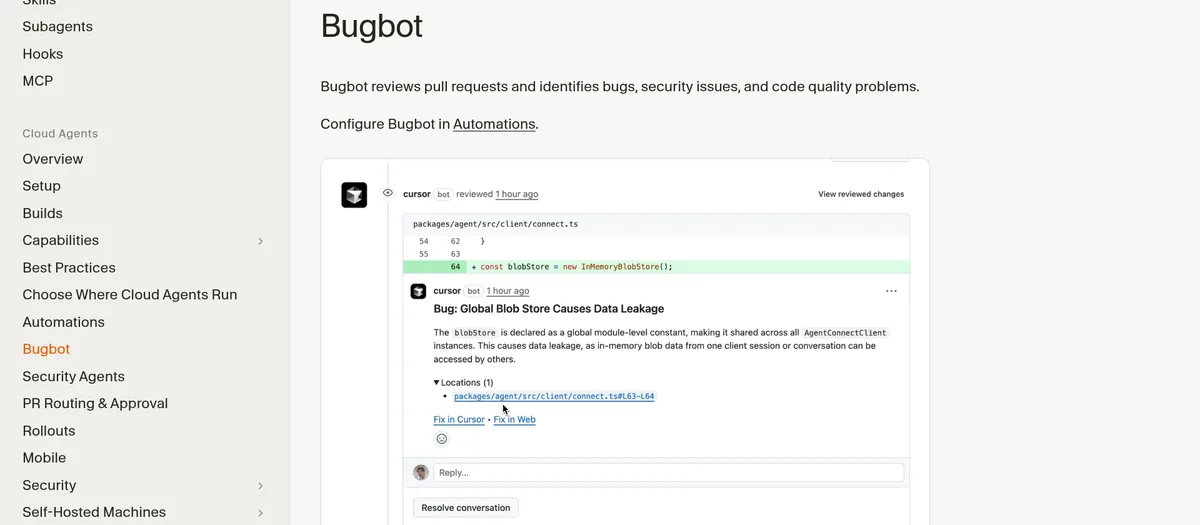
Bugbot reviews your pull requests. A pull request is a set of code changes you want to add to your project. Cursor's docs say Bugbot looks for bugs, security issues, and code quality problems, then leaves comments with fix ideas.
It runs on each update to a pull request. You can also start it by commenting cursor review or bugbot run. On the pricing page, AI code reviews start on Premium.
My earlier video review
My video: My honest review of Cursor, Lovable, and Bolt, recorded in February 2026. It compares all three tools, not just Cursor. Cursor's plans and prices changed after the SpaceX deal, so use the prices in this post.
Any results mentioned in videos are not typical and are not a promise of income. Your results depend on your work and your market.
Who Cursor fits, and who should skip it
Cursor is a good fit if you
- Already code, or want to learn by reading real code.
- Want to see and approve every change the AI makes.
- Work on a project that lives in real files and Git.
Pick something else if you
- Want to build an app by just describing it. See my list of the best no-code app builders.
- Would rather work in a terminal. Compare Cursor vs Claude Code.
- Want a cheaper or different editor. See my Cursor alternatives and Windsurf vs Cursor.
How to try Cursor the smart way
- Start on the free plan. Do not pay until you have used it on a real project.
- Use Git from day one. Checkpoints are great, but Git is your real backup.
- Give small, clear tasks. One feature or one fix at a time works best.
- Read every change before you accept it. The AI can be wrong.
- Watch your usage. Before you upgrade, decide if you need models besides Grok, since those cost extra.
Beginner mistakes I see with Cursor
- Asking for the whole app at once. Big asks lead to big messes. Break the work into small steps.
- Accepting every change without reading it. Even a quick skim catches a lot of problems.
- Skipping Git. When something breaks, you want a clean place to go back to.
- Upgrading before you know your needs. Try the free plan first, then pick a plan based on how you actually use it.
My verdict
Cursor is still a strong pick for people who code and want a capable AI agent in a real editor. The checkpoints, the agent, and Bugbot are all useful.
The catch is the new plan setup. Plus is cheap, but it only includes Grok models. To use other models, you need Premium and you pay for that usage on top. Read the pricing page before you buy, and start free.
Before you pay for Cursor
Nothing you check here is sent or saved. Download it if you want to keep it.
Want to build an app with AI, even without coding?
In my free workshop, I show how regular people use AI tools to build simple apps, step by step.
Join my free AI workshopFree to join. No credit card needed.
Frequently asked questions
Is Cursor worth it in 2026?
For people who code, yes. It has a strong agent, checkpoints, and code reviews on Premium. If you want to build without code, a no-code builder fits better.
Is Cursor free?
Yes, there is a free plan with limited agent and chat requests. Checked October 21, 2026.
What models does Cursor Plus include?
On October 21, 2026, Cursor's pricing page said only Grok models are available on Plus, which is $8 a month.
Can I use Claude or GPT in Cursor?
Yes, on Premium and up. Cursor says third-party models are billed separately by usage at API list price, on top of the monthly price.
What is Cursor Bugbot?
Bugbot reviews pull requests for bugs, security issues, and code quality problems, and leaves comments with fix ideas. AI code reviews start on Premium.
Who owns Cursor now?
Cursor posted on August 14, 2026 that it had been acquired by SpaceX.
Sources
Checked October 21, 2026. Plans, prices, and rules can change.
