
GoHighLevel integrations connect the apps you use for payments, bookings, leads and sales. Use the built-in link for Stripe, Google Calendar or Shopify if it does the job you need. For other tasks, look in the App Marketplace or try Zapier's LeadConnector app. Use the API when you need a custom link. The directory below shows where to start and what to check before you turn each link on.

Disclosure: I earn a commission if you buy HighLevel through my links, at no extra cost to you. I am not HighLevel and do not speak for it.
Key takeaways
- Start with the job you need done. Check how the link handles old records and later edits.
- Open the right sub-account first. Then use the menu for that app. Stripe and calendars have their own setup paths.
- In Zapier, look for LeadConnector and choose the sub-account when you sign in.
GoHighLevel integrations by use case
A sub-account is the workspace for a business. Start in the one that should get the data.
| App or route | What it does | Where to start |
|---|---|---|
| Stripe | Take payments on supported invoices and checkout pages | Payments > Integrations > Stripe |
| PayPal | Offer PayPal at checkout | Existing link: PayPal integration > Manage > Reconnect. First-time menu: the changelog gives no path. |
| Google Calendar | Sync bookings and check for busy times | Calendars > Calendar Settings > Connections > + Add New |
| Outlook Calendar | Sync bookings with Outlook | Settings > Calendars > Connections > + Add New |
| Facebook Lead Ads | Send form leads to HighLevel | Settings > Integrations > Facebook-Instagram card |
| Google Ads campaign publishing | Link an ad account to publish campaigns | Sub-Account > Marketing > Ad Manager |
| Google Business Profile | Bring reviews into Conversations | Settings > Integrations > Google Business Profile |
| Shopify | Import store data and sync new activity | Settings > Integrations > Shopify |
| QuickBooks | Bring in contacts and send sales receipts | Settings > Integrations > QB Connect |
| Zapier | Pass data between apps with a Zap | Zapier > Create > Zaps > Trigger > LeadConnector |
| App Marketplace | Find and install apps | Agency view > App Marketplace in the left menu |
| API | Build a link with code | HighLevel developer docs. Check your plan. |
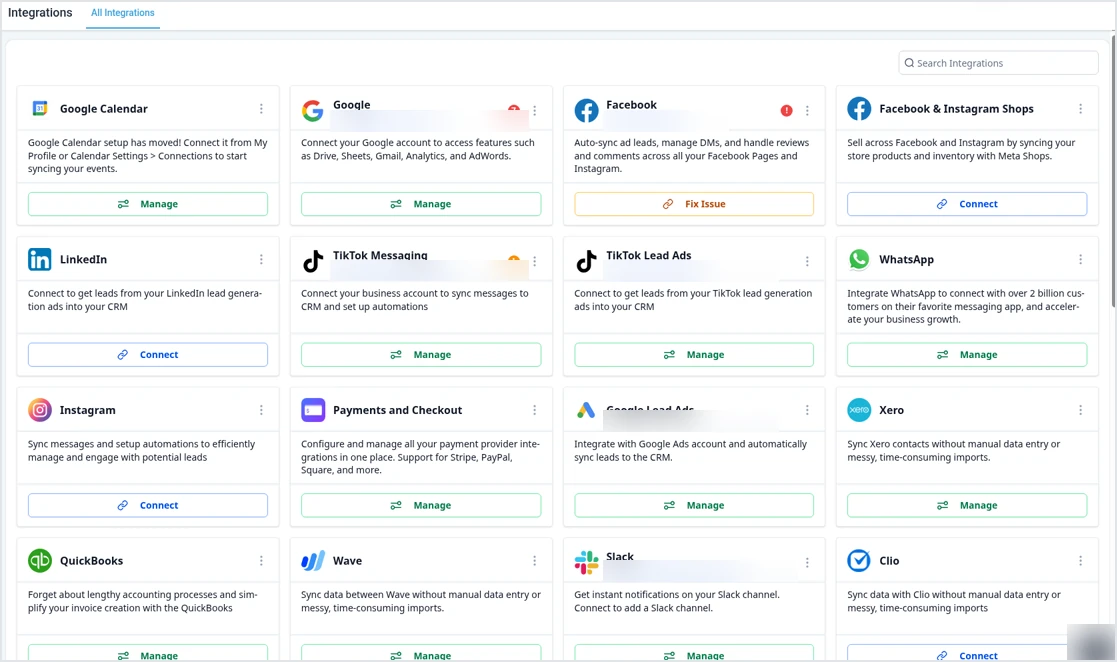
GoHighLevel payment integration for Stripe and PayPal
Stripe
In your sub-account, go to Payments > Integrations. Find Stripe and click Connect or Connect with Stripe. Sign in and approve access. Then return to Integrations to confirm Stripe shows as connected.
Stripe can take payments on items like invoices, payment links and order forms. Each sub-account can link to one Stripe account at a time. Check the payment options on the page your buyer will see. They can vary by country, currency and the type of checkout. A channel can also use its own provider choice in place of the account default.
PayPal
New accounts see the keyless option by default. The changelog gives menu steps for switching an existing link. To switch, open the PayPal integration, go to Manage and click Reconnect. HighLevel sends you to PayPal to finish. This setup skips the step of copying API keys.
The link can show PayPal, Pay Later and Venmo at checkout. Venmo depends on what is available to the buyer. Check which buttons appear before you share the page.
Google Calendar and Outlook Calendar
Google Calendar
Open Calendars > Calendar Settings > Connections > + Add New. Click Connect beside Google Calendar, pick your Google account and grant the requested access. Google Calendar can sync bookings both ways. A conflict calendar lets HighLevel check for busy times before it offers a slot.
Each team member links their own calendar from their user profile. If bookings fail to sync, open Settings > Integrations > Google. Look for a warning about missing access and use Reconnect to grant it.
Outlook Calendar
Go to Settings > Calendars > Connections > + Add New. Calendars is under Business Services. Click Connect beside Outlook Calendar. Sign in and accept the requested permissions. You need write access to send events to Outlook. If Microsoft asks for admin approval, your organization needs to approve the link.
The link supports Microsoft 365, Exchange Online, Outlook.com, live.com and Hotmail. HighLevel event calendars require Google Calendar.
Facebook Lead Ads, Google Ads and Google Business Profile
Facebook Lead Ads
Open Settings > Integrations in the sub-account. Find the Facebook-Instagram card and click Connect. Sign in to Facebook, grant access and choose the page. You need admin access to both the page and its Business Manager.
Choose All Leads to bring in past and new leads, or New Leads Only to start fresh. Click Connect and Continue. Map the form fields to the right contact fields so details like name and email end up where you expect. The Facebook Lead Form Submitted trigger can launch a workflow when a new lead comes in.
Google Ads campaign publishing
For campaign setup, open Sub-Account > Marketing > Ad Manager. Click Activate Ad Manager if you need to set it up. Your agency must give you Ad Manager access first. In setup, click Connect Google, grant LeadConnector access and pick an eligible account under Select Ad Account.
HighLevel's Ad Manager guide covers campaign publishing. It gives no setup path for Google Ads lead form intake. Campaign ad spend is separate from the Ad Manager subscription. It uses the payment method on the Google Ads account.
Google Business Profile
In the sub-account, go to Settings > Integrations. Sign in to Google, then find Google Business Profile and click Connect. Pick your location and click Connect again. Check the business name under Connected Pages in Integrations. New Google reviews can show up in Conversations, where you can reply.
The profile must be verified. The Google login needs Owner or Manager access to that location. If you manage more than one location, check the page name in the review thread before you reply.
Shopify for store data and order updates
Open Settings > Integrations > Shopify and click Connect. Enter your store name or URL and click Next. On Import Elements, pick the old data to bring in. Click Next to open Sync Settings. Pick what to sync, click Save, then click Install in Shopify.
Import brings over past records once. Sync sends the records you select from Shopify into HighLevel. You can also turn on the Order Received Trigger and Payment Received Trigger from the sync screen.
QuickBooks for contacts, invoices and receipts
Go to Settings > Integrations > QB Connect. If you want to bring older QuickBooks invoices into HighLevel, turn on Import invoices at setup. Turn on review requests if you want that option, then sign in to QuickBooks and grant access.
QuickBooks sends contacts to HighLevel. HighLevel sends sales receipts to QuickBooks for payments made in HighLevel. It syncs new invoices and their later updates to QuickBooks once sent. If you import an old QuickBooks invoice into HighLevel, later edits to that invoice stay in the app where you made them.
When to use Zapier, the App Marketplace or the API
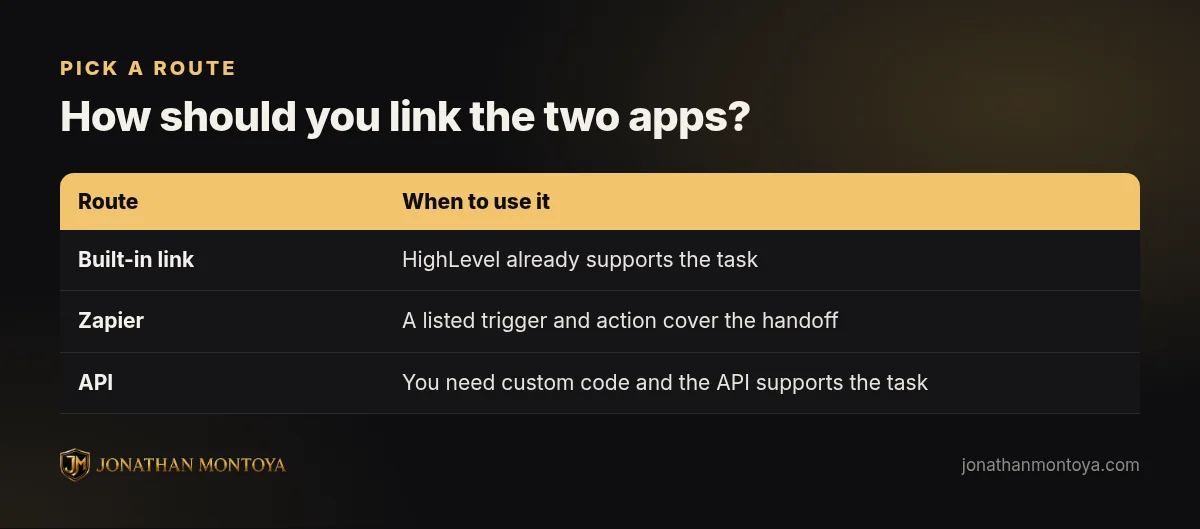
My take is to try the built-in link first if it does the job. Check the App Marketplace when you need an app HighLevel does not list in Settings. For a handoff such as passing a contact to another tool, look for the exact event and action in Zapier. If your job calls for custom code, check the API.
Zapier via LeadConnector
In Zapier, open Create > Zaps. In the Trigger block, pick LeadConnector. Choose an event such as Pipeline Stage Changed. Under Account, click Sign In, use your HighLevel login and choose the sub-account.
The link is for the sub-account you pick. If you need to switch, add a new connection in Zapier and change which account the Zap uses. For more ways to plan a handoff, see Make vs. Zapier and n8n vs. Zapier.
App Marketplace
For agency installs, open App Marketplace from the left menu in agency view. For a free agency app, click Install App, then Allow & Install. A paid app can show Install and ask you to pay during setup. If the listing covers both agency and sub-accounts, start the install in agency view. The agency-level guide lists Unlimited or Founder and requires an agency owner or admin. The Starter pricing card also lists Marketplace.
GoHighLevel API integration
HighLevel's pricing card lists Basic API access on Unlimited. The billing guide points to the HighLevel developer docs for setup and gives no in-app menu path. Check whether your plan covers the exact action your code needs. The GoHighLevel API guide is a place to start.
Ready to check a link in your own account? My HighLevel link shows a 30-day free trial for new customers on HighLevel's own offer page (checked Nov 18, 2026). HighLevel's standard pricing page lists 14 days.
Start HighLevelDo you need a GoHighLevel SMS integration?
For standard texts and calls, HighLevel's own Phone System can handle the job. You can send and receive texts in HighLevel. Text usage is billed by segment, which is a part of a message. A long text can count as more than one segment. See the HighLevel usage fees guide for more on the bill.
Check your first connection before you go live
- Check the account.Match the sub-account to the outside account and confirm you granted access.
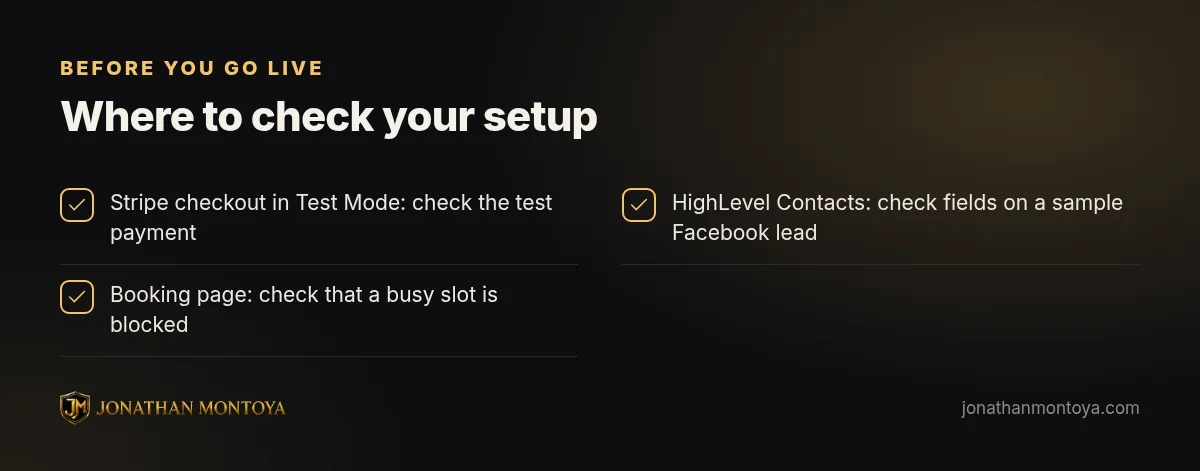
- Test the job.Use Stripe Test Mode for checkout. For calendars, mark a slot busy and check the booking page. For Facebook, send a sample lead and check the mapped fields in Contacts.
- Check account links.In Ad Manager, confirm the ad account you chose. For Marketplace, look for the app under Installed Apps.
Once your check passes, the GoHighLevel automation guide can help you plan the next step. If you are setting up the page where a buyer will book or pay, see the GoHighLevel website builder guide.
Try your first HighLevel connection
Pick the app you need most and check its setup before you go live. Usage fees can apply during a trial.
When you start HighLevel through my link, you also get my GHL Clone for free. It is a done-for-you affiliate system I spent 11 months building. You can copy it in about 5 minutes, add your own affiliate link and share it. There is no website to build and no emails to write.
Start HighLevelGet the free GHL CloneMy HighLevel link shows a 30-day free trial for new customers on HighLevel's own offer page (checked Nov 18, 2026). HighLevel's standard pricing page lists 14 days. Disclosure: I earn a commission if you buy HighLevel through my link, at no extra cost to you. The GHL Clone is my own system, and I earn a commission if you later pay for HighLevel. What anyone earns depends on their own work, and no one can promise a result.
FAQ
Where are integrations in GoHighLevel?
Start in the sub-account. Shopify, Facebook and QuickBooks start under Settings > Integrations. Stripe starts under Payments > Integrations, and calendar links have their own Connections tab.
Can I connect two Stripe accounts to one GoHighLevel sub-account?
HighLevel allows one Stripe account at a time per sub-account. Use separate sub-accounts if each business needs its own Stripe account.
Can GoHighLevel pull in old Facebook leads?
Yes. Choose All Leads when you connect the page to bring in past and new leads. New Leads Only starts with leads that come in after you connect. Check the form field map before you start using the data.
Why can I see LeadConnector but not GoHighLevel in Zapier?
LeadConnector is the name of the official Zapier app. Sign in with your HighLevel login and pick the sub-account you want the Zap to use.
Do I need a paid Shopify upgrade to sync orders?
HighLevel says Shopify Basic supports customer and order sync through its OAuth app. Turn on Contact Sync and Order Sync. For an older Custom App link, reconnect through OAuth first.
Why did my HighLevel invoice fail to show up in QuickBooks?
Only HighLevel invoices created after setup can sync to QuickBooks. Open the invoice and click Send if it is still a draft. Sent, Pending and Paid can sync. If you already sent it, confirm the customer is in QuickBooks and recheck the connection.
Do I need a separate app to send texts from HighLevel?
HighLevel has its own Phone System for standard texts and calls. The pricing page lists two-way SMS on Starter. Texts still have usage charges, so check the billing guide if you plan to send them from a workflow.
Sources, checked Nov 18, 2026
- HighLevel pricing and plan features
- HighLevel billing guide and Phone System
- Connect Stripe
- PayPal keyless connection
- Connect Google Calendar
- Connect Outlook Calendar
- Connect Facebook and map lead forms
- Connect Google Ads to Ad Manager
- Connect Google Business Profile
- Shopify import and sync
- Set up QuickBooks
- Connect Zapier through LeadConnector
- Install App Marketplace apps
- HighLevel offer page for my link
Affiliate disclosure: I earn a commission if you buy HighLevel through my links, at no extra cost to you. Freedom Launch Accelerator and the GHL Clone are my own programs. HighLevel is a trademark of HighLevel, Inc. This site is not run by or affiliated with HighLevel.
